
BitSpirit, a free and relatively lightweight BitTorrent client, has carved a niche for itself in the world of peer-to-peer (P2P) file sharing. While it may not boast the name recognition of giants like uTorrent or BitComet, BitSpirit offers a compelling alternative for users seeking a straightforward and efficient way to download torrent files. This review delves into the features, strengths, and weaknesses of BitSpirit, helping you decide if it’s the right torrent client for your needs.
BitSpirit: A User-Friendly Approach to Torrenting
At its core, BitSpirit is a BitTorrent client designed to simplify the process of downloading torrent files. It prioritizes ease of use, making it accessible to both novice and experienced users. The application’s intuitive interface minimizes complexity, allowing users to quickly initiate downloads, monitor progress, and manage their torrent queue without navigating a cluttered or overly technical environment. This user-friendliness is a key differentiator, appealing to those who prefer a streamlined approach to file sharing. The program aims to provide a hassle-free downloading experience with minimal interruptions or lags, focusing on delivering files efficiently.
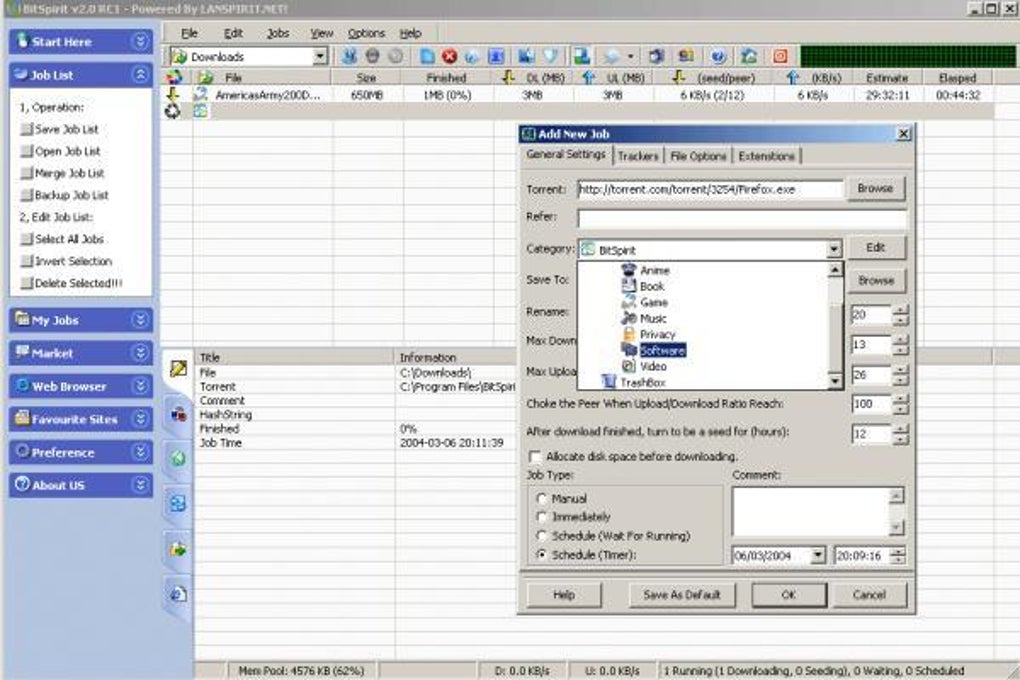
The program’s interface is deliberately straightforward, echoing the design philosophy of other popular BitTorrent clients. A main window displays essential information, while more advanced controls are readily accessible through intuitive menu options. The left-hand side typically lists downloaded files, providing a clear overview of completed and ongoing downloads. The right-hand side usually displays details about current uploads and downloads, offering real-time status updates and progress tracking. This arrangement provides a balanced view of both download and upload activities, keeping users informed about the overall process. A comprehensive “Settings” menu provides extensive customization options, allowing users to tailor their BitSpirit experience to their specific preferences. Even novice users can easily navigate the features and functionalities, thanks to the clearly organized menu structure and straightforward settings.
Customization and Advanced Features: Beyond the Basics
While its user-friendly interface is a significant advantage, BitSpirit doesn’t compromise on functionality. The software offers a surprisingly extensive array of customization options, exceeding what’s typically found in free torrent clients. Users can create detailed download schedules, utilizing proxy servers for enhanced privacy or bypassing geographical restrictions. A robust P2P feature facilitates communication with other users in the network, adding a social element to the file-sharing experience. Both download and upload speeds can be easily limited globally, providing granular control over bandwidth usage. These limits are conveniently monitored through a pop-up bar, ensuring users maintain awareness of their network activity.
Beyond basic download management, BitSpirit provides a suite of advanced features:
-
Download Management: Users can seamlessly stop, resume, or pause downloads, ensuring flexibility and control over the download process. A detailed list of processed files is readily available, enabling users to review their download history. Each torrent provides crucial details including estimated completion time, number of parts, download rate, number of peers, and number of seeders. Prioritization of download tasks allows users to manage downloads based on their individual importance. A “Super Speed” mode can be utilized to potentially boost download speeds. Comprehensive tracker and peer information aids in understanding the network’s health and the availability of sources for downloaded files. Finally, the option to categorize downloads into predefined groups (e.g., pictures, music, anime) enhances organization.
-
Torrent Creation and Advanced Utilities: BitSpirit allows users to create new torrents, extending its functionality beyond mere downloading. Users can configure automatic PC shutdown upon download completion. The client includes a built-in TCP/IP protocol patching feature to address potential limitations on certain Windows versions. A one-click cleanup utility helps remove unused files, maintaining disk space efficiency. The software automatically refreshes DHT (Distributed Hash Table) nodes, essential for locating torrent files.
-
Built-in Search and Security: A dedicated search function is integrated directly into the menu, simplifying the process of finding torrent files. A preview feature lets users examine downloaded files before committing to full downloads. Password protection for the entire application safeguards user data and privacy, particularly crucial when downloading copyrighted material in restricted regions. A built-in virus scanner adds a layer of protection, while support for plugins that translate IP addresses and peer information enhances functionality.
Shortcomings and Areas for Improvement
Despite its numerous strengths, BitSpirit isn’t without its drawbacks. One notable area for improvement is its approach to displaying active download information. While the torrent itself contains detailed information on progress, the main interface doesn’t provide this directly. Users must navigate into the individual torrent to check for specifics like download speed and estimated completion time. This lack of real-time summary information in the main view can be somewhat inconvenient for users wanting a quick overview of their active downloads.
Another point of concern for some users is BitSpirit’s origins as a Chinese program. While the software generally performs well, certain users might have legitimate privacy concerns, particularly regarding data handling and potential security vulnerabilities. The quality of menu translations is also reported as inconsistent, potentially leading to confusion or misunderstanding of certain options. Despite these translation issues, the program generally provides adequate flexibility in adjusting language options and setting custom download locations.
BitSpirit: A Viable Choice in the Torrent Client Landscape
Despite its minor shortcomings, BitSpirit remains a compelling option in the crowded torrent client market. It effectively balances ease of use with a comprehensive feature set. The client is free, lightweight, and performs well on a variety of systems. Its ability to handle simultaneous downloads, UPnP port mapping, UDP transport, NAT traversal, download queue management, and support for multi-file torrent packages demonstrates its robustness and suitability for a wide range of downloading tasks.
BitSpirit’s lightweight nature ensures minimal impact on system resources, even during high-volume downloads. This makes it a suitable choice for users with less powerful hardware. Whether downloading large files such as movies or smaller files like music, BitSpirit aims to provide a smooth, lag-free experience, avoiding unexpected crashes or slowdowns. The intuitive interface ensures efficient job completion, and customization options provide flexibility for tailoring the experience. The client’s integrated features, from torrent creation to built-in security measures, significantly improve functionality and user safety.
In summary, BitSpirit presents a strong case as a reliable torrent client. While it might not be the perfect solution for every user (due to the shortcomings mentioned above), its ease of use, feature-rich functionality, and lightweight design make it a worthy contender among established BitTorrent clients. For users prioritizing a user-friendly interface combined with a robust feature set, BitSpirit presents a compelling choice.
Conclusion: Is BitSpirit Right for You?
Ultimately, the question of whether BitSpirit is the right torrent client depends on your individual needs and priorities. If you value a simple, intuitive interface and a wide range of features without the complexity of some other clients, BitSpirit is certainly worth considering. However, if you prioritize meticulous real-time download tracking in the main interface or have specific concerns regarding the software’s origins, you might find other clients better suited to your preferences. Regardless, BitSpirit deserves consideration as a robust and versatile option within the world of BitTorrent clients.
File Information
- License: “Free”
- Latest update: “July 11, 2023”
- Platform: “Windows”
- OS: “Windows 98 SE”
- Language: “English”
- Downloads: “418.4K”
- Size: “2.55 MB”


