
In an era defined by ubiquitous data and the constant need for seamless access across multiple devices, file synchronization and sharing have become indispensable tools for individuals and businesses alike. While cloud-based solutions have dominated the market, a powerful alternative has quietly evolved, offering unparalleled speed, security, and privacy: Resilio Sync. Formerly known as BitTorrent Sync, this innovative application harnesses the robust power of peer-to-peer (P2P) technology to provide a direct, encrypted, and highly efficient method for syncing and transferring files between your Windows computers and beyond. This comprehensive guide will delve into the intricacies of Resilio Sync, exploring its core functionalities, unique advantages, and why it stands as a superior choice for those seeking absolute control over their data.
Understanding the Power of Peer-to-Peer Synchronization
At the heart of Resilio Sync’s exceptional performance lies its ingenious application of peer-to-peer (P2P) technology. Unlike traditional cloud storage services like Dropbox or Google Drive, which rely on central servers to store and relay your data, Resilio Sync establishes direct connections between your devices. This fundamental difference confers a multitude of benefits, particularly for Windows users managing substantial amounts of data or operating in environments where internet bandwidth is a bottleneck.
When you synchronize files using a conventional cloud service, your data must first be uploaded to the provider’s server and then downloaded by any other connected device. This introduces several potential points of failure, latency, and, critically, a dependency on the cloud provider’s infrastructure and bandwidth. Resilio Sync bypasses this intermediary step entirely. Instead, when you share a folder, the application directly links your Windows PC with other designated devices (peers). Data flows directly from one computer to another, or even simultaneously from multiple peers to one, dramatically accelerating transfer speeds. The more devices participating in a sync, the faster the data can often be distributed, as each device acts as both a sender and receiver. This distributed approach eliminates the bottleneck of a single central server, making it exceptionally efficient for large files, extensive photo libraries, or vast project folders.
Furthermore, this direct P2P connection inherently offers a degree of resilience and independence. There’s no single point of failure in the form of a central server going offline or suffering a data breach. Your data remains on your devices, managed by you, without residing on third-party servers you don’t control. This architectural choice not only boosts performance but also forms the bedrock of Resilio Sync’s privacy and security advantages, which we will explore further. For Windows users looking for a direct, high-speed, and truly private file synchronization solution, understanding this P2P foundation is key to appreciating Resilio Sync’s transformative capabilities.
Key Features and Seamless Functionality
Resilio Sync is designed to be both incredibly powerful and surprisingly straightforward to use, even with its underlying sophisticated P2P architecture. Its suite of features is tailored to provide a flexible and secure file management experience on Windows, addressing common pain points associated with traditional file sharing.
The process of setting up a synchronized folder is remarkably simple. You begin by selecting a folder on your Windows machine that you wish to share or synchronize. Resilio Sync then generates a unique “secret key” – a long, alphanumeric code that acts as an identifier and a secure access token for that specific folder. This key is paramount to the system’s security; only those possessing the correct key can access the synchronized content. You then share this key with the individuals or other devices you want to include in the synchronization. Once they input the key into their own Resilio Sync application, their device is added to the peer group, and synchronization commences. It’s a beautifully simple yet robust method for establishing secure, private connections.
The Intuitive Interface
Despite its advanced capabilities, Resilio Sync’s interface is clean, organized, and user-friendly, making it accessible even for those who are not tech-savvy. The application on Windows typically features a tab-based layout, ensuring that all crucial information and controls are just a click away:
- Devices: This tab provides an overview of all the computers and devices currently synchronized with your Resilio Sync instance. It allows you to monitor connections and ensure all your endpoints are properly linked.
- Shared Folders: Arguably the most central tab, this displays all the folders you have shared or are participating in. It offers real-time insights into synchronization progress, showing current transfers, download and upload speeds, and the status of each folder. This transparency is invaluable for managing your data flow.
- History: As the name suggests, this tab logs a history of all transfers and synchronization events. It’s a useful feature for auditing file changes, confirming successful transfers, and troubleshooting any potential issues.
- Preferences: This is where you can tailor Resilio Sync to your specific needs. Users can configure a range of settings, such as opting to receive notifications upon the completion of a download, setting bandwidth limits for both uploading and downloading files (crucial for managing network usage), and deciding whether the application should launch automatically when your Windows computer starts. These granular controls empower users to optimize Resilio Sync’s operation according to their workflow and network conditions.
Beyond these core tabs, Resilio Sync offers a wealth of advanced features that enhance its utility. While too numerous to list exhaustively, these include the ability to exclude specific files or directories from synchronization, support for various Network Attached Storage (NAS) devices, and an archive capability for retrieving previous versions of synced files – a critical function for data recovery and version control. This combination of a simple interface and powerful underlying features makes Resilio Sync a versatile tool for a wide range of synchronization tasks.
Advanced Security and Data Integrity
In today’s digital landscape, data security is paramount. Resilio Sync prioritizes the protection of your files not through reliance on third-party servers, but through robust, client-side encryption and direct connections. The application employs a 256-bit encryption algorithm to secure your data as it travels between devices. This level of encryption is considered industry-standard and highly secure, meaning that your files are scrambled into an unreadable format during transfer, making it virtually impossible for unauthorized entities to intercept and decipher them.
Crucially, because Resilio Sync uses direct P2P connections, your data never passes through or resides on any external cloud server that you don’t control. This dramatically reduces the risk of data breaches that could originate from a compromised central server. Your files live on your devices, and only those with the correct secret key can establish a connection and access them. This decentralized security model offers a profound advantage in terms of privacy and data sovereignty, giving you peace of mind that your sensitive information remains under your direct control.
Flexible Sharing with Secret Keys
Resilio Sync’s use of secret keys extends beyond mere access control, offering a highly flexible sharing model to suit diverse needs. Depending on the level of access you wish to grant, you can generate different types of keys:
- Read and Write Access Keys: These are the most common type, allowing all connected peers to both download existing files and upload new files or modifications to the shared folder. Ideal for collaborative projects where multiple team members need to contribute.
- Read-Only Access Keys: As the name implies, these keys grant recipients permission only to view and download files from the shared folder. They cannot make any changes, deletions, or add new content. This is perfect for distributing content to a wider audience without fear of unintended alterations, such as sharing a photo album or distributing a company policy document.
- Disposable Keys: For situations requiring temporary access, Resilio Sync offers disposable keys that expire within 24 hours. These can be configured for either read-only or read/write access. This feature is invaluable for one-time file transfers or granting temporary access to a contractor or client without needing to revoke permissions manually later.
This tiered approach to key generation provides granular control over how your data is shared, enhancing both security and convenience.
Setting Up and Optimizing Resilio Sync on Windows
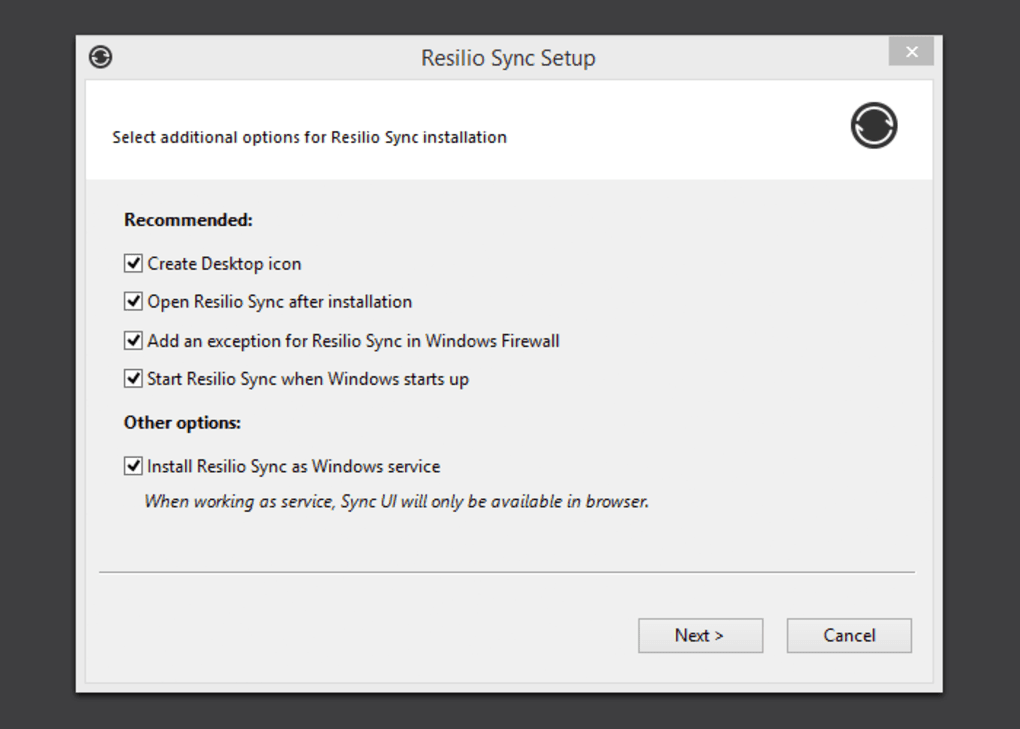
Getting started with Resilio Sync on your Windows machine is a straightforward process, designed to integrate seamlessly into your existing workflow. The first step involves downloading the application, which is readily available on PhanMemFree. Once downloaded, the installation wizard guides you through a few simple steps, much like any other Windows software. After installation, Resilio Sync will launch, and you’ll be prompted to set up your first synchronized folder.
To initiate synchronization, you’ll select an existing folder on your computer that you wish to share or create a new one. Resilio Sync will then generate the unique secret key for this folder. This key is your gateway to connecting other devices or sharing with collaborators. Copy this alphanumeric code and paste it into the Resilio Sync application on your other Windows PCs, Macs, Linux machines, or mobile devices. As soon as the key is entered, the devices will establish a direct, encrypted connection, and the synchronization process will begin automatically.
Optimizing Resilio Sync’s performance on Windows largely hinges on a few key settings available in the ‘Preferences’ tab. For users with limited internet bandwidth or those who want to ensure other applications are not hampered by large transfers, setting bandwidth limits is crucial. You can configure specific upload and download speeds, preventing Resilio Sync from consuming all available bandwidth. This feature is particularly useful when working from home or in shared network environments.
Another important setting is the auto-start option. By enabling Resilio Sync to launch automatically when your computer starts, you ensure continuous synchronization without manual intervention, keeping all your devices up-to-date effortlessly. Furthermore, for those managing numerous files, the exclusion list feature allows you to specify certain files or folders within a synced directory that you do not wish to synchronize. This is useful for temporary files, backup archives, or specific documents that should only reside on one machine. By fine-tuning these settings, Windows users can tailor Resilio Sync to perfectly match their system resources and network conditions, ensuring an optimal and efficient file synchronization experience.
Why Resilio Sync Stands Apart from Cloud Storage
The digital landscape is replete with cloud storage solutions, each promising seamless synchronization and accessibility. However, Resilio Sync carves out a distinct and superior niche, particularly for users prioritizing speed, privacy, and control, offering a fundamentally different paradigm compared to services like Dropbox, OneDrive, or Google Drive.
The primary differentiator, as discussed, is its P2P architecture. Traditional cloud services act as central intermediaries. When you save a file, it’s uploaded to their servers, then downloaded by your other devices. This inevitably introduces bottlenecks: the speed of your internet connection to their server, and the server’s own processing and bandwidth limitations. Resilio Sync, by contrast, establishes direct connections between your devices. If you’re syncing files between two Windows PCs on the same local network, the transfer speeds can be astounding, limited only by your network’s internal capabilities, not your internet connection. Even across the internet, direct P2P connections can often outperform cloud-based transfers by intelligently finding the most efficient path between peers and leveraging multiple sources simultaneously.
This direct connection also translates into a significant advantage regarding privacy and security. With cloud services, your data resides on their servers. While providers employ robust security measures, the very act of entrusting your data to a third party inherently introduces a level of risk and relinquishes some control. Resilio Sync eliminates this concern entirely. Your files never touch a third-party server. They remain exclusively on your devices, encrypted during transfer directly between your machines. This commitment to data sovereignty means you are solely in control of your data’s location and access, free from the prying eyes of service providers or the vulnerabilities of centralized data centers. For individuals and businesses dealing with sensitive information, this non-reliance on external servers is a compelling reason to choose Resilio Sync.
Furthermore, cloud storage often comes with storage limits and recurring subscription fees that escalate with increasing data volumes. Resilio Sync, on the other hand, offers potentially unlimited storage, constrained only by the storage capacity of your own devices. There are no monthly fees for exceeding a certain gigabyte threshold, allowing users to synchronize vast amounts of data—from large video libraries to extensive design archives—without incurring additional costs. This cost-effectiveness, combined with the unparalleled performance, makes Resilio Sync an incredibly attractive proposition for power users and those with extensive digital footprints.
Another critical distinction lies in public file sharing capabilities. Cloud services are often built with public or link-based sharing in mind, where anyone with a URL can access a file. While convenient for certain scenarios, this also carries risks if links are mishandled. Resilio Sync, in its core functionality, does not offer public file sharing capabilities. Its sharing mechanism is fundamentally private, based on explicit secret keys exchanged only between trusted parties. This focused design ensures that files are shared intentionally and securely, preventing accidental public exposure. In essence, Resilio Sync is not a public file hosting service; it is a private, secure, and incredibly fast synchronization and sharing utility tailored for your personal network of devices and trusted collaborators.
The Future-Proof Potential and Continuous Enhancements
Resilio Sync, as an application, has demonstrated immense potential since its inception as BitTorrent Sync. Its commitment to the P2P paradigm ensures that it remains at the forefront of efficient and secure file management. The development team has consistently introduced enhancements and refinements, solidifying its position as a robust and reliable tool for Windows users.
One notable improvement has been the introduction of archive capability for retrieving previous versions of synced files. This feature is a game-changer for collaborative work and personal data management. It acts as a built-in safety net, allowing users to revert to earlier states of a document or recover accidentally deleted files, without needing to rely on external backup solutions for basic versioning. This level of data integrity and recovery is vital for maintaining productivity and peace of mind.
Another significant enhancement is the option to exclude specific files/directories. This seemingly simple feature offers powerful control, enabling users to synchronize only the necessary data within a larger folder. For instance, temporary files, configuration backups, or sensitive personal notes can be easily excluded from sharing with others, even within a shared folder, ensuring that only relevant and intended content is synchronized across devices.
Moreover, the increasing support for additional types of NAS (Network Attached Storage) devices expands Resilio Sync’s utility significantly. Many businesses and advanced home users rely on NAS for centralized data storage. By seamlessly integrating with various NAS platforms, Resilio Sync transforms these devices into powerful synchronization hubs, allowing users to keep their network-attached storage in perfect sync with their Windows workstations, laptops, and mobile devices. This broad compatibility underscores Resilio Sync’s versatility as a cross-platform synchronization solution.
The continuous focus on bug fixes and performance optimizations further illustrates Resilio Sync’s commitment to providing a stable and efficient user experience. The application is consistently refined to improve speed, reduce resource consumption, and enhance overall reliability, ensuring that it remains a top-tier choice for demanding synchronization tasks.
In conclusion, Resilio Sync for Windows transcends the limitations of conventional cloud storage by offering a peer-to-peer approach that prioritizes speed, security, and user control. Its intuitive interface, flexible key-based sharing, and robust 256-bit encryption make it an indispensable tool for anyone seeking to manage their digital assets across multiple devices efficiently and privately. Whether you’re a professional collaborating on large projects, a photographer managing extensive media libraries, or simply an individual who values data sovereignty, Resilio Sync provides a powerful, fast, and secure alternative that puts you back in charge of your data. As digital demands continue to grow, Resilio Sync’s forward-thinking P2P technology positions it as a future-proof solution for seamless and secure file synchronization on your Windows operating system and beyond. For more information and to download Resilio Sync, visit Phanmemfree.org.
File Information
- License: “Free”
- Latest update: “July 21, 2025”
- Platform: “Windows”
- OS: “Windows 8”
- Language: “English”
- Downloads: “98.9K”
- Size: “41.82 MB”


