
Bitwarden has emerged as a popular choice among users seeking a robust, secure, and user-friendly password manager. This comprehensive review delves into its features, security protocols, platform compatibility, and overall usability, helping you determine if it’s the right solution for your password management needs.
Unwavering Security: The Core of Bitwarden
At the heart of Bitwarden’s appeal lies its unwavering commitment to security. Unlike many password managers that rely on proprietary code, Bitwarden is open-source. This transparency allows independent security researchers to scrutinize its codebase, identifying and reporting potential vulnerabilities. This collaborative approach fosters a continuous improvement cycle, ensuring the software remains a secure bastion against cyber threats. The open-source nature significantly increases trust, allowing users to independently verify the security claims.
Bitwarden employs advanced encryption standards to safeguard your sensitive information. Specifically, it utilizes 256-bit Advanced Encryption Standard (AES), an encryption algorithm widely considered to be military-grade. This robust encryption ensures that even if someone were to gain access to your Bitwarden data, decrypting it would be computationally infeasible, requiring an extraordinary amount of processing power and time. This level of protection makes it exceptionally difficult for unauthorized individuals to access your passwords, even with sophisticated hacking techniques.
Beyond the robust encryption, Bitwarden incorporates multiple layers of authentication to further enhance security. Two-factor authentication (2FA) is a standard feature, requiring a secondary verification method, such as a code from an authenticator app, in addition to your master password. Time-based one-time passwords (TOTP) are another option, adding an extra layer of protection by generating unique, time-sensitive codes. This multi-layered security approach significantly reduces the risk of unauthorized access, even if your master password is compromised.
Data Storage and Accessibility: Balancing Cloud and Local Options
Bitwarden offers a flexible approach to data storage, catering to users with diverse security preferences. The primary storage option is cloud-based, providing seamless access to your passwords across multiple devices (computers, smartphones, tablets). The cloud storage offers unlimited capacity, eliminating the need to worry about storage limitations as your password collection grows. This feature is invaluable for users who need consistent access to their credentials regardless of their location or device.
However, recognizing that some users might prefer to keep their data entirely within their own control, Bitwarden also provides the option of local data storage. This feature allows you to store your password vault locally on your device, minimizing reliance on third-party servers. This is particularly beneficial for individuals with stringent network security concerns or those who want to avoid any potential “man-in-the-middle” attacks, where an attacker intercepts communication between your device and the Bitwarden servers. The ability to choose between cloud and local storage provides exceptional flexibility, tailoring the experience to individual security preferences and network capabilities.
User-Friendliness and Feature Set: A Seamless Password Management Experience
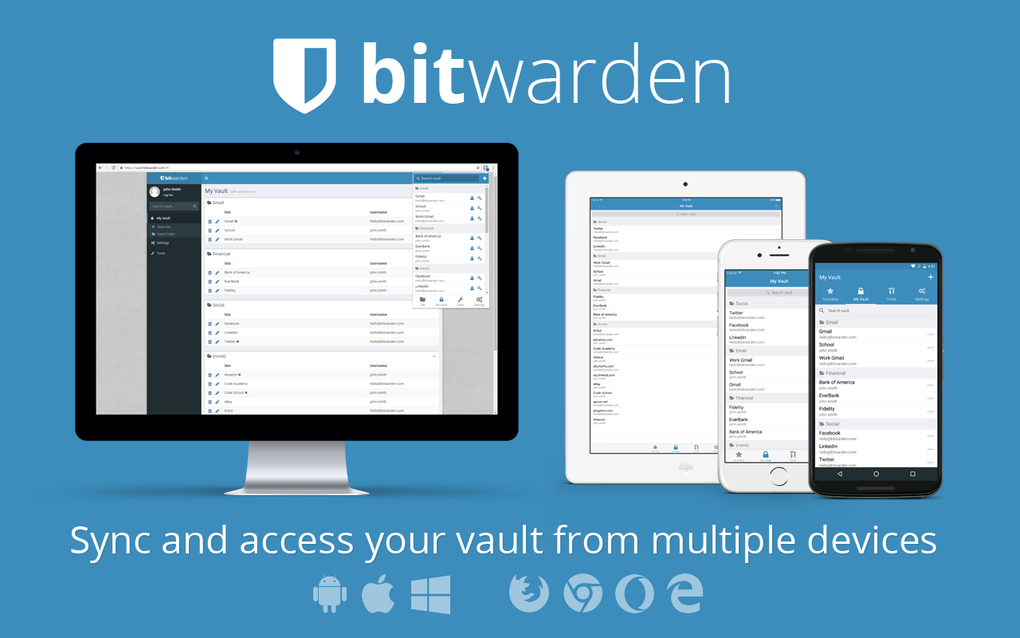
Bitwarden’s design prioritizes user-friendliness without compromising on security. The interface is intuitive and easy to navigate, making it accessible to both tech-savvy and less experienced users. The core functionality revolves around securely storing and managing passwords, but Bitwarden goes beyond the basics.
The password generator is a particularly useful tool. It creates strong, randomly generated passwords, alleviating the burden of creating secure passwords manually. The strength meter evaluates the complexity of passwords, ensuring you use credentials that are truly resistant to brute-force attacks. This helps users create passwords that meet or exceed recommended complexity levels, reinforcing overall security.
Bitwarden also offers features like secure note storage, allowing users to store sensitive information beyond passwords, such as credit card details or license keys. The ability to organize passwords into folders and use tags facilitates efficient management of large password collections. The browser extensions seamlessly integrate with popular browsers, providing one-click access to stored credentials and automatic password filling. The cross-platform compatibility extends to Windows, macOS, Linux, Android, iOS, and web browsers, enabling consistent password management across all your devices.
Beyond the Basics: Advanced Features and Integrations
While the core functionality of Bitwarden is focused on password management, its advanced features significantly enhance usability and security. The Emergency Access feature allows designated individuals to access your vault in case of emergencies, providing a layer of protection against data loss. The built-in audit logs track all activities within your account, providing transparency and enabling detection of any potential unauthorized access attempts. Furthermore, Bitwarden supports various integrations, enhancing its utility in conjunction with other services or applications.
Community and Support: A Thriving Ecosystem
Bitwarden boasts a vibrant and active community of users and developers. This fosters a collaborative environment, where users can share tips, troubleshoot issues, and contribute to the continuous improvement of the software. The open-source nature of the project allows for community contributions to bug fixes and security enhancements, ensuring a continuously evolving and secure application. The availability of detailed documentation and responsive support channels further contribute to a positive user experience.
Cost and Value: A Free and Premium Option
Bitwarden offers a generous free tier, providing access to its core features and unlimited password storage for personal use. This accessibility allows users to experience the advantages of using a password manager without any upfront cost. For users needing advanced features or organizational capabilities, a paid premium plan offers additional functionality, such as family sharing and advanced security features. The value proposition is clear: a powerful, secure password manager that’s accessible to everyone, with premium options for those seeking enhanced features.
Conclusion: A Strong Contender in the Password Management Landscape
Bitwarden stands out as a strong contender in the crowded password management landscape. Its open-source nature, robust security protocols, user-friendly interface, and flexible data storage options make it an appealing choice for users prioritizing security and privacy. The combination of a generous free tier and affordable premium plan caters to diverse needs and budgets. While other password managers offer similar functionalities, Bitwarden’s commitment to transparency and community engagement strengthens its position as a reliable and trustworthy option for managing your digital life’s most valuable asset: your passwords. With its focus on security, usability, and community engagement, Bitwarden emerges as a compelling solution for individuals and organizations alike.
File Information
- License: “Free”
- Latest update: “July 18, 2025”
- Platform: “Windows”
- OS: “Windows 7”
- Language: “English”
- Downloads: “5K”
- Size: “731.83 KB”


