
BlackMagic, a now-defunct Windows application, once held a place in the digital photography landscape, offering users a means to colorize their black and white photos. While its era is long past, and its technology is significantly outdated by modern standards, examining its history and capabilities provides a fascinating glimpse into the evolution of image editing software. This article delves into BlackMagic’s features, reception, and place within the broader context of early digital photo manipulation.
BlackMagic’s Functionality and Interface
BlackMagic presented a relatively simple interface for its time, catering to users seeking basic colorization capabilities. While detailed specifics about its algorithms and processing techniques are scarce, user reviews suggest it offered a straightforward workflow. Users could likely import black and white images, and the program would provide tools to apply color. The exact methods of color application remain unclear; it might have involved manual color selection and brush tools, or possibly some form of automated colorization based on rudimentary algorithms, a common limitation of early software in this domain.
The software’s core functionality centered around the transformation of monochrome photographs into colored images. This involved the selection and application of color hues, shades, and saturation levels to different areas of the image. Users likely had control over the intensity and precision of color application, albeit within the constraints of the technology available at the time. The program’s lack of advanced features, such as sophisticated layer management or masking tools typical of modern photo editors, suggests a focus on ease of use rather than complex adjustments.
BlackMagic’s Technical Specifications and System Requirements
BlackMagic was designed for Windows 95 and earlier operating systems, a significant indicator of its age. This limitation alone reveals a considerable gap in technological capabilities compared to contemporary photo editing software. Its small size, approximately 2.02 MB, was typical of software from that era, reflecting the constraints of storage space and processing power. The application was developed by Neuraltek and boasted a relatively modest download count for its time.
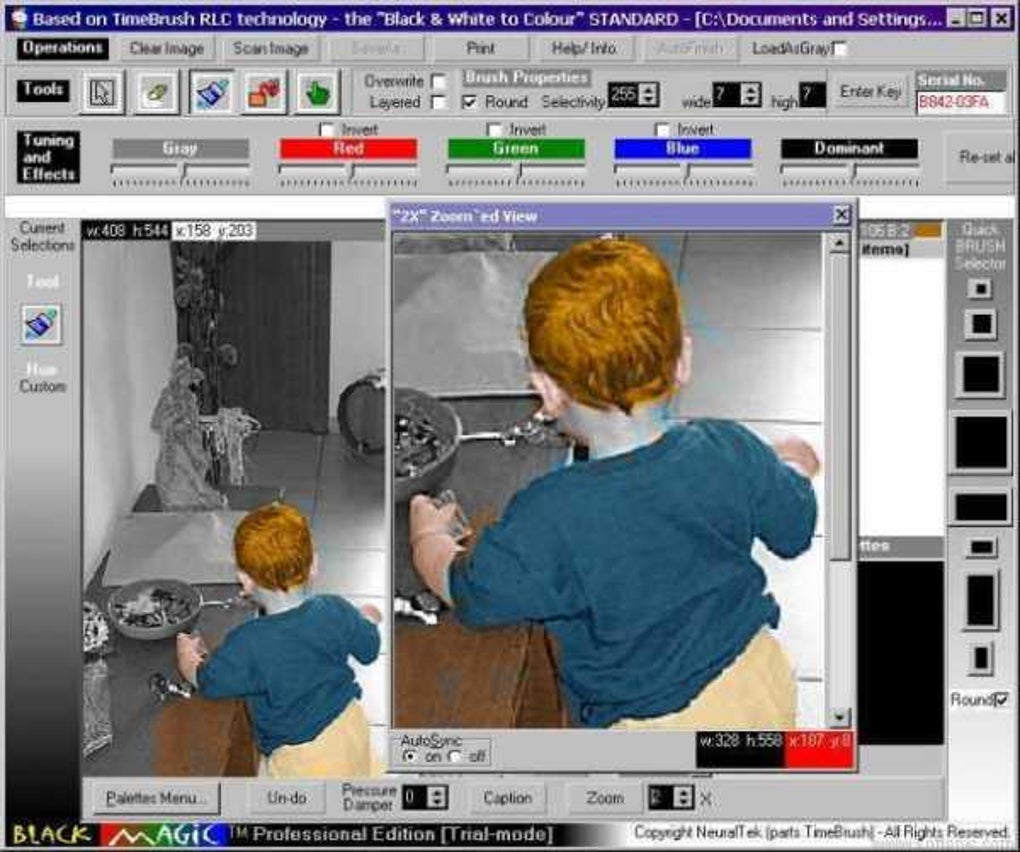
The program’s lightweight nature was a boon for users with limited system resources, a common constraint in the late 1990s and early 2000s. However, this inevitably came at the cost of sophisticated features and processing power. Users should expect a considerable difference in performance and capabilities compared to modern equivalents. The interface would have been less intuitive by modern standards, potentially involving limited screen real estate and less user-friendly interactions.
User Reception and Reviews of BlackMagic
User reviews available for BlackMagic paint a mixed, albeit somewhat limited, picture of user experience. While some praise the software for its ease of use and ability to colorize photos, comments like “Very good. Good. Very beautiful so that he helps me to see the pictures original colors” suggest a relatively basic user experience that delivered on its core function. Other reviews in Arabic further highlight the functionalities such as the ability to scan images, save in various formats, adjust image dimensions, zoom, and control color.
The lack of extensive reviews and the absence of detailed technical descriptions speak volumes about the software’s overall presence in the market. Its limited reach and reliance on older technologies likely hampered its long-term success and contributed to its eventual obsolescence. In contrast to today’s market flooded with advanced photo editors, BlackMagic occupied a niche space that has since been overtaken by superior alternatives.
The brevity and general nature of the available reviews suggest that many users found the software to be sufficient for their basic needs, without requiring the more advanced features provided by professional-grade tools. This hints at a targeted audience of casual users who were satisfied with a straightforward method for colorizing their older photographs.
BlackMagic’s Place in the History of Photo Editing Software
BlackMagic’s existence is a testament to the evolving nature of digital photo editing. Its simplicity and reliance on older technologies highlight the significant strides made in the field. The software’s arrival in 2006, relatively late in the evolution of photo editing tools, indicates that it filled a specific, albeit limited, market need. Compared to the powerful image editors available today, which utilize advanced algorithms, machine learning, and intuitive interfaces, BlackMagic’s capabilities appear rather rudimentary.
The small size and limited system requirements suggest that it was aimed at a market segment with less powerful hardware, a segment that has largely vanished due to advancements in computer technology. Its functionality was likely centered around basic color application, lacking the advanced features that have become commonplace in modern photo editing. This context helps situate BlackMagic within the broader narrative of technological advancement and the constant evolution of user expectations regarding software functionality and ease of use.
The program represents an important historical marker, showing how image editing capabilities have grown dramatically over the years. Modern photo editors boast features like AI-powered colorization, advanced layer management, detailed selection tools, and a host of sophisticated adjustment options that were completely absent from BlackMagic. The comparison underlines the sheer pace of innovation in the field of digital image manipulation.
Comparison to Modern Photo Editing Software
Considering modern photo editing software like Adobe Photoshop, GIMP, or even less resource-intensive options, the contrast with BlackMagic is striking. These contemporary tools offer a vast array of features beyond basic colorization, including:
- Advanced Color Correction: Tools for fine-tuning color balance, white balance, and selective color adjustments.
- Layer Management: The ability to work with multiple layers to non-destructively edit images.
- Masking and Selection Tools: Precise selection tools for isolating specific parts of an image for targeted adjustments.
- Filters and Effects: A wide range of filters and effects for creative manipulation.
- AI-powered Features: Advanced algorithms that automate tasks like background removal, upscaling, and even automated colorization, surpassing the capabilities of early tools like BlackMagic.
- Intuitive User Interface: Modern software prioritizes user-friendliness and intuitive workflows.
The differences in functionality, interface design, and overall capabilities emphasize the substantial advancements in both hardware and software development since BlackMagic’s release. The program served a purpose in its time, but its limitations are stark when juxtaposed with today’s standards.
Conclusion: A Legacy of Simplicity
BlackMagic, despite its simplicity and now-obsolete technology, holds a small place in the history of digital photography software. It offers a clear example of how technology evolves to meet user demands for efficiency and functionality. While far from the advanced tools available today, BlackMagic provided a basic solution for users seeking to colorize black and white photos. Its legacy is primarily a reminder of the remarkable advancements in image editing software and the increasingly sophisticated capabilities readily available to users today. The software’s relatively limited user reviews and its low download count suggest a niche market that has since been largely absorbed by more advanced tools, yet it serves as a fascinating historical artifact.
File Information
- License: “Trial version”
- Version: “2.84”
- Latest update: “July 16, 2020”
- Platform: “Windows”
- OS: “Windows 95”
- Language: “English”
- Downloads: “11.2K”
- Size: “2.02 MB”


