
Bloatbox is a free, portable utility developed by indie developer Builtbybel, designed to streamline the removal of unwanted applications from Windows PCs. It acts as a cleaner, providing a unified interface for uninstalling both built-in system apps and third-party software, offering a more flexible and lightweight alternative to heavier uninstallers like IObit Uninstaller and Revo Uninstaller. Its portability and ease of use make it an attractive option for both novice and experienced users, including system administrators.
Understanding Bloatbox’s Functionality
Bloatbox distinguishes itself through its simple yet effective design and its focus on providing users with granular control over the uninstallation process. The program’s user interface (UI) is remarkably intuitive, employing a three-column layout for clear navigation and application management.
The left-hand column presents a comprehensive list of installed applications. This list includes not only applications installed by the user but also built-in Windows programs and those bundled with other software from third-party manufacturers. This comprehensive inventory is crucial for effectively identifying and removing bloatware—pre-installed applications that often consume unnecessary system resources and storage space.
The central column serves as the control panel, housing the essential actions for managing the uninstallation process. Here, users find options to add individual applications to the removal queue using the “Add selected” button, or to add all applications at once via the “Add all” option. This allows for both selective and comprehensive cleanup depending on the user’s needs. The simplicity of these functions ensures that even users with limited technical experience can easily navigate the software. Furthermore, the drag-and-drop functionality adds an extra layer of convenience, allowing users to quickly move applications between columns.
The right-hand column displays the applications selected for uninstallation. This provides a visual confirmation of the selected items before initiating the uninstall process, minimizing the risk of accidental removals. Conversely, the “Remove selected” and “Remove all” buttons allow users to easily reverse their selections if they change their minds before proceeding. Once the desired applications are added to the right-hand column, a simple click of the “Uninstall” button initiates the removal process.
Bloatbox: A User-Friendly Approach to Bloatware Removal
Bloatbox’s ease of use extends beyond its intuitive three-column interface. The entire uninstallation process is designed to be straightforward and user-friendly. This simplicity makes it accessible to a broad range of users, regardless of their technical expertise. The program’s lightweight nature also ensures that it doesn’t impose an additional burden on system resources during operation. This is particularly beneficial for users with older or less powerful machines, ensuring a smooth and efficient uninstallation experience without causing performance slowdowns.
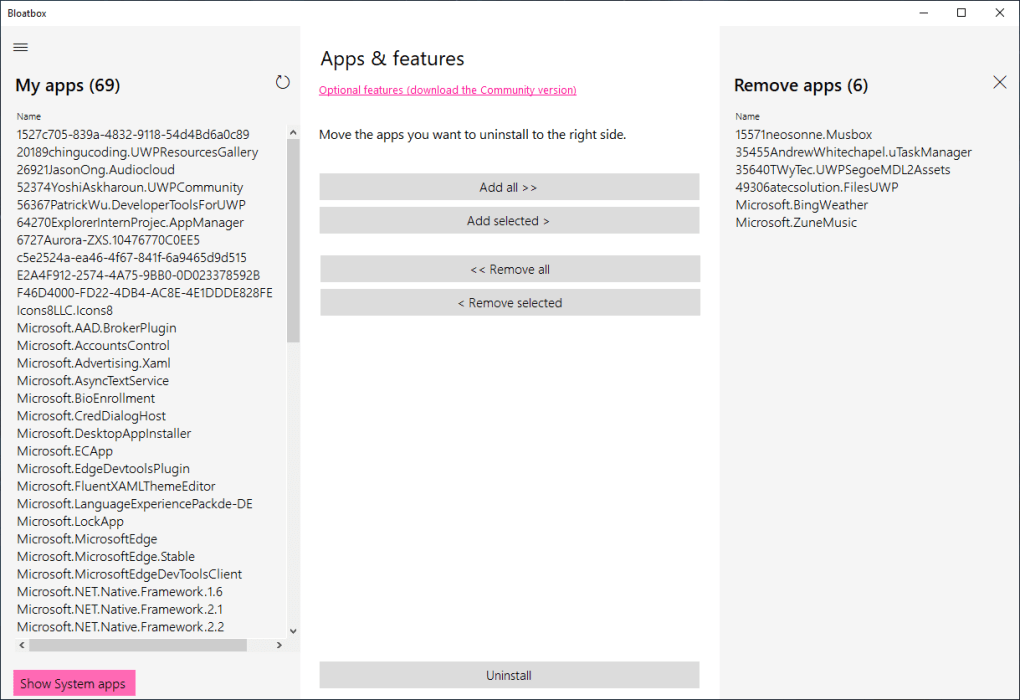
However, while Bloatbox excels in its simplicity and efficiency, there’s room for improvement in certain aspects of its user experience. One notable shortcoming is the lack of descriptive information for each application listed in the left-hand column. Adding short descriptions or identifying details would significantly enhance usability, allowing users to quickly identify and target specific applications for removal. This would be especially helpful for users who might not be familiar with every program installed on their system. Currently, relying solely on the application name can lead to uncertainty and potentially the accidental removal of critical software.
Another area where improvement could be made lies in the wording of the “Remove” and “Uninstall” buttons. The terms are conceptually similar and lead to potential confusion. While the difference in functionality is apparent to experienced users, it may not be immediately clear to everyone, potentially leading to accidental removal of items from the uninstallation queue. More distinct labeling would further enhance clarity and reduce the risk of unintentional actions. For example, using terms like “Remove from list” and “Uninstall selected programs” would significantly improve the clarity of these actions.
Advantages and Disadvantages of Using Bloatbox
Bloatbox offers a compelling set of advantages, making it a viable solution for users seeking to declutter their Windows systems. Its key strengths include its portability, allowing for use on various machines without installation; its straightforward operation, making it accessible to a wide range of users; and its ability to remove both built-in Windows apps and third-party bloatware, addressing a wide range of unwanted software. The ability to remove built-in Windows apps is a particularly powerful feature, often unavailable in other less aggressive uninstallation utilities. This offers a level of system customization not easily achievable through standard Windows tools. By removing unnecessary bloatware, users can free up valuable storage space, potentially improving overall system speed and performance, especially on older or less powerful machines. This streamlined performance can lead to a more responsive and efficient computing experience.
Despite its strengths, Bloatbox also has some limitations. The most prominent is the absence of application descriptions, as previously discussed. This makes identifying less-familiar applications for removal more difficult and increases the risk of inadvertently deleting crucial software. The confusing terminology of its buttons also detracts from the user experience. These minor drawbacks, however, do not overshadow the overall effectiveness and usability of the program. For users who prioritize simplicity and a lightweight approach to bloatware removal, Bloatbox provides a compelling solution.
Alternatives and Conclusion
While Bloatbox stands out for its lightweight and portable nature, several alternative solutions cater to similar needs with varying features and approaches. These alternatives may offer more advanced functionalities such as deep cleaning or registry management, but may also come with more significant system resource requirements and a steeper learning curve. Therefore, the choice between Bloatbox and other options depends heavily on individual needs and preferences. Users prioritizing simplicity and ease of use will find Bloatbox a strong contender. Those needing more sophisticated removal features may be better served by exploring more advanced uninstallers.
In conclusion, Bloatbox presents a valuable and user-friendly option for users looking to effectively remove unwanted applications from their Windows systems. Its simple, three-column interface, drag-and-drop functionality, and ability to handle both built-in Windows apps and third-party bloatware make it a compelling choice. While minor improvements to its user interface, such as adding application descriptions and clarifying button labels, would further enhance its usability, the program’s lightweight design and straightforward operation make it a highly efficient tool for reclaiming storage space and improving overall system performance. Bloatbox provides a simple yet powerful solution for decluttering your Windows PC and optimizing its performance. It is particularly well-suited for users who value simplicity and ease of use over advanced features.
File Information
- License: “Free”
- Version: “0.20.0”
- Latest update: “July 15, 2022”
- Platform: “Windows”
- OS: “Windows 8”
- Language: “English”
- Downloads: “18.3K”
- Size: “28.84 KB”


