
The digital age has ushered in unprecedented connectivity, but with it comes the challenge of managing online interactions. Social media platforms, while offering incredible opportunities for connection and information sharing, can also become breeding grounds for unwanted interactions. On X(Twitter), the constant stream of tweets, replies, and mentions can quickly become overwhelming, particularly if you encounter abusive, harassing, or simply undesirable users. Navigating the platform’s built-in blocking mechanisms can feel cumbersome and time-consuming. This is where the Block Button for X(Twitter) Google Chrome extension steps in, offering a streamlined and efficient solution to managing unwanted interactions.
Streamlining the Blocking Process: A Single-Click Solution
Block Button for X(Twitter) is a free Chrome extension designed to radically simplify the process of blocking users on X(Twitter). Its core function is to add a dedicated “Block” button directly next to each username on your X(Twitter) timeline. This eliminates the need to navigate through multiple menus, click through confirmation dialogs, or engage in any extra steps. With a single click, you can instantly block any user who is disrupting your experience. This seemingly minor improvement translates into significant time savings and an overall smoother browsing experience. Instead of interrupting your flow to deal with unwanted accounts, you can swiftly eliminate them and return to your feed.
Enhanced User Experience: A Cleaner, More Focused Timeline
The extension’s efficiency extends beyond just speed. By eliminating the extra steps required for blocking users, Block Button for X(Twitter) contributes to a significantly improved user experience. This is particularly beneficial for users who actively engage with X(Twitter) and regularly encounter users they wish to block. The clutter-free approach helps maintain a more focused and enjoyable browsing experience, allowing users to concentrate on the content and interactions that are valuable to them. This contributes to a more positive and productive engagement with the platform.
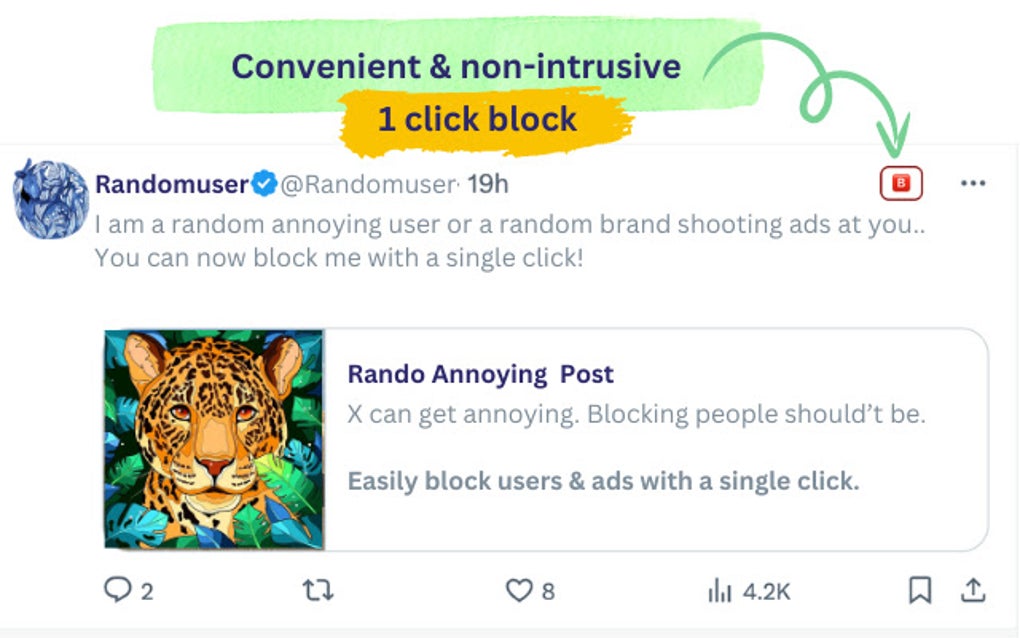
Intuitive Design and Seamless Integration: A User-Friendly Approach
The developers of Block Button for X(Twitter) prioritized simplicity and ease of use. The extension’s design is intentionally intuitive, integrating seamlessly into the existing X(Twitter) interface. There’s no learning curve; the added “Block” button is immediately recognizable and intuitive, making its functionality instantly clear. This user-friendly approach makes the extension accessible to a wide range of users, regardless of their technical proficiency. The seamless integration ensures a smooth and uninterrupted browsing experience, with the added functionality unobtrusively enhancing the existing platform experience rather than disrupting it.
Security and Privacy Considerations: Protecting Your X(Twitter) Experience
Given its function directly impacting user interaction and privacy, the security and privacy aspects of Block Button for X(Twitter) are crucial. While the extension itself doesn’t collect or store any user data beyond what is necessary for its core functionality (i.e., identifying users on X(Twitter) to add the “Block” button), it’s important to consider the extension’s permissions and its impact on your overall X(Twitter) experience. Users should always exercise caution when installing browser extensions and carefully review the permissions requested before granting access. In the case of Block Button for X(Twitter), the permissions should be limited to accessing and interacting with the X(Twitter) website for the sole purpose of facilitating the addition of the “Block” button. The extension should not have access to your broader browsing history or other personal data.
Comparing Block Button for X(Twitter) to Native Blocking Mechanisms
Compared to X(Twitter)’s built-in blocking mechanisms, Block Button for X(Twitter) provides a significant enhancement to usability. The native blocking process often involves multiple steps: navigating to a user’s profile, finding the block option within the user’s profile menu, and confirming the block action. This process is interrupted and can be frustrating, particularly when dealing with multiple unwanted users. Block Button for X(Twitter), on the other hand, streamlines this process, offering a significant improvement in efficiency and ease of use. It effectively transforms a multi-step operation into a single-click action, making the overall user experience smoother and less disruptive.
Technical Specifications and Availability: A Simple and Accessible Extension
Block Button for X(Twitter) is currently available as a free extension for the Google Chrome browser. It’s designed to work seamlessly with the latest versions of Chrome and offers a straightforward installation process. The extension’s size is minimal, ensuring it doesn’t significantly impact browser performance. It’s regularly updated to maintain compatibility with X(Twitter)’s evolving interface and to address any potential bugs or security vulnerabilities. The extension’s development history is transparent, with updates and version information readily available. This transparency builds trust with users who value accountability and reliability in their browser extensions. The lightweight nature of the extension minimizes the impact on system resources, ensuring that it operates efficiently without draining battery life or slowing down the browser.
Future Development and Potential Enhancements
While the current version of Block Button for X(Twitter) provides a robust and effective solution for blocking users, there’s always room for improvement. Future developments could potentially include features such as:
- Customizable Block Actions: Allowing users to configure what happens after a user is blocked, such as automatically muting or reporting the user.
- Bulk Blocking: Enabling users to block multiple users simultaneously, further streamlining the process of cleaning up a timeline.
- Integration with Other Services: Potentially integrating with other services to provide additional functionality, such as automatically blocking users also present on other platforms.
- Improved Reporting: Giving users the ability to easily report blocked users directly within the extension.
These potential enhancements would further enhance the functionality and user-friendliness of Block Button for X(Twitter), cementing its position as a valuable tool for managing interactions on the X(Twitter) platform.
Conclusion: A Must-Have for X(Twitter) Users Seeking a Better Experience
Block Button for X(Twitter) presents a straightforward yet powerful solution to a common problem faced by many X(Twitter) users: the need for an efficient and convenient way to manage unwanted interactions. Its simple design, intuitive functionality, and seamless integration make it a valuable addition to any user’s browser extension collection. The extension’s focus on efficiency translates directly into a more positive and productive experience on X(Twitter), allowing users to reclaim their timelines and focus on the content and interactions that matter to them. For those seeking a cleaner, more focused, and ultimately more enjoyable X(Twitter) experience, Block Button for X(Twitter) is a must-have tool. Its simple, yet effective approach to user blocking is a testament to the power of well-designed, user-centric software. It’s a prime example of how a small, focused extension can significantly improve the overall user experience of a major social media platform.
File Information
- License: “Free”
- Version: “1.0.11”
- Latest update: “September 6, 2024”
- Platform: “chrome”


