
Blockbench is a versatile and user-friendly 3D modeling application that has gained significant popularity, particularly among Minecraft enthusiasts. This free, open-source software, licensed under the GPL, empowers users to create low-poly 3D models with ease, offering a robust suite of tools for model design, texture application, and animation. While its intuitive interface makes it accessible to beginners, its advanced features cater to experienced modelers as well. This detailed guide explores Blockbench’s capabilities, its strengths and weaknesses, and how it can enhance your 3D modeling workflow, whether you’re creating assets for Minecraft or venturing into other 3D projects.
Blockbench’s Core Functionality: A Beginner-Friendly Interface for Powerful 3D Modeling
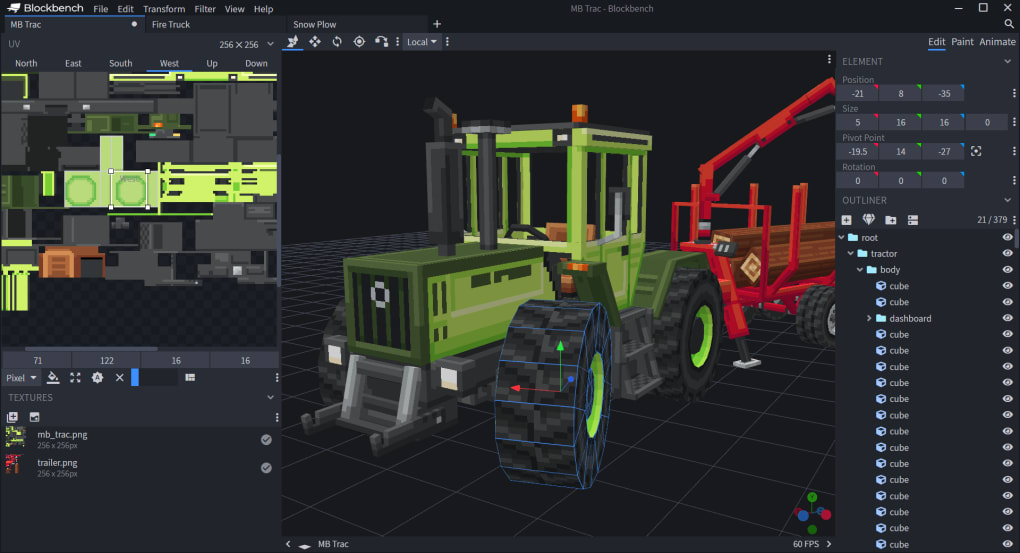
Blockbench’s core strength lies in its streamlined interface, which simplifies the process of 3D model creation. The software leverages a cuboid-based approach, making it exceptionally intuitive for users unfamiliar with complex 3D modeling techniques. This makes it particularly well-suited for creating assets within the Minecraft aesthetic, which often employs blocky, low-polygon models. However, Blockbench’s functionality extends far beyond Minecraft, offering a range of features applicable to a variety of 3D projects.
The process begins with setting basic parameters: file name, parent model, texture size, and description tag. Users can choose between creating regular models and entity models, providing flexibility depending on the intended use. Export options are equally diverse, including support for Minecraft Java and Bedrock Edition formats, along with the ability to export as OBJ models and save JSON models. This broad compatibility ensures seamless integration with various game engines and 3D design pipelines.
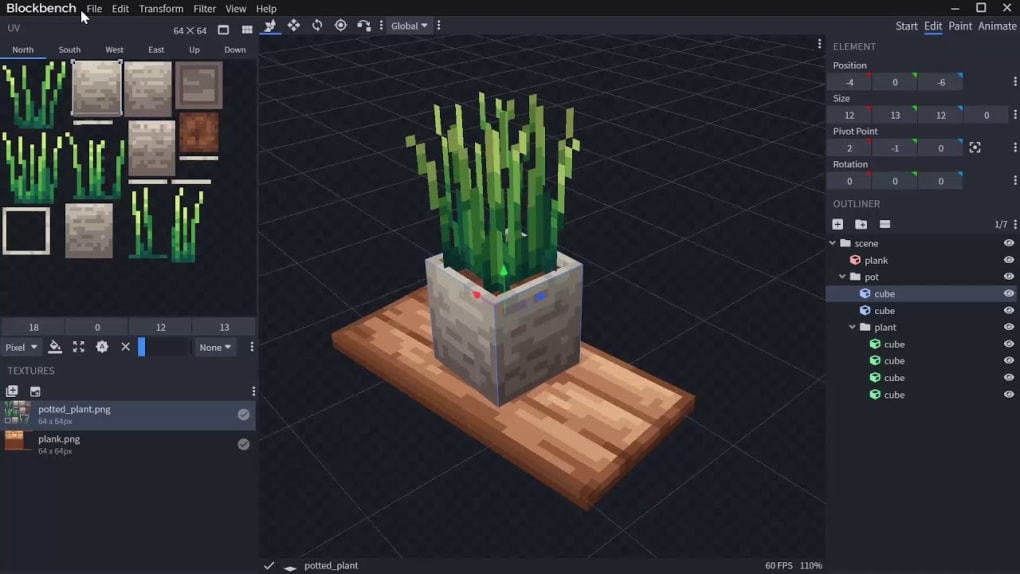
Blockbench’s editor provides an intuitive environment for manipulating cubes. Users can easily add cubes, defining their angle, origin, and orientation with precision. Texture editing is integrated directly into the application, allowing users to paint textures in either a 3D space or a dedicated 2D texture editor. This eliminates the need to constantly switch between different applications. Furthermore, the software supports loading textures from local PNG files, adding another layer of flexibility and allowing for the seamless integration of custom artwork. The program’s support for plugins also opens the door for potential extensions and added functionality from the community, offering ongoing opportunities for enhanced capabilities.
Advanced Features: Animation and Texture Refinement
Beyond basic model creation, Blockbench boasts powerful animation and texture editing capabilities. The built-in animation editor allows users to bring their creations to life, adding dynamic movement and interactions. A dedicated graph editor provides fine-grained control over animations, enabling the creation of complex and nuanced movements. These animations can then be exported to Minecraft: Bedrock Edition, or used in external applications like Blender or Maya, showcasing the versatility of Blockbench’s workflow. Furthermore, the ability to share animations on platforms like Sketchfab allows for easy collaboration and sharing of your 3D creations within the broader community.
Texture editing within Blockbench is also noteworthy. The ability to paint textures directly within the 3D modeling space allows for a more intuitive workflow, providing immediate visual feedback as you refine your textures. This can significantly accelerate the texture creation process, particularly for complex models. Furthermore, the inclusion of a 2D texture editor offers a more traditional approach, catering to those accustomed to working with pixel art or other image editing techniques.
Beyond Minecraft: Blockbench’s Applicability in Broader 3D Design
While Blockbench’s association with Minecraft is strong, its capabilities extend well beyond the realm of blocky game assets. While the cuboid-based approach is ideal for Minecraft, users can also incorporate curves into their models. However, it’s important to acknowledge that working with curves within Blockbench can be more challenging than manipulating cubes, and it may potentially introduce complexities into the animation process. Despite this limitation, Blockbench’s versatility makes it a valuable tool for various low-poly 3D modeling tasks, offering a viable alternative to more complex and resource-intensive applications. The ability to export in common formats like OBJ allows users to integrate their creations into other applications, expanding the possibilities for use cases.
The software’s open-source nature fosters a thriving community of users and developers. This vibrant community contributes to the software’s ongoing development, creating a supportive environment for users to learn, share, and collaborate. Access to tutorials, plugins, and community-created resources significantly enhances the learning curve, making Blockbench accessible even for individuals with minimal prior experience in 3D modeling. This collaborative environment is a key asset for the longevity and continued improvement of the software.
Advantages and Disadvantages of Using Blockbench
Blockbench offers a compelling set of advantages, including its intuitive interface, powerful animation tools, support for plugins, and broad compatibility with various file formats. Its free and open-source nature also makes it accessible to a wider user base, eliminating financial barriers to entry. However, limitations do exist. The relative difficulty of working with curves compared to cubes can be a significant drawback for certain projects, and the software may have limited utility outside projects that lean towards low-poly or blocky aesthetics.
Pros:
- Ease of Use: Blockbench’s intuitive interface is easily navigable, even for novice users.
- Powerful Animation Tools: The software offers robust animation features, including a graph editor for precise control.
- Plugin Support: Extensibility through plugins allows for customized workflows and extended functionality.
- Cross-Platform Compatibility: Blockbench is available on multiple platforms, ensuring accessibility for a wider audience.
- Open-Source and Free: The software is available free of charge, fostering a large and active community.
- Minecraft Integration: Excellent support for Minecraft models, including dedicated formats for Java and Bedrock.
- Versatile Export Options: Support for various file formats such as OBJ and JSON allows seamless integration with other tools.
Cons:
- Curve Manipulation Challenges: Adding and manipulating curves is significantly more complex than working with cubes.
- Animation Complexity with Curves: The use of curves can complicate the animation process.
- Limited Use Outside Low-Poly Aesthetics: While usable for other projects, its strengths are most evident in low-poly or blocky style modeling.
Conclusion: A Valuable Tool for Minecraft and Beyond
Blockbench stands as a powerful and accessible 3D modeling application, particularly well-suited for creating low-poly models, particularly for Minecraft. Its user-friendly interface, combined with its robust animation and texture capabilities, makes it an excellent choice for both beginners and experienced 3D modelers. While it does possess limitations, particularly regarding curve manipulation, its strengths far outweigh its weaknesses, making it a valuable asset for anyone looking to create 3D models, whether for gaming, animation, or other creative pursuits. The active community and ongoing development ensure that Blockbench will continue to evolve, adding new features and expanding its capabilities in the future.
File Information
- License: “Free”
- Latest update: “June 24, 2025”
- Platform: “Windows”
- OS: “Windows 10”
- Language: “English”
- Downloads: “19.6K”
- Size: “86.63 MB”


