
BlockCAD offers a nostalgic journey back to childhood, recreating the joy of building with Lego bricks in a digital environment. This free Windows application blends the functionality of a creative tool with the engaging nature of a game, allowing users to construct virtually anything their imagination can conjure. The program provides hundreds of virtual Lego bricks in a vast array of shapes, sizes, and customizable colors, offering a limitless playground for digital construction. This review will delve into the strengths and weaknesses of BlockCAD, examining its user interface, functionality, and overall user experience.
The BlockCAD Experience: Building Your Digital Creations
At its core, BlockCAD provides a straightforward drag-and-drop interface. Users select bricks from a palette and place them on the virtual building surface. The intuitive nature of the drag-and-drop system makes the initial interaction accessible, mirroring the tactile experience of handling physical Lego bricks. However, the three-dimensional perspective, while realistic, presents a learning curve. Initially, users may find themselves struggling with the spatial arrangement of pieces, often needing to remove and reposition bricks to achieve the desired structure. This is particularly challenging for complex builds, requiring patience and a gradual adaptation to the program’s perspective.
The color customization feature adds another layer of creative freedom. Users can personalize each brick, choosing from a wide spectrum of colors to achieve precise aesthetics for their constructions. This aspect enhances the overall creative potential, allowing for highly personalized and unique builds that extend beyond the limitations of physical Lego sets. The ability to fine-tune the color of each individual brick allows for a level of detail and visual expression not readily available with physical Lego.
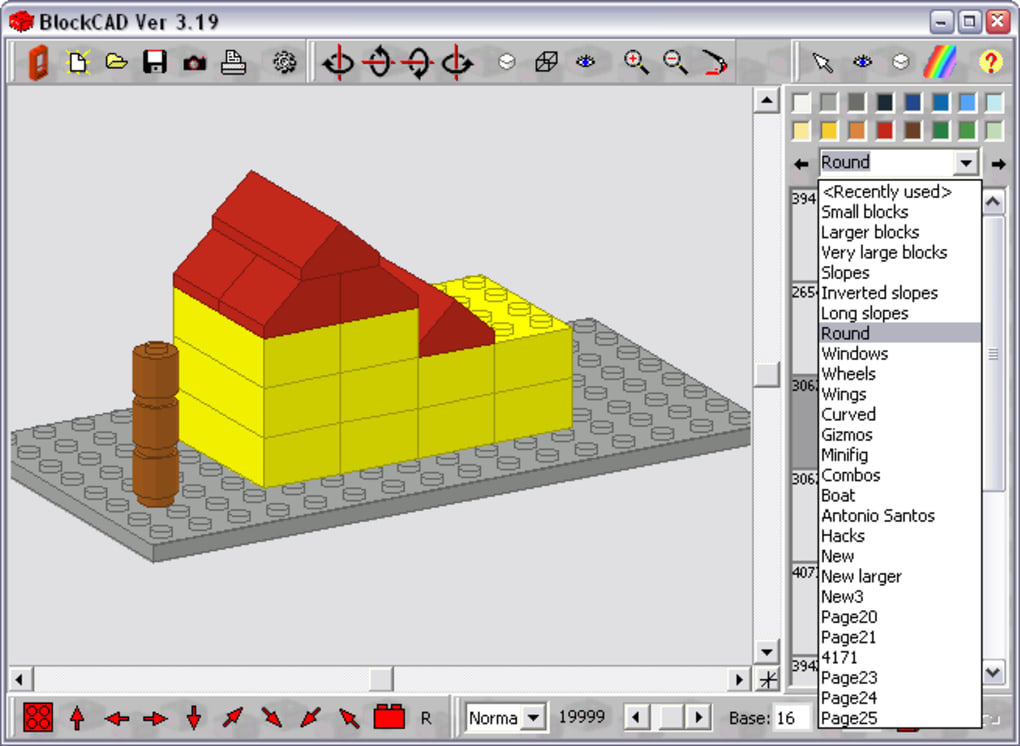
However, the lack of clarity in the interface presents a significant drawback. Buttons and menu options are not immediately self-explanatory. Navigating the program requires exploration and a reliance on the “Hints” option, accessible within the gear menu. This lack of intuitive design hinders the user experience, especially for newcomers unfamiliar with the program’s conventions. The unintuitive nature of the interface detracts from the overall ease of use, forcing users to expend unnecessary time and effort learning the program’s controls rather than focusing on the creative aspects of building.
Beyond the Bricks: Features and Limitations
While BlockCAD primarily focuses on the fundamental Lego-building experience, it also includes features aimed at enhancing the creative process. The ability to save creations allows users to revisit and refine their designs over time, preserving their digital constructions for future use or modification. This feature is crucial for managing larger, more intricate projects, enabling users to step away from a build and return to it without losing their progress. However, the program’s documentation and tutorials are limited, further compounding the challenge presented by the initially unclear interface. A comprehensive tutorial or interactive guide would significantly improve the onboarding experience and allow users to quickly grasp the program’s potential.
The built-in brick editor offers advanced customization options. Users can modify the shape and dimensions of individual bricks, allowing for greater control over the final design. However, similar to the main interface, the brick editor’s functionality is not clearly explained, resulting in a steeper learning curve for users seeking to utilize this advanced feature. The lack of clear instructions or visual cues undermines the potential of this feature, making it less accessible to casual users who might benefit from greater creative control. A more intuitive design, coupled with clearer instructions, could unlock the potential of the brick editor and enhance the overall user experience.
Furthermore, while the program is described as having “hundreds” of Lego pieces, the precise number and variety are not specified. This lack of transparency may lead to some disappointment for users expecting a vast and comprehensive selection of bricks mirroring the extensive range offered in physical Lego sets. A more detailed inventory of available bricks would be beneficial, allowing users to understand the capabilities of the program before committing their time and effort to building.
Performance and System Requirements
BlockCAD, despite its relatively modest size, demonstrates remarkable performance even on older computer systems. User reviews consistently highlight its ability to run smoothly on machines with limited resources, making it accessible to a wider audience. This efficient performance is a significant advantage, particularly for users with older hardware or limited system specifications. The program’s minimal RAM usage (reportedly as low as 6MB) further underscores its efficient design and accessibility. This makes BlockCAD a viable option for users who might not have access to high-end gaming computers or modern hardware.
BlockCAD in the Context of Similar Software
While BlockCAD offers a unique blend of simplicity and creative potential, it faces competition from other virtual Lego-building programs, such as LeoCAD. User reviews often compare BlockCAD to LeoCAD, suggesting that LeoCAD possesses a broader range of features and a more polished user interface. This comparison highlights the need for BlockCAD to improve its interface and add more features to remain competitive within the digital Lego-building software market. The lack of a detailed feature comparison between BlockCAD and competing software further hinders users’ ability to make an informed decision. A transparent comparison of features and functionalities would help users assess BlockCAD’s strengths and weaknesses relative to other available options.
The positive aspects of BlockCAD lie in its lightweight nature and ease of access. Its minimal system requirements make it a highly accessible tool for a broad range of users, irrespective of their computer’s specifications. The ease of use, once the user overcomes the initial learning curve presented by the interface, allows for rapid prototyping and experimentation. However, the lack of clarity in the interface and the limited feature set compared to other programs represent significant limitations.
The last update of BlockCAD was in August 2009, indicating a lack of recent development and updates. This lack of ongoing development raises concerns about future updates, bug fixes, or the addition of new features. The absence of recent updates hinders the program’s competitiveness and could lead to compatibility issues with newer operating systems.
In conclusion, BlockCAD offers a nostalgic and engaging experience for users seeking a digital Lego-building platform. While its core functionality is solid, the unintuitive interface and limited features compared to competitors hinder its overall appeal. Addressing the interface issues and expanding the feature set, along with providing more comprehensive documentation and support, would significantly enhance BlockCAD’s user experience and competitiveness within the digital Lego-building market. The program’s efficient performance and low system requirements remain its strong points, ensuring accessibility to a wide user base. However, without significant updates and improvements, BlockCAD risks remaining a niche offering in a rapidly evolving digital construction landscape.
File Information
- License: “Free”
- Version: “3.19”
- Latest update: “August 12, 2009”
- Platform: “Windows”
- OS: “Windows 98 SE”
- Language: “English”
- Downloads: “23.4K”
- Size: “848.30 KB”


