
Book Keeper is a versatile financial accounting software designed for both personal and professional use. It acts as a comprehensive bookkeeping package, offering a robust set of features without the unnecessary complexities often found in larger, more expensive applications. This makes it an ideal solution for individuals, small businesses, and even medium-sized enterprises seeking a powerful yet accessible accounting tool. The software is available for Windows, Android, and iOS, providing seamless cross-platform compatibility and data synchronization. A free 30-day trial allows users to experience the full functionality before committing to a purchase.
Core Functionality and Features
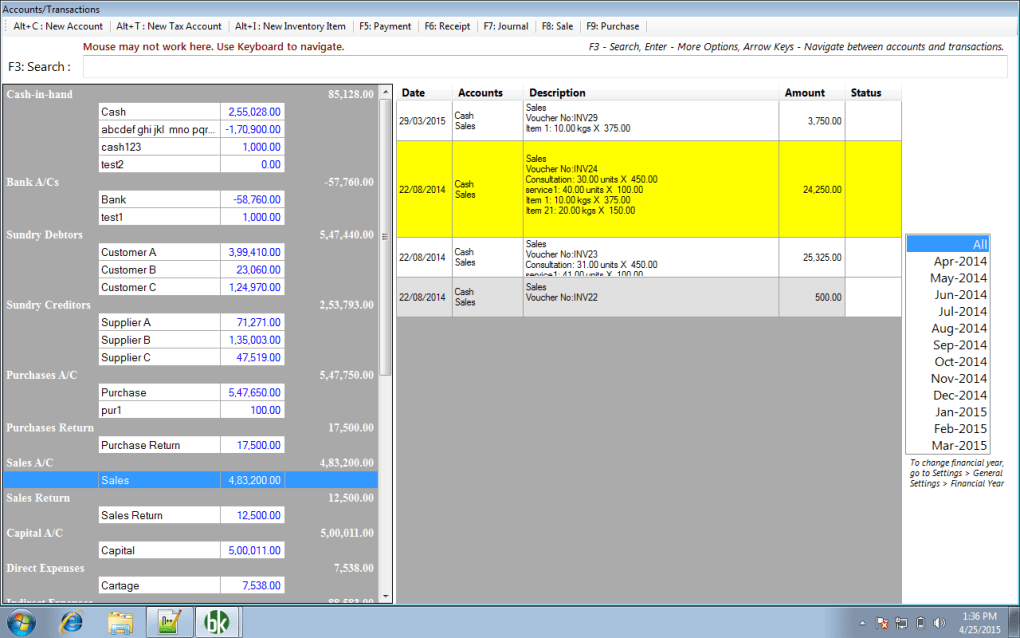
Book Keeper’s strength lies in its comprehensive suite of tools covering the essential aspects of financial management. The software empowers users to streamline various accounting tasks, ranging from basic bookkeeping to more complex financial analysis. This section delves into the key functionalities that make Book Keeper a valuable asset for managing finances effectively.
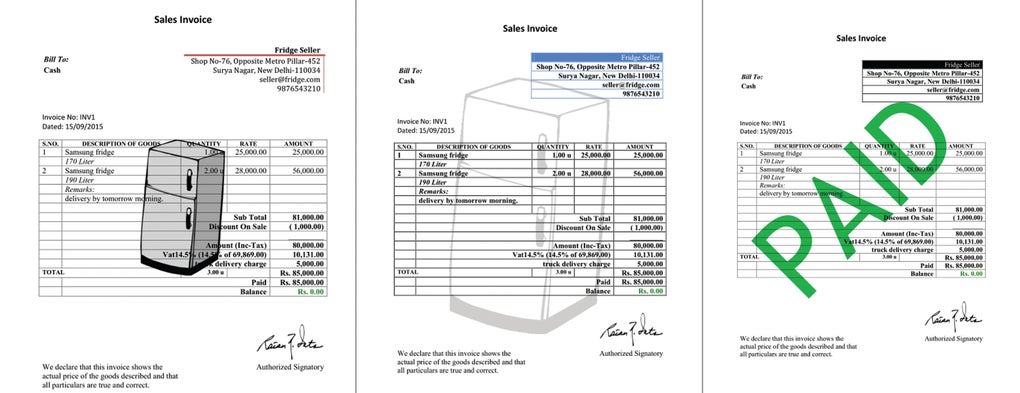
Invoice Management: The software facilitates the efficient creation and sending of invoices to clients. Users can customize invoices with their business details, including logos and contact information, ensuring professional branding. The system also allows for tracking of invoices, indicating whether they have been paid, outstanding balances, and overdue payments. This feature helps businesses maintain a clear overview of their receivables. Furthermore, the aging analysis feature provides a categorized overview of outstanding invoices based on their due dates, facilitating timely follow-up and debt collection.
Expense Tracking: Effective expense tracking is crucial for accurate financial reporting. Book Keeper simplifies this process by allowing users to easily record all business expenses, categorizing them for detailed analysis. This granular level of expense tracking provides valuable insights into spending habits, facilitating informed decision-making. The system supports the upload of receipts, creating an auditable trail for all expenditures. This ensures transparency and facilitates reconciliation with bank statements.

Inventory Management: For businesses that handle inventory, Book Keeper provides a dedicated module for efficient inventory tracking. Users can create individual inventory items with custom units of measure, recording purchase and sale transactions, including returns. The software automatically calculates inventory valuations based on the Average Cost (AVCO) method, providing an accurate assessment of inventory value. This feature is particularly beneficial for businesses that need to track the movement and value of their stock. Comprehensive reporting capabilities allow for the generation of detailed inventory reports, showing stock levels, cost of goods sold, and other important metrics.
Financial Report Generation: Accurate and comprehensive financial reports are essential for understanding the financial health of a business. Book Keeper generates a variety of automatically produced reports, including:
- Trial Balance: A summary of all general ledger accounts, providing a snapshot of the business’s financial position.
- Profit & Loss (P&L) Account: Details the revenue and expenses of a business over a specific period, revealing profitability.
- Trading Account: Specifically focuses on the gross profit of a business by deducting the cost of goods sold from revenue.
- Balance Sheet: Presents a summary of a company’s assets, liabilities, and equity at a specific point in time, showing the financial health and solvency of the business.
These reports are vital for internal decision-making, external reporting to stakeholders, and regulatory compliance. The ability to export reports in various formats (e.g., Excel, PDF) enhances accessibility and sharing capabilities.
Order Management: Book Keeper also assists in streamlining order management through the generation of sales orders and purchase orders. This facilitates smooth workflow within the business and improves communication with suppliers and customers. Tracking orders throughout the process provides real-time visibility into the order fulfillment cycle.
Tax Computation and Filing: The software assists with tax computation and allows for the recording of tax vouchers, providing a streamlined process for managing tax obligations. This simplifies the tax compliance process, reducing errors and potential penalties.
Advanced Features and Benefits
Beyond the core functionality, Book Keeper incorporates several advanced features that enhance its efficiency and utility.
Multi-Company and Multi-Account Support: The software allows users to manage multiple companies and accounts within a single application. This is beneficial for individuals managing personal and business finances or for businesses with multiple entities.
Offline Functionality: Book Keeper operates as a standalone application, eliminating the reliance on an internet connection. This allows users to access and manage their financial data anytime, anywhere, regardless of network availability. This is particularly crucial for individuals or businesses operating in areas with unreliable internet connectivity.
Data Synchronization: While functioning offline, Book Keeper supports data synchronization across multiple devices via Dropbox. This ensures data consistency and accessibility across various platforms, including desktop and mobile. This seamless synchronization feature enhances collaboration and ensures data integrity across all user devices.
User-Friendly Interface: Despite its comprehensive functionality, Book Keeper boasts a user-friendly interface designed for ease of use, even for those with limited accounting knowledge. The intuitive design minimizes the learning curve, allowing users to quickly adapt to the software. This ensures that even those without prior accounting experience can effectively manage their finances.
No Prior Accounting Knowledge Required: The software’s intuitive design and user-friendly interface make it accessible even to those without prior accounting expertise. The simple navigation and clear presentation of financial data minimize the need for extensive accounting training. This makes the software a practical solution for small business owners and individuals who may not have the resources or expertise to hire a professional accountant.
System Requirements and Availability
Book Keeper is available for Windows, Android, and iOS operating systems. The specific system requirements may vary depending on the platform. Regular updates and enhancements ensure optimal performance and compatibility across different devices and operating systems. The software is available for a one-time purchase after a free 30-day trial period.
User Reviews and Feedback
User reviews consistently highlight Book Keeper’s ease of use, comprehensive features, and mobile accessibility. Many users praise its ability to streamline their accounting processes and provide valuable insights into their financial performance. Positive feedback frequently mentions the offline functionality, which is particularly beneficial for those who require access to their financial data regardless of internet connectivity.
Conclusion
Book Keeper presents a powerful and user-friendly solution for managing financial data effectively. Its comprehensive feature set, cross-platform compatibility, and intuitive interface make it an ideal choice for individuals and businesses of various sizes. The software’s offline capabilities and data synchronization through Dropbox further enhance its practicality and appeal. With its user-friendly design, robust functionality, and affordable pricing, Book Keeper stands out as a strong contender in the accounting software market. The 30-day free trial allows potential users to experience the software’s full capabilities before committing to a purchase, reducing the risk associated with adopting a new accounting system.
File Information
- License: “Trial version”
- Latest update: “July 20, 2021”
- Platform: “Windows”
- OS: “Windows 8”
- Language: “English”
- Downloads: “41.3K”
- Size: “22.13 MB”


