
BootRacer is a free utility designed to measure and, to a limited extent, help optimize your Windows computer’s boot speed. In the world of computing, a swift boot-up is often taken for granted, but a sluggish start can be incredibly frustrating, significantly impacting productivity and user experience. This comprehensive review will examine BootRacer’s functionality, strengths, weaknesses, and its place within the broader landscape of Windows optimization tools.
Understanding BootRacer’s Functionality
BootRacer’s primary function is straightforward: it measures the time it takes for your Windows system to boot. It achieves this using a dual approach: directly measuring the time from startup to desktop load and providing a secondary, algorithmically derived estimate based on internal parameters. This dual measurement offers a more comprehensive picture than a single metric alone.
The process is relatively simple. After installation, users initiate a “Race” command. BootRacer then configures itself as a Windows service, monitoring processor load during the boot process. This clever method allows the application to accurately determine the completion of the boot sequence by identifying the point where processor activity drops to a predetermined low level. This ensures accurate measurement, irrespective of any post-boot application loading processes.
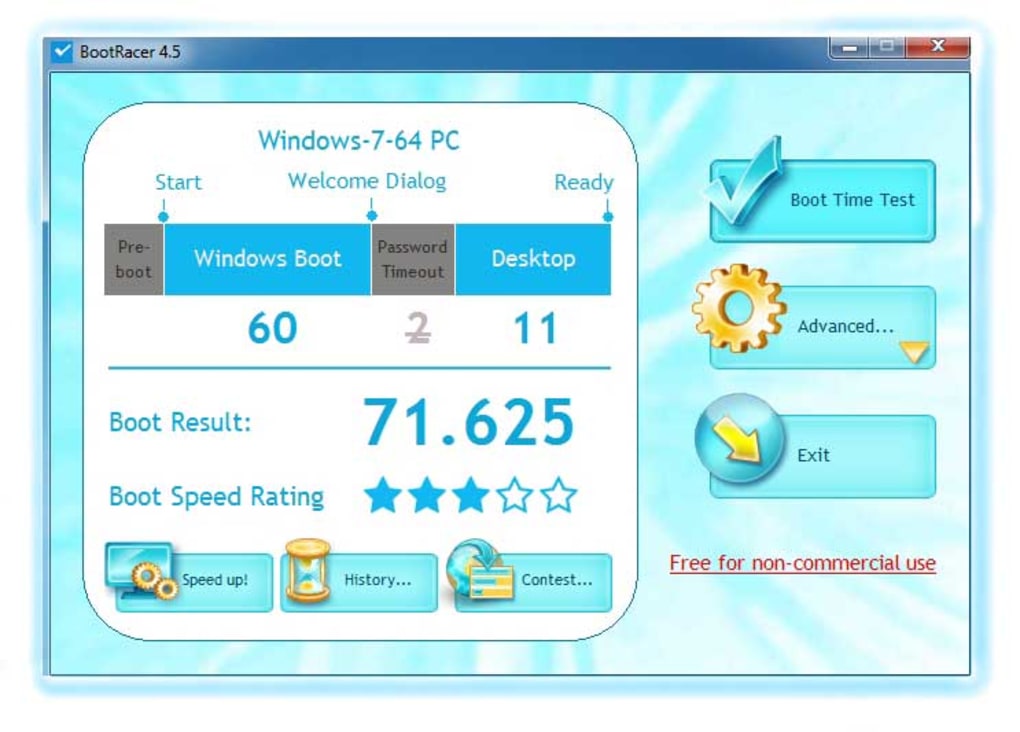
Crucially, the developers emphasize the importance of user inactivity during the test. Any mouse or keyboard input during the boot measurement process will reset the test and require a restart. This design choice emphasizes the precision of the measurement and minimizes external variables that could skew the results. Users can choose to run BootRacer only once or have it automatically measure boot times each startup.
While BootRacer doesn’t offer sophisticated diagnostic capabilities to pinpoint the precise cause of slow boot times, it provides a clear metric – a unique “BootRacer rating” – that allows users to track their progress after implementing optimization strategies. This rating serves as a quantifiable benchmark for assessing the impact of any changes made to the system.
Advantages and Disadvantages of Using BootRacer
BootRacer’s simplicity and ease of use are significant advantages. Its intuitive interface makes it accessible to users of all technical skill levels. The straightforward process of initiating a test and obtaining a numerical rating eliminates the need for complex configuration or technical expertise. This simplicity contributes to its broad appeal and ease of adoption. The generation of the unique BootRacer rating provides a convenient means of tracking boot speed improvements over time, fostering a data-driven approach to optimization.
However, BootRacer’s limited functionality is its primary drawback. Unlike more comprehensive system optimization tools, BootRacer doesn’t provide any diagnostic information about potential causes of slow boot times. It simply measures the speed; it doesn’t offer insights into the underlying issues contributing to that speed. There is no comparison against benchmarks or industry averages, which could provide a context for interpreting the obtained rating. This lack of diagnostic capability limits its utility for users who require more in-depth troubleshooting and performance analysis. The absence of a mechanism to identify and address the root causes of slow boot times requires users to employ other tools to identify and resolve such issues.

BootRacer within the Broader Context of Windows Optimization
BootRacer occupies a niche within the broader ecosystem of Windows optimization utilities. While it excels at precisely measuring boot times, it lacks the comprehensive diagnostic and remediation capabilities of more advanced tools. This positioning makes it a valuable supplementary tool, rather than a standalone solution for addressing complex performance issues.
Many sophisticated optimization suites incorporate boot time analysis as just one aspect of a broader set of features. These advanced tools often offer in-depth analysis of startup programs, driver performance, and disk health, providing a more granular understanding of the factors influencing boot speed. They might even offer automated solutions to address identified bottlenecks. Therefore, BootRacer’s utility is best viewed in conjunction with such more comprehensive tools. It can provide a precise measurement to verify the impact of changes implemented through more comprehensive optimization suites.
Improving Boot Speed: Beyond BootRacer
Addressing slow boot times requires a multi-pronged approach that extends beyond simply measuring the time it takes. While BootRacer offers a convenient benchmark, resolving underlying performance issues often necessitates a more involved process.
Several strategies can contribute to improving Windows boot speed. These include:
- Disabling unnecessary startup programs: Many applications automatically launch upon startup, consuming system resources and lengthening boot times. Managing startup programs through the Task Manager or dedicated system optimization tools can significantly reduce boot time.
- Removing unnecessary software: Uninstall any unused or rarely used programs to free up disk space and reduce the number of applications competing for resources during startup.
- Updating drivers: Outdated drivers can negatively impact system performance, including boot times. Regularly updating drivers to their latest versions can improve overall system efficiency.
- Defragmenting or optimizing the hard drive (or SSD): Fragmentation can slow down access to files, negatively impacting boot times. Defragmenting a traditional hard drive or optimizing an SSD can improve overall system responsiveness.
- Checking for malware or viruses: Malware can significantly impact system performance, including boot times. Regularly scanning for malware and viruses is crucial for maintaining system health.
- Upgrading hardware: In some cases, aging or underpowered hardware may be the primary contributor to slow boot times. Upgrading components such as RAM or the storage drive can significantly improve performance.
Conclusion: BootRacer’s Role in Optimizing Your PC
BootRacer effectively serves as a straightforward and easy-to-use tool for measuring Windows boot time. Its simple interface and direct measurement provide a clear, quantifiable metric for tracking improvements. However, its limited functionality means it’s not a standalone solution for diagnosing and resolving the root causes of slow boot times. It is best utilized as a supplementary tool, working in conjunction with more comprehensive system optimization utilities that can identify and address the underlying performance bottlenecks. While it doesn’t offer solutions, it does provide an accurate and useful benchmark to track the effectiveness of other optimization efforts. Ultimately, a holistic approach incorporating several strategies is often necessary to achieve significant improvements in Windows boot speed.
File Information
- License: “Free”
- Latest update: “June 11, 2025”
- Platform: “Windows”
- OS: “Windows 7”
- Language: “English”
- Downloads: “21.5K”
- Size: “23.74 MB”


