
The Borderlands series, known for its unique blend of first-person shooter action, role-playing elements, and darkly humorous writing, has captivated millions of players worldwide. For those seeking to enhance their gameplay experience beyond the standard challenges, the Borderlands Profile Editor offers a compelling, albeit potentially risky, avenue for customization. This tool allows players to directly manipulate in-game parameters, offering a level of control not typically available through conventional gameplay. This in-depth review will explore the functionalities, risks, and overall value of this profile editor.
Understanding the Borderlands Profile Editor
The Borderlands Profile Editor is a free-to-use utility designed for modifying various aspects of your Borderlands 2 and Borderlands: The Pre-Sequel game profiles. Crucially, it does not support the original Borderlands game. Its primary function lies in altering in-game statistics and parameters, providing players with the ability to adjust things like Badass Ranks, Tokens, and even core character statistics. This means players can potentially bypass some of the inherent challenges presented in the game, accelerating progression or customizing their experience in ways that might not otherwise be possible.
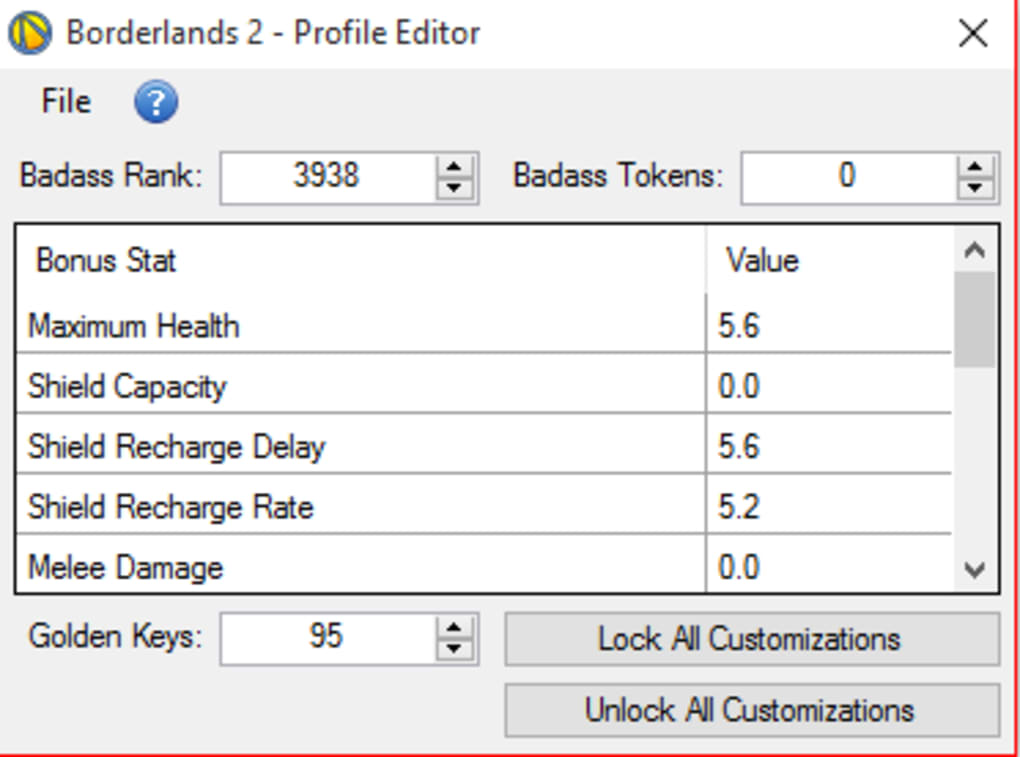
The editor’s user interface is designed for relative simplicity. Players primarily input the desired values for the parameters they wish to modify. This straightforward approach aims to make the process accessible, even to users with limited technical experience. However, this simplicity belies the potential risks associated with its use, a point that warrants careful consideration.
Functionality and Features
The Borderlands Profile Editor offers a broad range of modification capabilities. While the specific parameters vary depending on the game version, the core functionalities remain consistent. Here’s a breakdown of what you can generally expect to adjust:
-
Character Stats: This encompasses a wide array of attributes, including health, shields, action skill cooldown rates, damage output, and more. By modifying these stats, players can significantly alter their character’s performance and overall effectiveness in combat. This can be particularly useful for experimenting with different builds or overcoming challenging encounters.
-
Badass Ranks and Tokens: These in-game progression systems are directly impacted by the editor. Players can artificially boost their Badass Rank, unlocking additional perks and benefits earlier than would normally be possible through standard gameplay. Similarly, they can adjust their token count, allowing for greater flexibility in purchasing upgrades and enhancements.
- Account Status: Although less direct than the character stat modifications, some aspects of your overall account status might be alterable. This could include things like progress markers or completed challenges. However, tampering with this aspect of the game profile requires caution, as it carries a higher risk of causing instability or corruption.
Risks and Considerations: Navigating the Potential Downsides
While the Borderlands Profile Editor offers enticing possibilities for customization, it’s crucial to acknowledge the associated risks. These risks are not to be taken lightly, as they can result in significant issues with your game save and potentially even damage to your system files.
-
Save File Corruption: This is arguably the most significant risk. Improper use of the editor, such as entering incorrect values or using the editor while the game is online, can lead to corrupted save files. This could result in the loss of your character’s progress, gear, and overall gameplay experience. It’s vital to always back up your save files before using any profile editor to mitigate this risk.
-
False Positives from Anti-Malware Software: Some anti-malware programs might flag the editor’s installer as a potential threat due to its nature of manipulating game files. This is often a false positive, but it’s important to be aware of this possibility and to potentially use a reputable anti-malware solution that allows for custom exclusions if necessary.
-
Game Instability: Modifying in-game parameters outside the intended design can sometimes lead to unexpected behavior or game instability. This can manifest in various ways, including glitches, crashes, or even the inability to launch the game. Always exercise caution and be prepared for the possibility of encountering such problems.
-
Online Gameplay Restrictions: While the editor might function offline, using a modified profile online could result in a ban or suspension from online multiplayer services. It’s strongly advised to only use the Borderlands Profile Editor when playing offline.
-
Compromised Account Security: Though the developer assures the editor doesn’t directly compromise account security, using third-party tools always carries a certain level of risk. It’s crucial to download the editor from trusted sources only to minimize the chance of malicious software.
Best Practices and Safe Usage Guidelines
To minimize the risks associated with using the Borderlands Profile Editor, consider the following best practices:
-
Offline Usage: Always use the editor while the game is completely offline and disconnected from the internet. This is the single most effective way to prevent save file corruption.
-
Backup Your Saves: Before making any changes, back up your existing save files. This ensures that you can revert to a stable version if anything goes wrong.
-
Small, Incremental Changes: Instead of making drastic changes all at once, modify parameters in small increments. This allows you to monitor the effects of each adjustment and quickly identify any problems that might arise.
-
Download from Reputable Sources: Only download the editor from the official developer’s website or other trusted sources. Avoid downloading from untrusted websites or forums, as this increases the risk of downloading malicious software.
-
Read the Instructions Carefully: Familiarize yourself with the editor’s instructions and documentation before attempting any modifications. Understanding the tool’s functionalities and limitations will help you avoid potential pitfalls.
-
Antivirus Check: After downloading, scan the installer with your preferred antivirus software. While likely a false positive, it’s a good practice to confirm there are no malicious components included.
Alternatives and Similar Tools
While the Borderlands Profile Editor provides a specific set of functionalities, several alternative tools and methods exist for altering gameplay experiences. These options might offer different functionalities or levels of risk. Exploring these alternatives might provide a safer or more appropriate approach depending on your preferences and goals.
Many modding communities offer a wealth of alternative options, though these often require a deeper level of technical expertise to implement. Some might offer more comprehensive modifications, while others might focus on specific aspects of the game. Always proceed with caution when exploring modifications from unofficial sources, as their safety and stability cannot be guaranteed.
Conclusion: Weighing the Benefits and Risks
The Borderlands Profile Editor provides a powerful tool for players seeking to enhance their gameplay experience. Its ability to modify core game parameters offers a level of customization not normally achievable through standard gameplay. However, this power comes with significant risks, primarily the potential for save file corruption and game instability.
Ultimately, the decision of whether or not to use this tool rests entirely with the individual player. Those willing to accept the inherent risks and follow the necessary safety precautions can potentially benefit from the customization options it offers. However, players prioritizing the preservation of their save files and a stable gaming experience should likely refrain from using the editor and explore safer alternatives. The potential rewards of using the Borderlands Profile Editor must be carefully weighed against the significant risks involved. Remember, always prioritize data safety and responsible usage.
File Information
- License: “Free”
- Version: “1.0.1.0”
- Latest update: “January 18, 2024”
- Platform: “Windows”
- OS: “Windows 10”
- Language: “English”
- Downloads: “1.9K”
- Size: “335.94 KB”


