In an increasingly interconnected world, the ability to communicate and express oneself in one’s native language digitally is paramount. For the millions of Bangla speakers across the globe, typing in their beautiful and rich script has often presented a challenge, historically requiring specialized keyboards or complex input methods. However, the landscape has evolved significantly, thanks to innovative software solutions designed to simplify this process. Among these, Borno - A FREE Bangla Typing Software emerges as a standout, offering a comprehensive, user-friendly, and highly customizable platform for Windows users to effortlessly type in Bangla. Developed by Codepotro, Borno is not just another typing tool; it’s a meticulously crafted companion engineered to enhance efficiency, convenience, and personalization for anyone looking to articulate their thoughts in Bengali.
This powerful utility goes beyond basic character input, integrating a suite of features that cater to both novice computer users and seasoned typists. Its core appeal lies in its commitment to flexibility and ease of use, making the often-intimidating task of typing in a non-Latin script as intuitive as possible. Whether you’re drafting an email, writing a document, creating content for social media, or engaging in academic pursuits, Borno provides a robust foundation for all your Bangla typing needs. It presents a viable and often superior alternative to other popular Bangla typing software like Avro Keyboard and Bijoy Bayanno, distinguishing itself through its lightweight design, extensive customization options, and powerful underlying technology. With Borno, the digital barrier to expressing oneself in Bangla is decisively removed, paving the way for seamless and efficient communication.
Unlocking Seamless Bangla Typing: Core Features and User Experience
Borno - A FREE Bangla Typing Software stands out not merely because it allows you to type in Bangla, but because of how it enables you to do so: with unparalleled ease, speed, and customization. This software is a testament to thoughtful design, ensuring that every feature contributes to a streamlined and enjoyable typing experience. From the moment you launch the utility, its commitment to user convenience becomes apparent, offering a rich array of functionalities packed into a lightweight and unobtrusive package.
One of Borno’s most celebrated attributes is its extensive support for various keyboard layouts. Recognizing that different users have distinct preferences and familiarity with existing systems, Borno provides a diverse selection of built-in layouts. Users can effortlessly switch between Borno’s native layout, Borno Phonetic (which allows typing Bangla characters by phonetic transliteration of English characters), Borno Encoding, National, and Probhat. This versatility means that regardless of whether you’re accustomed to a fixed layout or prefer a phonetic approach that translates English sounds into Bengali script, Borno has a setting that will feel natural to you. The seamless transition between these layouts is facilitated by intuitive controls, ensuring that your typing flow is never interrupted.
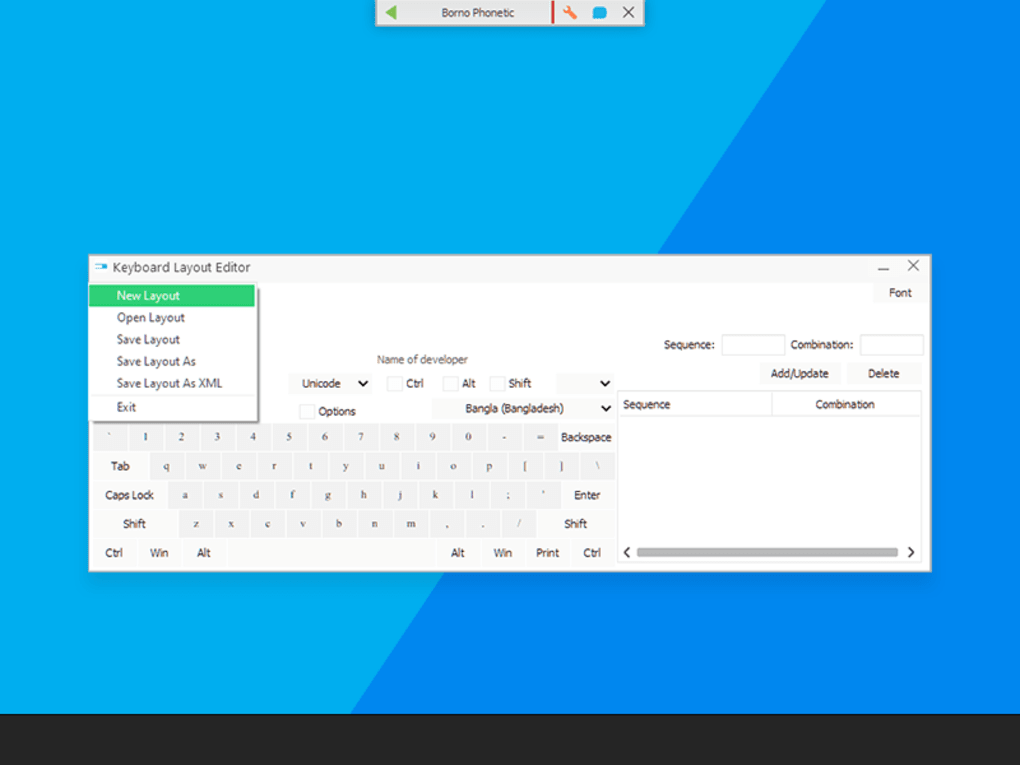
Beyond the pre-configured options, Borno takes personalization to the next level with its powerful Keyboard Layout Editor. This feature is a game-changer for users who require a truly bespoke typing environment. The editor allows you to not only modify existing layouts but also to design entirely new ones from scratch. Imagine being able to map specific Bangla characters to keys that make the most sense to you, creating a layout that perfectly matches your muscle memory and workflow. This level of customization ensures that Borno adapts to your style of typing, rather than forcing you to adapt to the software. Once a personalized layout is created, it can be saved and, remarkably, shared with other devices or users. This sharing capability fosters a collaborative environment, allowing communities or teams to standardize their typing experience or exchange innovative layout designs.
Unicode compatibility is another cornerstone of Borno’s architecture. In today’s digital landscape, Unicode is the universal standard for encoding, representing, and handling text, ensuring that Bangla characters display correctly across different applications, operating systems, and web platforms. By being fully compatible with the latest version of Unicode, Borno guarantees that whatever you type will be universally readable and rendered without corruption or display errors. This is crucial for professional communication, content creation, and ensuring the longevity and accessibility of your digital text. Paired with this, Borno features a powerful phonetic engine that simplifies typing for those who prefer phonetic input. This engine intelligently converts Romanized input into correct Bangla script, making it particularly useful for new PC users or those who are not familiar with traditional Bangla keyboard layouts. The engine’s robustness transforms the typing experience, making it intuitive and reducing the learning curve significantly.
To further enhance efficiency, Borno incorporates keyboard shortcuts. These shortcuts allow users to swiftly jump between different keyboard layouts, activate specific functions, or insert common characters without ever needing to touch the mouse. In a world where every second counts, these time-saving shortcuts are invaluable, contributing to a faster, more fluid typing rhythm. The software’s design philosophy clearly prioritizes keeping the user’s hands on the keyboard, minimizing distractions and maximizing productivity.
While Borno offers a highly sophisticated typing experience, it also acknowledges the occasional technical hiccup. Should your physical keypad ever malfunction or become unresponsive, the software provides an advanced mouse typing function. This intelligent fallback allows you to click necessary characters seamlessly using your mouse, ensuring that you can continue working without significant disruption. It’s a thoughtful inclusion that underscores Borno’s commitment to providing an uninterrupted and reliable typing solution.
Finally, a notable component of Borno is its built-in dictionary feature, designed to facilitate smart input by suggesting words as you type. This functionality aims to speed up the writing process and reduce errors by offering predictive text. While an incredibly useful concept, the developers at Codepotro openly acknowledge that this feature is still undergoing refinement. Users might occasionally encounter instances where the suggested words appear somewhat “odd” or not entirely relevant to the context. However, this is an area marked for future improvements, and even in its current state, it provides a valuable assistive layer to the typing process. This transparency regarding areas for development reflects a commitment to continuous improvement and responsiveness to user feedback.
In essence, Borno’s core features weave together to create a harmonious and powerful typing environment. It caters to a wide spectrum of users by offering choice in layout, the power to create, and smart assistive technologies, all while maintaining a lightweight and user-friendly interface.
Crafting Your Perfect Typing Environment: The Layout Designer and Customization
The true power of Borno - A FREE Bangla Typing Software extends beyond its comprehensive set of pre-defined keyboard layouts; it lies in its revolutionary Keyboard Layout Designer. This feature is not just an add-on; it’s a central pillar of Borno’s appeal, empowering users to take full control over their digital Bangla typing experience. In an era where personalization is key, this designer tool offers an unprecedented level of flexibility, making Borno a truly adaptable instrument for linguistic expression.
The Keyboard Layout Designer is an intuitive interface where users can meticulously craft a keyboard layout that resonates perfectly with their individual typing habits and preferences. Imagine a canvas where each key can be assigned a specific Bangla character, symbol, or even a sequence of characters. This means you are no longer limited by traditional layouts that might not suit your specific needs or existing muscle memory. For instance, if you’ve grown accustomed to a particular arrangement from a physical keyboard or another software, you can replicate that exact setup within Borno. This dramatically reduces the learning curve associated with switching to a new typing software, allowing you to hit the ground running without needing to retrain your fingers.
One of the most significant advantages of the designer is its support for creating layouts with your own encoding. This advanced capability is particularly beneficial for developers, linguists, or specialized users who might work with unique character sets or legacy systems. While Unicode compatibility is a standard feature, the ability to define custom encodings within your layout offers an extra layer of control and flexibility, ensuring that Borno can integrate seamlessly into highly specific workflows. This level of granular control is rarely found in free typing software, positioning Borno as a sophisticated tool for both general users and technical professionals.
The process of designing a custom layout is straightforward, yet robust. Users can drag and drop characters, assign key combinations (like Shift + key or AltGr + key) to produce alternative characters, and even define macro-like functions for frequently used phrases or symbols. This level of detail allows for the creation of layouts that are not only efficient but also highly ergonomic, minimizing keystrokes and maximizing typing speed and comfort. Whether you need to place rarely used but essential characters in an easily accessible spot or group similar-sounding characters together for phonetic consistency, the layout designer provides all the necessary tools.
Once a custom layout is perfected, it can be saved as a profile, ensuring that your personalized setup is always available. But Borno’s innovation doesn’t stop there. As mentioned earlier, these personally designed keyboards are shareable. This feature opens up a world of possibilities:
- For Teams and Organizations: Companies or educational institutions that require employees or students to type in Bangla can create a standardized layout and distribute it, ensuring consistency and ease of use across the board.
- For Communities: Online communities or groups dedicated to Bangla language use can share optimized layouts, fostering a collaborative environment where users can benefit from each other’s expertise.
- For Multi-Device Users: If you work on multiple Windows machines, you can design your layout once and transfer it to all your devices, maintaining a consistent typing experience everywhere you go.
The Keyboard Layout Designer effectively transforms Borno from a mere typing tool into a creative platform. It empowers users to be the architects of their own digital expression, fostering a deeper connection with the language and making the act of typing a truly personalized and efficient endeavor. This commitment to user empowerment distinguishes Borno in a crowded market, making it an indispensable asset for anyone serious about mastering Bangla digital communication.
Why Borno Stands Out: Performance, Accessibility, and Community Contribution
In a market with several Bangla typing solutions, Borno - A FREE Bangla Typing Software carves a distinct niche for itself through a combination of thoughtful design, powerful features, and a commitment to accessibility. Its proposition as a cost-free yet feature-rich utility makes it an incredibly attractive option, especially when compared to its contemporaries.
A Superior Alternative for Bangla Typists: Borno often gets compared to established names like Avro Keyboard and Bijoy Bayanno. While these are respectable programs, Borno frequently emerges as a preferred choice for several compelling reasons. Its modern, streamlined interface is often lauded for being more intuitive and less cluttered, making the onboarding process smoother for new users. The robust Unicode compatibility, coupled with a powerful phonetic engine and an advanced layout designer, gives Borno an edge in terms of both flexibility and future-proofing. Avro Keyboard is known for its phonetic typing, but Borno’s engine is equally capable, and its custom layout design often surpasses the customization options of other free alternatives. Bijoy Bayanno, while widely used, sometimes involves licensing complexities or has a more traditional interface that some users find less engaging than Borno’s contemporary design. By being entirely free and open in its customization, Borno democratizes access to high-quality Bangla typing.
Optimized Performance and System Compatibility: One of Borno’s practical advantages is its lightweight and unobtrusive nature. The software is designed to run efficiently in the background without consuming excessive system resources. This means it won’t slow down your computer or interfere with other demanding applications, making it ideal for users who multitask extensively or have older hardware. Its minimal footprint ensures a smooth user experience, even on less powerful Windows machines. Borno is specifically designed for the Windows OS, with broad compatibility covering various versions, including Windows Vista and subsequent releases. This wide compatibility ensures that a vast majority of Windows users can benefit from its capabilities without worrying about system requirements.
Commitment to Continuous Improvement: As noted earlier, the developers are transparent about areas for improvement, such as the built-in dictionary’s smart input function. This transparency is a strength, signaling a responsive development team committed to refining the software based on user feedback and evolving technological standards. Regular updates, as indicated by version releases (e.g., V2025.1.134.9(86) as of January 16, 2025, according to the provided data), ensure that Borno remains current, secure, and progressively more powerful. Such continuous development indicates a dedication to providing the best possible Bangla typing experience for its user base.
Accessibility and Global Reach: The very nature of Borno as a free software democratizes access to Bangla typing tools, making it available to anyone with a Windows PC, regardless of their financial resources. This is particularly important for promoting digital literacy and cultural preservation. Its availability in English (as indicated by the “In English” tag) makes it accessible to a wider international audience who may not be native Bangla speakers but wish to type in the script for various reasons, such as academic research or communication with Bangla-speaking friends and colleagues. The significant download numbers (over 31K overall, with 1.3K last month alone as per PhanMemFree’s statistics) are a clear indicator of its growing popularity and essential role in the digital landscape for Bangla speakers.
Community and Support: While the provided text doesn’t delve deeply into community forums, the sharing features for custom layouts inherently foster a community aspect. Users can exchange layouts, tips, and potentially contribute to the collective knowledge base. Furthermore, the availability on platforms like PhanMemFree.org and its positive user reviews (when they begin to accumulate) build trust and a sense of community around the software. The option to “Rate it!” and “Report Software” on PhanMemFree.org provides direct channels for user engagement and feedback, which is vital for a free and evolving application.
In conclusion, Borno - A FREE Bangla Typing Software is more than just a utility; it’s a meticulously engineered solution that addresses the multifaceted needs of Bangla typists. Its blend of advanced customization, robust performance, and unwavering commitment to being a free, accessible tool positions it as an indispensable asset for anyone looking to connect with the Bengali language in the digital realm. Whether you are a student, a professional, a content creator, or simply someone who wishes to communicate in their mother tongue, Borno offers a powerful and satisfying typing experience that truly stands out.
Borno - A FREE Bangla Typing Software is a cost-free typing companion that enables you to type in Bangla letters faster and with so much ease. Thanks to its streamlined interface, you can easily customize your keyboard layouts to anything that will work best for your convenience. It is now compatible with Unicode, letting you experience both fixed and phonetic keyboard layouts, keypad shortcuts, and so much more. Furthermore, the personally designed keyboard is shareable with other devices or users. Borno can be a good alternative for Avro Keyboard and Bijoy Bayanno.
Borno - A FREE Bangla Typing Software is equipped with truckloads of handy features, which will aid you in personalizing your keyboard seamlessly. The program itself is lightweight and unobtrusive so it won’t really bother you whenever you’re busy doing other tasks. Once you launch the utility, you will be greeted by the numerous keyboard layouts that you can freely switch to and from. This includes Borno, Borno Phonetic, Borno Encoding, National, and Probhat, along with two more options named “Current Keyboard Layout” and “Keyboard Layout Editor.” Keep in mind that the last option is where you can actually customize and design your keyboard layout to your preference. As mentioned, you can swiftly jump from one keyboard to another simply through the shortcuts that it allows. Save more time without ever touching your mouse. On top of that, it is equipped with a built-in dictionary feature which further strengthens its smart input capability. However, some more improvements are required for this function as the suggested words appear odd at times. If ever your keypad suddenly malfunctions, you don’t have to worry much as it is capable of providing an advanced mouse typing function enabling you to click necessary characters seamlessly.
It may have some shortcomings with its smart input feature, nonetheless Borno - A FREE Bangla Typing Software is a useful suite for all your Bangla or Bengali keyboard needs. You can fully rely on this tool to give many helpful keyboard layouts that you can smoothly swap depending on the convenience that you require. For a more personalized experience, you can even customize your own keyboard layout.
Borno is a FREE Bangla typing software for the Windows OS. It comes with both fixed and phonetic keyboard layouts, powerful keyboard layout creator and also it’s fully compatible with the latest version of Unicode. Borno has a powerful phonetic engine which will change your typing experience and it’s also very useful to the new pc users. Borno comes with a powerful keyboard layout designer. Use Borno keyboard layout designer and create layout with your own encoding!
For more free software and reviews, visit Phanmemfree.org. License: Free Version: 2025.1.132.0.0.0 Latest update: January 16, 2025 Platform: Windows OS: Windows Vista Language: English Downloads: 31K Last month’s downloads: 1.3K Size: 9.11 MB Developer: Codepotro
Copyright PHANMEMFREE INTERNATIONAL S.A. © 1997–2025 — All rights reserved.
File Information
- License: “Free”
- Latest update: “January 16, 2025”
- Platform: “Windows”
- OS: “Windows Vista”
- Language: “English”
- Downloads: “31.9K”
- Size: “9.11 MB”