
In an era defined by rapid communication and demanding workflows, the efficiency of our digital interactions plays a pivotal role in overall productivity. For anyone who spends a significant portion of their day typing – be it crafting emails, writing reports, coding, or engaging in online discussions – the repetitive nature of certain phrases can be a substantial drain on time and energy. Enter Breevy, a remarkably lightweight yet incredibly powerful text expander for Windows. Available for download on PhanMemFree, Breevy stands out as an essential utility designed to eliminate redundant typing, streamline communication, and ultimately, liberate users from the tedium of repetitive keystrokes.
At its core, Breevy is an intelligent abbreviation software. It observes your typing patterns, or more precisely, allows you to pre-define them. Imagine having to type a lengthy disclaimer, a complex technical term, a standard email closing, or a multi-paragraph explanation dozens of times a day. With Breevy, these cumbersome sequences of words can be condensed into a short, memorable abbreviation. Type that abbreviation, and Breevy instantly replaces it with the full, pre-defined text. This seemingly simple function yields profound benefits, transforming minutes of typing into mere seconds.

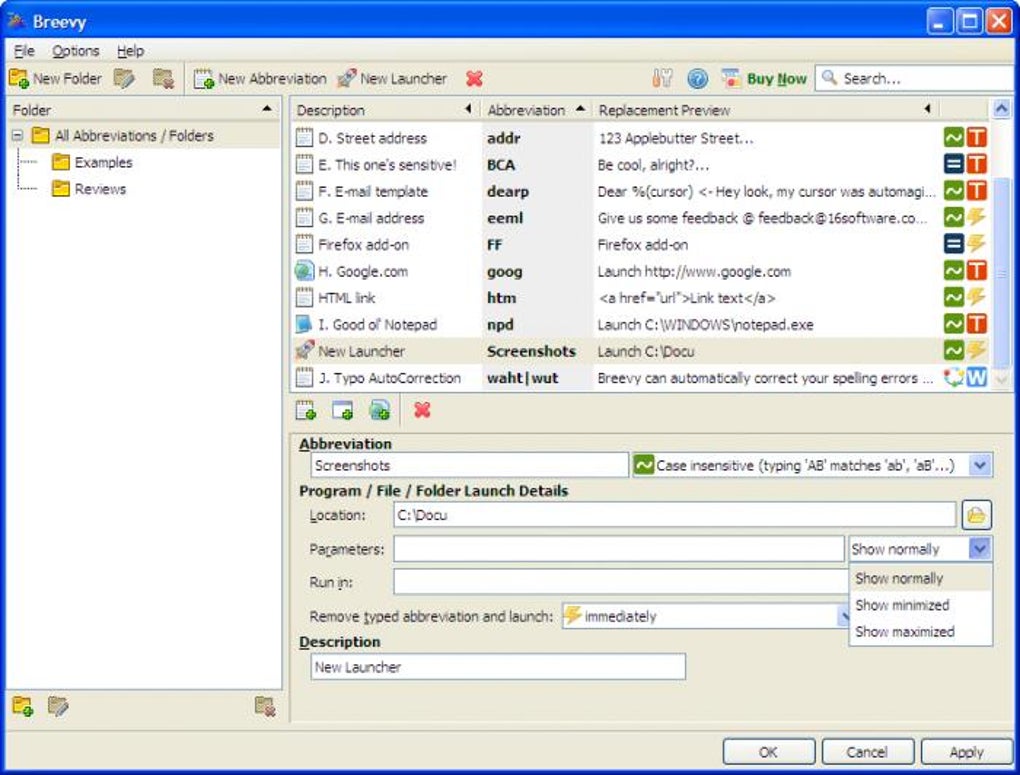
The beauty of Breevy lies not just in its core functionality but also in its elegantly designed user experience. Upon launching, users are greeted with a basic yet intuitive interface, which can be easily minimized to the taskbar, allowing Breevy to operate seamlessly in the background without cluttering the workspace. This unobtrusive presence is crucial, as the program needs to be active to detect and expand your abbreviations. For newcomers, Breevy provides a generous array of examples, meticulously illustrating how the system works. This hands-on demonstration ensures that even those unfamiliar with text expansion software can quickly grasp its mechanics and begin integrating it into their daily routine.
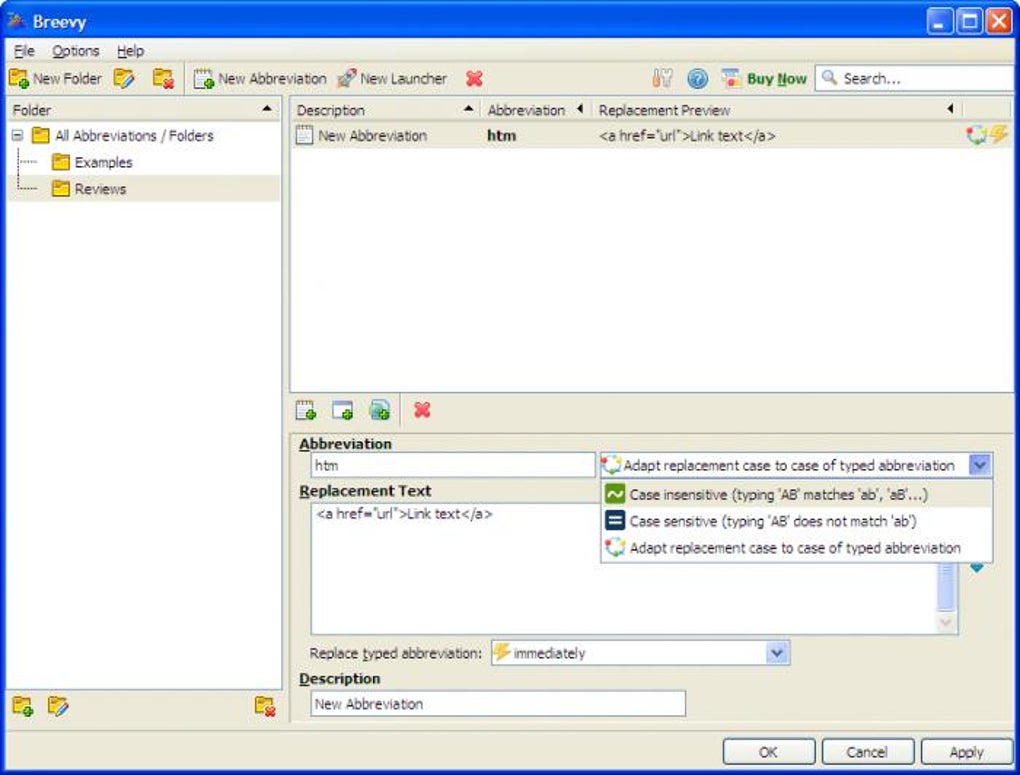
Configuring an abbreviation in Breevy is a straightforward process. You select the specific term or phrase you frequently type. Then, you devise a concise abbreviation that will act as its trigger. The replacement text, which can range from a single word to several paragraphs, is then entered. Breevy offers flexible options for replacement triggers: instantly as soon as the abbreviation is typed, after a designated “trigger key” (which you can customize), or following a word-ending character like an exclamation mark or a period. This level of control allows users to fine-tune the system to prevent accidental expansions while ensuring immediate access to necessary text. To maintain an organized library of abbreviations, Breevy also prompts users to add a descriptive label to each entry, making it easy to locate and manage them later. Once configured and minimized, Breevy silently monitors your keystrokes, ready to spring into action and enhance your typing efficiency.
But Breevy’s talents extend beyond mere text replacement. This versatile utility also empowers users to create abbreviations that, when typed, can launch programs or open specific websites. This feature transforms Breevy from a simple text expander into a powerful command launcher, further consolidating essential actions under a unified, easy-to-access system. The depth of its configuration options ensures that users can tailor Breevy precisely to their individual needs. For instance, the ability to specify whether an abbreviation is case-sensitive is a small but significant detail that offers greater precision and control, preventing unwanted expansions. Similarly, users can dictate whether the case of the replacement text should match the case of the typed abbreviation, adding another layer of intelligent customization. For any individual or professional who regularly engages with written content, both online and offline, Breevy proves to be an indispensable asset, even if only utilized for a select handful of frequently used phrases. The key, as experienced users attest, lies in thoughtfully designing your abbreviations to avoid unintentional triggers, ensuring a smooth and uninterrupted workflow. The overall consensus is clear: Breevy is an exceptional program poised to significantly elevate your productivity. Its continuous development is evident, with recent updates like support for TextExpander snippets further enhancing its utility and interoperability with other popular tools.
Unleashing Productivity with Breevy
The promise of Breevy lies in its ability to dramatically increase personal and professional productivity. In a world where every second counts, reclaiming time spent on repetitive typing translates directly into more time for creative thought, strategic planning, or simply a better work-life balance. For individuals, this means faster email replies, quicker document drafting, and a reduced cognitive load when writing. For businesses, the implications are even broader, impacting everything from customer service efficiency to consistent brand messaging.
Consider the diverse applications across various professional landscapes. Customer service representatives, for instance, can leverage Breevy to rapidly respond to common inquiries with pre-written, comprehensive answers, ensuring accuracy and consistency across all interactions. Programmers can store complex code snippets or frequently used command-line arguments, calling them up with a few keystrokes instead of retyping or searching through documentation. Academic writers, researchers, and students can efficiently insert citations, methodological descriptions, or standard formatting elements. Legal professionals can streamline the drafting of contracts, briefs, and official correspondence by abbreviating common clauses and legal boilerplate. In essence, any role that involves extensive typing and repetitive information exchange stands to benefit immensely from Breevy’s capabilities.
One of the most compelling testimonials to Breevy’s power comes from an English teacher, who lauded the software as an “absolute MUST” for educators, especially those who compulsively comment on student work. This user shared a vivid example: instead of repeatedly typing a lengthy and detailed explanation about sentence structure variation, they now simply type “v-s-s-l” (without hyphens). This instantly expands into a multi-sentence, comprehensive paragraph: “Vary sentence structure and length. You must include simple, compound, complex, and compound-complex sentences. You must also include short, medium-length, and long sentences. A lack of variation in sentence structure and length yields writing that strikes the mind’s ear as either monotonous and sing-songy (when you rely excessively upon short and/or simple and compound sentences) or confusing (when you rely excessively upon long and/or complex and compound-complex sentences).” The teacher described this experience as “HEAVEN!” and noted that their productivity increased “EXPONENTIALLY!” Such a dramatic improvement highlights Breevy’s transformative potential, not just in saving time, but in enhancing the quality and depth of communication without the associated effort. This newfound efficiency means more time for planning lessons, individual student support, or personal pursuits, truly putting “Free time ON THE HORIZON!”
The core benefits identified by users like this educator – rapid, thorough, and clear communication, exponential productivity gains, and portability of abbreviations – underscore Breevy’s value. The intuitive interface and customizable simplicity further reduce the learning curve, making it accessible to a wide range of users, regardless of their technical proficiency. The ability to import shorthand dictionaries and auto-correct glossaries means that users aren’t starting from scratch; they can quickly integrate existing knowledge bases into Breevy, making the transition to text expansion seamless and immediate.
Breevy’s Place Among Utilities & Tools
On a comprehensive software portal like PhanMemFree.org, Breevy finds its natural home within the “Utilities & Tools” and “Productivity” categories. These sections are dedicated to applications that enhance system functionality, streamline workflows, and help users accomplish tasks more efficiently. Breevy exemplifies these principles, offering a focused solution to a universal problem: the inefficiencies of manual text entry.
From a technical standpoint, Breevy is a lean and robust application. It is a trial version, allowing prospective users to experience its benefits before committing to a purchase. The current version, 4.11, released on December 26, 2023, reflects active development and commitment from its developer, 16 Software, to keep the program updated and feature-rich. Designed specifically for the Windows platform, Breevy is compatible with various Windows OS versions, including Windows XP and later, ensuring broad accessibility for a diverse user base. Its compact size, a mere 11.21 MB, means it downloads quickly and occupies minimal disk space, making it an ideal choice for users who prioritize system performance and resource efficiency.
The popularity of Breevy is evident in its download statistics on PhanMemFree.org. With over 5.5K total downloads and 22 downloads in the last month, it maintains a steady appeal among users seeking to optimize their typing experience. Furthermore, its “Security Status” on PhanMemFree.org indicates that it has been vetted and deemed safe, offering users peace of mind when downloading and installing the software.
While there are other text expansion or automation tools available, such as the more complex AutoHotkey, Breevy distinguishes itself by offering a powerful feature set within a more approachable framework. As one anonymous user review on PhanMemFree.org stated, “Breevy is great, on par with AutoHotkey for non-programmers.” This sentiment perfectly encapsulates Breevy’s market position: it provides sophisticated text expansion capabilities without requiring scripting knowledge or a steep learning curve, making it the preferred choice for a vast majority of computer users who prioritize ease of use and immediate productivity gains.
Beyond its core English version, Breevy demonstrates a global reach, reflecting the international nature of productivity needs. PhanMemFree.org proudly lists the program’s availability in numerous languages, including Arabic, German, Spanish, French, Indonesian, Italian, Japanese, Korean, Dutch, Polish, Portuguese, Russian, Swedish, Thai, Turkish, Vietnamese, and Chinese. This multilingual support not only broadens Breevy’s appeal but also highlights PhanMemFree.org’s commitment to serving a diverse, global audience with localized software solutions, allowing users worldwide to integrate this powerful tool into their native language workflows.
Enhancing Education and Professional Communication
The detailed review from the English teacher on PhanMemFree.org provides a profound insight into the practical impact of Breevy, particularly in fields demanding extensive written communication. The ability to transform “twenty-two years of teaching high-level English courses” worth of repetitive feedback into concise abbreviations is nothing short of revolutionary. Imagine the sheer volume of times an educator might write phrases like “Vary sentence structure and length” or complex instructions about integrating prompt language into interpretive claims. Breevy eliminates this drudgery, allowing teachers to deliver more detailed and consistent feedback without sacrificing their personal time or succumbing to burnout. The portability of these abbreviations further enhances its utility, allowing educators to maintain their personalized feedback system across different machines or academic years.
This specific example, while powerful, is merely a microcosm of Breevy’s broader applicability in professional communication. In healthcare, doctors and nurses can quickly input standardized patient notes, diagnoses, and treatment plans. In law, legal assistants and attorneys can rapidly generate routine correspondence, contracts, and filings. In sales and marketing, teams can ensure consistent brand messaging and efficient client communication. The benefits are cumulative: improved accuracy, reduced errors, and a uniformly professional output that strengthens an organization’s brand and client relations. Breevy empowers professionals to focus on the nuanced aspects of their work, leaving the mechanics of repetitive typing to an intelligent assistant.
Optimizing Workflow: Beyond Simple Text Replacement
While the immediate benefit of Breevy is straightforward text replacement, its true power lies in its capacity to fundamentally optimize an individual’s or a business’s workflow. This optimization isn’t just about saving time on individual keystrokes; it’s about reducing mental fatigue, ensuring consistency, and fostering a more efficient approach to all typing-intensive tasks.
One of the strategic aspects of using Breevy effectively is the thoughtful design of abbreviations. As the developer wisely advises, users must “think carefully about your abbreviations, because you don’t want to trigger Breevy’s replacements accidentally!” This highlights a key user responsibility: choosing intuitive yet distinct triggers that minimize the risk of unintended expansions. For instance, using “em” for “email address” is safer than using “ea,” which might be part of many common words. Breevy’s advanced configuration options, such as specifying trigger keys or word-ending characters, provide the necessary controls to manage this, allowing users to fine-tune the expansion behavior to their personal typing style.
Furthermore, Breevy’s ability to import shorthand dictionaries and auto-correct glossaries is a significant advantage for workflow optimization. This feature allows users to quickly onboard vast amounts of pre-existing data, whether it’s industry-specific jargon, medical terminology, or a personal collection of commonly misspelled words. Instead of painstakingly entering each abbreviation, users can leverage established resources, making Breevy productive from day one. This is particularly valuable in a FOR BUSINESS context, where companies can create and distribute standardized abbreviation dictionaries to their employees. This ensures uniform terminology across departments, streamlines onboarding for new staff, and significantly boosts overall organizational efficiency and communication consistency. By integrating Breevy, businesses can ensure that all external and internal communications adhere to established guidelines, project professionalism, and reduce misunderstandings.
The versatility of Breevy extends to its seamless integration with virtually any application where text input is required. Whether you’re working in an office suite, an email client, a web browser, a coding IDE, or a chat application, Breevy operates universally across the Windows environment. This ubiquity means that once an abbreviation is set, it’s available everywhere you type, eliminating the need for context-specific solutions or fragmented workflows. This universal applicability is a testament to Breevy’s robust design and its effectiveness as a pervasive productivity tool.
The “Pros” listed on Breevy’s PhanMemFree.org page – “Lots of examples make it very easy to figure out,” “Plenty of configuration options,” “Can import shorthand dictionaries and auto-correct glossaries” – collectively paint a picture of a well-rounded and user-centric application. The fact that the “Cons” section simply states “None so far” is a powerful endorsement from the PhanMemFree community, reinforcing Breevy’s reliability and its highly positive user reception.
Security and Privacy Considerations for Text Expansion
When using any software that handles personal text input, it’s natural to consider security and privacy. Breevy operates locally on your Windows machine. The abbreviations and their corresponding replacement texts are stored on your computer, meaning they are not typically transmitted to external servers unless you explicitly configure a backup to cloud storage or a network drive. This local storage model inherently offers a layer of privacy, as your snippets remain under your control.
However, as with any productivity tool, user discretion is paramount. While Breevy is designed to enhance efficiency, users should exercise caution when abbreviating highly sensitive information, such as passwords or personal financial details. Although the risk of a local text expander being compromised is generally low, adopting best practices, such as not storing unencrypted highly sensitive data within any plain-text application, is always advisable. PhanMemFree.org diligently assesses the “Security Status” of the software it hosts, providing a level of initial vetting for its users, and Breevy passes this check. Ultimately, for the vast majority of its intended uses – boilerplate text, common phrases, and content snippets – Breevy offers a secure and efficient means of managing and expanding text.
Conclusion
Breevy stands as a testament to how intelligent, well-designed software can fundamentally transform daily computing habits. As an indispensable text expander for Windows, available on PhanMemFree.org, it excels at taking the drudgery out of repetitive typing, liberating users from countless keystrokes and allowing them to focus on the content and meaning of their communication. From its lightweight operation and intuitive interface to its comprehensive configuration options and the ability to launch applications and websites, Breevy offers a complete solution for anyone looking to reclaim precious time and enhance their digital efficiency.
The glowing reviews, particularly from dedicated professionals like the English teacher who experienced an exponential boost in productivity, underscore Breevy’s profound impact. It’s more than just a convenience; it’s a strategic tool that promotes consistency, reduces errors, and significantly lowers the mental and physical burden of extensive typing. Whether you’re a student, a professional, a business owner, or simply someone who types a lot, Breevy provides the means to work smarter, not harder.
With its active development, broad language support on PhanMemFree.org, and an overwhelmingly positive user consensus, Breevy proves itself to be a top-tier utility. We highly recommend exploring the trial version of Breevy from PhanMemFree.org and experiencing firsthand how this simple yet powerful application can revolutionize your personal and professional productivity. Step into a world where your frequently typed phrases are just an abbreviation away, and unlock a new level of efficiency in your daily digital life.
File Information
- License: “Trial version”
- Latest update: “December 26, 2023”
- Platform: “Windows”
- OS: “Windows XP”
- Language: “English”
- Downloads: “5.5K”
- Size: “11.21 MB”


