
BrowserDownloadsView, a free utility developed by NirSoft, provides a comprehensive and detailed view of your browser’s download history. Unlike the built-in download managers of most web browsers, which often offer limited information and lack advanced filtering options, BrowserDownloadsView offers a powerful alternative for managing and analyzing download data. This detailed analysis explores the software’s functionality, benefits, potential drawbacks, and alternatives.
Understanding BrowserDownloadsView’s Functionality
BrowserDownloadsView operates by directly accessing the download history stored by various web browsers on your Windows system. It’s not a browser extension or plugin; instead, it’s a standalone executable file that runs independently. This allows it to access download information that may not be readily available through standard browser interfaces. The software meticulously compiles data from multiple browsers, providing a unified view of all your downloads across different applications, eliminating the need to manually check each browser’s individual history.
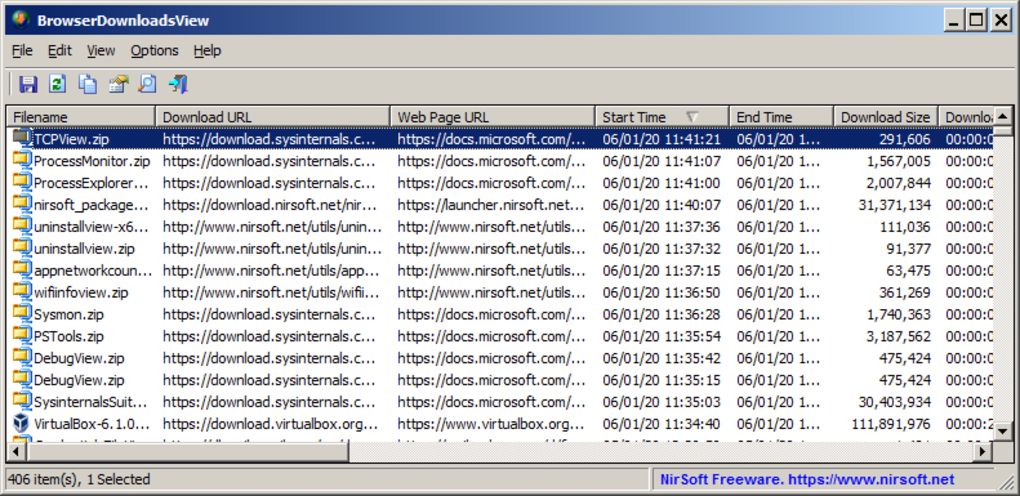
The core strength of BrowserDownloadsView lies in its ability to present a comprehensive list of downloaded files, along with detailed metadata. This includes but is not limited to:
- File name: The original name of the downloaded file.
- Full path: The complete directory where the file was saved.
- URL: The source URL from which the file was downloaded.
- Size: The size of the downloaded file.
- Status: Whether the download was completed successfully, failed, or is currently in progress.
- Date and time: The precise date and time the download was initiated.
- User agent: The browser’s user agent string, which can help identify the specific browser used for the download.
- Referer URL: The URL of the webpage that linked to the downloaded file.
This granular level of information proves exceptionally valuable for various purposes. Users can readily identify specific files, track download progress, investigate incomplete or failed downloads, and even conduct historical analysis of their online activity.
Benefits of Using BrowserDownloadsView
The advantages of BrowserDownloadsView extend beyond its simple interface and extensive data presentation. Several key benefits set it apart from other download management tools:
-
Cross-browser compatibility: BrowserDownloadsView works with numerous web browsers, including (but not limited to) Chrome, Firefox, Edge, Internet Explorer, and Opera. This unified view across different browsers saves considerable time and effort.
-
Detailed information: The rich metadata associated with each download provides a level of detail often lacking in standard browser histories. This is especially useful for troubleshooting download problems or conducting detailed analysis of download patterns.
-
Search and filtering: The application allows users to search and filter the download history based on various criteria, such as file name, URL, date range, size, and status. This capability is invaluable for efficiently locating specific downloads within a large dataset.
-
Portable application: BrowserDownloadsView doesn’t require installation; it runs directly from the executable file, making it highly portable and convenient to use on multiple computers without leaving any registry entries or system modifications.
-
Free and open-source: Developed by NirSoft, a well-known provider of freeware utilities, BrowserDownloadsView is completely free to use and distribute. The source code is also available, offering transparency and allowing for community contributions.
-
Ease of use: The user interface is intuitive and straightforward, even for users unfamiliar with advanced system utilities. The simple design prioritizes ease of navigation and data access.
-
Data export: The downloaded data can be exported into various formats like text, CSV, HTML, and XML, making it easy to integrate with other applications or analyze the data using spreadsheets or other data processing tools. This allows for detailed reporting and data analysis beyond the simple interface.
Potential Drawbacks and Limitations
While BrowserDownloadsView offers numerous advantages, it’s important to acknowledge some potential limitations:
-
Windows-only: Currently, BrowserDownloadsView is only available for Windows operating systems. Users on macOS, Linux, or other platforms cannot utilize this utility.
-
Limited management capabilities: BrowserDownloadsView primarily focuses on viewing and analyzing download history; it doesn’t offer download management features like pausing, resuming, or scheduling downloads. It’s a viewing tool, not a replacement for a full-fledged download manager.
-
Potential for errors: As with any utility accessing system files, there’s a small risk of encountering errors due to file corruption or system inconsistencies. While unlikely, it’s a possibility to consider.
-
Privacy concerns: The application provides access to a wealth of download history, which might contain sensitive information depending on the user’s browsing habits. Users should be mindful of privacy implications and appropriately handle the downloaded data.
Alternative Applications
While BrowserDownloadsView offers compelling advantages, several alternative applications provide similar functionalities or address its limitations:
-
Built-in browser download history: Most modern web browsers maintain a detailed download history accessible through their settings. However, these built-in tools often lack the advanced search and filtering options available in BrowserDownloadsView.
-
Download managers: Dedicated download managers like JDownloader, Free Download Manager, or Internet Download Manager offer download management features beyond what BrowserDownloadsView provides. These tools allow for pausing, resuming, scheduling, and managing multiple simultaneous downloads. They might also include features like download acceleration and error recovery.
-
File explorer: The basic file explorer in Windows allows users to browse downloaded files, but it lacks the metadata and history information available in BrowserDownloadsView.
Conclusion
BrowserDownloadsView is a powerful and versatile free utility for Windows users who need a detailed and comprehensive view of their browser download history. Its cross-browser compatibility, advanced search and filtering capabilities, detailed metadata, and easy-to-use interface make it an indispensable tool for anyone who needs to investigate, analyze, or manage their download activity. However, it’s crucial to acknowledge its limitations, primarily its lack of download management capabilities and its exclusive availability on Windows. Users should carefully consider their specific needs and choose the appropriate tool based on their individual requirements. While dedicated download managers offer comprehensive download management, BrowserDownloadsView excels in its ability to provide a granular and detailed historical analysis of download data, making it a valuable addition to any Windows user’s toolbox. Its free and open-source nature further enhances its appeal, making it a readily accessible solution for users seeking a powerful and efficient download history viewer.
File Information
- License: “Free”
- Version: “1.00”
- Latest update: “January 8, 2020”
- Platform: “Windows”
- OS: “Windows Vista”
- Language: “English”
- Downloads: “457”
- Size: “231.33 KB”


