
BullGuard Antivirus, a product from BullGuard LTD, was a popular antivirus solution offering robust protection against various online threats. While the specific version discussed here is from 2014, its core features highlight the strengths and potential weaknesses of such software in the context of its time. This review delves into the functionalities, performance characteristics, and user experience based on available information. It’s important to remember that the software landscape, particularly in cybersecurity, is constantly evolving, and this review reflects the product’s capabilities as of its release date.
Award-Winning Protection and Multi-Layered Defense
BullGuard Antivirus 2014 boasted an “impenetrable protection system based on multiple defense layers.” This layered approach aimed to counter a wide spectrum of threats, including viruses, spyware, phishing attacks, rootkits, botnets, malicious links, and spam. The software combined traditional signature-based detection with behavioral detection, a hallmark of effective antivirus solutions. Signature-based detection relies on identifying known malicious code patterns, while behavioral detection monitors program activity for suspicious actions, such as attempts to access sensitive data or modify system files. This dual approach was intended to provide protection against both known and unknown threats, a significant advantage in the ever-changing landscape of malware.
The multi-layered defense strategy, as advertised, incorporated several key components:
-
Antivirus Engine: The core of the system, responsible for identifying and neutralizing malicious software. The combination of signature and behavioral detection was key to its efficacy.
-
Spam Filter: This component aimed to prevent unwanted emails from reaching the user’s inbox. Beyond simple spam filtering, it also targeted phishing attempts, which often arrive via email disguised as legitimate communications.
-
Safe Browsing: This feature served as a proactive measure to protect users from malicious websites. By analyzing website URLs and content, it warned users about potential dangers before they could interact with harmful materials, preventing accidental infections.
The claim of “award-winning protection” suggested that independent testing labs had validated its effectiveness against prevalent malware. While specific test results are not readily available in this context, the assertion suggests a level of confidence in the product’s capabilities at the time.
User-Friendly Interface and Ease of Use
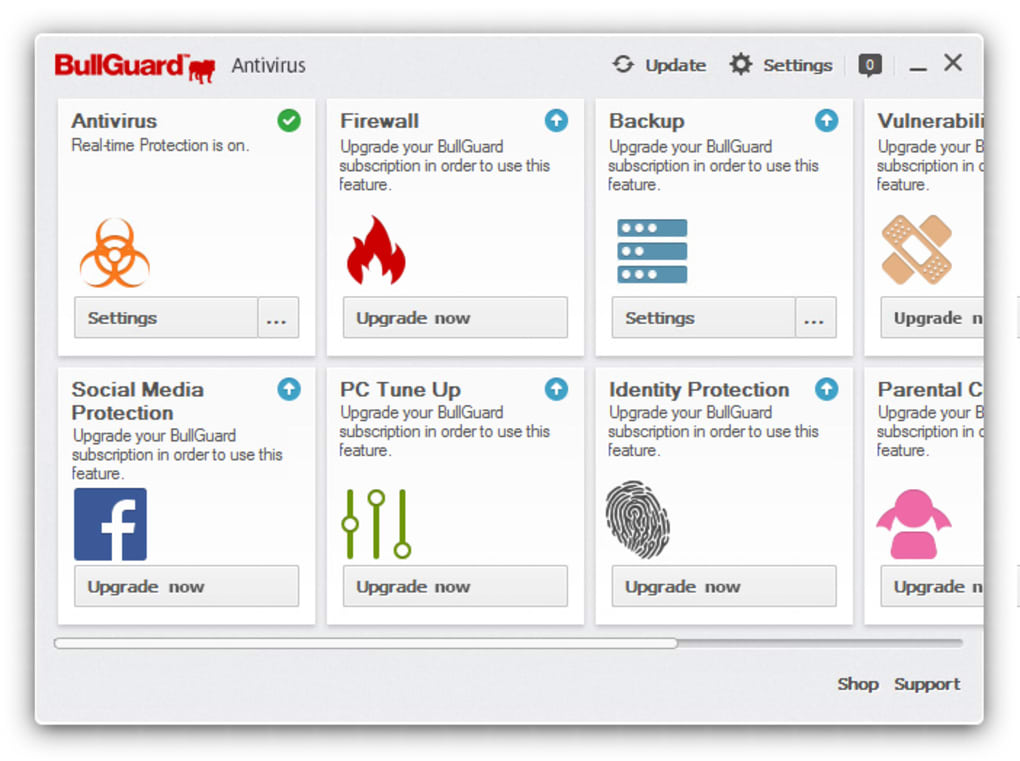
The software emphasized a user-friendly design, emphasizing “simple, elegant and effortless” functionality. Its quick installation and intuitive interface were designed to make it accessible even to users with limited technical expertise. The ease of customization, enabling users to adjust settings such as spam filters and protection levels according to their preferences, further enhanced its user-friendliness.
High System Performance and Minimal Impact
One significant selling point was its minimal impact on system performance. Many antivirus programs, due to their resource-intensive nature, can slow down computer operations. BullGuard Antivirus 2014, however, aimed to maintain high system performance, regardless of the user’s activity, whether it be coding, design work, or gaming. This claim, while common among antivirus vendors, is crucial for user satisfaction, as a sluggish system can negate the benefits of security software.
Comprehensive Support and Customer Service
BullGuard Antivirus offered 24/7 support via live chat and email, ensuring assistance was readily available whenever needed. This level of support was complemented by an option for remote access support, allowing technicians to directly address and resolve issues remotely. This proactive approach to customer service reflects a commitment to user satisfaction and aids in quick problem resolution.
App Specs and Availability
The software was available as a trial version for Windows XP and later versions. It supported a wide range of languages, including Danish, German, English, Spanish, Finnish, French, Italian, Dutch, Norwegian, Portuguese, Swedish. The size of the 2014 version was relatively small (325.98 KB), indicating a compact installation footprint, which could be an advantage for users with limited storage space. The software’s popularity is indicated by its download numbers, exceeding 25,000 downloads and an additional 63 downloads in the month preceding the review.
User Reviews and Feedback
User reviews available at the time indicated a positive reception of the software. One user described it as the “best AV program” they had tried, praising its speed and ease of installation. This positive feedback aligns with the claims of ease of use and high system performance.
Comparison with Other Antivirus Software
BullGuard Antivirus 2014 competed with several other antivirus solutions in the market, including popular options like Avast Free Antivirus, SmadAV, 360 Total Security, McAfee Total Protection, and Microsoft Security Essentials. These competitors offered varying features, pricing models, and system impacts. The competitive landscape highlights the importance of considering individual needs and priorities when selecting an antivirus program.
Related Keywords and Topics
The software is often associated with search terms such as “Keep Safe For Windows 7,” “Antivirus For Windows,” “Antivirus For Windows 7,” “Top Antivirus,” and “Privacy Protection,” reflecting its target audience and the security concerns it addressed.
Conclusion
BullGuard Antivirus 2014 presented a compelling package of security features, user-friendly design, and comprehensive support. Its multi-layered protection strategy, combined with behavioral detection and a focus on minimal system impact, aimed to deliver robust protection without compromising performance. While this review focuses on the 2014 version, the core principles and functionalities demonstrated highlight the characteristics of effective antivirus software and the importance of selecting a solution that meets individual user needs. The availability of 24/7 support and a wide range of language options further demonstrated a customer-centric approach. However, it is crucial to remember that the ever-evolving landscape of cybersecurity necessitates keeping antivirus software updated to maintain optimal protection levels. The information presented here provides a snapshot of the product at a specific point in time and should be considered within that context.
File Information
- License: “Trial version”
- Version: “2014”
- Latest update: “November 7, 2014”
- Platform: “Windows”
- OS: “Windows XP”
- Language: “English”
- Downloads: “25.3K”
- Size: “325.98 KB”


