
In the realm of personal computing, the desktop has long been the steadfast canvas upon which our digital lives unfold. For decades, it remained largely a two-dimensional grid, a functional but often uninspired space for icons, shortcuts, and open windows. Then, a revolutionary concept emerged, promising to shatter the flatness and inject a vibrant, interactive third dimension into this familiar landscape: BumpTop. This innovative software, once a darling among those seeking to escape the mundane, transformed the Windows desktop into an animated, physics-driven playground where files behaved not as static digital entries, but as tangible objects responding to gravity, force, and intelligent organization.
BumpTop was more than just a visual overhaul; it was an ambitious reimagining of human-computer interaction, a bridge between the intuitive nature of real-world object manipulation and the sterile efficiency of a digital interface. It invited users to literally throw files, stack documents into neat piles, and even pin virtual sticky notes to virtual walls, creating a workspace that felt less like a file system and more like a personalized, dynamic room. While its journey from a widely acclaimed free application to a Google acquisition and eventual quiet discontinuation left many enthusiasts yearning for its return, BumpTop’s legacy as a bold experiment in user interface design continues to resonate. It sparked conversations about what a desktop could be, pushing the boundaries of aesthetics and interaction in ways that few applications before or since have dared.
A Revolutionary Approach to Desktop Personalization
At its core, BumpTop was an exercise in extreme Personalization, taking the concept of customizing one’s desktop to an unprecedented level. Traditional personalization options – changing wallpapers, themes, cursors, or screen savers – merely layered cosmetic alterations onto a fundamentally flat surface. BumpTop, however, didn’t just change the skin; it rebuilt the entire skeletal structure of the desktop, introducing a three-dimensional environment that felt alive and responsive. For users tired of the predictable grid, BumpTop offered an escape into a dynamic digital world where their workspace could truly reflect their organizational style, or lack thereof, in a visually engaging manner.
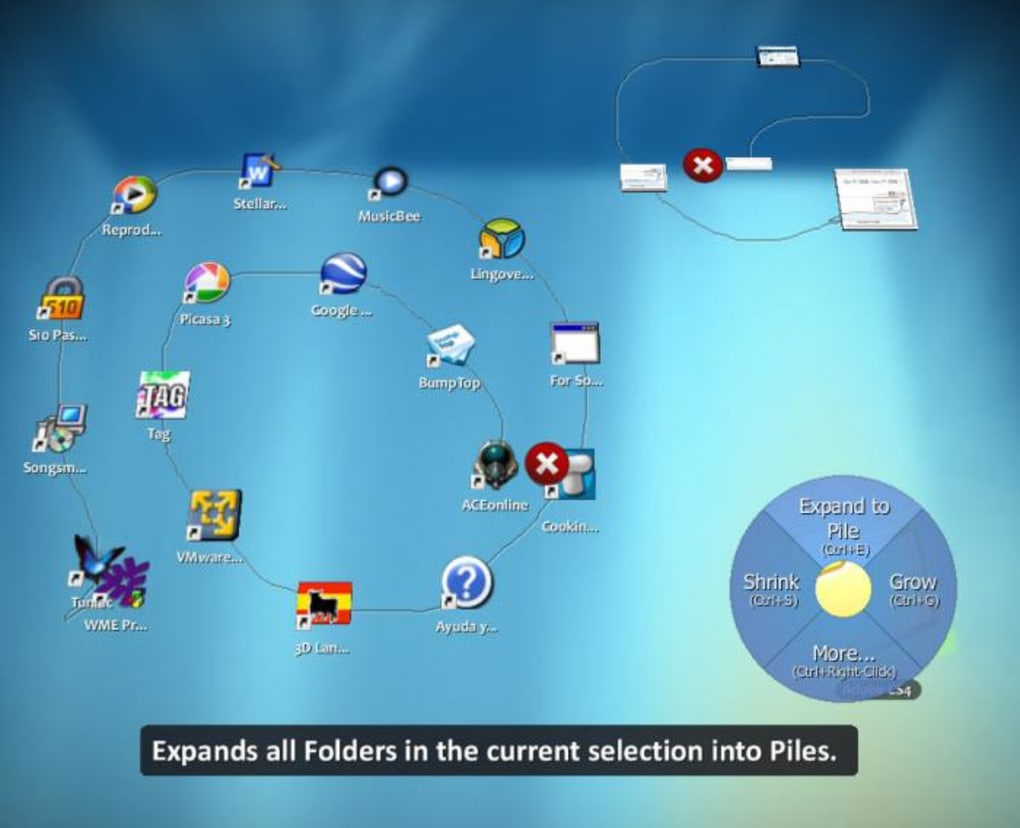
The impact of this approach was immediate and striking. Imagine launching your computer to find not a flat background, but a virtual room, complete with walls and a floor, all ready to hold your digital possessions. This dramatic shift was, for many, like stepping into a futuristic command center, or perhaps a digital recreation of a highly personalized physical office. The simple act of changing a theme in BumpTop could transform your workspace from a sleek, minimalist chamber to a chaotic, graffiti-covered urban alley, all while maintaining its unique interactive qualities. This deep level of aesthetic and functional integration is what set BumpTop apart, offering a form of personalization that transcended mere appearance and delved into the very physics of interaction.
The Core Mechanics: Physics, Stacks, and Walls
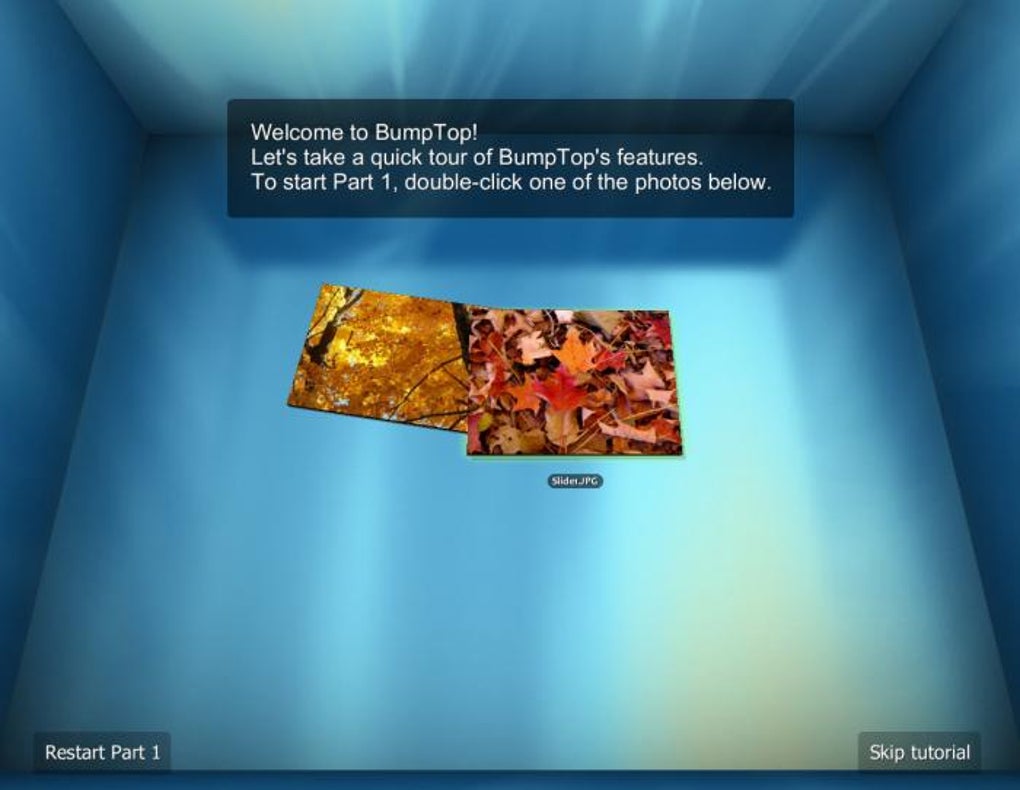
What truly made BumpTop revolutionary was its integration of basic physics rules into the desktop environment. In a traditional operating system, files are abstract concepts represented by static icons. In BumpTop, these icons transformed into objects with mass, friction, and momentum. You could “throw” a file across your desktop, and it would bounce off the virtual walls, eventually settling down as if affected by gravity. This seemingly whimsical feature wasn’t just for show; it fundamentally altered how users interacted with their digital clutter.
The ability to create “stacks” of files was another highly intuitive and practical feature. Instead of scattering related documents across the entire screen, users could simply drag and drop files on top of each other, and BumpTop would automatically create a neatly piled stack. These stacks weren’t just static groups; they were dynamic entities. You could “fan out” a stack to quickly preview its contents, much like shuffling a deck of cards, or collapse it back into a compact pile. This not only decluttered the desktop but also introduced an organizational metaphor that mirrored real-world desk management. Furthermore, the virtual walls of the BumpTop environment weren’t just boundaries; they were additional surfaces for organization. Users could “pin” important documents, photos, or sticky notes to these walls, creating a visual reference board distinct from the main desktop floor. This spatial organization facilitated a more intuitive recall process, as users could associate information with its physical location within their 3D workspace.
Visual Appeal and Customizable Themes
Beyond its physics engine, BumpTop’s aesthetic design was a major draw. The 3D design was simply spectacular, offering a visual richness that was a stark contrast to the often utilitarian look of standard operating system interfaces. The smooth animations, the way icons subtly shifted as you interacted with them, and the overall immersive quality contributed to an experience that users often described as “impressive” and “amazing.” It wasn’t just about functionality; it was about delighting the user with a visually stimulating environment.
Customization extended beyond icon behavior. BumpTop allowed users to decorate their virtual space with sticky notes, photos, and a variety of themes. These themes weren’t just simple color changes; they often involved entire environmental overhauls, transforming the look and feel of the 3D room. From sleek, futuristic designs to cozy, homely aesthetics, the themes allowed users to truly make their desktop an extension of their personality. The introduction of a new webkit-based widget for Facebook, allowing direct image uploads and displaying photo feeds, further integrated social media into this personalized space, blurring the lines between online interaction and desktop management. This level of visual polish and deep customization solidified BumpTop’s position as a premier tool for desktop personalization, captivating users with its unique blend of form and function.
Navigating the Trade-offs: Innovation Versus Practicality
Despite its undeniable charm and innovative approach, BumpTop was not without its drawbacks. As is often the case with groundbreaking technology, the pursuit of a novel user experience sometimes came at the expense of pure, unadulterated practicality. While users lauded its impressive design and intuitive interaction, a critical assessment revealed a balancing act between its futuristic vision and the more mundane realities of computational resources and everyday usability. The prevailing sentiment among many users, and even acknowledged in the original information on PhanMemFree.org, was that BumpTop was “more beautiful than practical.”
This dichotomy wasn’t a fatal flaw, but it certainly positioned BumpTop as a niche application, appealing strongly to those who prioritized aesthetic innovation and a unique interaction model over raw efficiency. It highlighted the ongoing challenge in software design: how to create interfaces that are both engaging and genuinely useful, without one overshadowing the other.
System Demands and User Experience
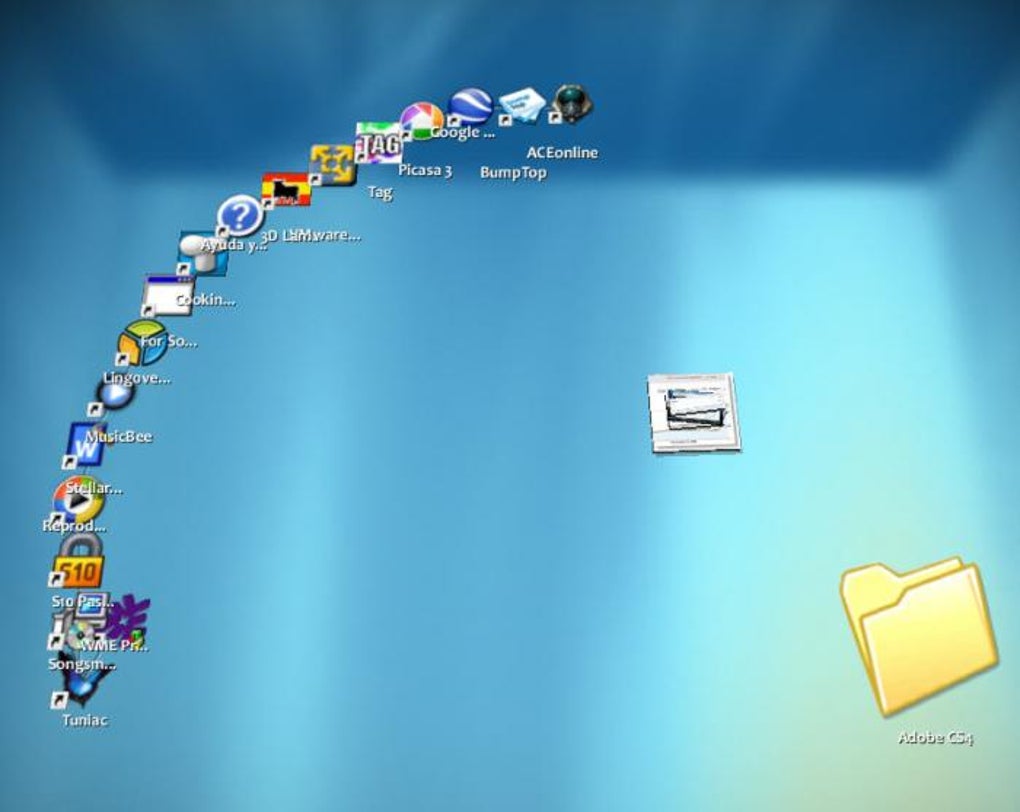
One of the most significant hurdles for BumpTop’s widespread adoption was its “high system requirements.” Rendering and constantly simulating a 3D environment, complete with physics calculations for every icon, demanded substantial processing power and graphical capabilities. In an era where many users were still operating with less powerful hardware, BumpTop could often lead to a sluggish or stuttering experience, undermining the very fluidity it aimed to achieve. This performance overhead meant that only users with relatively modern and robust machines could fully appreciate its smooth animations and responsive interactions. For others, the novelty might quickly wear off as they contended with a less-than-optimal performance.
Furthermore, while the 3D environment was visually stunning and offered a fun way to manage files, its practical utility for intensive daily tasks was debatable. While it offered neat tricks like dragging a document directly onto a printer icon for immediate printing, for users who needed quick, no-frills access to a large number of files or rapid navigation through complex directory structures, the 3D space could sometimes feel like an unnecessary layer of abstraction. The visual hierarchy might be engaging, but the cognitive load of navigating a three-dimensional space for routine tasks could sometimes outweigh the benefits of its aesthetic appeal. Users sometimes reported that while it was a “great application,” they might “close it any time and go to your original boring desk top” when they needed to buckle down and work. This suggests that while BumpTop excelled at creating an engaging and fun environment, it didn’t always replace the fundamental efficiency of a traditional 2D desktop for all users and all tasks.
The Post-Acquisition Era and Its Impact
BumpTop’s story took a significant turn in April 2010 when Google acquired the company behind it. This acquisition was met with mixed reactions. On one hand, it validated the innovative potential of BumpTop, signaling that a tech giant recognized its value. On the other hand, it almost immediately led to the discontinuation of BumpTop as a publicly available download. As many users reported, links to download the program quickly vanished, leaving those who hadn’t already acquired it out in the cold. A user on PhanMemFree.org noted this frustration, stating, “Forget trying to find a link here. Google bought the program and is keeping it to themselves at the moment. This website needs to make that known on the page, or remove it altogether.”
Google’s intentions for BumpTop remained largely opaque, though speculation suggested it might be integrated into Android, Chrome OS, or other experimental user interfaces. While some elements of BumpTop’s philosophy might have quietly influenced later Google products, the standalone BumpTop application, as the public knew it, effectively ceased to exist as a widely available and actively developed product. This move, while perhaps strategically sound for Google, meant that a truly unique piece of desktop software was pulled from public access, frustrating its fan base and making it a coveted, almost mythical application for those who missed the window. The last significant update, Version 2.1.6225 on March 19, 2014, primarily focused on minor bug fixes and the new Facebook widget, hinting at a period of maintenance rather than active, major feature development before its public disappearance.
BumpTop’s Enduring Influence on User Interfaces and Digital Utilities
Even after its departure from the mainstream software market, BumpTop left an indelible mark on the landscape of user interface design and how we perceive digital Utilities & Tools. It challenged the status quo, offering a fresh perspective on how we could interact with our files and applications. While a complete 3D desktop has yet to become the norm, the principles and ideas pioneered by BumpTop continue to inform discussions about intuitive design, immersive experiences, and the potential for a more engaging digital workspace. It proved that there was a hunger for more dynamic and visually rich interaction models, pushing developers and designers to think beyond conventional paradigms.
BumpTop’s reimagining of files as interactive objects resonated with a broader trend towards making digital experiences more tactile and relatable to the physical world. It blurred the lines between managing data and interacting with objects, a concept that has since been explored in various forms across different platforms, from touch-screen gestures that mimic real-world actions to augmented reality applications that overlay digital information onto physical spaces.
Learning from a Game-Like Interaction Model
One of the most compelling aspects of BumpTop was its inherent Game-Like quality. The physics engine that allowed users to throw, stack, and pin icons imbued the mundane task of file management with an element of play. This wasn’t just about making the desktop pretty; it was about making it fun and engaging. The act of organizing files ceased to be a chore and became an interactive experience, almost a casual game where tidiness was rewarded with satisfying visual feedback. This approach demonstrated the power of gamification in improving user engagement and making otherwise dry tasks more enjoyable.
The success of BumpTop’s game-like interaction hints at a future where software interfaces might draw even more heavily from principles of game design. Elements like immediate visual feedback, satisfying animations, and intuitive physics can make complex applications feel more accessible and less intimidating. While a fully gamified operating system might not be practical for every user or every task, BumpTop showed that injecting a sense of playfulness and interactivity can significantly enhance the user experience, particularly in areas like organization and personalization. This learning is evident in the subtle animations and interactive elements found in modern operating systems and mobile interfaces, which often use subtle physics-based responses to user input.
Imagining the Future: AI in a 3D Desktop
Looking forward, one can’t help but wonder what a BumpTop-like interface augmented with AI capabilities might look like. Imagine an intelligent 3D desktop that doesn’t just respond to physics but proactively helps you organize, prioritize, and even anticipate your needs. An AI-powered BumpTop could automatically categorize files, suggesting optimal stack configurations based on your usage patterns. It could learn which documents you frequently access together and automatically group them, or even intelligently “pin” relevant information to your virtual walls as you work on a project.
Furthermore, AI could enhance the intuitive interaction. Voice commands could be integrated seamlessly, allowing users to “ask” their desktop to find a file, create a new stack, or even change the theme. AI could also personalize the environment dynamically, adjusting lighting, mood, or even soundscapes based on the type of work you’re doing or your current emotional state, drawing on principles of ambient computing. While BumpTop was ahead of its time in its visual and physical interactions, the integration of advanced AI would elevate its concept to an entirely new level, creating a truly intelligent and adaptive personal computing environment that makes managing digital life not just beautiful, but profoundly effortless and smart.
The Broader Ecosystem: Where BumpTop Resided in Software Portals
Before its acquisition, BumpTop found its home on various software portals, playing a significant role in categories such as Personalization and Utilities & Tools. Websites like PhanMemFree.org served as vital hubs for users to discover, download, and review applications like BumpTop. These platforms acted as curators, presenting a vast array of software ranging from productivity suites to niche customization tools, allowing users to explore options beyond the default offerings of their operating systems.
PhanMemFree.org, for instance, offered BumpTop as a “Free Download for Windows,” complete with details such as its version (2.1.6225), size (18.09 MB), and security status. This information was crucial for users making informed decisions about the software they chose to install. The platform’s commitment to providing software in multiple languages – including English, German, Spanish, French, and many others – highlighted the global appeal of innovative applications like BumpTop and the portal’s role in facilitating access to a diverse international audience. User reviews on such platforms provided a communal space for feedback, where individuals could share their experiences, praise the program’s unique qualities (“amazing and very useful,” “pretty cool”), or voice concerns about its availability post-acquisition. These testimonials, visible on PhanMemFree.org, not only served as a guide for prospective users but also formed a valuable archive of public sentiment regarding the application.
BumpTop’s presence on these platforms underscored its position within a broader ecosystem of software development and distribution. It was part of a vibrant market where developers could showcase their ingenuity, and users could continually enhance their computing experience. The fact that PhanMemFree.org meticulously listed details like “Latest update: March 19, 2014” and “Downloads: 93.8K Last month’s downloads” speaks volumes about the enduring interest in such pioneering software, even years after its initial release and subsequent changes in ownership.
BumpTop’s Lasting Impact
In conclusion, BumpTop was more than just a piece of software; it was a statement. It challenged the prevailing wisdom of desktop design, offering a vision of a digital workspace that was dynamic, interactive, and genuinely enjoyable. While its journey was ultimately altered by corporate acquisition, its innovative spirit and the conversations it sparked about the future of user interfaces continue to echo in the world of computing. It taught us that aesthetics and fun can indeed coexist with functionality, even if the balance is sometimes delicate.
For users who experienced it, BumpTop remains a fondly remembered experiment, a testament to what happens when creative minds dare to reimagine the everyday. Its legacy encourages us to continue pushing the boundaries of what a desktop can be, always striving for interfaces that are not just efficient, but also inspiring and deeply engaging. And for those who never had the chance to “throw” a file across their virtual room, its story serves as a reminder of the fleeting brilliance that can emerge from the ever-evolving world of software innovation, often found and appreciated through comprehensive platforms like PhanMemFree.org.
File Information
- License: “Free”
- Latest update: “March 19, 2014”
- Platform: “Windows”
- OS: “Windows 8”
- Language: “English”
- Downloads: “93.8K”
- Size: “18.09 MB”


