
Burrrn was a free, lightweight audio CD burning utility for Windows operating systems. While the application is no longer available for download due to unknown reasons—potentially discontinuation, security concerns, or other unforeseen circumstances—its legacy remains as a testament to the simplicity and effectiveness that characterized many early-generation software solutions. This article explores the functionalities of Burrrn, analyzes user feedback surrounding its operation, and examines alternative options for users seeking similar capabilities today.
Burrrn’s Functionality and Features
Burrrn offered a streamlined approach to creating audio CDs, distinguishing itself through its minimalist design and ease of use. Unlike many comprehensive multimedia suites that bundled numerous features, Burrrn focused exclusively on its core functionality: burning audio CDs from various file formats. This laser focus on a single task resulted in a remarkably simple user interface. The program’s primary function was to enable users to easily create audio CDs incorporating CD-Text from diverse audio sources. This was a significant advantage over many competing programs at the time which lacked intuitive CD-Text support or required complex configuration.
The application supported a wide range of audio file formats, including MP3, WAV, OGG, AAC, MP4, FLAC, OFR, WV, TTA, and even M3U, PLS, and FPL playlists as well as cue sheets. This broad compatibility catered to users with diverse digital music libraries. A particularly notable feature was Burrrn’s ability to accurately read metadata tags from all supported formats, including APE tags embedded within MP3 files. This ensured proper track titles, artist information, and other metadata were accurately reflected on the burned CD.
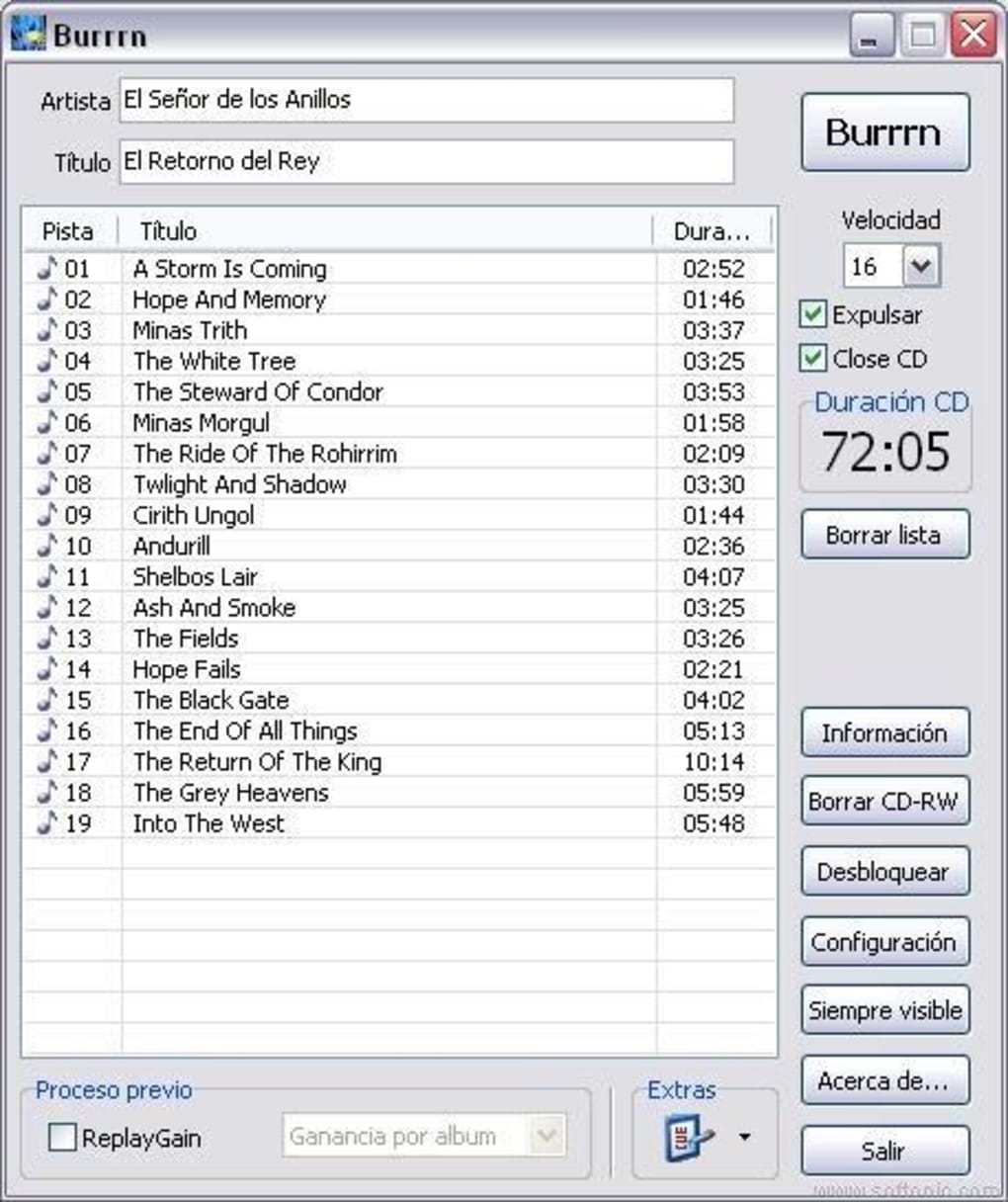
The process of burning an audio CD with Burrrn was remarkably straightforward. Users simply dragged and dropped their selected audio files, playlists, or cue sheets onto the program’s interface. After selecting the desired writing speed, initiating the burning process was as easy as pressing a single button labeled “Burrrn”. A progress window provided real-time feedback on the burning process, offering users transparency and reassurance. Upon completion of the burning process, the user could simply close the window, and the application would reset, ready for the next session. This intuitive, step-by-step approach contributed significantly to Burrrn’s popularity among users who preferred simplicity over complex features.
User Reviews and Reported Issues
User reviews for Burrrn, while limited in number due to the program’s age and unavailability, reveal both positive aspects and recurring issues. Positive reviews frequently highlighted the program’s ease of use and effectiveness in burning audio CDs. Users praised its straightforward interface and the reliable performance in producing high-quality audio CDs. The ability to seamlessly handle diverse audio formats and accurate CD-Text embedding were repeatedly cited as key strengths.
However, several reviews documented issues related to compatibility and driver problems. One recurring problem involved the failure to initialize the SPTI (SCSI Pass-Through Interface) driver, a crucial component for interacting with CD-ROM drives. This error often manifested with messages indicating a failure to open the SCSI device. Some users reported resolving this by manually installing or configuring the ASPI (Advanced SCSI Programming Interface) driver, while others found success by adjusting settings related to “Raw Driver” and “SPTI” options within the program itself. The inconsistent success rate of these workarounds suggests a deeper compatibility issue potentially stemming from variations in hardware and operating system configurations. The lack of clear, comprehensive troubleshooting documentation likely exacerbated these problems for many users.
Alternatives to Burrrn
Given Burrrn’s unavailability, several alternative applications provide comparable audio CD burning capabilities. These alternatives often offer more comprehensive features but sometimes at the cost of increased complexity.
Nero Burning ROM: A long-standing industry leader, Nero Burning ROM offers a comprehensive suite of burning capabilities extending far beyond simple audio CD creation. While more complex than Burrrn, it provides unparalleled flexibility and advanced features for users needing more than just basic audio CD burning. However, it is a commercial product and comes with a price tag.
UltraISO: This program primarily focuses on ISO image management. While not a dedicated audio CD burner like Burrrn, its capabilities extend to creating and burning audio CDs from ISO images, making it a viable alternative if users already possess or wish to generate ISO files containing their audio tracks. UltraISO offers a free version but a paid version includes more features.
PowerISO: Similar to UltraISO, PowerISO is an ISO image management program with additional disc burning capabilities. It’s a solid alternative for users who prefer working with ISO images but needs an alternative to Burrrn for creating physical media. Like UltraISO, it offers both free and paid versions, with the paid versions providing increased functionality.
ImgBurn: This is a free, open-source alternative that provides robust audio CD burning capabilities. ImgBurn offers similar functionality to Burrrn but has a slightly steeper learning curve due to its more feature-rich interface.
Easy Disc Burner: This software option is also free, offering a simple method to burn various files and media to discs. It is a user-friendly and straightforward choice for those requiring a quick and easy solution, though its features are more limited than some other options listed.
These alternatives provide a range of options, from the simple and free to the feature-rich and commercial. Users seeking a direct replacement for Burrrn’s simplicity might find Easy Disc Burner appealing. Those who require more advanced features, such as support for various disc formats or extensive image manipulation, would likely prefer a more comprehensive program like Nero Burning ROM.
Conclusion: A Legacy of Simplicity
Burrrn, despite its unavailability, holds a place in the history of freeware audio CD burning utilities. Its minimalistic approach and focus on core functionality catered to users who valued simplicity and reliability. While its lack of comprehensive error handling and potential compatibility issues created some frustrations for users, its intuitive design and wide-ranging format support were notable strengths. The current availability of alternative applications provides users with various choices, ranging from free, basic options to commercial suites with extensive capabilities. The choice ultimately depends on individual needs and technical proficiency. However, Burrrn serves as a reminder of a time when software often prioritized ease of use and core functionality above extensive features and complex interfaces.
File Information
- License: “Free”
- Version: “1.14”
- Latest update: “February 20, 2024”
- Platform: “Windows”
- OS: “Windows 2000”
- Language: “English”
- Downloads: “160.6K”
- Size: “2.13 MB”


