
Cade Simu is a free, portable software application designed for the simulation and design of electrical circuits. Targeting both students and professionals in the field of electrical engineering, it offers a user-friendly interface and a comprehensive library of components, making it a valuable tool for educational and professional purposes. This review delves into the features, functionality, installation process, advantages, disadvantages, and overall usability of Cade Simu.
Understanding Cade Simu’s Functionality and Purpose
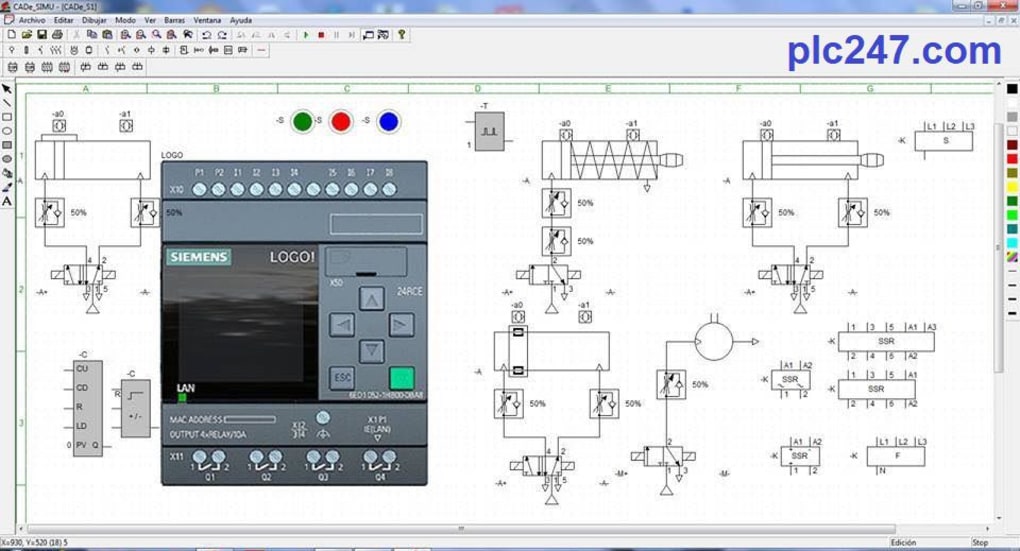
Cade Simu functions as a digital workbench for electrical circuit design and simulation. Users can visually construct circuit diagrams using a wide array of components available within its library. These components are categorized and easily accessible, streamlining the design process. Once a circuit is designed, the software allows for simulation, providing immediate feedback on its functionality. The simulation highlights potential errors, making it an excellent learning tool for students who can visually identify problematic areas within their designs. This visual feedback, combined with the ease of use, makes Cade Simu particularly effective for educational purposes.
The Design Process and Simulation Capabilities
The software’s design interface is intuitive, even for users with limited experience in circuit design software. The process involves selecting components from the library and placing them on the workspace. Users can then connect these components using virtual wires, creating a visual representation of the circuit. This visual representation is not just aesthetically pleasing but also crucial for understanding the flow of electricity and identifying potential problems. The software’s simulation engine accurately models the behavior of the circuit, providing valuable insights into its operation. This simulation extends beyond simply indicating whether the circuit works or not; it also pinpoints specific errors and their locations, providing constructive feedback for troubleshooting.
Beyond Basic Functionality: Cade Simu’s Library and Error Detection
One of Cade Simu’s key strengths lies in its extensive library of electrical components. This library covers a wide range of devices commonly used in electrical circuits, providing a comprehensive set of tools for designing various circuit types. The well-organized library allows users to quickly locate and add components to their design, significantly reducing the time and effort required. Furthermore, the simulation’s error detection capabilities are a vital aspect of the software. It not only indicates if the circuit is functional but also pinpoints specific areas of concern, such as short circuits or open circuits. This ability to pinpoint errors is especially helpful for students, providing immediate and visual feedback that accelerates the learning process.
Installation and System Requirements
Cade Simu’s ease of use extends to its installation. Unlike many software applications, Cade Simu is a portable application, meaning it doesn’t require a traditional installation process. Users simply download the compressed ZIP file, extract its contents, and run the executable (.EXE) file. This portable nature makes Cade Simu highly convenient, requiring minimal system resources and leaving no trace of installation files on the user’s computer after removal. This streamlined approach makes it ideal for users who want to avoid complex installation procedures or those working on computers with limited storage space. The minimal system requirements of Cade Simu ensure that it can run on a wide range of computer systems, even those with older or less powerful hardware. This broad compatibility ensures accessibility to a wider user base.
Advantages and Disadvantages of Using Cade Simu
Cade Simu offers several significant advantages, making it an attractive option for both educational and professional use. Its portability and minimal system requirements are major draws for users who prioritize convenience and efficiency. The user-friendly interface and extensive component library further enhance its usability, making it accessible to users of all skill levels. The ability to simulate circuits and pinpoint errors provides invaluable feedback, accelerating the learning process for students and streamlining troubleshooting for professionals. Moreover, the ability to save work in the CAD format ensures compatibility and ease of sharing amongst users.
However, Cade Simu also has some drawbacks. The software’s design is somewhat dated, which might be visually unappealing to some users accustomed to modern interfaces. Simulation speed can be slow, especially for complex circuits, which might impact efficiency for users working on large-scale projects. Some users have reported compatibility issues with certain modern PC configurations, suggesting that not all systems might be seamlessly compatible with the software. Finally, the lack of customization options limits the user’s ability to personalize the software’s interface and functionality according to their preferences.
Cade Simu: A Comparison with Alternative Software
While Cade Simu offers a valuable suite of features, it’s essential to compare it with other available circuit simulation software. Several alternative programs, such as Fritzing, LTspice, and others, offer similar functionalities but may have different strengths and weaknesses. Fritzing, for example, is also free and known for its user-friendly interface. However, Fritzing’s simulation capabilities may be less robust than those of Cade Simu. Conversely, LTspice is a powerful and highly detailed simulator, but its interface is more complex and may be less accessible to novice users. The choice of software will depend on the user’s specific needs and technical expertise.
Conclusion: Is Cade Simu the Right Choice for You?
Cade Simu stands as a valuable tool for anyone involved in the design and simulation of electrical circuits. Its ease of use, extensive component library, and effective error detection make it a particularly strong choice for educational purposes. For professional users, the software’s capabilities may be sufficient for smaller projects, but its limitations in speed and customization may necessitate exploring more advanced alternatives for large-scale or complex designs. Ultimately, the suitability of Cade Simu depends on the user’s specific needs and priorities. The software’s strengths in accessibility and simplicity make it a compelling option for many, while its limitations should be carefully considered when choosing the right circuit simulation tool for your particular requirements. The free and portable nature of Cade Simu, however, ensures it remains a viable and worthwhile option for many users.


