
Camfrog Video Chat is a free video chat application designed to connect users worldwide. While not ideal for professional video conferencing due to its cluttered interface, it offers a unique blend of features geared towards casual social interaction, gaming, and virtual gifting, making it a popular choice for users seeking a less formal online communication experience. This in-depth review explores its functionality, user interface, features, and potential drawbacks.
Understanding the Camfrog App: Connecting with a Global Community
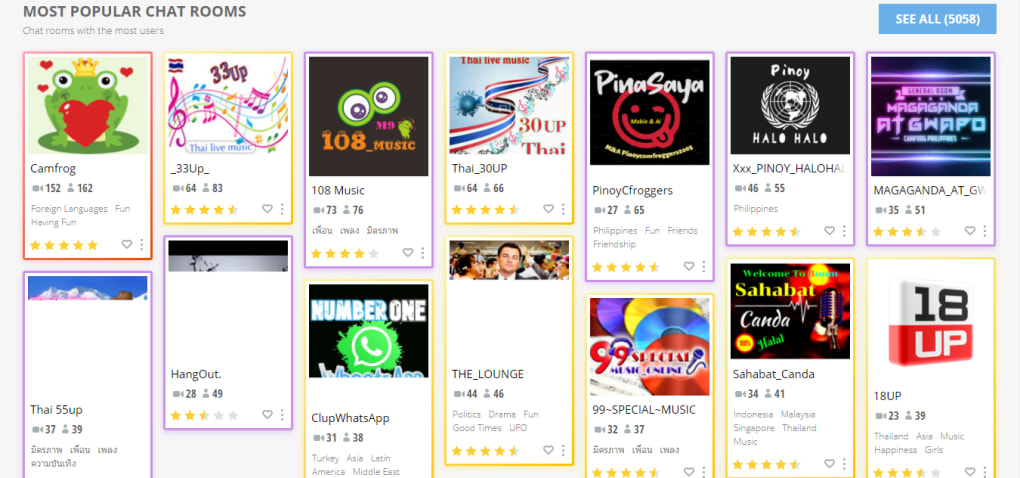
At its core, Camfrog provides a platform for users to engage in text and video chats with both friends and strangers. The platform differentiates itself through its vast network of over 5,000 chat rooms, categorized for easy navigation. These categories range from general interest topics to more specific niches, ensuring a diverse range of conversations available to users.
Navigating the chat room selection is streamlined through intuitive filters. Users can easily find rooms based on proximity, recency, popularity, promotional status, or the number of active webcams. Each room is clearly identified with a title, profile picture hinting at the chat’s subject matter, a user count, and the number of active video streams. Tags further refine the search, allowing users to find rooms focusing on topics like drama, international discussions, politics, or public speaking, adding a layer of specificity to the search process. A public rating system allows users to gauge the general atmosphere and quality of each chat room.
Upon entering a chat room, users are presented with a dynamic interface. The main chat feed occupies the central area of the screen, displaying a running log of text messages, virtual gifts, and notifications when a user’s webcam is viewed. A text box at the bottom allows users to contribute to the conversation, utilizing text, emojis, stickers, and virtual gifts. Volume control for audio and access to the settings menu are conveniently placed above the text input area. The active speaker’s username appears next to a speaker icon, providing visual cues for active participants.

Individual webcam feeds appear in separate, resizable windows that users can move and arrange across their desktop. Crucially, users are not required to have their webcam enabled to participate in the conversation; the platform offers flexibility for different levels of engagement and privacy preferences.
Camfrog’s User Interface: A Double-Edged Sword
Camfrog’s user interface is arguably its most defining characteristic, presenting both strengths and weaknesses. The platform is designed to be engaging, prioritizing user interaction and a sense of community. The emphasis on virtual gifting and a constant stream of activity can be stimulating for some users. However, this emphasis on activity can also lead to an overwhelming and potentially chaotic user experience for others. The sheer volume of information and visual elements displayed simultaneously can be distracting and difficult to navigate for those who prefer a more minimalist interface.
The abundance of features—while providing a wealth of options—contributes to the cluttered aesthetic. The constant stream of chat messages, webcam feeds, gift notifications, and the dynamic ranking of active users can feel overwhelming, particularly for new users or those unfamiliar with similar platforms. This might make it difficult for newcomers to find their footing and fully appreciate the platform’s potential. The design, though functional, feels somewhat outdated compared to more modern video chat platforms.
Beyond Chat Rooms: Games and Personalized Spaces
Camfrog offers a range of games that users can play directly within the platform. This integrated gaming aspect adds another layer of interactive engagement, fostering a sense of community through shared experiences. Users can send and receive game invitations, and game rules are clearly outlined, facilitating smooth interactions and minimizing confusion.
Furthermore, Camfrog allows users to create their own private or public chat rooms, known as “ponds.” Public ponds allow mutual friends to join, promoting a sense of closer interaction among users who know each other. Private ponds, accessible only through invitation, provide a secure environment for more intimate conversations. Creating ponds is a straightforward process, offering a significant degree of personalization and control over the conversational environment. The free version limits the number of participants in a pond, while the paid version offers increased capacity.
Camfrog’s Monetization and Privacy Considerations
Camfrog operates on a freemium model, offering a free version with some limitations and a paid version, Camfrog Video Chat Pro, which unlocks additional features. The free version displays advertisements within the user interface and restricts the number of users allowed in private ponds. The paid version removes advertisements and increases the maximum number of participants in ponds, alongside additional functionalities such as file sharing.
The platform’s privacy policy outlines the personal data collected, raising concerns about the sharing of user information with third-party companies for tracking purposes. Users should carefully review the privacy policy and understand the implications before using the platform, particularly regarding data privacy and potential tracking.
Camfrog: Strengths and Weaknesses Summarized
Pros:
- Lightweight and Cross-Platform: Camfrog boasts a relatively small footprint and operates on multiple operating systems, including Android, iOS, and Windows.
- Large and Diverse User Base: The platform boasts a significant user base, ensuring a high likelihood of connecting with people from various backgrounds and locations.
- Extensive Chat Room Options: The wide array of chat rooms caters to a variety of interests and preferences.
- Integrated Games: The inclusion of games adds an extra dimension of social interaction.
- Private and Public Rooms (“Ponds”): The ability to create private or public chat rooms offers flexibility and control over the conversational environment.
Cons:
- Outdated and Cluttered User Interface: The interface, while functional, can be overwhelming and visually cluttered, making it less user-friendly than some competitors.
- Chaotic User Experience: The high level of activity and abundance of information displayed concurrently can lead to a chaotic and less focused user experience.
- Privacy Concerns: The sharing of user data with third-party tracking companies raises privacy concerns.
- Free Version Limitations: The free version’s limitations, such as ad displays and restricted pond sizes, might be a drawback for some users.
Camfrog in the Broader Context of Video Chat Applications
While Camfrog excels in providing a platform for casual social interaction, gaming, and connecting with a global community, it’s crucial to acknowledge its limitations. Its cluttered interface and overwhelming nature make it less suitable for professional use, where clarity and efficiency are paramount. Platforms like Skype, Zoom, and ManyCam offer more streamlined interfaces and features specifically designed for professional video conferencing.
However, Camfrog fills a niche by providing a vibrant and interactive environment specifically designed for casual social interaction and entertainment. Its vast chat room network and integrated games make it a unique offering in the video chat landscape, catering to users seeking a more casual and less formal online experience than that offered by more business-oriented platforms. The platform’s continued updates and active development indicate an ongoing effort to improve the user experience. Whether Camfrog is the right choice for an individual depends heavily on their priorities and preferences regarding interface design and the overall user experience.
File Information
- License: “Free”
- Latest update: “February 17, 2025”
- Platform: “Windows”
- OS: “Windows XP”
- Language: “English”
- Downloads: “1.2M”
- Size: “93.58 MB”


