
Camin - Video Recorder & Virtual Webcam is a free Google Chrome extension developed by caminsupport. This powerful tool allows users to seamlessly record video demonstrations, elevate their video conferencing experience, and enhance video calls with a suite of virtual camera features. This guide delves into the functionalities, benefits, and applications of Camin, providing a comprehensive overview for both novice and experienced users.
Effortless Video Recording for Diverse Needs
Camin’s primary function is its intuitive video recording capability. This makes it an ideal solution for a wide range of applications, including:
-
Software Demonstrations: Creating tutorials and how-to videos for software applications becomes incredibly straightforward. Camin’s simple interface allows you to capture your screen activity alongside your webcam feed, providing a complete visual guide for viewers. You can showcase specific features, highlight key functionalities, and effectively guide users through complex processes. The resulting videos can be easily shared online, embedded in websites, or distributed through various platforms.
-
Presentations and Lectures: Delivering engaging and dynamic presentations has never been easier. Camin enables you to record your presentation alongside your screen share, enhancing viewer engagement. Whether you’re presenting to a small group or a large audience, Camin provides a simple and effective method for recording high-quality videos. The recorded material can be utilized for online training, internal communications, or even as a means of archiving important presentations for later review.
-
Educational Content Creation: The creation of educational videos, from simple tutorials to complex instructional guides, is streamlined with Camin. Its user-friendly interface eliminates the need for extensive video editing skills, allowing educators and trainers to focus on the content itself. Whether you’re creating content for online courses, supplementing classroom lectures, or developing training materials, Camin empowers you to create easily digestible and informative videos.
-
Personal and Professional Use: Beyond its professional applications, Camin’s versatility extends to personal use. You can use it to record family events, create personal vlogs, or document projects for posterity. The ease of use and streamlined features make it accessible to anyone, regardless of prior video recording experience.
Enhanced Video Conferencing with Virtual Camera Features
Camin’s capabilities extend far beyond basic video recording. Its integrated virtual camera features transform your video conferencing experience, allowing you to add a professional and engaging touch to your interactions:
-
Sticker Integration: Add a touch of personality and fun to your video calls by incorporating stickers. This is a great way to add visual interest to presentations, create a more relaxed atmosphere in casual meetings, or simply liven up your video calls. The ability to easily add and remove stickers ensures that your video calls remain both professional and engaging.
-
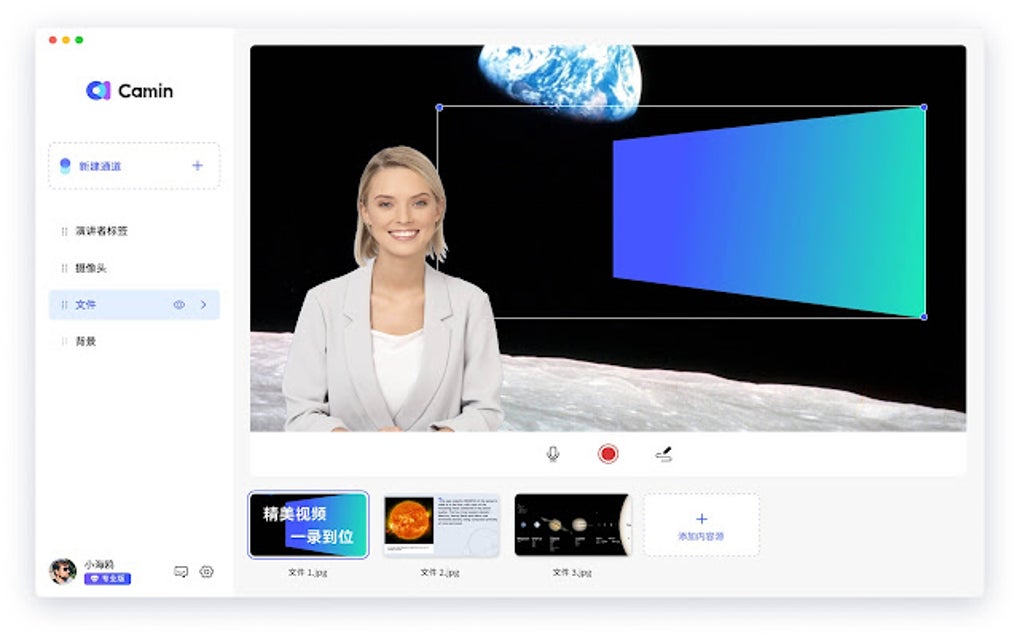
Picture-in-Picture Video: This feature is especially useful for screen-sharing presentations or demonstrations. It allows you to embed a smaller version of your webcam feed within the main screen share window, maintaining a personal connection with your audience even while showcasing your work. This feature fosters a more interactive and engaging experience for viewers.
-
Background Removal and Replacement: Eliminate distracting backgrounds from your video calls by utilizing Camin’s background removal feature. This ensures that the focus remains on you, improving the overall quality and professionalism of your video calls and conferences. This can be particularly useful for those working from home, where backgrounds might not always be ideal. The ability to potentially replace the background with a custom image adds another layer of customization and professionalism.
Streamlined Workflow and User-Friendly Interface
Camin is designed with user experience at its core. The intuitive interface ensures that even individuals with limited technical expertise can quickly master its functions. The streamlined workflow eliminates the complexities often associated with video recording and editing software, allowing users to focus on the content rather than the technology. Key features that contribute to this user-friendly design include:
-
One-Click Recording: Starting and stopping recordings is as simple as clicking a button. This effortless functionality ensures that you don’t miss key moments and can seamlessly integrate video recording into your workflow.
-
Real-time Preview: A live preview window shows you exactly what will be recorded, helping you frame your shots and adjust your settings before starting the recording. This eliminates the need for multiple takes due to unexpected framing or lighting issues.
-
Easy Export Options: Exporting your recordings is straightforward. Camin supports a variety of common video formats, ensuring compatibility with diverse platforms and editing software. This means your recorded videos can be easily shared and utilized across different applications.
System Requirements and Compatibility
Camin is designed as a Google Chrome extension, ensuring compatibility across a wide range of devices and operating systems. The specific system requirements are minimal, ensuring that you can easily leverage Camin regardless of your hardware configuration. However, it is crucial to ensure that your Chrome browser is up-to-date to guarantee optimal performance and compatibility with the extension.
Comparing Camin to Other Video Recording Software
While many video recording applications are available, Camin distinguishes itself through a combination of features, ease of use, and its seamless integration with the Google Chrome browser. Compared to other software, Camin often surpasses its competitors in convenience and simplicity, making it an ideal choice for those who prioritize user-friendliness. While advanced editing features might not be available, the focus on recording and basic enhancement features caters specifically to users requiring quick and easy video creation.
Troubleshooting and Support
Like any software, Camin may occasionally encounter minor issues. However, the developers have committed to providing user support. The availability of online resources, FAQs, and support channels ensures that users can quickly find solutions to common problems. This commitment to user satisfaction enhances the overall user experience, providing a sense of security and assurance.
Conclusion: Unlocking the Potential of Video Communication
Camin - Video Recorder & Virtual Webcam is a valuable tool for anyone looking to enhance their video communication experience. Its intuitive design, powerful features, and wide range of applications make it a versatile solution for both personal and professional use. Whether you need to record screencasts, conduct engaging video conferences, or create high-quality presentations, Camin provides a simple yet effective way to achieve your video communication goals. Its commitment to user-friendliness and continuous improvement solidifies its position as a compelling option in the ever-evolving landscape of video communication technology. Download Camin today and experience the difference.
File Information
- License: “Free”
- Version: “1.0.2”
- Latest update: “June 6, 2024”
- Platform: “chrome”
- Downloads: “1.7K”


