
In an increasingly connected world, the demand for seamless integration between our digital devices and physical output remains paramount. For users of Canon inkjet printers, the solution lies in the Canon Inkjet Smart Connect application. This powerful utility transcends the traditional boundaries of printing, transforming it into an intuitive, accessible, and highly efficient process for both PC and mobile device users. Designed to mirror the robust functionalities found in Canon’s popular SELPHY and Print Inkjet smartphone applications, Smart Connect offers a centralized platform to manage your printing, scanning, and device monitoring needs. Whether you’re a home user looking to print cherished photos or a small business professional needing to scan important documents, this application streamlines your workflow, bringing convenience and control directly to your fingertips.
The evolution of printing technology has moved far beyond simply sending a document to a peripheral device. Modern users expect the flexibility to print from anywhere, manage printer settings remotely, and even troubleshoot minor issues without needing extensive technical knowledge. Canon Inkjet Smart Connect is Canon’s answer to these evolving demands, providing a cohesive ecosystem that ensures your inkjet printer is always ready to perform, irrespective of whether you’re using a Windows PC, an iOS smartphone, or an Android tablet. It simplifies complex tasks, making advanced features like perspective correction for scanned documents readily available to a broader audience. This comprehensive overview will delve into the intricacies of Canon Inkjet Smart Connect, exploring its features, benefits, installation process, and how it empowers users to unlock the full potential of their Canon inkjet devices. From its deep compatibility across various operating systems to its user-friendly interface, we will uncover why Smart Connect is an indispensable tool for anyone seeking an optimized printing experience.
Unlocking Seamless Printing: An Overview of Canon Inkjet Smart Connect
The Canon Inkjet Smart Connect application serves as a pivotal bridge in the modern printing landscape, consolidating a suite of functionalities previously distributed across various tools and mobile apps. Its primary objective is to simplify the interaction between Canon inkjet printers and the user’s diverse array of computing devices. By bringing together essential services under one umbrella, it redefines the user experience, making printing and scanning more intuitive and less cumbersome. This solution caters to the dynamic needs of contemporary users who frequently switch between their desktops, laptops, smartphones, and tablets, ensuring that printing capabilities remain consistent and accessible.
Bridging the Gap Between PC and Mobile Devices
Historically, managing a printer often meant installing specific drivers on a PC and relying on separate, sometimes limited, applications for mobile printing. Canon Inkjet Smart Connect cleverly integrates the best aspects of Canon’s mobile printing experience – notably from the Canon PRINT Inkjet/SELPHY apps – directly into a desktop application for Windows, while also offering compatible mobile versions. This integration means that the familiar, user-friendly interface and robust features enjoyed by smartphone users are now accessible on a Windows PC, providing a unified experience. For instance, the ability to check your printer’s ink levels, paper status, or even conduct maintenance tasks is no longer confined to a mobile device; it’s available across your connected ecosystem. This cross-platform compatibility ensures that no matter which device you’re working on, you have instant access to your printer’s applications and services, making the transition between devices smooth and efficient. It eradicates the need to learn different interfaces for different platforms, fostering a consistent and hassle-free user journey.
Core Functionalities and Key Advantages
At its heart, Canon Inkjet Smart Connect is designed to provide “convenient access to the printer’s applications and services.” This translates into a rich set of core functionalities that empower users. One of its most significant advantages is the ability to scan documents and print photos from a mobile device, even if the primary application is installed on a PC. This remote capability is invaluable in homes and small offices where flexibility is key. Imagine scanning a multi-page document directly to your smartphone or tablet, or effortlessly printing a photo taken moments ago on your phone, all managed through a single, intelligent application.
Beyond basic print and scan operations, Smart Connect offers advanced features that enhance the quality and versatility of your output. Users can easily initiate photo prints, choosing from various print types and adjusting settings directly within the application. For document management, it provides tools for copying and making perspective corrections before printing, which is particularly useful for scanning documents that might not be perfectly aligned or that require digital cleanup before reproduction. Furthermore, the application allows users to check the printer’s status in real-time, providing crucial information about ink levels, connectivity, and any potential errors. This proactive monitoring helps prevent interruptions and ensures your printer is always in optimal working condition. The combination of these features – simplified access, advanced imaging tools, and comprehensive printer management – solidifies Canon Inkjet Smart Connect as an indispensable tool for maximizing the utility and lifespan of your Canon inkjet printer.
Installation, Compatibility, and User Experience
The effectiveness of any software solution is often measured by its ease of access and user-friendliness. Canon Inkjet Smart Connect excels in these areas, ensuring that users can quickly get up and running, regardless of their technical proficiency. Its widespread compatibility across major operating systems further solidifies its position as a go-to solution for Canon printer owners, providing a consistent and intuitive interface for managing printing tasks.
Getting Started: A Straightforward Setup Process
One of the most appealing aspects of Canon Inkjet Smart Connect is its uncomplicated installation process. The reference content explicitly states, “The application is easy to install and use. Simply download the app to your device, and follow the prompts.” This highlights Canon’s commitment to user accessibility. For Windows users, the application is available for Microsoft Windows 10 and later, ensuring broad compatibility with modern PCs. The download size, at approximately 1.10 MB, is remarkably small, facilitating quick downloads even on slower internet connections. Once downloaded, the installation wizard guides the user through a series of clear, simple steps. This typically involves accepting terms and conditions, choosing an installation directory (if desired), and then allowing the installer to complete the process. The entire procedure is designed to be self-explanatory, minimizing the need for technical support.
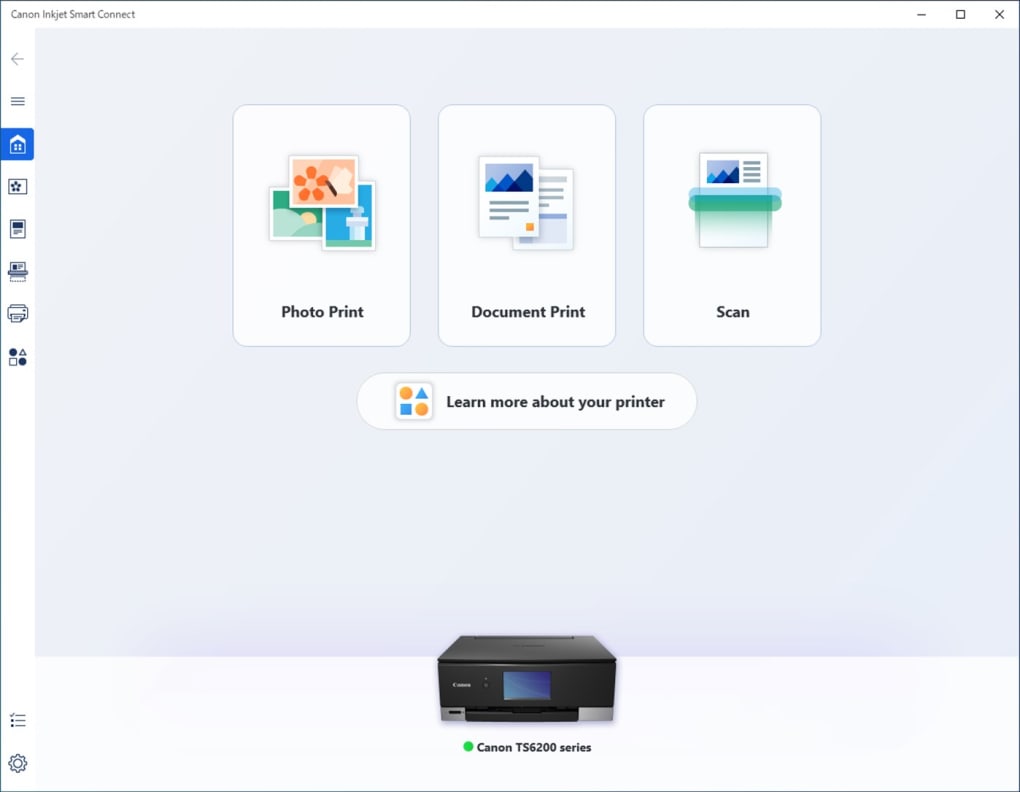
After installation, launching the application usually prompts the user to connect to their Canon printer. This often involves ensuring the printer is powered on and connected to the same network as the device running the Smart Connect app. The application then automatically detects compatible printers, simplifying the setup of a new device or adding an existing one to the app’s control. Once connected, users can immediately access functions like “Photo Print,” where they can “set up the application settings and select the desired printer settings” before choosing their “type of print.” This seamless transition from installation to active use underscores the app’s user-centric design philosophy.
Comprehensive Device and OS Compatibility
Canon Inkjet Smart Connect boasts impressive compatibility, catering to a wide array of devices and operating systems, which is crucial in today’s multi-device environment. For desktop users, the app is specifically designed for Microsoft Windows 10 (and presumably Windows 11, given its continuous development and updates). This ensures that a vast majority of PC users can leverage its features without compatibility concerns.
For mobile users, the application extends its reach to both of the dominant mobile platforms: iOS and Android devices. This broad mobile compatibility is a significant advantage, as it means virtually all smartphone and tablet users can download and utilize the Canon PRINT Inkjet/SELPHY app, which offers similar core functionalities to Smart Connect and can often work in tandem with it. The reference explicitly mentions, “The Canon Inkjet Smart Connect App for PC is available for Microsoft Windows 10, but it offers similar functionality to the Print Inkjet/SELPHY mobile application. The app is compatible with iOS and Android devices.” This indicates a harmonious ecosystem where mobile and PC users benefit from a consistent Canon printing experience. The availability in numerous languages, including Chinese, Czech, Danish, Dutch, English, French, German, Spanish, Italian, Japanese, Korean, Norwegian, Polish, Portuguese, Russian, Swedish, Turkish, and Vietnamese, further enhances its global accessibility and user experience, ensuring that language is not a barrier to efficient printing.
Navigating the Intuitive Interface
A key differentiator for Canon Inkjet Smart Connect is its intuitive user interface (UI). Designed with simplicity and efficiency in mind, the application ensures that users can quickly find the functions they need without wading through complex menus. The layout is clean and logical, presenting core options such as “Photo Print,” “Scan,” and “Printer Status” prominently. The visual design often incorporates clear icons and straightforward language, reducing the learning curve for new users.
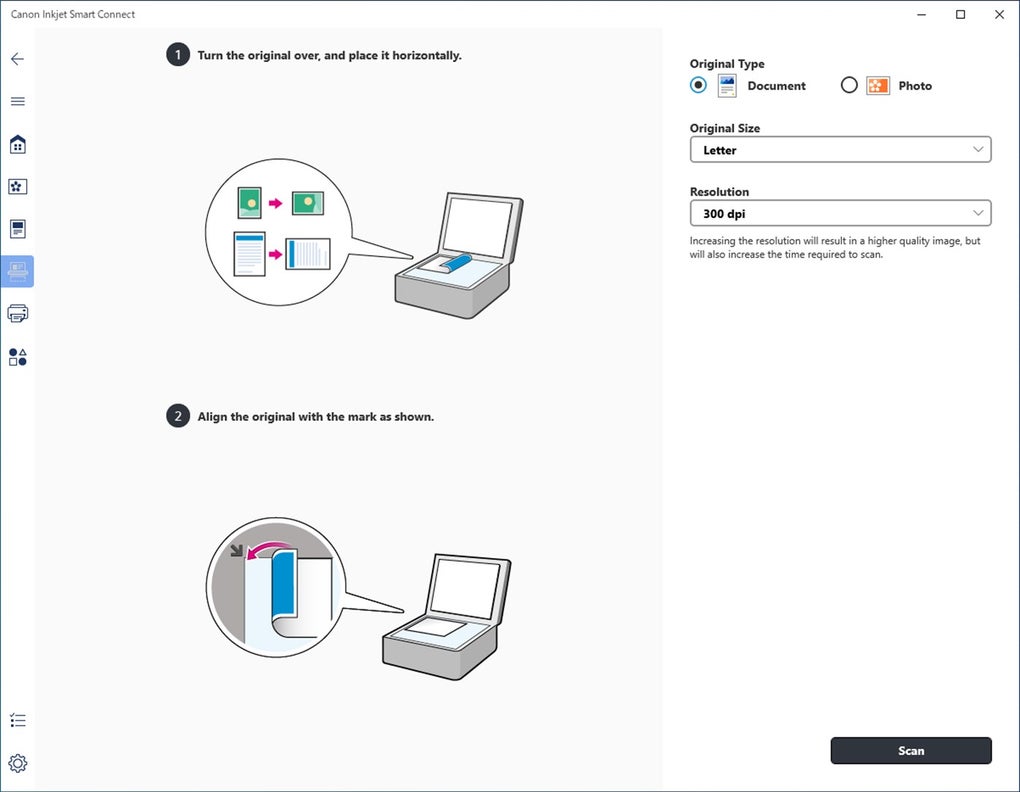
When interacting with features like “Photo Print,” the application typically guides the user through a step-by-step process. This might involve selecting the image, choosing paper type and size, specifying print quality, and previewing the output before final printing. Such guided workflows are particularly beneficial for less experienced users, ensuring they can achieve desired results with confidence. Similarly, the scanning interface is streamlined, offering options for document type, resolution, and destination (e.g., save to PC, cloud, or email). The real-time feedback on printer status is also presented clearly, often with visual cues for ink levels and paper jams, allowing for quick diagnosis and resolution of common issues. This thoughtful design minimizes frustration and maximizes productivity, making the entire printing and scanning process an enjoyable and efficient experience.
Expanding Your Capabilities: Advanced Features and Benefits
Canon Inkjet Smart Connect goes beyond basic printing, offering a suite of advanced features designed to enhance document and photo quality, streamline workflows, and provide comprehensive printer management. These capabilities underscore its role as a versatile tool that maximizes the utility and longevity of Canon inkjet devices, catering to both casual users and those with more demanding requirements.
Precision Scanning and Image Correction
One of the standout advanced functionalities of Canon Inkjet Smart Connect, often inherited from or integrated with the Canon PRINT Inkjet/SELPHY app, is its robust scanning capability coupled with image correction tools. The application empowers users to “scan, copy and make perspective corrections before printing.” This feature is particularly valuable when scanning documents or photos that may have been placed imperfectly on the scanner bed, resulting in skewed or distorted images. Perspective correction algorithms intelligently analyze the image and automatically or semi-automatically adjust its orientation, ensuring that the final digital file or print is perfectly aligned and true to form. This eliminates the need for manual adjustments in external image editing software, saving time and effort.
Beyond perspective correction, the scanning function often includes options for adjusting resolution, color depth, and file format, allowing users to tailor their scans to specific needs, whether it’s archiving important documents in high fidelity or quickly digitizing a receipt. The ability to copy documents directly through the app further enhances its versatility, effectively turning your printer into a multi-functional device controlled entirely from your computer or mobile device. This comprehensive approach to scanning and image processing ensures that every digital capture is of the highest possible quality, ready for immediate use or printing.
Real-time Printer Management and Maintenance
Effective printer management is crucial for uninterrupted printing, and Canon Inkjet Smart Connect provides a sophisticated interface for real-time monitoring and maintenance. The application allows users to “check the printer’s status,” offering vital information at a glance. This typically includes:
- Ink Levels: Visual indicators for each ink cartridge, allowing users to anticipate and replace depleted cartridges before they run out completely, preventing mid-print interruptions.
- Paper Status: Information on paper tray capacity and any paper jams, enabling quick resolution of feeding issues.
- Connectivity: Confirmation of the printer’s network connection, essential for wireless printing.
- Error Messages: Clear display of any printer errors, often accompanied by troubleshooting suggestions.
Furthermore, Smart Connect often provides access to printer maintenance functions. This could include initiating print head cleaning cycles to resolve streaky prints, nozzle checks to diagnose print quality issues, or even firmware updates to ensure the printer operates with the latest enhancements and bug fixes. By putting these diagnostic and maintenance tools directly into the user’s hands, Canon Inkjet Smart Connect empowers them to proactively manage their printer, reducing downtime and extending its operational life. This proactive approach to printer care is a significant benefit, translating into greater reliability and a more consistent printing experience.
The Integrated Canon Printing Ecosystem
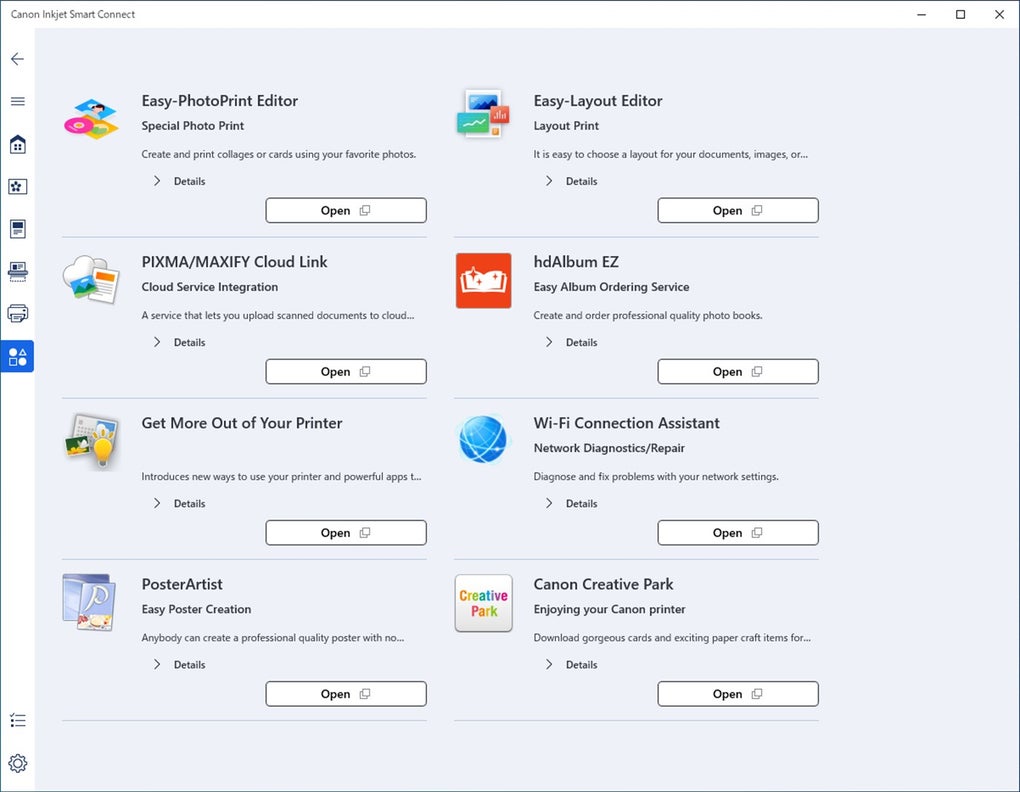
Canon Inkjet Smart Connect is not an isolated application but rather a key component of Canon’s broader printing ecosystem. The reference notes its similarity to the Canon PRINT Inkjet/SELPHY mobile application and states, “the Canon PRINT application gives you access to the Canon PRINT Inkjet/SELPHY mobile app.” This highlights a deliberate strategy by Canon to create a unified and interconnected experience across its software offerings. Users who are familiar with the mobile app will find Smart Connect’s interface and functionalities consistent, minimizing any learning curve. This integration means that features and updates developed for one platform often translate to the other, ensuring that all users benefit from the latest innovations.
This ecosystem approach extends to drivers and other utility software. While Smart Connect handles the primary user interface for printing and scanning, it often works in conjunction with underlying printer drivers (like the Canon LBP2900b driver mentioned in the alternatives, though for a different printer line, it illustrates the necessity of drivers). The seamless operation of Smart Connect implies that it leverages these foundational drivers to communicate effectively with the hardware. By providing a comprehensive suite of tools—from basic drivers to advanced smart connect applications—Canon ensures that its users have all the necessary resources to manage their printing needs efficiently and effectively, creating a cohesive and powerful printing environment that truly enhances productivity and creative output.
Why Canon Inkjet Smart Connect Stands Out
In a crowded market of printing solutions, Canon Inkjet Smart Connect distinguishes itself through its user-centric design, comprehensive feature set, and unwavering commitment to reliability. It addresses the diverse needs of modern users, from facilitating simple photo prints to enabling complex document workflows, all while ensuring ease of use and peace of mind.
Maximizing Efficiency and Productivity
The primary appeal of Canon Inkjet Smart Connect lies in its ability to significantly boost user efficiency and productivity. By consolidating various printing and scanning tasks into a single, intuitive application, it eliminates the need to switch between multiple programs or wrestle with complex printer settings. Imagine the time saved by being able to initiate a scan, correct its perspective, and print it, all within the same interface. For home users, this means more time enjoying printed memories and less time troubleshooting. For small businesses, it translates into a smoother document management workflow, allowing employees to focus on core tasks rather than printer logistics.
The convenience of accessing printer applications and services from both PC and mobile devices means that users are no longer tethered to their desks to manage print jobs or check printer status. This flexibility is a game-changer for those who work on the go or prefer the comfort of managing tasks from their smartphone. The streamlined process of selecting print types, adjusting settings, and initiating jobs, as simple as choosing “Photo Print” and following prompts, ensures that even complex tasks become manageable. This focus on efficiency and convenience makes Canon Inkjet Smart Connect an invaluable tool for anyone looking to optimize their printing experience and reclaim valuable time.
Reliability, Security, and Peace of Mind
When it comes to software, especially one that interacts with hardware, reliability and security are paramount. Canon, as a renowned brand in imaging and printing, builds its software solutions with these principles in mind. Canon Inkjet Smart Connect benefits from this legacy, offering a stable and secure platform for managing your printer. The regular updates (such as “V1.04(6)” with its “Latest update July 18, 2025” mentioned in the specs, indicating ongoing development) ensure that the application remains compatible with the latest operating system changes and addresses any potential vulnerabilities, providing users with a sense of security.
Furthermore, the application’s ability to provide real-time printer status information contributes significantly to user peace of mind. Knowing the ink levels, paper status, and connectivity at a glance means fewer unexpected interruptions and less frustration. Proactive maintenance features, like print head cleaning, accessible through the app, help maintain printer health and prevent common issues that lead to poor print quality or complete malfunctions. This robust approach to development and maintenance instills confidence, allowing users to rely on their Canon printer and its accompanying software for consistent, high-quality output without constant worry about technical glitches or security risks. The fact that the application goes through security checks by platforms like PhanMemFree further underscores its commitment to user safety.
Addressing Modern Printing Challenges
Modern printing comes with its own set of challenges, from multi-device environments to the demand for instant gratification and high-quality output. Canon Inkjet Smart Connect is meticulously designed to tackle these head-on. The challenge of device fragmentation, where users switch between PCs, smartphones, and tablets, is addressed through its cross-platform compatibility and unified user experience, ensuring that printing is consistently accessible. The demand for immediate results is met by its quick installation and intuitive interface, allowing users to print photos or scan documents with minimal delay.
Moreover, the application directly confronts the issue of print quality and accuracy. Features like perspective correction for scanned documents are critical for professionals and hobbyists alike who require precise digital reproductions. The integration with the broader Canon PRINT Inkjet/SELPHY ecosystem means that users benefit from Canon’s continuous innovation in print technology, ensuring that their output—whether a vibrant photo or a crisp document—always meets high standards. By offering a solution that is easy to use, highly compatible, feature-rich, and reliable, Canon Inkjet Smart Connect successfully navigates the complexities of contemporary printing, establishing itself as an essential tool for unlocking the full potential of any Canon inkjet printer. It truly empowers users, making printing less of a chore and more of a seamless extension of their digital lives.
In conclusion, Canon Inkjet Smart Connect represents a significant leap forward in printer utility software. It embodies Canon’s commitment to enhancing user experience through intelligent integration, robust functionality, and broad compatibility. By providing a unified hub for both PC and mobile devices, it simplifies tasks, boosts productivity, and ensures that Canon inkjet printer users can effortlessly manage all their printing and scanning needs, solidifying its position as an indispensable component of any modern digital workflow.
File Information
- License: “Free”
- Version: “1.0”
- Latest update: “July 18, 2025”
- Platform: “Windows”
- OS: “Windows 11”
- Language: “English”
- Downloads: “15.1K”
- Size: “1.10 MB”


