
In today’s digital age, we spend countless hours staring at computer screens, leading to increased eye strain and potential long-term vision problems. CareUEyes is a lightweight software application designed to mitigate these risks by offering a suite of tools to reduce eye fatigue and promote healthier computer usage habits. It’s a simple yet effective solution for anyone who spends significant time working or playing on their computer. This comprehensive guide delves into the features, benefits, and limitations of CareUEyes, providing a thorough understanding of its capabilities and how it can contribute to overall eye health.
Understanding the Problem: Digital Eye Strain
The pervasive use of computers, tablets, and smartphones exposes our eyes to prolonged periods of intense visual activity and harmful blue light emitted from digital screens. This constant exposure can lead to a range of symptoms collectively known as digital eye strain (DES). DES manifests in various ways, including:
- Eye fatigue and dryness: Prolonged focus on a screen can lead to tired, strained, and dry eyes. This is often accompanied by a burning or itching sensation.
- Headaches: Eye strain can trigger headaches, particularly in the temples and forehead areas.
- Blurred vision: Focusing on a screen for extended periods can temporarily blur vision, making it difficult to see clearly.
- Neck and shoulder pain: Poor posture associated with prolonged computer use contributes to muscle tension and pain in the neck and shoulders.
- Sleep disturbances: Exposure to blue light, particularly in the evening, can interfere with the body’s natural sleep-wake cycle (circadian rhythm), leading to insomnia and poor sleep quality.
These symptoms not only impact daily productivity and comfort but also pose potential long-term risks to eye health. The cumulative effect of DES can contribute to more serious vision problems if left unaddressed. CareUEyes aims to address these concerns by providing practical solutions for mitigating digital eye strain.
CareUEyes: A Tripartite Approach to Eye Protection
CareUEyes offers a three-pronged approach to combating digital eye strain. Rather than relying on a single method, it combines three key functionalities to provide a holistic solution:
1. Blue Light Filter: This is arguably the most crucial feature of CareUEyes. Blue light, a high-energy visible light, is known to be particularly harmful to the eyes. Prolonged exposure can accelerate the degradation of the macula, the central part of the retina responsible for sharp, central vision. CareUEyes’s blue light filter intelligently reduces the amount of blue light emitted from the screen, making the display appear warmer and more comfortable to the eyes.
This filter is not a simple on/off switch; it offers several customizable presets to cater to different environments and preferences. Users can choose from various color temperatures and brightness levels, selecting presets tailored to various activities such as gaming (“Game” mode), nighttime viewing (“Night” mode), typical daytime work (“Normal” mode), office tasks (“Office” mode), and a dynamically adjusting mode (“Smart” mode). This adaptability allows users to personalize the filter to best suit their needs and the lighting conditions of their workspace.
The advantage of a customizable filter over a simple, fixed filter is significant. Different individuals have varying sensitivities to blue light, and different tasks demand different levels of screen brightness and color temperature. CareUEyes’s flexibility ensures a personalized and effective solution for each user.
2. Screen Dimmer: Beyond blue light filtering, controlling screen brightness is vital for reducing eye strain. CareUEyes provides a built-in screen dimmer, allowing users to adjust the overall brightness of their monitor. This is especially beneficial in varying lighting conditions. A bright screen in a dimly lit room, for example, can cause significant discomfort and contribute to eye strain. Conversely, a dimly lit screen in a brightly lit room can make it difficult to focus. CareUEyes’s screen dimmer facilitates optimal screen brightness regardless of the surrounding environment.
The software’s compatibility extends to a wide range of monitors, including LCD, LED-backlit, and TFT screens, ensuring broad applicability across different computer setups. Crucially, the developers emphasize that the dimming functionality will not damage the screen itself.
3. Break Reminder: Prolonged periods of screen time are detrimental to eye health. Even with blue light filtering and brightness adjustment, regular breaks are essential to allow the eyes to rest and refocus. CareUEyes incorporates a break reminder function that prompts users to take short breaks after specific intervals. These reminders appear as desktop notifications, gently interrupting the workflow to encourage a momentary respite.
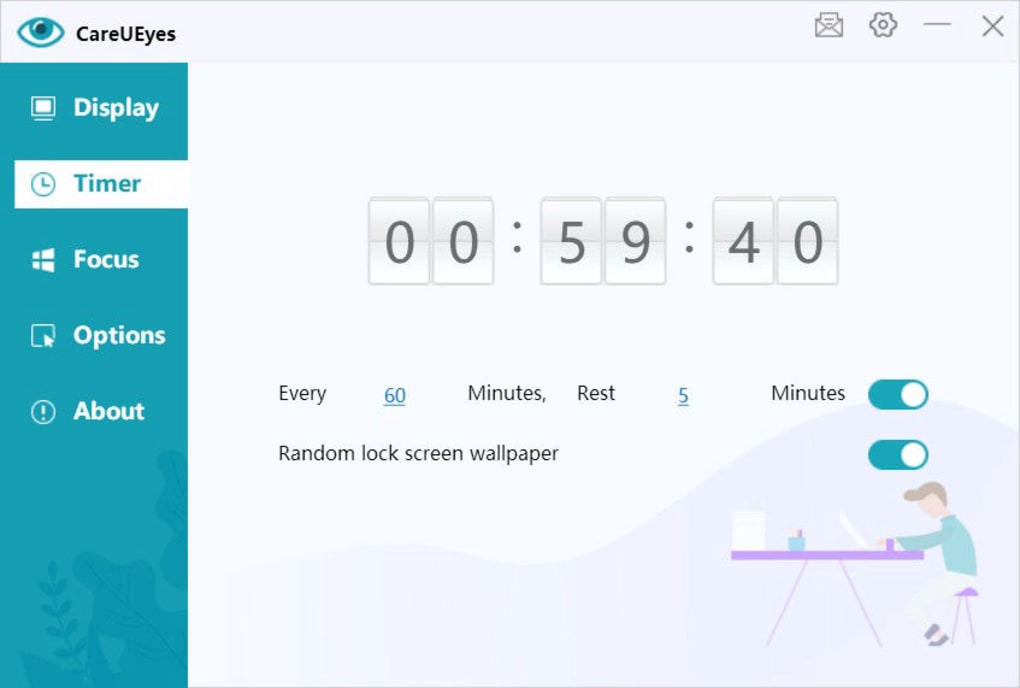
Users can customize the frequency and duration of these reminders, ensuring the break schedule aligns with their individual needs and work patterns. Furthermore, a random lock screen wallpaper feature adds an extra layer of encouragement, forcing users to step away from their computer momentarily. This encourages physical activity and prevents prolonged periods of inactivity, which are just as damaging to health as prolonged screen time. The software acts as a persistent yet considerate reminder of the importance of regular breaks for maintaining eye health and overall well-being.
Beyond the Core Features: Additional Benefits and Considerations
While the three core functionalities – blue light filtering, screen dimming, and break reminders – form the foundation of CareUEyes’s functionality, several additional advantages contribute to its overall value:
- Ease of use: The software is designed with simplicity in mind, making it user-friendly for individuals of all technical skill levels. The intuitive interface ensures a smooth and straightforward user experience.
- Lightweight design: CareUEyes is a lightweight application, minimizing its impact on system resources. This ensures that the software operates efficiently without slowing down the computer.
- Compatibility: CareUEyes boasts broad compatibility with various Windows operating systems and a wide range of computer screens and monitors.
However, it’s crucial to acknowledge certain limitations:
- Trial version limitations: The free trial version of CareUEyes may have limitations compared to the paid version. Users might experience restrictions on features or functionalities, influencing their decision to purchase the full version.
- Alternative solutions: While CareUEyes offers a comprehensive approach, alternative applications provide similar functionalities. Users should compare different software to determine the best fit for their specific needs and preferences.
- Not a replacement for professional eye care: CareUEyes is a valuable tool for mitigating digital eye strain, but it is not a substitute for regular eye examinations and professional eye care. Users experiencing persistent eye problems should consult an ophthalmologist or optometrist.
CareUEyes vs. the Competition: A Comparative Look
CareUEyes competes with several other applications designed to reduce digital eye strain. Some popular alternatives include F.lux, DimScreen, and Eyes Relax. While these applications often share core functionalities such as blue light filtering and screen dimming, they differ in their specific features, customization options, and overall user experience.
F.lux, for example, primarily focuses on adjusting color temperature based on the time of day, aiming to mimic natural lighting conditions. DimScreen offers a more simplistic approach, concentrating solely on screen dimming functionalities. Eyes Relax provides a wider range of features, including customizable break reminders and eye exercises.
Choosing between CareUEyes and its competitors depends on individual preferences and priorities. CareUEyes’s strength lies in its balanced approach, combining blue light filtering, screen dimming, and break reminders into a single, user-friendly package.
Conclusion: A Valuable Tool for Digital Wellbeing
CareUEyes offers a practical and accessible solution for individuals seeking to protect their eyes from the harmful effects of prolonged computer use. Its combination of blue light filtering, screen dimming, and break reminders provides a comprehensive approach to mitigating digital eye strain. While not a cure-all for eye problems, it serves as a valuable tool for promoting healthier computer usage habits and improving overall digital well-being. However, it’s essential to remember that CareUEyes complements, rather than replaces, regular eye examinations and professional eye care. A balanced approach incorporating both technological aids and professional consultations is the most effective strategy for maintaining optimal eye health in the digital age.
File Information
- License: “Trial version”
- Latest update: “August 4, 2025”
- Platform: “Windows”
- OS: “Windows 8”
- Language: “English”
- Downloads: “41.8K”
- Size: “5.02 MB”


