
In the vast and ever-evolving digital landscape, where applications proliferate and digital footprints accumulate with every click and installation, maintaining a clean, efficient, and private computer system is paramount. While operating systems offer basic maintenance tools, savvy users often seek out specialized utilities to truly optimize their machines. Among these, CCleaner has long stood as a pillar of system hygiene, renowned for its ability to clear temporary files, manage startup programs, and uninstall software. However, even the most robust tools have their limitations, and this is where an ingenious unofficial add-on, CCEnhancer, steps in.
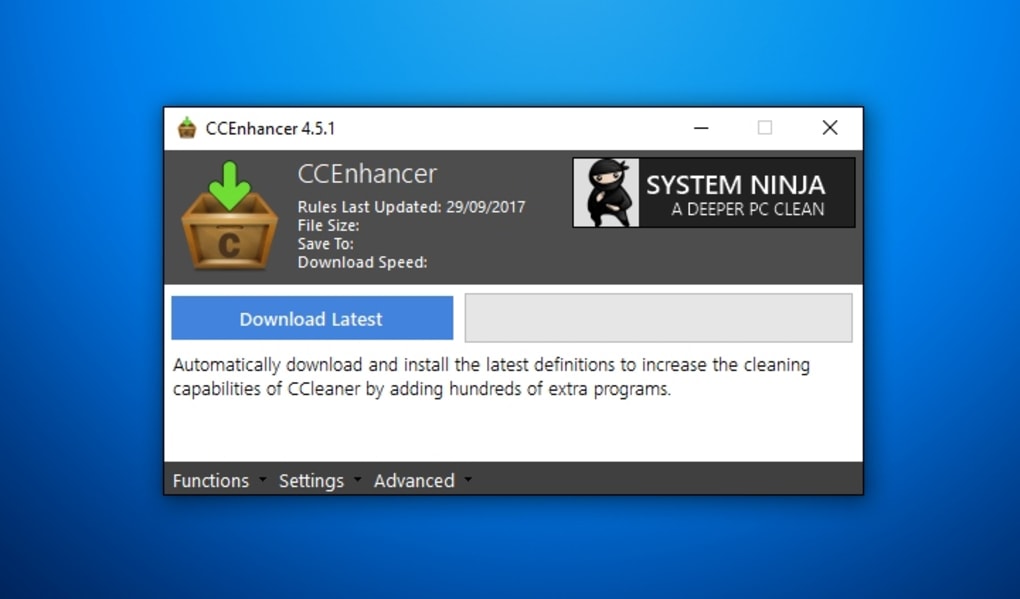
CCEnhancer, previously recognized as CCleaner Enhancer, is a transformative utility designed to elevate the capabilities of its parent application, CCleaner. Its core function is remarkably straightforward yet profoundly impactful: it extends CCleaner’s reach by adding support for an astounding array of over 270 new applications. This means that with CCEnhancer integrated, users can leverage CCleaner to meticulously remove digital traces left by a significantly broader spectrum of software, ensuring a more thorough and comprehensive system cleanup. Available for free and boasting a robust version 4.5.7, CCEnhancer has solidified its reputation as a must-have for anyone serious about system performance and digital privacy on Windows platforms.
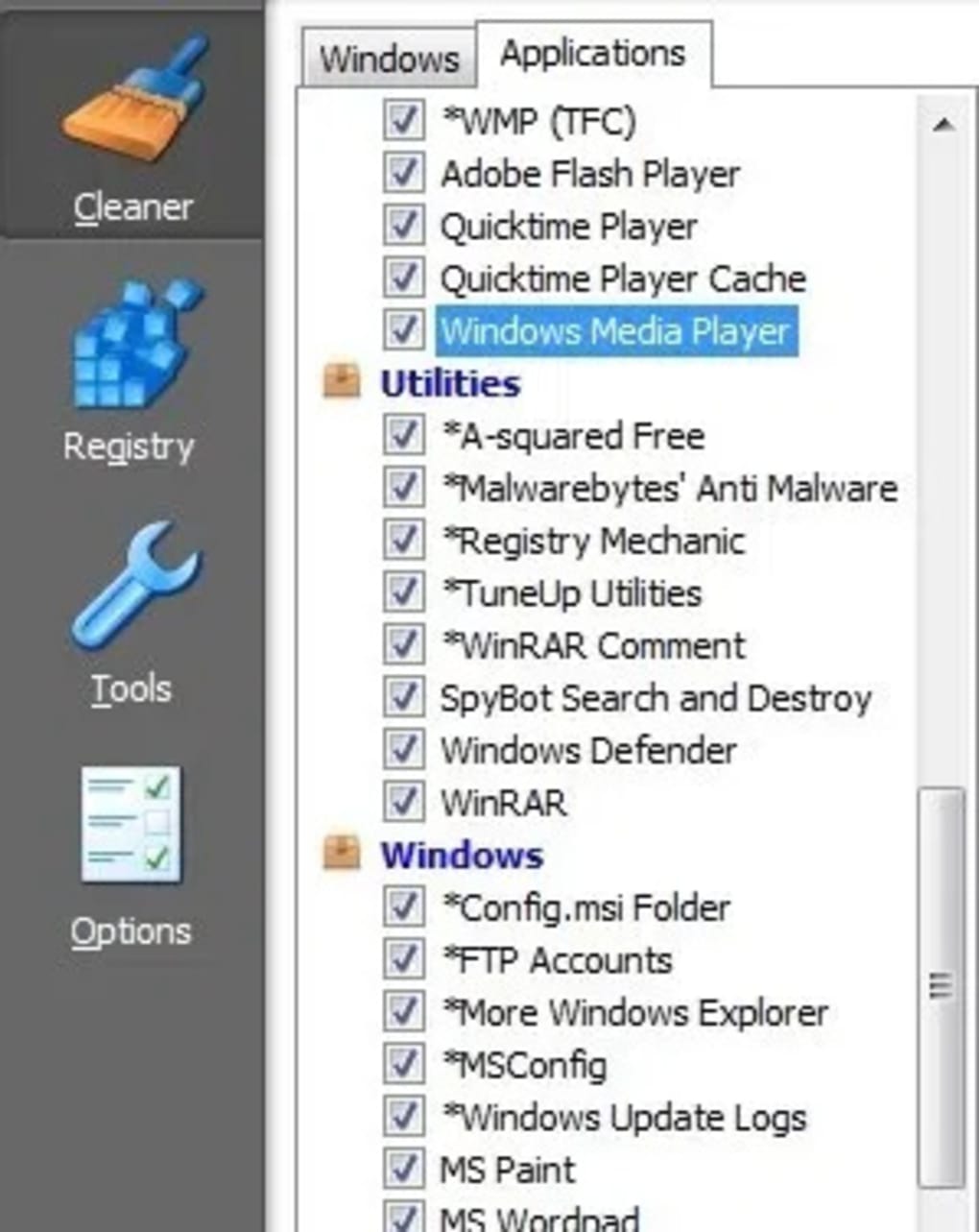
The beauty of CCEnhancer lies in its absolute simplicity. Users merely need to run its small EXE file, and the program automatically integrates its extended definitions into the existing CCleaner installation. It intelligently identifies and adds support only for those applications detected on the user’s system, preventing unnecessary bloat. Once the integration is complete, a subsequent launch of CCleaner reveals the newly supported programs prominently displayed in the Applications list, marked with a distinctive asterisk, ready for their traces to be expertly expunged. This seamless process underscores CCEnhancer’s design philosophy: powerful enhancement without user complexity. While it is important to remember that CCEnhancer is a non-official plug-in, requiring users to proceed at their own discretion, its track record, user reviews, and consistent updates (including recent additions of Turkish and Chinese Traditional translations, and fixes for previous issues) attest to its reliability and widespread acceptance within the PC optimization community.
The Evolving Landscape of Utilities & Tools
The modern computing experience is defined by a constant interaction with various software applications, each serving a specific purpose. From creative suites to communication platforms, and from gaming clients to productivity tools, our digital lives are interwoven with programs that, while indispensable, inevitably leave behind digital residue. This accumulation of temporary files, cache data, installation logs, and browser histories can, over time, lead to diminished system performance, reduced storage space, and potential privacy vulnerabilities.
This is precisely why the category of “Utilities & Tools” has become an indispensable segment of the software ecosystem. Operating systems like Windows come bundled with a basic set of utilities, such as Disk Cleanup or Task Manager, but these are often insufficient for the advanced user or for tackling the specific intricacies of third-party software. Consequently, a vibrant market of specialized utilities has emerged, addressing every conceivable aspect of system maintenance and enhancement.
Within this expansive category, one finds a diverse array of applications designed to manage, optimize, secure, and restore a computer system. For instance, “File Managers” like Windows Explorer or more advanced alternatives help users organize their data efficiently. “Data Recovery” tools become saviors in moments of accidental deletion, while “File Compression” software aids in saving storage space and facilitating faster transfers. “Screen Capture” utilities enable easy documentation, and “Clocks & Alarms” provide organizational assistance. The utility landscape also encompasses more foundational tools like “Bar Code Scanning” applications for inventory management or “Keyboards” for customizing input.
CCEnhancer fits squarely into this vital “Utilities & Tools” category, but with a unique twist: it acts as an enhancer for another utility. Its existence highlights a deeper trend in software development – the community-driven extension of existing, popular tools to meet user demands that official developers might not prioritize or have the resources to address. By expanding CCleaner’s cleaning definitions, CCEnhancer addresses a critical need for a more exhaustive cleanup regimen, making it an invaluable addition for users who regularly install and uninstall various applications, or simply wish to keep their systems exceptionally tidy. It ensures that the very tools we rely on for system maintenance are themselves kept up-to-date with the ever-changing roster of mainstream and niche applications.
Enhancing System Productivity and Performance
A clean system is a fast system, and a fast system is a productive system. The link between thorough digital hygiene and overall user productivity cannot be overstated. When a computer is bogged down by accumulated junk files, outdated cache data, fragmented hard drives, and residual traces from countless applications, its performance inevitably degrades. Applications launch slower, multitasking becomes sluggish, and the overall user experience suffers. This digital clutter translates directly into lost time, frustration, and a significant impediment to productivity.
Consider the “Productivity” section of any software directory. It encompasses a vast array of tools designed to streamline tasks and maximize output: “Accounting” software for financial management, “Agenda & Calendars” for time organization, “Document Management” systems for efficient filing, and “Office Suites” for essential work tasks. The effectiveness of these sophisticated productivity tools hinges on the underlying health and responsiveness of the operating system. If the OS is struggling under the weight of digital debris, even the most powerful project management software or advanced email client will falter.
CCEnhancer plays a crucial, albeit indirect, role in enhancing system productivity. By enabling CCleaner to detect and remove traces from an additional 270+ applications, it ensures a more comprehensive cleanup. This means that temporary files, installation remnants, and other junk data associated with a wider range of software are efficiently eliminated. The immediate benefits are tangible:
- Increased Free Disk Space: Clearing out hundreds of megabytes, or even gigabytes, of unnecessary files frees up valuable storage. This is particularly important for users with SSDs or those who frequently download large files.
- Improved System Responsiveness: Less clutter means fewer files for the system to index and process, leading to faster boot times, quicker application launches, and smoother multitasking.
- Reduced Software Conflicts: While not its primary goal, removing old, potentially corrupted temporary files can sometimes prevent minor software glitches or conflicts.
- Optimized Application Performance: Some applications, particularly those involved in multimedia or gaming, can generate significant cache files. Cleaning these regularly, facilitated by CCEnhancer’s expanded definitions, can help maintain their optimal performance.
In essence, CCEnhancer helps create a leaner, more agile operating environment. This optimized foundation allows productivity applications to run at their best, empowering users to complete tasks more efficiently and with less technical friction. It transforms a potentially sluggish, memory-hogging machine into a responsive workstation, directly contributing to a more productive digital lifestyle. The “Pros” listed by PhanMemFree.org for CCEnhancer aptly summarize this: “Makes CCleaner even more powerful!” and directly translates to a more powerful and productive user experience.
Navigating Security & Privacy in the Digital Age
Beyond performance, the meticulous management of digital traces is fundamentally intertwined with modern concerns about “Security & Privacy.” In an era dominated by data collection and pervasive online tracking, every interaction, every installed application, and every visited website leaves behind a breadcrumb trail. These digital footprints, if left unchecked, can pose significant risks, ranging from mild annoyances like targeted advertising to more severe threats such as identity theft or unauthorized access to sensitive information.
The “Security & Privacy” landscape is multifaceted, encompassing a wide array of tools and practices. Users employ “Antivirus” software to combat malware, “VPNs” to encrypt their internet traffic and mask their IP addresses, “Password Management” tools to create and secure unique credentials, and “Ad Blockers” to prevent intrusive tracking. Each of these components contributes to a layered defense against the myriad threats lurking online.
CCEnhancer, through its enhancement of CCleaner, serves as an important, albeit niche, component within this broader security and privacy framework. While it is not designed to detect malware or encrypt data, its ability to facilitate the thorough removal of application traces directly contributes to a stronger privacy posture. Consider the types of data that applications might leave behind:
- Browser History and Cookies: While CCleaner handles these for major browsers, CCEnhancer ensures that traces from less common or specialized browsers and web-enabled applications are also purged. This minimizes the risk of someone reconstructing browsing habits or session data.
- Application-Specific Caches and Logs: Many programs store temporary files, usage logs, and even snippets of user data in obscure locations. These can contain sensitive information about user preferences, recently accessed files, or internal operations. By extending CCleaner’s reach, CCEnhancer ensures these are cleaned.
- Installation Remnants: Even after uninstalling an application, traces often remain. These can sometimes include configuration files with personal data or system information. CCEnhancer helps ensure these are thoroughly removed, reducing potential exposure.
By empowering users to wipe away more of their digital footprint, CCEnhancer helps in minimizing the surface area for potential privacy breaches. It makes it harder for malicious actors (or even intrusive advertisers) to piece together a comprehensive profile based on residual application data. In a world where data is the new currency, exercising control over what information persists on one’s system is a critical aspect of personal security.
However, it is precisely within this domain that the “Cons” of CCEnhancer – specifically, “It’s not an official add-on” – become most pertinent. Users must exercise a degree of caution. While CCEnhancer has a good reputation and is widely used, any third-party, unofficial tool carries an inherent, albeit small, risk. Reputable platforms like PhanMemFree.org conduct security checks (as indicated by the “Security Status” on the product page), but the ultimate responsibility lies with the user to understand the tool they are integrating into their system. This balance between enhanced functionality and careful discernment is a hallmark of navigating digital security and privacy effectively.
The Role of Third-Party Enhancements
The digital world thrives on innovation, and often, the most creative and impactful solutions emerge from communities rather than solely from official developers. CCEnhancer is a prime example of this phenomenon – a powerful third-party enhancement that significantly augments the capabilities of a widely used, official application (CCleaner). Its existence and popularity speak volumes about the dynamic relationship between official software development and community-driven innovation.
Third-party enhancements, plugins, and add-ons exist for a multitude of reasons:
- Filling Gaps: Official software, while feature-rich, cannot anticipate every user’s niche need or every emerging application. Third-party tools often step in to fill these gaps, providing support for less common programs or offering specialized functionalities.
- Faster Development Cycles: Community developers can often respond to new trends or address user frustrations more quickly than large software companies, which operate under more rigid development schedules and testing protocols.
- Specialized Expertise: Developers within specific communities might possess unique expertise that allows them to craft highly effective, targeted solutions. In CCEnhancer’s case, this is the deep understanding of how various applications store their temporary files and traces.
- User Empowerment: These tools empower users to customize and optimize their software experience beyond what the official developers initially provided.
The “Pros” associated with CCEnhancer on PhanMemFree.org highlight these advantages: “Very easy to configure” and “Makes CCleaner even more powerful!” These benefits underscore why users actively seek out such unofficial tools. The ability to expand CCleaner’s cleaning definitions for over 270 new apps simply means a more comprehensive clean, without needing to wait for an official update from CCleaner that might never come for certain niche applications.
However, the “Cons” are equally important: “It’s not an official add-on.” This simple statement carries significant implications that users must acknowledge:
- “Use at your own risk”: As explicitly stated in the description, there’s no official support channel from CCleaner’s developers for CCEnhancer. While CCEnhancer has proven stable and effective, users assume responsibility for any potential issues.
- Potential for Instability: Unofficial plugins, by their nature, might sometimes introduce unforeseen bugs or conflicts, though CCEnhancer has a strong reputation for stability. The user review mentioning the program freezing if the updater isn’t working is an example of a minor issue that users might encounter with third-party software.
- Security Concerns: While CCEnhancer from PhanMemFree.org has a “Security Status” indicating it’s safe, the general principle for unofficial software is to be vigilant. Users should always download such tools from reputable sources like PhanMemFree.org and check user reviews and developer reputation.
Ultimately, CCEnhancer embodies the spirit of community contribution that enhances the digital experience. It demonstrates that valuable innovation can originate outside traditional corporate structures, offering users greater control and more robust solutions for their computing needs. The key is intelligent discernment: appreciating the benefits while understanding and mitigating the inherent risks associated with any non-official software.
Best Practices for Software Management
Integrating powerful tools like CCEnhancer into your system management routine requires a thoughtful approach to software management as a whole. In a world saturated with applications, advertisements, and constant updates, adopting best practices ensures not only that your system runs optimally but also that your digital security and privacy remain intact.
1. Prioritize Trusted Sources: Always download software, especially utilities and unofficial add-ons, from reputable platforms. Websites like PhanMemFree.org (formerly Softonic.com) often provide security statuses, user reviews, and developer information, offering a layer of vetting. Avoid unknown or suspicious download sites, as they can bundle legitimate software with unwanted adware or even malware.
2. Read User Reviews and App Specs: Before installing anything new, take a moment to review what other users are saying. CCEnhancer, for example, has a rating of 3.6 out of 5 from 173 reviews on PhanMemFree.org, with users praising its ability to add features to CCleaner, even while noting minor issues like occasional freezes or delayed launches. Pay attention to “Pros” and “Cons” and consider if the reported issues are deal-breakers for you. Check the “App specs” for details like license, version, last update, platform compatibility (Windows Vista and newer for CCEnhancer), language availability, and download statistics, all of which provide valuable context.
3. Understand What You’re Installing: Don’t just click “Next” through installation wizards. Read the prompts carefully. For tools like CCEnhancer, understanding its direct function – adding support for over 270 new apps to CCleaner – is crucial. Be wary of optional software bundles during installation; often, these are unnecessary programs or browser toolbars that can slow down your system.
4. Regular Updates are Key: Keep both your operating system and all installed applications, including utilities like CCleaner and its enhancers, up to date. Developers frequently release updates to fix bugs, improve performance, and patch security vulnerabilities. While CCEnhancer itself is periodically updated (e.g., version 4.5.7, last updated May 24, 2023), ensure your core CCleaner installation is also current.
5. Back Up Your Data: This is perhaps the most fundamental best practice. Before making significant system changes or installing powerful utilities, especially those that modify other applications, always ensure you have a recent backup of your critical data. Tools mentioned in the “Development & IT” section, such as “Backup & Cloud Storage,” are vital for this purpose. While CCEnhancer is generally safe, unforeseen circumstances can always occur.
6. Leverage System Monitoring Tools: Familiarize yourself with your operating system’s built-in monitoring tools (like Task Manager on Windows) to keep an eye on resource usage. If a new application or utility causes unexpected spikes in CPU or memory usage, it might indicate an issue.
7. Be Mindful of Language Options: The global reach of software is extensive. CCEnhancer, for instance, is available in numerous languages, including English, German, Spanish, French, Italian, Dutch, Polish, Portuguese, Russian, Turkish, and Chinese. Choosing the correct language ensures you can fully understand and utilize the software, reducing potential misunderstandings.
8. Consider Your Overall Software Ecosystem: Think about how new software fits into your existing set of tools. Does it duplicate functionality? Does it conflict with other programs? A well-organized digital environment, much like a well-managed physical space, contributes to greater efficiency and fewer problems.
By adhering to these best practices, users can confidently leverage powerful enhancements like CCEnhancer to maintain a high-performing, secure, and private computing experience. The digital world is full of incredible tools, and knowing how to safely and effectively use them is the hallmark of a discerning user.
In conclusion, CCEnhancer stands as a testament to the power of community-driven innovation in enhancing core software functionality. By dramatically expanding CCleaner’s ability to cleanse system traces from over 270 additional applications, it provides an invaluable service for anyone committed to maintaining optimal system performance and safeguarding their digital privacy. While its non-official status necessitates a cautious approach, its proven track record, ease of use, and significant benefits make it a highly recommended addition to any Windows user’s utility toolkit. By adopting robust software management practices and understanding the landscape of available tools, users can transform their computing experience, ensuring their systems remain as clean, fast, and secure as possible, all thanks to intelligent choices and powerful add-ons like CCEnhancer, readily available for download from trusted platforms like PhanMemFree.org.
File Information
- License: “Free”
- Latest update: “May 24, 2023”
- Platform: “Windows”
- OS: “Windows Vista”
- Language: “English”
- Downloads: “38.7K”
- Size: “326.50 KB”


