
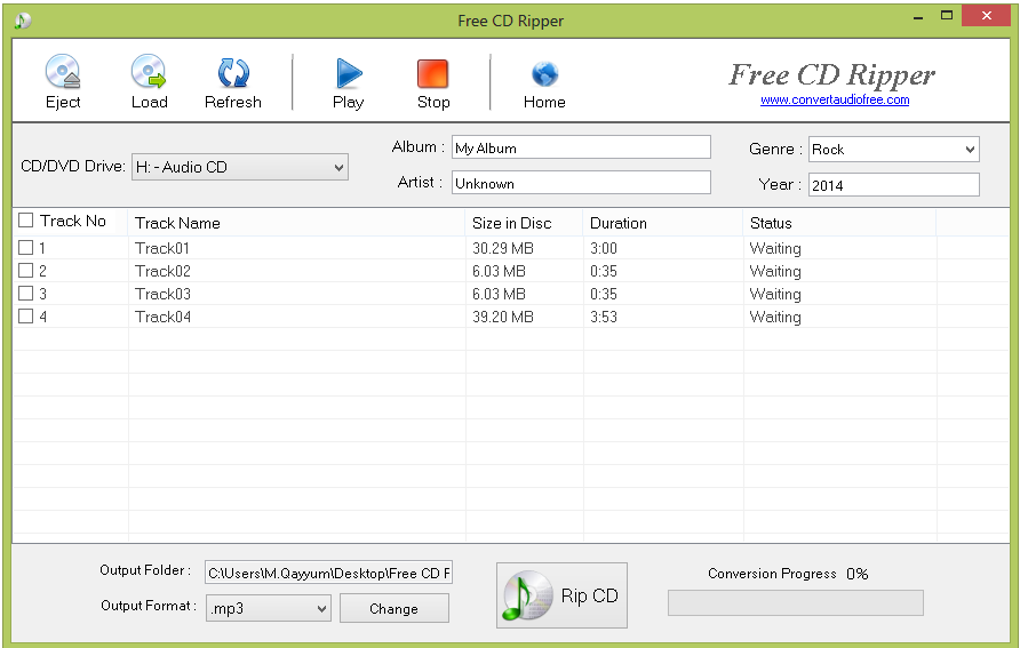
Ripping audio CDs to digital formats has become a common practice for music enthusiasts. The ability to transfer your favorite albums to portable devices, create custom playlists, and enjoy your music collection in a variety of ways has revolutionized how we consume music. This guide explores the world of free CD rippers, focusing on the features, functionalities, and considerations involved in selecting the right software for your needs. While numerous CD ripping applications exist, understanding the nuances of each is crucial for ensuring a smooth and efficient process. This detailed exploration of free CD ripping software aims to empower you to make an informed decision and seamlessly transfer your musical treasures to the digital realm.
Understanding CD Ripping Software and its Benefits
CD ripping software bridges the gap between physical audio CDs and the digital formats compatible with modern devices. This process involves extracting the audio tracks from a CD and converting them into digital files, typically in formats like MP3, WAV, FLAC, or OGG. The benefits of ripping CDs are numerous:
- Portability: Transfer your entire music library to smartphones, tablets, and other portable devices, allowing you to enjoy your music anywhere.
- Convenience: Create customized playlists and organize your music collection for easy access. No more fumbling through physical CDs.
- Backup and Preservation: Create digital backups of your CDs, safeguarding your music collection against physical damage or loss.
- Format Conversion: Convert audio files between various formats to optimize for different devices or players. For example, you might convert lossless WAV files to smaller MP3s for mobile devices.
- Enhanced Playback Capabilities: Enjoy features like gapless playback, metadata tagging (artist, album, track title), and more, functionalities not always present on traditional CD players.
- Improved Sound Quality (with the right tools and settings): While MP3 compression reduces file size, using lossless formats like WAV or FLAC during ripping preserves the original audio quality. Choosing the right bitrate during compression is vital to balance file size and audio quality.
Selecting the right CD ripping software depends on your technical expertise, preferred audio formats, and desired features.
Key Features to Consider in a Free CD Ripper
While the core function of any CD ripper is to extract audio tracks, several key features differentiate them:
-
Supported Audio Formats: The ideal CD ripper should support a wide range of output formats, including popular choices like MP3, WAV, WMA, OGG, FLAC, and others. Consider your preferred listening devices and the formats they support when making your selection. MP3 is widely compatible but involves compression, potentially reducing sound quality. WAV and FLAC are lossless formats preserving the original audio, but result in larger file sizes.
-
Bitrate Selection: For compressed formats like MP3, the bitrate significantly impacts the file size and audio quality. Higher bitrates result in better sound quality but larger files. Experimenting with different bitrates is key to finding the balance that best suits your needs.
-
Metadata Tagging: Automatic or manual tagging of metadata, including artist, album, title, track number, and genre, is incredibly useful for organizing your digital music library. A well-tagged collection is much easier to navigate and enjoy.
-
Error Correction and Handling: CD ripping software should include error correction capabilities to compensate for scratches or imperfections on your CDs. This ensures that the ripped tracks are as clean and free of errors as possible.
-
Gapless Playback: For albums where tracks are meant to seamlessly flow into one another, gapless playback ensures a more natural and uninterrupted listening experience.
-
User Interface (UI): A clean and intuitive interface makes the ripping process easier and more enjoyable. Complex settings can be intimidating, so a user-friendly design is valuable for novice users.
-
Batch Processing: The ability to rip multiple CDs or multiple tracks from a single CD simultaneously saves considerable time and effort.
-
Database Integration: Some CD rippers offer the ability to automatically search online databases (like Freedb) to retrieve accurate metadata for your tracks, further simplifying the tagging process.
Free CD Ripper Software: A Comparative Look
While many free CD ripping programs exist, their capabilities and ease of use vary significantly. Researching and comparing available options before settling on a specific software is highly recommended. Factors to consider include the supported audio formats, the level of control offered over ripping parameters, the user interface’s intuitiveness, and the presence of advanced features. A program with a clean interface and easily accessible settings is ideal for less technically-skilled users.
Consider exploring user reviews and online comparisons to identify programs that align with your technical expertise and requirements. Look for software with robust error correction, efficient batch processing, and an intuitive interface to ensure a seamless and enjoyable experience. Always download software from reputable sources to minimize the risk of malware or viruses.
Choosing the Right Format: MP3, WAV, FLAC, and More
The choice of audio format depends on factors like storage space, audio quality requirements, and compatibility with your listening devices.
-
MP3: The most ubiquitous compressed audio format, offering a good balance between sound quality and file size. Suitable for portable devices with limited storage. The choice of bitrate is crucial; higher bitrates mean better quality but larger file sizes.
-
WAV: An uncompressed format offering superior sound quality to MP3 but resulting in significantly larger files. Ideal for archiving and preserving high-fidelity audio.
-
FLAC: Another lossless format similar to WAV, but with better compression. Offers excellent quality without excessive file size increase.
-
OGG: A free and open-source format offering a similar balance to MP3 between quality and file size, often a preferred choice for those prioritizing open standards.
-
WMA: Microsoft’s proprietary format, offering varying levels of compression and quality. While widely used in the past, it’s less common today.
The ideal choice for you depends on your priorities. If storage is a concern, MP3 is a suitable compromise. If preserving original audio quality is paramount, consider WAV or FLAC. For a balance between quality and file size, OGG can be a viable option.
Beyond the Basics: Advanced CD Ripping Techniques
Advanced users may want to explore options that offer finer control over the ripping process. This might include the ability to adjust gain, normalize audio levels, or employ more sophisticated error correction algorithms. Additionally, specialized software may offer features like accurate metadata retrieval from online databases or gapless playback for improved listening experiences. Exploring different options will allow you to tailor the CD ripping process to meet your specific audio quality and organization preferences.
Security Considerations and Best Practices
Always download CD ripping software from reputable sources like established software download websites to avoid malicious software. Regularly update your antivirus software and be cautious when clicking on links or attachments from unknown sources. When using free software, be aware of any bundled software or potential advertising during installation. Carefully read the software’s End-User License Agreement (EULA) to understand the terms and conditions of use.
By following these guidelines and carefully selecting your CD ripping software, you can easily and safely transfer your cherished music collection to the digital domain. Remember to prioritize reputable sources, understand the limitations of free software, and make informed choices regarding your audio format preferences. With careful planning, the process of transferring your music to a digital format can be efficient, enjoyable, and well-organized.
File Information
- License: “Free”
- Version: “1.0”
- Latest update: “May 21, 2020”
- Platform: “Windows”
- OS: “Windows 7”
- Language: “English”
- Downloads: “11K”
- Size: “577.34 KB”


