
CDBurnerXP is a well-regarded and popular freeware application designed for burning various types of discs and managing ISO files. Its user-friendly interface and comprehensive feature set make it a strong contender in the disc burning software market, offering a robust alternative to commercial options. This article delves into the capabilities, strengths, and weaknesses of CDBurnerXP, specifically focusing on its 32-bit version, and providing an in-depth look at its functionality and user experience.
Core Features and Functionality
CDBurnerXP provides a complete suite of tools for disc burning tasks, catering to both novice and experienced users. Its key features include:
-
Data Disc Burning: The software seamlessly burns data to various disc formats, including CD-R, CD-RW, DVD+R, DVD-RW, DVD+RW, DVD-R, and Blu-ray discs. This allows users to easily back up files, create archives, or transfer large amounts of data. The process is straightforward, guiding users through the selection of files and folders, and offering options for data verification after the burning process is complete to ensure data integrity.
-
Audio CD Burning: CDBurnerXP supports the creation of standard audio CDs from a wide array of audio file formats, such as MP3, WAV, WMA, and OGG. Users can customize their audio CDs by adjusting track order, adding gaps between tracks, or selecting specific audio segments. The software often includes options to obtain track information (ID3 tags) from online databases, enhancing the metadata associated with the tracks for better organization and playback experience.
-
ISO Image Burning and Creation: The ability to both burn and create ISO images is a significant advantage. Users can burn pre-existing ISO files directly to disc, simplifying the process of installing software or restoring backups. Conversely, the software allows users to create ISO images from files and folders on their computer, facilitating easy archiving and backup strategies. This dual functionality makes CDBurnerXP a versatile tool for managing and distributing digital content.
-
Disc Copying: CDBurnerXP enables the creation of exact copies of existing CDs and DVDs. This feature is valuable for backing up important discs or creating multiple copies for distribution. The copying process is generally straightforward and efficient, with options to verify the copied disc’s accuracy.
-
Bootable Disc Creation: For users needing to create bootable media, CDBurnerXP offers the capability to burn bootable CDs and DVDs. This functionality is essential for installing operating systems, recovering data, or running diagnostic tools. The software provides the necessary options to select boot images and configure the boot settings appropriately.
-
Additional Utilities: Beyond the core burning functions, CDBurnerXP often integrates additional utilities, such as a BIN/NRG to ISO converter, basic cover printing capabilities (dependent on printer and driver support), and potentially other helpful tools that enhance the user experience.
User Interface and Ease of Use
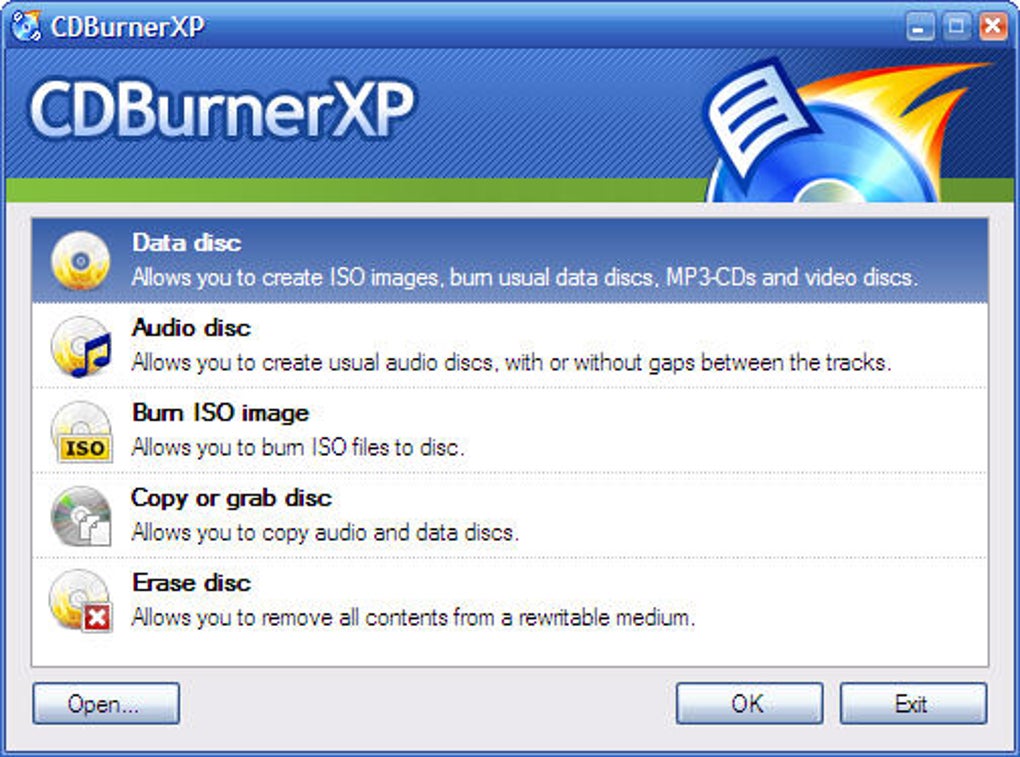
CDBurnerXP’s user interface is generally praised for its intuitive design and ease of use. The main window presents a clear and concise layout, offering quick access to the primary functions. While different versions might vary slightly in appearance, the overall structure is consistent across updates, minimizing the learning curve for new users. The software’s straightforward navigation and clearly labeled options make even complex tasks relatively simple to perform.
Supported Disc Formats and Drive Types
The software boasts broad compatibility with various disc formats and drive types. Its support extends to CD-R, CD-RW, DVD+R, DVD-RW, DVD+RW, DVD-R, and Blu-ray discs. Furthermore, CDBurnerXP generally supports a wide range of optical drive interfaces, including IDE, USB, Firewire, and SCSI. This broad compatibility ensures that the majority of users can utilize the software with their existing hardware. However, it’s always prudent to check the system requirements and compatibility information before installation to ensure compatibility with the specific hardware configuration.
Strengths and Weaknesses
Strengths:
- Free and Open-Source (in many instances): This is a significant advantage, making it accessible to a wider range of users who may not want to invest in commercial burning software.
- Comprehensive Feature Set: The software offers a comprehensive range of burning capabilities, covering data discs, audio CDs, ISO images, disc copying, and bootable media creation.
- User-Friendly Interface: Its intuitive interface makes it easy to use, regardless of the user’s technical expertise.
- Wide Compatibility: CDBurnerXP typically supports a broad spectrum of disc formats and drive types, making it compatible with most systems.
- Regular Updates: The developers usually release regular updates that address bugs, improve performance, and enhance compatibility.
Weaknesses:
- Launcher Closure: One commonly cited drawback is the closure of the main launcher window after selecting a burning task. This means that switching between different tasks requires restarting the program, which can be slightly inconvenient.
- Potential for Occasional Bugs: While generally stable, like any software, CDBurnerXP may occasionally experience bugs or glitches, although regular updates aim to mitigate these issues. User reviews sometimes reflect minor inconsistencies or difficulties, but these are often isolated cases.
- Limited Double-Layer DVD Support (Historically): In earlier versions, support for double-layer DVDs might have been limited or absent. However, updates often address this, and checking the latest version’s features is advisable.
- Absence of Advanced Features: CDBurnerXP generally lacks some advanced features found in commercial software packages. While this doesn’t affect the majority of users, those needing highly specialized functionalities might find it lacking.
User Reviews and Community Feedback
User reviews for CDBurnerXP are largely positive, highlighting the software’s ease of use, comprehensive functionality, and free nature. However, occasional negative reviews mention issues such as program crashes or incompatibility with specific hardware or disc types. It’s important to note that these issues are relatively infrequent and generally resolved with software updates. The active development and maintenance of the software demonstrate a commitment to addressing user concerns and improving the software’s stability and performance. Overall, the community sentiment towards CDBurnerXP is favorable, with many users considering it a reliable and efficient freeware solution for their disc burning needs.
Conclusion
CDBurnerXP presents a compelling option for users seeking a free and robust disc burning solution. Its comprehensive features, user-friendly interface, and broad compatibility make it suitable for a wide range of users. While minor drawbacks exist, such as the main window closing after task selection, these are outweighed by its strengths. Regular updates continually improve the software, addressing bugs and enhancing features. For most users, CDBurnerXP provides a dependable and highly functional tool for all their disc burning requirements. Before installation, it’s recommended to check the system requirements and the latest version’s features to ensure optimal compatibility and performance on your specific system.
File Information
- License: “Free”
- Latest update: “August 27, 2024”
- Platform: “Windows”
- OS: “Windows 8.1”
- Language: “English”
- Downloads: “302.3K”
- Size: “15.19 MB”


