
CDR Software, as the name suggests, isn’t a traditional CD burning application. Instead, it’s a compact collection of icons representing various popular CD burning software packages. This seemingly simple resource offers a unique way to personalize your computer’s interface, injecting a touch of nostalgia for users familiar with these classic applications. This article delves into the details of CDR Software, exploring its features, pros and cons, and comparing it to other similar personalization tools.
What is CDR Software?
CDR Software is a downloadable ZIP file containing a curated set of icons representing popular CD burning software from the past. These icons serve purely as visual elements for desktop customization and aren’t functional programs themselves. The collection includes icons for several versions of popular software, providing users with a range of stylistic choices. The icons are available in both ICO (icon) and PNG (Portable Network Graphics) formats, catering to different user needs and operating system compatibility.
The specific software represented includes:
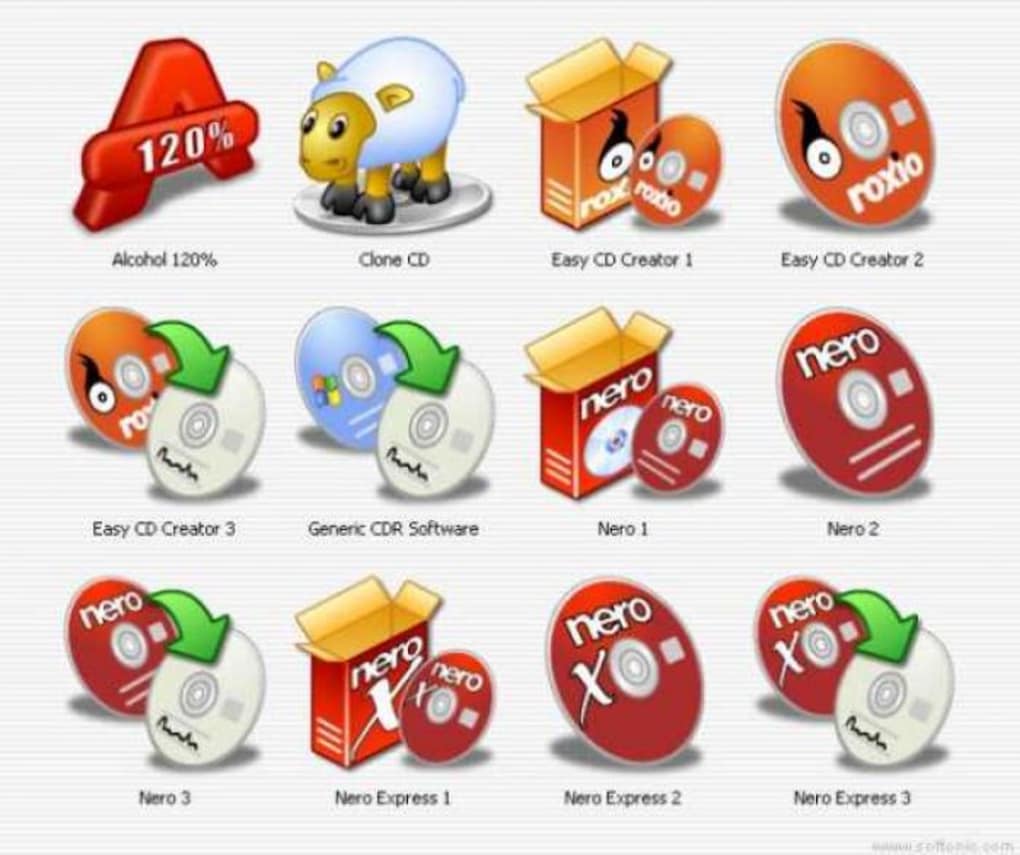
- Alcohol 120%: A widely used CD/DVD emulation and burning software known for its robust features.
- Clone CD: A program focused on creating exact copies of CDs and DVDs.
- Easy CD Creator (versions 1, 2, & 3): One of the early and influential CD burning suites.
- Generic CDR Software: A catch-all icon likely representing generic CD burning software.
- Nero (versions 1, 2, & 3): Another highly popular and feature-rich CD/DVD burning application.
- Nero Express (versions 1, 2, & 3): A simplified version of Nero, designed for easier use.
The inclusion of multiple versions of Nero and Easy CD Creator highlights the evolution of CD burning technology and provides a historical perspective on the software’s development. The presence of a “Generic CDR Software” icon suggests the collection aims for broader appeal, encompassing users who might have employed less mainstream applications.
The ZIP file also includes a README file, which provides crucial information regarding the use and licensing of the icons. This README file, attributed to the creator “FOOOD,” outlines usage guidelines and ensures responsible and legal usage of the assets.
Features and Functionality
CDR Software’s core functionality is remarkably straightforward: providing a collection of high-quality icons for personalization. Its simplicity is both a strength and a limitation. The lack of additional features beyond the icons themselves prevents complexity and ensures ease of use. The key features include:
- Icon Variety: The multiple versions and different software represented offer a good degree of choice, enabling users to customize their desktop to reflect their preferred CD burning software or a preferred aesthetic era.
- Format Compatibility: The availability of icons in both ICO and PNG formats ensures wider compatibility with various operating systems and applications. ICO is the standard format for Windows icons, while PNG offers more versatility for other uses.
- High-Quality Icons: While not explicitly stated, the software’s positive user reviews suggest the quality of the icons is generally considered to be good. The use of sharp and well-defined icons ensures they are visually appealing and don’t appear pixelated or blurry even on higher-resolution displays.
The relatively small file size further enhances the accessibility and convenience of the software. Downloading and extracting the files is a quick process, minimizing the time investment required to personalize the desktop.
Pros and Cons
Like any software, CDR Software presents both advantages and disadvantages. Weighing these aspects is crucial before deciding whether it aligns with individual needs.
Pros:
- Ease of Use: The simplicity of the software is a major plus. Downloading, extracting, and applying the icons is incredibly straightforward, even for novice users.
- No Installation Required: The software requires no installation process, making it completely portable and easily accessible.
- Multiple Formats: The availability of both ICO and PNG formats provides flexibility for different applications and operating systems.
- Free of Charge: The software is freely available, making it an attractive option for users on a budget or those simply looking for a quick and easy personalization solution.
- Nostalgia Factor: For those who remember the era of physical media, the icons offer a nostalgic trip back to simpler times.
Cons:
- Limited Functionality: CDR Software’s sole function is providing icons. It doesn’t offer any advanced features or additional tools.
- Small Icon Set: The number of icons is relatively limited, compared to some extensive icon packs available.
- Lack of JPG Format: The absence of JPG format might be a drawback for users who prefer this format for its wider compatibility or specific usage contexts.
- Outdated Relevance: The focus on older CD burning software might limit its appeal for users who only use modern digital distribution methods.
The limited functionality and small icon set should be considered before downloading. Users seeking a comprehensive icon pack with a large variety and advanced customization features might find CDR Software too simplistic.
Alternatives and Comparisons
Several alternatives to CDR Software exist for users seeking more extensive personalization options. Some key alternatives include:
- Icon Packs: Numerous icon packs offering thousands of icons across various styles and themes are readily available online. These packs often come with advanced customization features and broader thematic coverage than CDR Software.
- Icon Editors: Software allowing users to create their own icons offers unmatched control and allows the creation of custom icons tailored specifically to their needs. However, this requires more technical expertise and time investment.
- Theme Packs: Theme packs provide a holistic approach to desktop customization, changing not only icons but also cursors, wallpapers, and other visual elements.
The choice between CDR Software and these alternatives depends largely on individual needs and preferences. If a small, free, and easy-to-use set of icons is sufficient, CDR Software fits the bill. However, users requiring a more extensive collection, advanced features, or the ability to create custom icons should explore alternative options.
Conclusion
CDR Software provides a simple yet effective way to personalize a computer’s desktop with icons representing classic CD burning software. Its ease of use, free availability, and nostalgia factor make it an appealing choice for certain users. However, its limited functionality and small selection of icons might not satisfy those seeking a more comprehensive personalization solution. Ultimately, the decision of whether to use CDR Software depends on individual requirements and preferences. Weighing the pros and cons alongside the availability of alternative solutions is crucial for making an informed choice. The software serves as a niche tool for specific users, offering a unique and readily accessible way to add a personal touch to their computing experience.
File Information
- License: “Free”
- Version: “1.1”
- Latest update: “September 26, 2018”
- Platform: “Windows”
- OS: “Windows 98 SE”
- Language: “English”
- Downloads: “86.8K”
- Size: “934.53 KB”


