
Celtx is a powerful, all-inclusive software solution designed for professionals in the film, television, theatre, and new media industries. It seamlessly integrates robust scriptwriting capabilities with rich media pre-production support, all while facilitating online collaboration among team members. This comprehensive approach revolutionizes the traditional workflow, moving away from the cumbersome paper-based methods of the past. This article delves into the features, benefits, and alternatives of Celtx, exploring its impact on modern production processes.
Revolutionizing Pre-Production: From Paper Scripts to Digital Collaboration
Before Celtx, film and television productions relied heavily on paper scripts, often maintained in bulky three-ring binders overflowing with accompanying images, handwritten notes, and supplementary documents. Sharing project information was a slow, inefficient process limited to physical distribution. Celtx’s emergence marked a paradigm shift. Its digital environment allows for real-time collaboration, breaking down scripts digitally and making collaborative workflows far more streamlined and efficient.
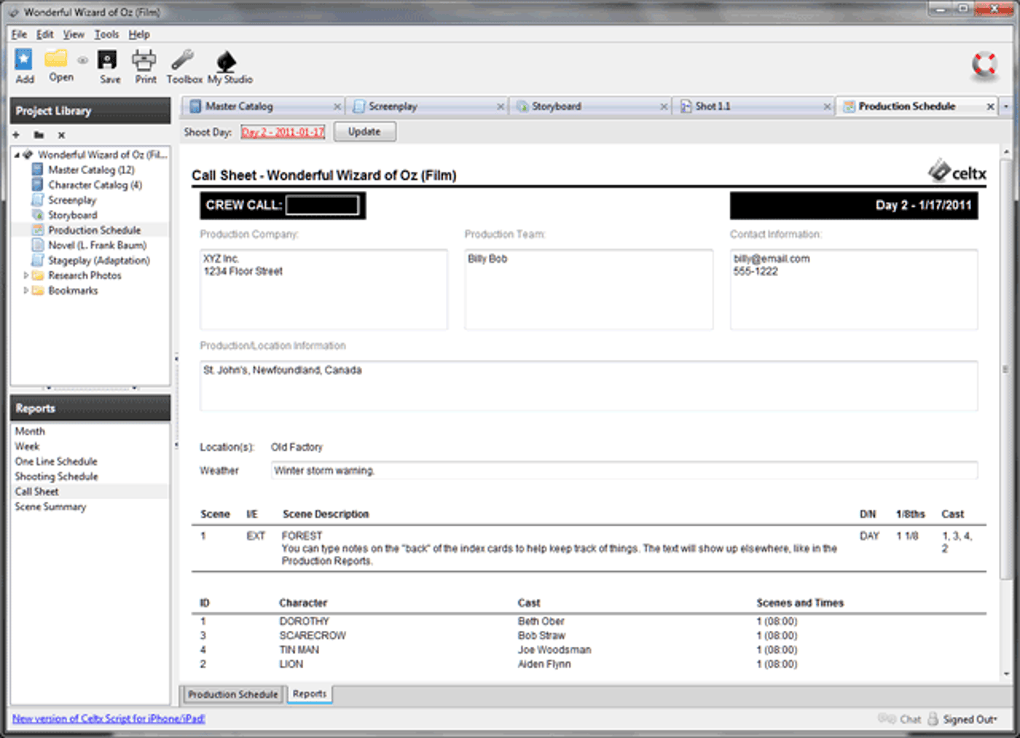
The software’s online capabilities mirror those of Google Docs, allowing for simultaneous access and editing by multiple team members. This is a significant advantage for distributed teams working remotely, eliminating the need for version control issues associated with multiple physical documents. Team members can view and edit the script concurrently, ensuring everyone is consistently updated with the latest revisions. This real-time collaboration is critical for the fast-paced nature of film and media production, enabling immediate feedback and quick adjustments to creative impulses. The immediate nature of feedback within the software streamlines the creative process, allowing for immediate reactions and alterations to the project.
Beyond online collaboration, Celtx offers an invaluable offline mode. This functionality is integral for maintaining productivity even when an internet connection is unavailable. Before disconnecting from the internet, users can easily initiate offline mode, enabling continued work on the script and related pre-production elements. The software allows for offline editing of documents by granted team members. Once offline, a unique URL is generated for the document, allowing easy access and resumption of online collaboration upon reconnection. This ensures seamless transitions between online and offline work environments, maintaining the flow of creative output.
Streamlined Script Breakdown, Budgeting, and Scheduling
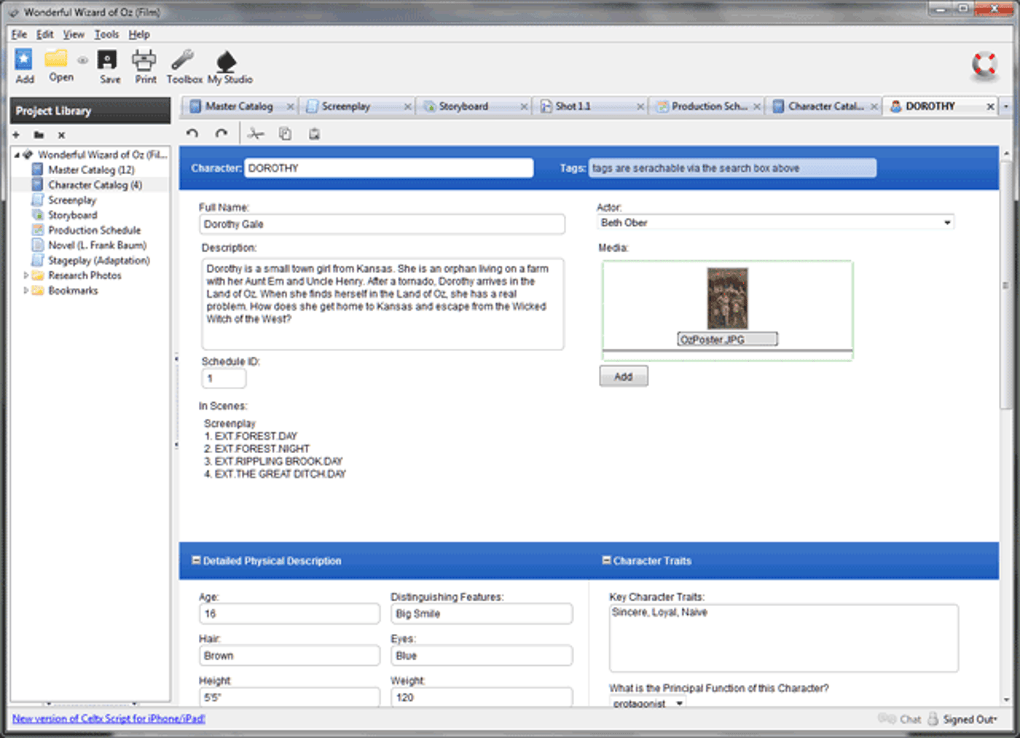
A crucial aspect of film and television production is the detailed breakdown of the script. This process involves integrating information related to items, budgeting, and scheduling into individual scenes. Celtx simplifies this complex task by allowing users to highlight words within the script and associate a wide range of data with them. This data is automatically synchronized with the script and the catalog, creating a holistic, integrated system.
Breakdown items are categorized (actors, additional labor, animals, props, etc.), and each category is represented by a distinct color code in the script. This visual organization enhances clarity and facilitates easy identification of specific elements. The synchronized system integrates items from the script breakdown into a user-friendly catalog accessible in the ‘Project View’. This centralized catalog facilitates efficient management of resources. Collaborators can manually add items, complete with media, cost, and budgeting information. This data is automatically incorporated into the budget sheet, providing a comprehensive financial overview of the production.
Furthermore, the stripboard and calendar tabs offer clear visual representations of the production schedule, ensuring every team member has access to the same information. The integration of data between various sections (reports, call sheets) minimizes manual data entry and reduces the potential for human error. Adding locations to scenes is equally straightforward, requiring only input into the designated left-hand panel. This level of integration minimizes errors and inconsistencies often found in traditional methods.
Celtx: A Superior Alternative to Traditional Methods
Compared to traditional methods, Celtx presents a clear advantage. While alternatives such as Final Draft exist, these options often come with a considerable price tag. Microsoft Word, although free, lacks the specialized features and integrated workflow of dedicated scriptwriting software. Celtx provides a free, comprehensive solution bridging the gap between basic word processing and professional-grade scriptwriting tools.
Unlike many software packages that require downloads and installations, Celtx operates via a simple login system. This eliminates the need for complex installation procedures, reducing the time and effort required to get started. The software is available for both Mac and Windows systems, supporting a broad range of users. Furthermore, Celtx’s continuous updates ensure compatibility with the latest operating systems and technologies.
The environmental benefits of Celtx are noteworthy. By replacing paper-based scripts, the software contributes to a more eco-friendly production process, reducing the consumption of paper and other resources. Its centralized, digital platform promotes unity and collaboration, eliminating the confusion and delays often associated with managing numerous physical documents and the challenge of distributing them to many team members.
Advantages and Disadvantages of Celtx
Pros:
- Free: Celtx offers its core functionality without any subscription fees, making it accessible to a wider range of users.
- No Download Required: The browser-based nature of the software simplifies access and eliminates installation complexities.
- Cross-Platform Compatibility: Celtx works seamlessly on Mac and Windows systems, and a mobile application further expands accessibility.
- Real-time Collaboration: Simultaneous editing and viewing of documents streamline workflow and enhance teamwork.
- Comprehensive Features: The software combines scriptwriting tools with pre-production features such as budgeting and scheduling, creating a complete solution.
- Eco-Friendly: The digital platform reduces paper consumption and minimizes environmental impact.
Cons:
- Offline Mode Limitations: The offline mode, while functional, restricts some features like image uploading and access to certain project elements. The offline mode requires initiation while online and limitations are placed on what can be done offline.
- Dependence on Internet Connectivity: Full functionality relies on a stable internet connection, limiting offline accessibility for certain features.
Alternatives to Celtx
While Celtx offers a robust free solution, several alternative applications cater to various needs and budgets. These include paid professional options like Final Draft, which provides a more advanced set of features but requires a purchase. Other free alternatives exist, such as Storybook, which focuses on plot organization and character development, and yWriter, a text editor designed for writers. These alternatives often lack the comprehensive integration of Celtx, which seamlessly combines scriptwriting with pre-production tools.
Conclusion
Celtx represents a significant advancement in scriptwriting and pre-production workflows. Its free, accessible platform, coupled with its comprehensive features and emphasis on collaboration, makes it a compelling choice for both independent filmmakers and large production teams. While some limitations exist concerning offline functionality, the overall benefits of real-time collaboration, integrated pre-production tools, and environmental consciousness significantly outweigh these drawbacks. For those seeking a free, efficient, and comprehensive solution for managing film and television productions, Celtx stands out as a powerful and valuable tool.
File Information
- License: “Full”
- Version: “4.42”
- Latest update: “December 27, 2023”
- Platform: “Windows”
- OS: “Windows 7”
- Language: “English”
- Downloads: “1.1M”


