
CheatSheet is a free, lightweight utility application for macOS that significantly enhances productivity by providing instant access to keyboard shortcuts. Developed by Media Atelier, this tool has gained immense popularity among Mac users for its simplicity and effectiveness in streamlining workflows. Instead of memorizing numerous keyboard shortcuts across different applications, CheatSheet acts as a readily available reference, placing all the shortcuts at your fingertips. This eliminates the need to constantly search for commands, ultimately boosting efficiency and saving valuable time. This review explores the capabilities, limitations, and overall value of CheatSheet for Mac users.
Effortless Access to Keyboard Shortcuts
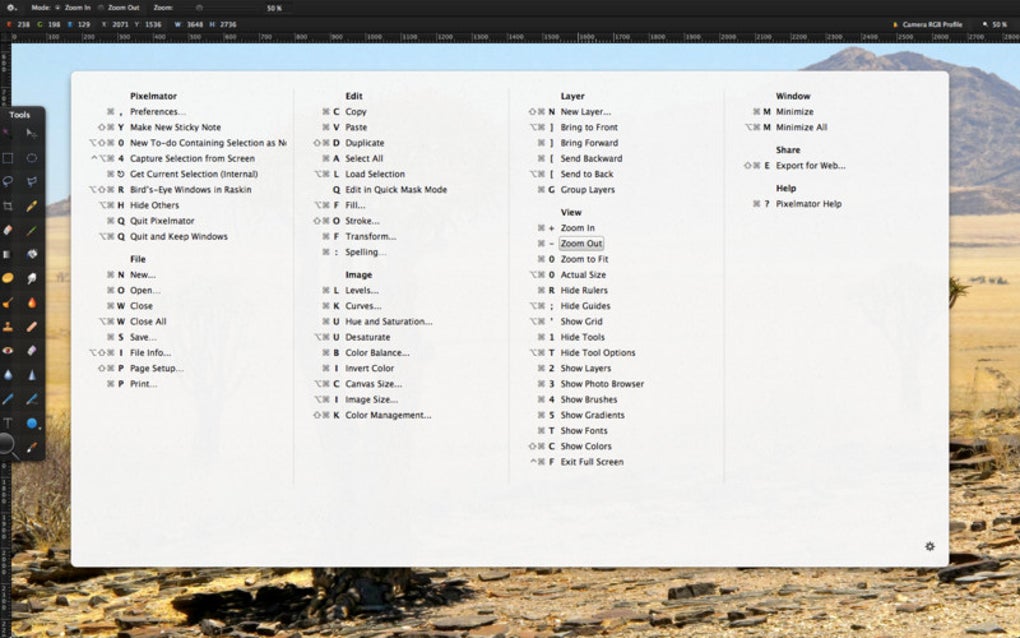
CheatSheet’s core functionality revolves around its ability to instantly display all available keyboard shortcuts for the currently active application. This is achieved with a simple, intuitive process: holding down the Command key (⌘) for two seconds triggers a pop-up window displaying a comprehensive list of shortcuts, meticulously categorized for easy navigation. These shortcuts are presented in a clear, user-friendly format, allowing users to quickly identify and utilize the desired command. Instead of hunting through menus or online documentation, users can instantly execute actions with a single keystroke combination after a brief consultation of the CheatSheet panel.
The application seamlessly integrates into the macOS environment. Regardless of the application being used – from word processors like Microsoft Word to creative design suites like Adobe Photoshop, or even games – the same simple Command key press consistently reveals the available shortcuts. The flexibility extends to the execution method; users can either type the shortcut directly from the keyboard or conveniently click on the shortcut within the CheatSheet panel to trigger the action. This dual-mode execution caters to diverse user preferences and optimizes workflow based on individual needs.
Beyond Immediate Convenience: Long-Term Benefits
While the immediate access to shortcuts is undoubtedly a significant advantage, CheatSheet’s value extends far beyond mere convenience. The application acts as a powerful learning tool, passively helping users memorize frequently used keyboard shortcuts. Through repeated use, users develop muscle memory, gradually reducing their reliance on the CheatSheet itself. This gradual learning process ultimately translates into enhanced speed and efficiency in the long run. By constantly presenting the available shortcuts, CheatSheet fosters familiarity and accelerates the process of mastering keyboard shortcuts within diverse applications.
The time saved through this method is considerable. The elimination of the need to search for individual commands reduces time spent on clerical tasks and allows users to focus on the core aspects of their work, whether it’s writing a document, editing an image, or coding a program. The cumulative time saved over time is substantial and contributes significantly to increased productivity. The application’s minimal impact on system resources further contributes to its seamless integration into existing workflows without impacting performance.
Limitations and Areas for Improvement
Despite its numerous strengths, CheatSheet does have some limitations that should be considered. The most prominent limitation is its lack of universal application support. While CheatSheet effectively works with a wide range of applications commonly used by Mac users, including productivity suites, design software, and many games, there are instances where it fails to provide shortcut information.
This lack of support stems from applications that either do not utilize keyboard shortcuts extensively or have not been specifically configured for compatibility with CheatSheet. Unfortunately, there’s no readily available, official list of supported and unsupported applications. Determining whether a specific app is supported requires direct testing – pressing the Command key for two seconds and observing whether a panel with shortcuts appears. This lack of comprehensive documentation is a noticeable drawback, as users might invest time trying the application with an incompatible program only to discover it doesn’t work.
A Powerful Tool for Most Users
Despite the limitation of unsupported applications, CheatSheet remains a highly recommended tool for a large majority of Mac users. Its benefits significantly outweigh its limitations for the vast array of applications it successfully supports. The convenience and time-saving features are substantial, especially for users who frequently switch between various applications or engage in tasks requiring repetitive keyboard input. The long-term benefits of learning and internalizing keyboard shortcuts further strengthen CheatSheet’s value proposition.
The application’s small file size (a little over 1MB) and minimal resource consumption ensure seamless integration into the existing system without impacting performance. The simple and intuitive interface makes it accessible to users of all skill levels, regardless of their prior experience with keyboard shortcuts. This combination of ease of use, potent functionality, and long-term benefits positions CheatSheet as an indispensable tool for enhancing productivity on macOS.
Comparison with Alternative Applications
Several alternative applications offer similar functionality to CheatSheet, albeit with varying features and approaches. Some alternatives provide more advanced features, while others might prioritize a different aspect of user experience. A brief comparison with a few notable alternatives will illuminate the relative strengths and weaknesses of CheatSheet.
-
KeyCue: KeyCue is a powerful alternative that offers a more comprehensive and visually detailed display of keyboard shortcuts. However, it typically comes with a price tag (a trial version is available). KeyCue might be preferable for users needing more detailed information or a more visually appealing interface. The added features, however, come at the cost of higher resource consumption.
-
Spectacle: Spectacle focuses on window management rather than keyboard shortcuts directly. While not a direct competitor, it enhances overall workflow efficiency by simplifying window arrangement. This is particularly beneficial for users who frequently work with multiple applications and require efficient window management to optimize their workspace. Combining Spectacle with CheatSheet can create a highly effective productivity setup.
- AppCleaner: AppCleaner is a completely different type of utility. Instead of focusing on keyboard shortcuts, it assists in the complete removal of applications and their associated files. It’s not a direct replacement for CheatSheet but represents a valuable supplementary tool for managing applications and optimizing system performance.
While these alternative applications cater to specific needs, CheatSheet’s focus on providing simple, straightforward access to keyboard shortcuts in a lightweight package remains its key differentiator. Its ease of use and minimal resource requirements make it an excellent choice for users primarily seeking a quick and efficient way to access keyboard shortcuts without added complexities.
Conclusion: A Must-Have for Mac Users
In conclusion, CheatSheet for Mac stands as a highly valuable addition to the arsenal of any Mac user seeking to enhance their productivity. While not a perfect solution—its lack of universal application support being its main drawback—its benefits significantly outweigh its limitations for the majority of users. The simple interface, combined with the significant time savings and the long-term benefits of learning keyboard shortcuts, make CheatSheet a compelling tool for boosting efficiency and streamlining workflows. Its lightweight nature ensures that it integrates seamlessly into the Mac ecosystem without any performance penalties. For a free utility, CheatSheet provides exceptional value and is highly recommended for any Mac user looking to improve their productivity and mastering their device’s full potential.
File Information
- License: “Free”
- Latest update: “May 24, 2023”
- Platform: “Mac”
- OS: “Mac OS X”
- Language: “English”
- Downloads: “268.9K”
- Size: “2.76 MB”


