
Check Printer is a Windows-based application designed to streamline the process of creating and printing checks. While the software might seem outdated in today’s predominantly digital payment landscape, it still holds value for businesses and individuals who frequently utilize checks for transactions. This review delves into its features, benefits, drawbacks, and user experiences to provide a comprehensive understanding of its functionality and relevance in the modern era.
Functionality and Features: Automating Check Writing
Check Printer’s primary function is to automate the process of filling out and printing checks. This eliminates the manual effort of writing checks, which can be time-consuming and prone to errors. The software allows users to design and print checks directly onto pre-printed check stock, eliminating the need for tedious manual alignment and precise handwriting. This automated approach significantly enhances efficiency, especially for businesses processing numerous checks regularly.
The software offers a range of customizable features. Users can select from various pre-designed check layouts or create their own custom layouts to match the specifics of their checkbooks. Font selection is also customizable, allowing users to maintain brand consistency or personal preferences. This flexibility accommodates diverse check designs and ensures compatibility with a wide range of checkbooks.
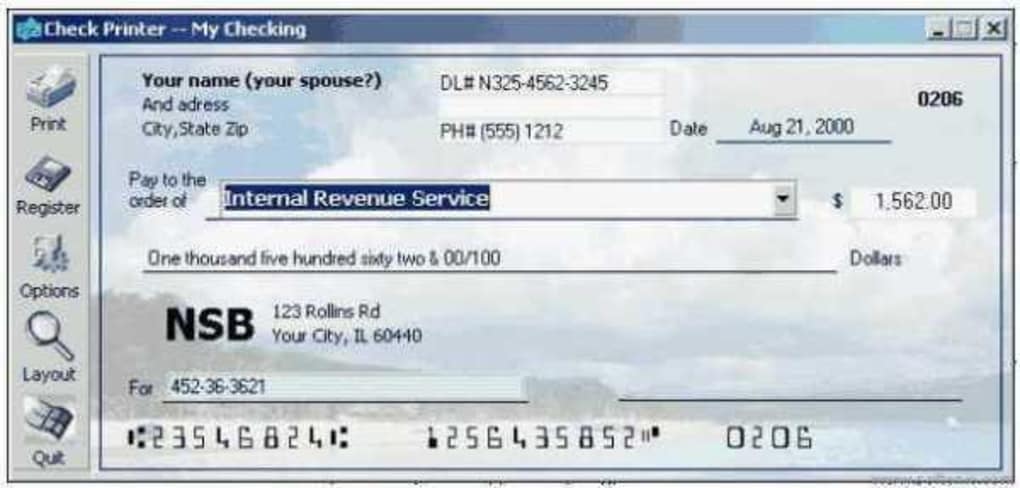
Beyond printing, Check Printer assists with check management. It includes an integrated address book for storing recipient information, simplifying the process of selecting and addressing checks. A built-in check database allows users to track their payments, providing a record of issued checks and associated details. Furthermore, the software supports data import from popular financial software like Quicken and Money, easing data transfer and reducing manual data entry.
The integration of an address book and check database adds a layer of organizational functionality. This capability streamlines the process of managing check recipients and tracking issued checks, improving financial record-keeping and minimizing the risk of errors or omissions. The data import feature from Quicken and Money enhances integration with existing financial management systems, further simplifying the workflow for users already utilizing these applications.
User Experience and Interface: Ease of Use and Accessibility
Check Printer boasts an intuitive and user-friendly interface, making it accessible to users with varying levels of technical expertise. The straightforward design and clearly labeled functions minimize the learning curve, allowing users to quickly become proficient in utilizing the software’s features. The software’s simplicity reduces the time and effort required to learn the program and begin using its functions effectively.
The software’s intuitive design makes navigating its features simple and straightforward, even for users with limited technical expertise. The straightforward design and clearly labeled functions minimize the learning curve. Users can quickly become proficient in utilizing the software’s features, reducing the time investment required to learn and efficiently use the program.
Advantages and Disadvantages: Weighing the Pros and Cons
Check Printer offers several significant advantages. The automation of check writing saves considerable time and effort, particularly for businesses handling a high volume of checks. The customizable layouts and fonts ensure compatibility with a wide range of checkbooks and allow for branding consistency. The integrated address book and check database enhance organization and improve financial record-keeping. Finally, the ability to import data from popular financial software simplifies data transfer and minimizes manual data entry.
However, Check Printer also has limitations. A primary drawback is its inability to print checks on blank check stock; it requires pre-printed checkbooks. This limitation restricts its usability for individuals or businesses without access to pre-printed checks. The software’s age and limited updates may also present compatibility challenges with newer operating systems and printers. The software’s limitations require users to have pre-printed checks, which may be impractical for some. Additionally, its age and lack of frequent updates may result in compatibility challenges with newer operating systems or printers.
Despite its limitations, Check Printer remains a viable option for specific use cases. Its strengths lie in its ability to automate a tedious process, making it particularly beneficial for individuals or businesses who frequently utilize checks and have access to pre-printed checkbooks. The software’s simple interface and ease of use further contribute to its practicality.
User Reviews and Feedback: Real-World Experiences
User reviews reveal a mix of positive and negative experiences. Many users praise the software’s ease of use and the time-saving benefits it provides. The customizable layouts and the integrated address book are frequently cited as valuable features. However, some users have criticized the limitation of printing only on pre-printed checks and the software’s age. There are reports of occasional download issues and instances where the software failed to function as expected. The mixed feedback highlights the software’s strengths and weaknesses from the perspective of its users.
Positive user feedback consistently highlights the software’s ease of use and time-saving capabilities. Many users appreciate the ability to customize check layouts and utilize the integrated address book. However, some negative feedback centers on the software’s inability to print on blank check stock and its age, which can lead to compatibility issues. The mixed feedback illustrates that the software’s value depends on individual circumstances and expectations.
Conclusion: Relevance and Future Prospects
Check Printer remains a relevant tool for those who still rely heavily on check payments, despite the increasing prevalence of electronic payment methods. Its automation features significantly improve efficiency and reduce the risk of errors associated with manual check writing. However, the software’s limitations, particularly its incompatibility with blank check stock, restrict its applicability. In the future, updating the software to address these limitations and enhance compatibility with modern operating systems and printers could extend its appeal and ensure its continued relevance.
In conclusion, Check Printer caters to a specific niche within the check-writing market. While its functionality remains valuable for users who extensively utilize checks and possess pre-printed check stock, its limitations must be considered. Future updates incorporating broader compatibility and additional features could significantly increase its appeal. The software’s ongoing relevance will depend on its ability to adapt to the evolving demands of the payment processing landscape.
File Information
- License: “Trial version”
- Version: “5.7.3469”
- Latest update: “September 29, 2021”
- Platform: “Windows”
- OS: “Windows 98”
- Language: “English”
- Downloads: “92.3K”
- Size: “3.04 MB”


