
In the intricate universe of chemistry, where invisible forces govern the assembly of atoms into complex molecules, the ability to visualize and manipulate these structures is paramount. For students, educators, and professional chemists alike, translating abstract chemical concepts into tangible, visual models has long been a challenge. Generic graphic design software often falls short, struggling to capture the precise geometries, bond angles, and symmetrical nuances that define molecular architecture. This is where specialized tools become indispensable, and among them, ChemSketch emerges as a cornerstone application.
ChemSketch is a remarkable and freely available software package designed specifically for drawing chemical structures, reactions, and generating sophisticated two-dimensional (2D) and three-dimensional (3D) molecular models. Developed by ACD/Labs, it addresses a critical need within the scientific community by providing an intuitive yet powerful platform for representing the microscopic world of chemistry. More than just a drawing tool, ChemSketch enables users to create accurate, consistent, and detailed molecular representations, paving the way for deeper understanding, clearer communication, and more efficient scientific exploration. Whether you’re sketching a simple organic compound, illustrating a complex biochemical pathway, or analyzing the spatial arrangement of atoms in a novel material, ChemSketch offers the precision and versatility required to bring chemical structures to life. It’s a specialized instrument in a scientist’s digital toolkit, transforming the often-abstract nature of chemistry into an accessible visual language. Available for Windows and boasting a strong security status, ChemSketch represents a significant utility for anyone engaged with the chemical sciences, offered without cost on platforms like PhanMemFree.
ChemSketch: A Powerful Tool for Chemical Drawing and Modeling
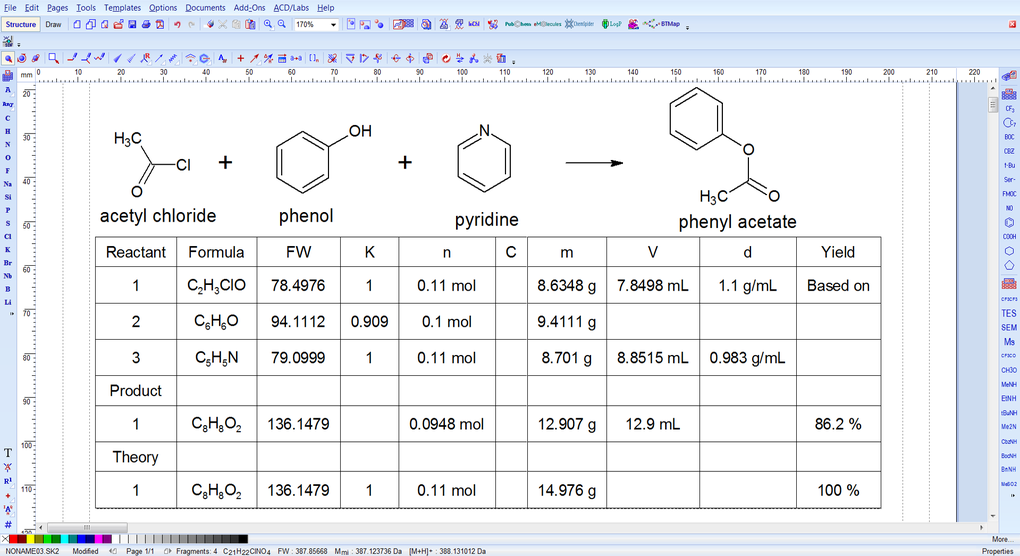
At its core, ChemSketch empowers users to construct molecular diagrams with an unparalleled degree of detail and accuracy. Unlike general-purpose drawing applications, ChemSketch is built with a deep understanding of chemical principles. It allows for the precise placement of atoms, the drawing of various bond types (single, double, triple, aromatic), and the easy incorporation of functional groups and rings. This foundational capability extends to representing complex reactions, including mechanisms with electron-pushing arrows, stereochemical notations, and reaction conditions.
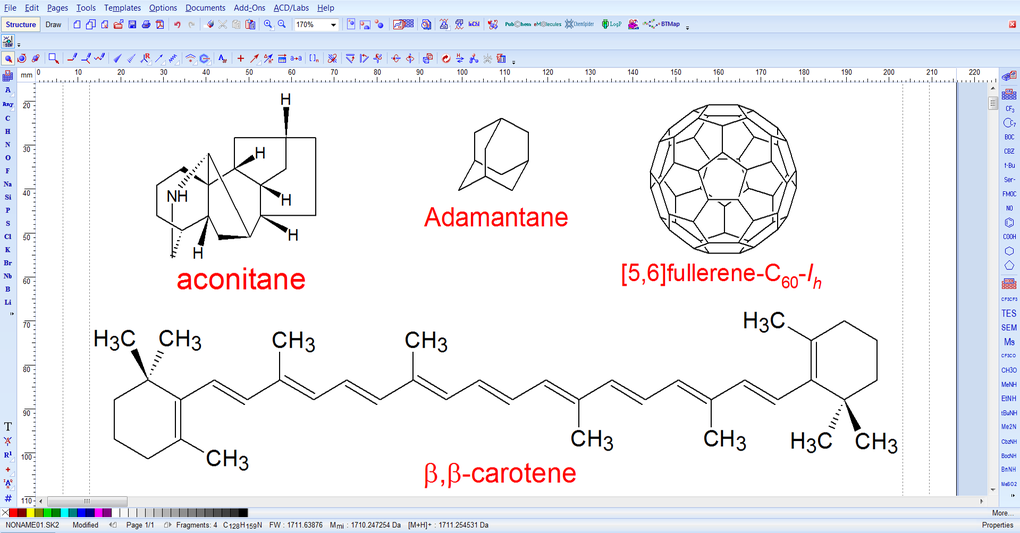
One of ChemSketch’s most lauded features is its capacity for creating consistent and symmetrical molecular representations. A common frustration for chemists using standard graphic design software is the difficulty in maintaining uniform dimensions and orientations when depicting multiple molecules or isomers. This inconsistency can lead to misleading diagrams that hinder comparison and analysis. ChemSketch elegantly resolves this by enforcing a high degree of uniformity in its outputs. Molecules drawn with ChemSketch will exhibit similar characteristics in terms of dimensional orientation and size, which is incredibly beneficial when scientists need to compare different models side-by-side or track changes in molecular structure across a series of compounds. This feature is not just about aesthetics; it’s about maintaining scientific rigor and clarity, ensuring that visual aids accurately reflect the underlying chemical reality.
Furthermore, ChemSketch extends its capabilities into the realm of three-dimensional modeling. The ability to visualize molecules in 3D is crucial for understanding stereochemistry, molecular recognition, and intermolecular interactions. With ChemSketch, users can generate 3D models from their 2D drawings, rotate them to view from any angle, and even measure bond lengths and angles. This spatial perception is vital for drug design, materials science, and biochemistry, where the precise arrangement of atoms in space dictates function. While it might require some time to master its more advanced functionalities, the investment in learning ChemSketch pays dividends by offering a powerful platform for visualizing the nuanced world of molecular structures. The software’s focus on both 2D drawing and 3D modeling makes it an indispensable asset for comprehensive chemical representation. Its design philosophy centers on providing tools that are specifically tailored to the unique demands of chemical illustration, making it a powerful program that truly serves its niche.
Beyond the Blackboard: Enhancing Education and Reference in Chemistry
The impact of ChemSketch on chemical education and reference is profound, transforming how complex scientific concepts are taught, learned, and documented. For students, ChemSketch serves as an interactive textbook and a virtual laboratory. It allows them to move beyond static images in textbooks and actively construct, manipulate, and observe molecular structures. This hands-on engagement fosters a deeper understanding of chemical bonding, molecular geometry, and stereochemistry – topics that can be notoriously abstract when taught solely through diagrams or verbal descriptions. Instead of merely memorizing structures, students can build them, experiment with different arrangements, and immediately see the implications of their choices, such as changes in symmetry or spatial orientation. This direct interaction enhances learning retention and develops a more intuitive grasp of chemical principles.
Educators, too, find ChemSketch to be an invaluable resource. It empowers them to create dynamic, highly accurate, and visually appealing teaching materials, including lecture slides, handouts, and exam questions. The ability to quickly generate clear diagrams of complex molecules or reaction mechanisms means less time spent wrestling with generic drawing tools and more time focused on pedagogy. For instance, explaining chirality or conformational analysis becomes significantly easier when a 3D model can be rotated and projected for the entire class to see, highlighting specific features or spatial relationships. Furthermore, ChemSketch’s consistency in molecular representation ensures that all diagrams used in a curriculum maintain a uniform standard, reducing potential confusion for students.
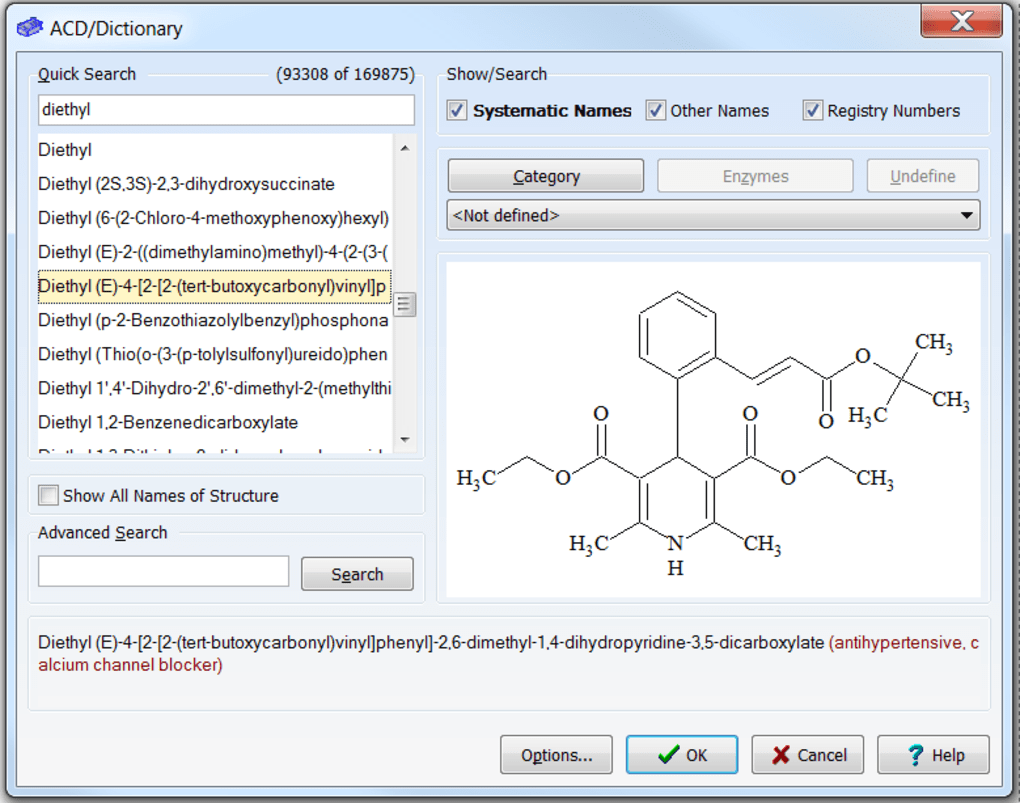
Beyond the classroom, ChemSketch plays a critical role in scientific reference and communication. Researchers rely on it for preparing figures for publications, presentations, and grant applications. The software’s capacity to produce professional-quality chemical diagrams ensures that scientific findings are communicated with precision and clarity, upholding the high standards of academic and industry reporting. Moreover, the integration of tools that allow for connection with databases means that ChemSketch can serve as a gateway to broader scientific knowledge, helping users retrieve information about compounds directly related to their drawings. In essence, ChemSketch bridges the gap between theoretical knowledge and practical application, providing a robust platform that supports the entire spectrum of chemical learning, teaching, and scientific discourse, solidifying its place as a cornerstone in “Education and Reference” tools for the scientific community.
Boosting Scientific Productivity: ChemSketch in the Modern Lab
In today’s fast-paced scientific environment, productivity is paramount. Chemists, researchers, and lab professionals are constantly seeking tools that can streamline their workflows, reduce repetitive tasks, and enhance the efficiency of their documentation and analysis. ChemSketch stands out as a significant contributor to scientific productivity, offering a suite of features that simplify various aspects of chemical work, from initial conception to final reporting.
One of the most immediate benefits of ChemSketch is its ability to accelerate the creation of professional-grade chemical diagrams. Before specialized software, chemists often had to painstakingly draw structures by hand or rely on cumbersome general drawing applications, which were prone to errors and inconsistencies. ChemSketch automates many aspects of drawing, providing pre-set templates for common rings, functional groups, and even entire compounds. This significantly reduces the time and effort required to construct complex molecules, allowing chemists to focus more on the scientific content rather than the mechanics of drawing. For example, sketching a steroid backbone or a complex natural product, which would be a laborious task manually, becomes a matter of a few clicks and adjustments within ChemSketch.
Beyond basic drawing, ChemSketch enhances productivity by offering tools that aid in chemical analysis and reporting. The software’s ability to calculate bond angles and distances in 3D models provides quick insights into molecular geometry, which is crucial for understanding reactivity and properties. This eliminates the need for external tools or manual calculations, integrating analytical capabilities directly into the design process. Furthermore, for those involved in analytical chemistry, ChemSketch provides features relevant to techniques like Mass Spectrometry (MS), Thin-Layer Chromatography (TLC), and Gas Chromatography (GC). While the specifics might vary, the inclusion of such features indicates its potential to assist in interpreting and visualizing data from these experimental methods, thereby streamlining the overall research process.
The ability to export chemical structures into various formats, including those compatible with word processors like Microsoft Word and presentation software like PowerPoint, is another critical productivity booster. This seamless integration ensures that chemists can easily incorporate their diagrams into lab reports, scientific papers, and presentations without loss of quality or requiring extensive reformatting. This makes preparing documents faster and more professional, allowing scientists to dedicate more time to experimental work and data interpretation. In essence, ChemSketch acts as a comprehensive “Productivity” tool for the modern chemist, centralizing drawing, modeling, and certain analytical functions into a single, accessible platform, thereby significantly enhancing the efficiency and quality of scientific output.
Utilities and Tools: Advanced Features for Comprehensive Analysis
While ChemSketch’s core function is drawing and modeling, its true value lies in the array of advanced utilities and specialized tools it offers, elevating it beyond a simple graphic editor to a comprehensive chemical analysis and visualization platform. These tools are designed to assist chemists not just in depicting molecules, but also in understanding their properties and relationships, making it a powerhouse for detailed chemical work.
A significant utility embedded within ChemSketch is its extensive library of pre-designed templates. While some users might initially feel there aren’t enough, the software does provide a broad range of common compounds, functional groups, and ring systems. These templates serve as building blocks, allowing users to rapidly assemble complex structures without having to draw every atom and bond from scratch. This feature is particularly useful for organic and medicinal chemists who frequently work with variations of established scaffolds. The ability to quickly retrieve and modify these templates drastically reduces drawing time and ensures accuracy, as the pre-drawn structures adhere to accepted chemical conventions.
Furthermore, ChemSketch’s analytical capabilities extend to providing quantitative data about molecular structures. As mentioned, it can calculate bond lengths and angles from 3D models. This is more than just a visualization aid; it’s a direct analytical tool that can help in validating theoretical models, comparing different conformations, or even predicting reactivity based on steric strain. For researchers, having these measurements readily available within the drawing environment is an immense advantage, saving time and ensuring consistency between visual representation and numerical data.
Another powerful utility often overlooked is ChemSketch’s capacity to connect with external databases. User reviews highlight its ability to link to databases for searching information on compounds. This integration transforms ChemSketch from an isolated drawing tool into a gateway for scientific inquiry. Imagine drawing a novel compound and then, with a few clicks, being able to search for existing literature, spectroscopic data, or physical properties related to similar structures. This interconnectedness allows chemists to enrich their understanding of the molecules they are working with, fostering more informed decisions and accelerating research. Whether it’s generating tautomeric forms, calculating molecular weights, or predicting log P values, ChemSketch includes various utilities that cater to a wide range of chemical analyses. These integrated features truly position ChemSketch as a multifaceted “Utility and Tool” that supports the entire lifecycle of chemical research and education.
Understanding the User Experience: Installation, Support, and Community Insights
The overall user experience with any software is a critical factor in its adoption and utility, and ChemSketch is no exception. While universally praised for its powerful capabilities and the invaluable service it provides to the chemistry community, especially as a free tool, there are certain aspects of its user experience that warrant discussion, particularly concerning installation, learning curve, and community feedback.
The initial hurdle for many potential users revolves around the download and installation process. Several user reviews from the PhanMemFree.org platform indicate that while ChemSketch is free, it often requires registration and sometimes a license number from the developer, ACD/Labs. This extra step, though quick (often taking “2 minutes” as one user noted), can be a minor inconvenience for those expecting a direct, one-click download. While the PhanMemFree.org platform makes it clear that it’s “Gratuito” (Free), the developer’s requirement for registration is a mechanism for them to track usage and potentially offer support or updates. It’s a small price to pay for such a comprehensive freeware, but it’s an important point for new users to be aware of.
Once installed, the learning curve for ChemSketch can be steep. This is a common feedback point: “Es difícil de aprender a usar” (It’s difficult to learn to use). Unlike simplistic drawing apps, ChemSketch’s depth of features and chemical intelligence means that mastering its full potential requires time and dedicated practice. New users might initially struggle with navigating its interface or understanding the nuances of its various tools for drawing, modeling, and analysis. However, persistent users and long-time adopters emphasize that the effort is well worth it, as the rewards in terms of precision, consistency, and advanced functionality are substantial. The availability of manuals, sometimes in multiple languages including Spanish, certainly aids in this learning process, providing structured guidance.
Despite the initial challenges, the overwhelming sentiment from user reviews is positive. Phrases like “Simplemente el mejor” (Simply the best), “Maravillosa y de gran ayuda” (Wonderful and very helpful), and “herramienta esencial si eres estudiante o estas relacionado con la quimica” (essential tool if you are a student or related to chemistry) highlight its profound impact. Users commend its comprehensive nature, its ability to handle organic and inorganic structures, its user-friendly interface (once learned), and crucially, its freeware status for students. The ability to create structural formulas for “lo imposible” (the impossible) and its utility for chromatography tools, compound templates, and 3D models are frequently cited pros. While a few users noted the time required to create a complex drawing or perceived lack of pre-designed molecules, these are often balanced by the sheer power and versatility that ChemSketch offers once proficiency is achieved.
PhanMemFree.org lists ChemSketch as available for Windows 98 and later versions, with its most recent update in 2024 and 2025 (as indicated in the source data, possibly reflecting ongoing minor updates or future planning). The availability in various languages beyond English and Spanish, such as Japanese, Korean, German, and many others, underscores its global reach and the developer’s commitment to accessibility for a diverse scientific community. This multilingual support, coupled with its robust feature set and free availability, cements ChemSketch’s position as a globally valued asset for chemical drawing and modeling. The community’s continuous positive feedback, despite minor initial hurdles, reinforces its standing as a truly exceptional and essential piece of scientific software.
In conclusion, ChemSketch stands as a unique and indispensable tool in the digital landscape of chemistry. It provides a robust, free solution for accurately drawing, modeling, and analyzing chemical structures, overcoming the limitations of generic design software. While it presents a learning curve and requires a brief registration, the investment of time yields a powerful utility that significantly enhances education, boosts productivity, and offers advanced analytical capabilities for both students and seasoned professionals. Its global accessibility and strong community endorsement underscore its value, making ChemSketch a treasured asset for anyone dedicated to understanding and communicating the molecular world.


