
ChipGenius is a lightweight, portable application designed to provide comprehensive information about USB devices connected to a computer. Unlike many other system utilities, it doesn’t require installation, making it a readily available tool for troubleshooting and identifying USB devices. Its primary function is to quickly display detailed specifications and status reports for connected USB devices, proving invaluable in situations where Windows Explorer fails to identify or properly display a device. This detailed exploration will examine its functionality, advantages, limitations, and compare it to alternative solutions.
Unveiling the Power of ChipGenius: Features and Functionality
ChipGenius excels in its simplicity and speed. The program’s primary strength lies in its ability to quickly identify and detail the specifications of any connected USB device. This immediate access to information bypasses the often convoluted process of navigating through Windows Device Manager or other system settings. For users unfamiliar with the intricacies of system configuration, this streamlined approach significantly reduces troubleshooting time.
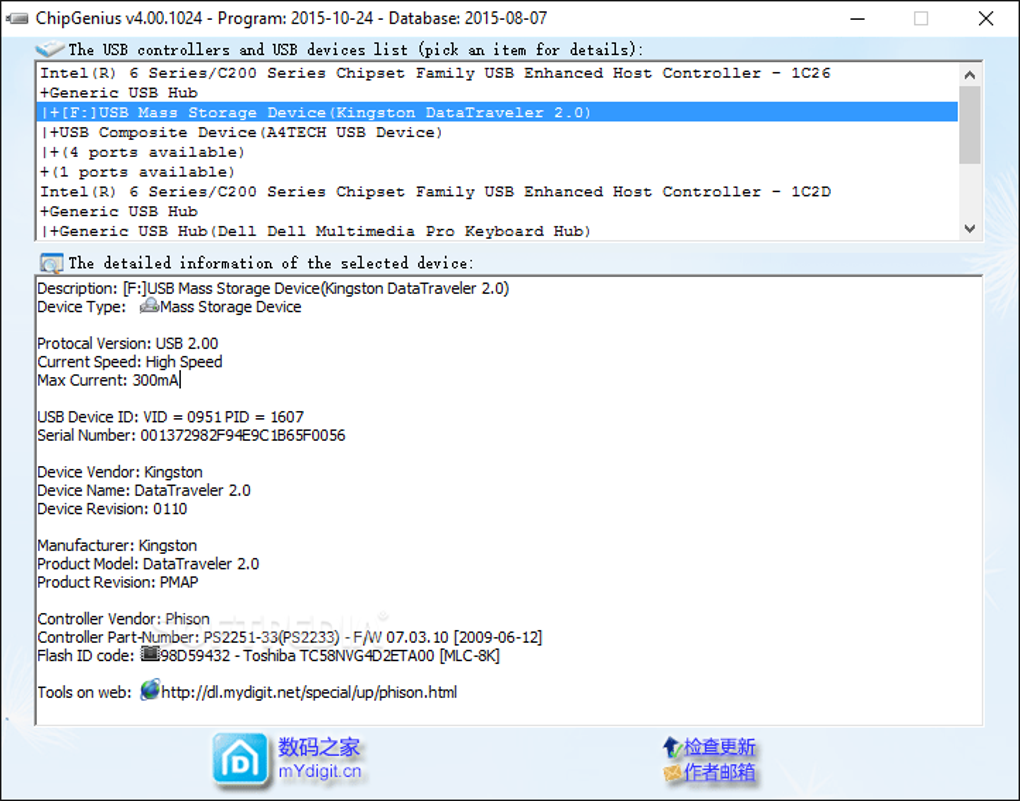
The application’s user interface is remarkably straightforward. Upon launching, ChipGenius immediately scans for connected USB devices and displays a concise summary of their properties. This information typically includes, but is not limited to:
-
Device Name and ID: Provides a clear identification of the USB device, including its manufacturer and model number. This is often crucial for identifying the specific device, especially when dealing with generic or unidentified devices. The device ID is a crucial piece of information for advanced troubleshooting and finding compatible drivers.
-
Protocol Version: Specifies the USB protocol version the device uses (e.g., USB 2.0, USB 3.0, USB 3.1, etc.). Understanding the protocol version helps determine the device’s speed capabilities and potential compatibility issues.
-
Processing Speed: Shows the device’s data transfer rate, providing insight into its performance characteristics. This is particularly helpful when diagnosing slow data transfer speeds or performance bottlenecks.
-
Serial Number: Unique to each device, the serial number acts as a definitive identifier, useful for tracking and identifying specific units, particularly important for warranty claims or tracking down problematic devices.
-
Manufacturer Information: ChipGenius often reveals detailed information about the device’s manufacturer, including contact information or support links – assisting in finding technical support or drivers.
-
Installation Date: Displays the date the device was first installed on the system. This can be helpful in determining the age of the device and its potential for hardware failure.
-
Device Status: Indicates whether the device is functioning correctly or if it has any errors. This allows for quick identification of malfunctioning devices.
Beyond this core functionality, ChipGenius offers the ability to save the retrieved information to a local file. This feature proves invaluable for documentation purposes or for sending specific device details to technical support personnel when seeking assistance with troubleshooting. The saved information can provide a detailed record of device configuration and status, simplifying the diagnosis of recurring problems.
Advantages of Using ChipGenius
ChipGenius offers several key advantages over other methods of identifying USB devices:
-
Portability: The program is entirely portable; it doesn’t require installation and can be run directly from a USB drive or other removable media. This flexibility is extremely useful for troubleshooting on multiple computers or when dealing with systems that restrict software installations.
-
Speed and Efficiency: ChipGenius provides near-instantaneous results, significantly reducing the time spent identifying and troubleshooting USB device issues. Its streamlined interface enhances efficiency, eliminating the need to navigate complex system settings.
-
Comprehensive Information: The application provides a rich set of details for each identified USB device, surpassing the limited information often presented in Windows Explorer or Device Manager.
-
Ease of Use: The intuitive interface and straightforward functionality make ChipGenius accessible to both novice and experienced users.
- Offline Functionality: Since it doesn’t require an internet connection, ChipGenius is readily available regardless of network accessibility. This is particularly beneficial in environments with limited or no internet connectivity.
Limitations of ChipGenius
Despite its strengths, ChipGenius is not without its limitations:
-
Limited Export Options: While ChipGenius allows saving device information locally, it lacks advanced export options, such as exporting to common spreadsheet formats like CSV or TXT. This restricts the ease of sharing information or conducting large-scale analysis of multiple devices.
-
Operating System Compatibility: ChipGenius may not be compatible with older operating systems, limiting its applicability to users with outdated systems. This is a critical limitation for users still reliant on older versions of Windows.
-
Lack of Advanced Features: ChipGenius lacks advanced features found in more comprehensive system utilities. It doesn’t offer functionality beyond identifying and displaying device information. More advanced diagnostics and repair tools are absent.
-
No Automatic Updates: The program’s update mechanism, if any, is not explicitly mentioned. Users might need to rely on manual updates, potentially missing critical bug fixes or improvements.
ChipGenius vs. Alternative Solutions
While ChipGenius provides a valuable service, several alternative tools offer comparable or expanded functionality:
-
Windows Device Manager: A built-in Windows utility, Device Manager offers a detailed view of all connected hardware, including USB devices. However, it can be less user-friendly than ChipGenius and requires navigating multiple menus.
-
Third-Party System Utilities: Several commercial and open-source system utilities provide broader functionality, including hardware diagnostics, driver management, and more comprehensive reporting capabilities. These applications often offer more advanced features but usually require installation and can be more resource-intensive.
-
Manufacturer-Specific Utilities: Some device manufacturers provide their own utilities for managing and troubleshooting their products. These utilities might offer more device-specific information, but they are limited to the manufacturer’s products.
The choice between ChipGenius and alternative solutions depends on the specific needs of the user. For quick and straightforward identification of USB device information, ChipGenius is an excellent choice. However, users requiring more advanced features or broader system diagnostics might prefer more comprehensive utilities.
Conclusion
ChipGenius remains a valuable and practical tool for quickly obtaining detailed information about connected USB devices. Its portability, ease of use, and comprehensive information make it a convenient solution for many users. While it lacks some features found in more advanced applications, its simplicity and effectiveness make it a strong contender for users seeking a lightweight and efficient method for identifying and troubleshooting USB device issues. Its greatest strength is its ease of access and rapid delivery of critical device information, bypassing the often more complex processes inherent in standard operating system utilities. The user should carefully consider their specific needs and the limitations of ChipGenius before deciding if it is the optimal solution for their requirements.
File Information
- License: “Free”
- Version: “1.0”
- Latest update: “September 30, 2023”
- Platform: “Windows”
- OS: “Windows 10”
- Language: “English”
- Downloads: “81.5K”


