
In the vibrant, evolving landscape of early 21st-century digital communication, before dedicated mobile apps and integrated web solutions became ubiquitous, users often sought alternative methods to interact with their favorite online platforms. Facebook, rapidly ascending to global dominance as the social networking site, was no exception. While its website offered a perfectly functional chat feature, many users yearned for the simplicity and directness of a desktop application, reminiscent of the popular instant messaging clients of the era. It was into this niche that “Chit Chat for Facebook” emerged, a Windows desktop client designed to liberate Facebook chat from the confines of the web browser.
Developed by Daniel Offer, Chit Chat for Facebook aimed to provide a streamlined, standalone experience for direct messaging on the social network. Released around 2011, a period when Facebook was still maturing its own official desktop and mobile applications, third-party clients like this offered a glimpse into how users desired to compartmentalize and optimize their online interactions. Available for free and compatible with Windows operating systems up to Windows 8, Chit Chat for Facebook represented a common type of utility – an application designed to bridge a perceived gap in the primary service’s offering, providing convenience and a familiar user interface.
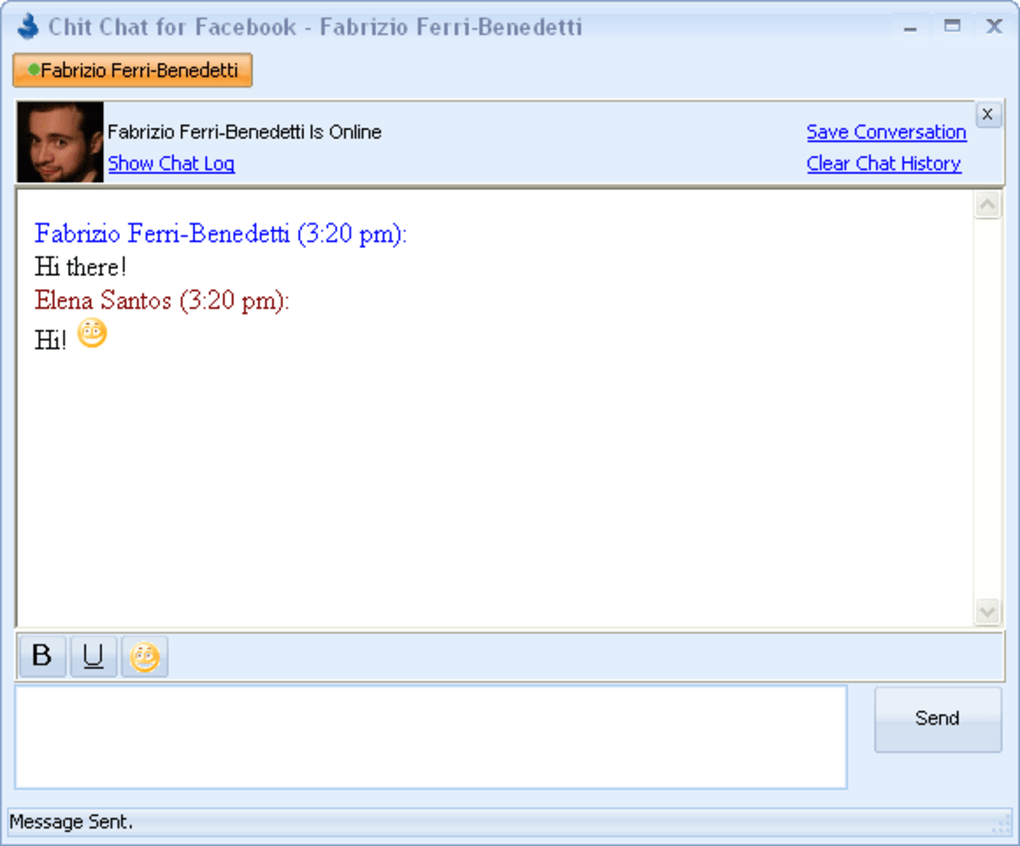
At its core, Chit Chat for Facebook was intended to function much like any traditional instant messaging client. Upon installation and logging in with Facebook credentials, users would be presented with their contact list, neatly categorized into online and offline statuses. The interface drew immediate comparisons to established players like Windows Live Messenger, featuring a clean, minimalist design focused solely on the chat experience. Initiating a conversation was as simple as a double-click on a contact’s name, opening a dedicated chat window. Beyond basic messaging, the application boasted features like the ability to log chat histories, providing a record of past conversations, and discrete notifications for contacts coming online or going offline, ensuring users stayed informed without constantly monitoring a browser tab.
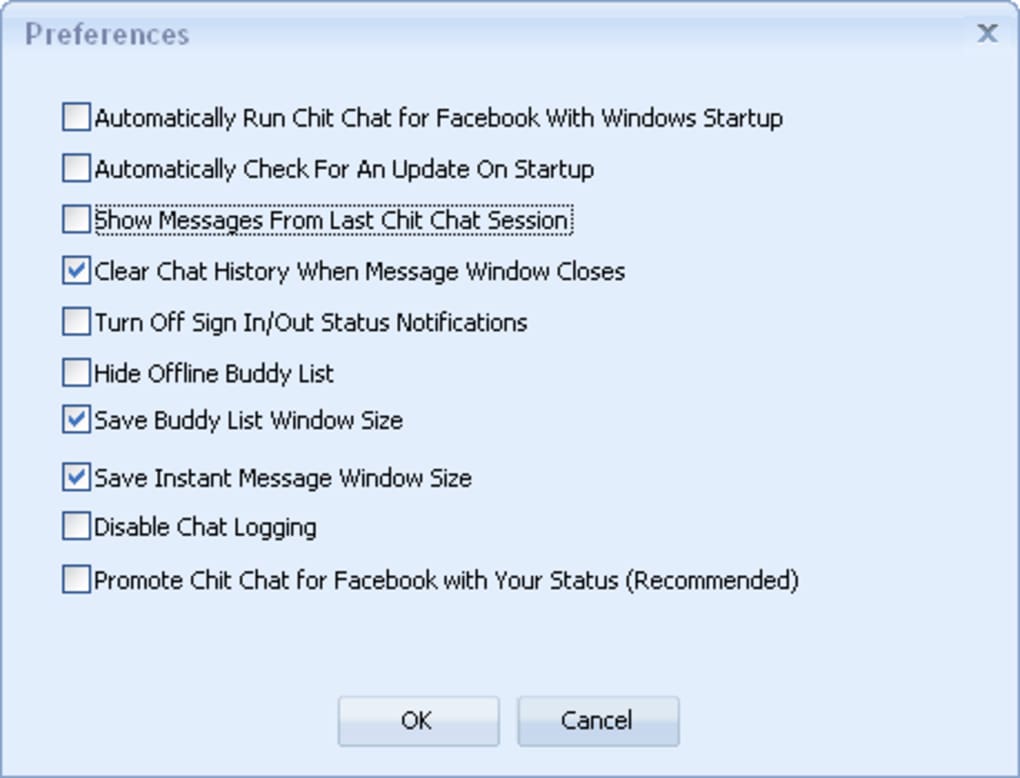
However, despite its promising premise and initial appeal, Chit Chat for Facebook was not without its significant drawbacks. User reviews and testing by platforms like PhanMemFree (formerly Softonic) highlighted recurring issues that ultimately marred its utility. Unreliability and instability were frequently cited problems, with the application often struggling to maintain a consistent connection or accurately reflect online statuses. A particularly frustrating aspect was its reported interference with the native Facebook chat tool on the website itself, leading to disjointed or duplicate experiences. Furthermore, the application’s aggressive self-promotion, with constant reminders to share it on the user’s Facebook account, quickly became an annoyance rather than an encouragement. Complaints about login failures, instances where the login process would get stuck, and the later revelation of bundled adware/spyware further eroded trust and diminished its standing as a viable solution.
The story of Chit Chat for Facebook is a microcosm of the dynamic interplay between user demand, third-party innovation, and the eventual maturation of official platform offerings. While it aimed to deliver a superior, dedicated chat experience, its technical shortcomings and ethical compromises prevented it from achieving widespread, long-term success. Nevertheless, its existence underscores a particular era in digital history where desktop clients played a crucial role in shaping how we interacted with the nascent social web.
Social & Communication: The Drive for Dedicated Chat Clients
The early 2010s marked a fascinating period in the evolution of social networking and communication. Before the smartphone revolution fully consolidated our digital lives into sleek, integrated mobile applications, desktop computers remained the primary gateway to the internet for many. During this time, the concept of a dedicated desktop chat client was not just common; it was often preferred. Applications like AIM, MSN Messenger, Yahoo Messenger, and ICQ had cultivated a user base accustomed to having a standalone program running in the background, offering instant access to their contacts without the need to open a web browser.
Facebook’s meteoric rise, however, presented a new challenge and opportunity. While its web interface integrated a chat function, it was often seen as secondary to the News Feed and other social features. Users, particularly those deeply embedded in the desktop chat client culture, desired a similar experience for their Facebook interactions. This desire stemmed from several factors. Firstly, a dedicated client offered a less cluttered environment. Browsers could become heavy with multiple tabs, advertisements, and various scripts, potentially slowing down the chat experience. A standalone application promised a cleaner, faster, and more focused channel for communication.
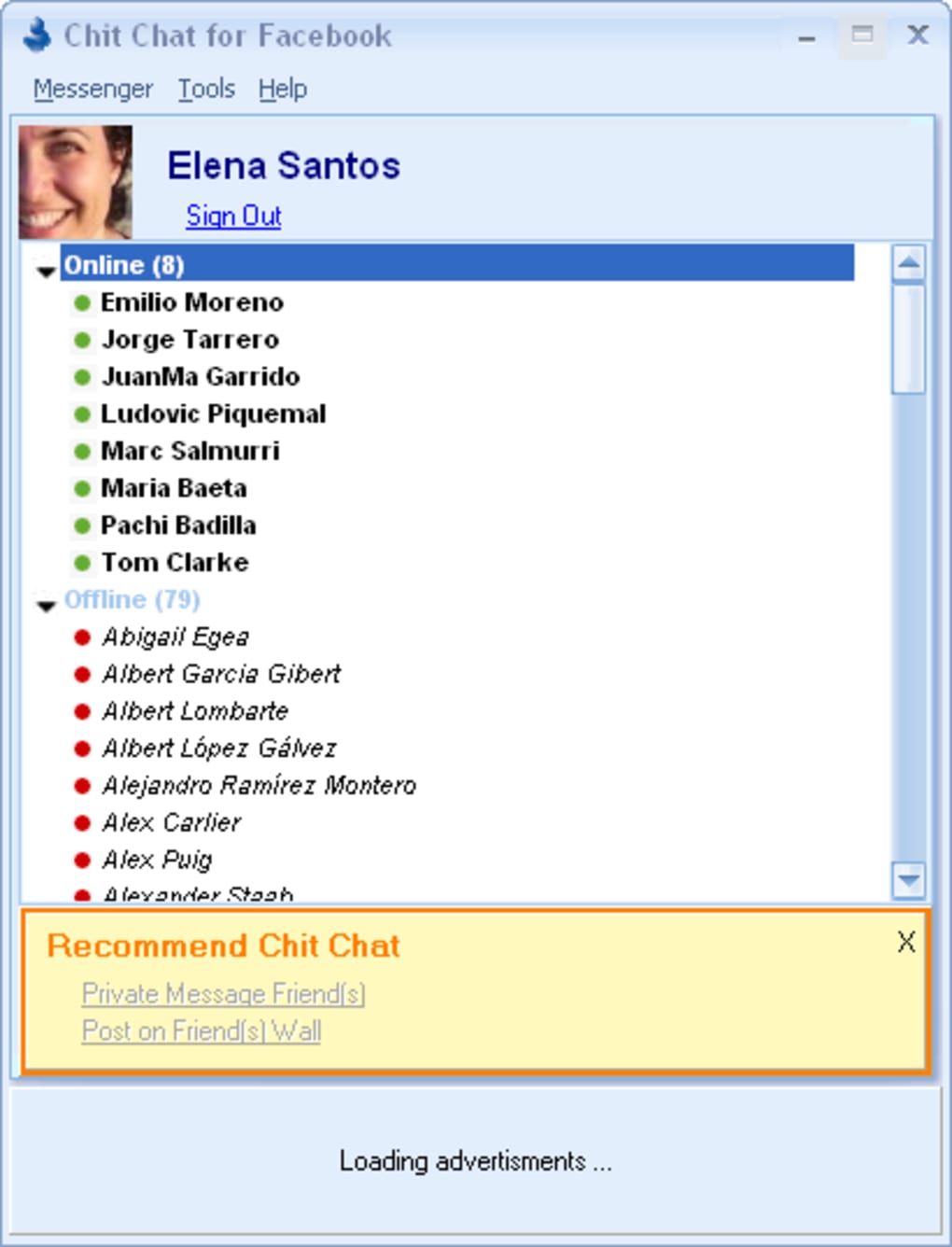
Secondly, these clients provided a sense of immediate availability. With a desktop client minimized to the taskbar, users could instantly see who was online and initiate conversations with a single click, regardless of what they were doing in their web browser or other applications. This convenience factor was a significant draw. Chit Chat for Facebook tapped directly into this sentiment, aiming to replicate the beloved Windows Live Messenger experience for Facebook users. Its promise of a separate application for Facebook chat meant that one could keep up with social conversations without having a browser tab dedicated to Facebook constantly open, thus offering a psychological and practical separation of activities.
The inherent limitations of early web technologies also played a role. While AJAX and other asynchronous communication methods were improving, building robust, real-time chat experiences directly within a browser often required more resources and was sometimes less responsive than a native desktop application. Developers like Daniel Offer, seeing this gap, sought to leverage the power of desktop applications to deliver a smoother and more reliable chat experience.
However, this era was also characterized by a rapid evolution of both web standards and Facebook’s own development strategy. As Facebook refined its web chat and eventually launched its standalone Messenger app for various platforms (including desktop and mobile), the need for third-party clients like Chit Chat for Facebook diminished. The official solutions often had better integration, more features, and critically, direct support and updates from Facebook itself, which could access APIs and functionalities not always available or stable for external developers. The story of Chit Chat for Facebook, therefore, is also a reflection of a transitional period where user habits and technological capabilities were rapidly converging towards the integrated, multi-platform experiences we now take for granted. The initial drive for dedicated chat clients, born from a specific set of technological and user experience constraints, eventually gave way to the platforms themselves providing comprehensive solutions.
Productivity & Streamlined Interaction
The concept of using a dedicated desktop application for Facebook chat, as exemplified by Chit Chat for Facebook, was inherently linked to the idea of enhancing productivity and streamlining digital interaction. In an increasingly complex digital workspace, managing multiple browser tabs and applications can be a significant distraction. The promise of a standalone chat client was to disentangle social communication from the broader web browsing experience, thereby creating a more focused and efficient environment.
For many users, separating their social interactions from their work or general browsing activities was a key benefit. Imagine a scenario where a user is conducting research, writing an email, or engaging in online learning within their web browser. Constantly switching between these tasks and a Facebook tab to respond to messages could break concentration and reduce efficiency. A desktop chat client, running in the background, allowed users to receive notifications and respond to messages without disrupting their primary workflow. This “always-on, yet discreet” nature was perceived as a significant boost to personal productivity.
Chit Chat for Facebook offered features like “online/offline notifications” and “support for chat logs” that further underscored this productivity angle. Instant notifications meant less time spent checking for new messages, and more time focused on the task at hand, with the assurance that important communications wouldn’t be missed. Chat logs, while simple, provided a record of conversations, which could be invaluable for recalling information, tracking discussions, or simply reviewing past interactions, whether for personal or informal professional purposes. In an age where digital communication was rapidly replacing traditional phone calls and emails for quick exchanges, having a reliable history of those exchanges was a practical advantage.
The interface, designed to resemble established clients like Windows Live Messenger, aimed to leverage existing user familiarity, reducing the learning curve and allowing users to be productive with the application almost immediately. The ease of initiating a conversation with a double-click, and the context menu for quick actions like sending an email or posting to a friend’s wall, were all geared towards minimizing steps and maximizing the speed of interaction.
However, the reality of Chit Chat for Facebook often fell short of its productivity aspirations. The very instability and unreliability that plagued the application—such as delayed contact updates, login failures, and interference with the web version—ironically became significant productivity drains. If an application intended to streamline communication instead caused frustration, interrupted workflows, or presented security risks (like adware), its purported productivity benefits were entirely negated. Users found themselves spending more time troubleshooting or dealing with the consequences of the app’s flaws than actually benefiting from its existence. The promise of efficiency was undermined by a lack of robust development and ongoing maintenance. This serves as a critical lesson in software design: for a tool to genuinely enhance productivity, it must first and foremost be stable, reliable, and respectful of the user’s digital environment.
Internet & Network: Under the Hood of a Chat Application
Understanding a desktop chat client like Chit Chat for Facebook also requires a brief look at the underlying “Internet & Network” mechanisms that allow it to function. These applications are essentially specialized tools that communicate over the internet, often relying on Application Programming Interfaces (APIs) provided by the service they interact with (in this case, Facebook).
When a user logged into Chit Chat for Facebook with their Facebook credentials, the application would send these details to Facebook’s servers, authenticate the user, and then establish a connection to retrieve information about their friends’ online statuses and send/receive messages. This process involves various network protocols and data exchanges. The stability and responsiveness of such an application depend heavily on how efficiently it manages these network connections and how robustly it handles data.
The complaints about Chit Chat for Facebook being “unreliable” and “taking a while to show online contacts” directly point to issues in its network communication layer. This could stem from inefficient API calls, poor handling of network latency, or an inability to maintain a persistent, stable connection to Facebook’s servers. The claim that it “messes with the online chat tool on the Facebook website” is particularly interesting. This suggests that the desktop client might have been making conflicting API requests or somehow interfering with the session management that Facebook’s own web interface used, leading to inconsistencies in chat status or message delivery between the two platforms. This highlights a common challenge for third-party developers: navigating the intricacies of a platform’s network infrastructure and API usage without causing unintended side effects.
Furthermore, the “Internet & Network” category in the broader software ecosystem encompasses utilities like “Download Managers,” “File Sharing & Peer To Peer,” and “Wifi” tools. While Chit Chat for Facebook wasn’t directly a download manager, its ability to transmit chat logs or even support rudimentary file sharing (though not explicitly listed as a feature, it’s common in chat clients) places it within the realm of applications that rely heavily on network connectivity for their core functionality. The performance and security of a user’s local network and internet connection directly impact the usability of such a chat client.
From a security perspective, the reported bundling of “adware/spyware” with Chit Chat for Facebook raises significant concerns regarding network security and privacy. Adware often works by injecting advertisements into web browsers or other applications, which requires intercepting or manipulating network traffic. Spyware, on the other hand, can monitor user activity and transmit data over the network to third parties. These malicious components leverage network access, often without the user’s explicit consent, to achieve their objectives. This underscores the critical importance of downloading software from trusted sources and exercising caution with free applications, as they can sometimes serve as conduits for unwanted network activity.
In essence, Chit Chat for Facebook’s interaction with the “Internet & Network” was both its raison d’être and its Achilles’ heel. Its ability to connect users across the internet was fundamental, but its failure to do so reliably and securely ultimately undermined its purpose, illustrating the complex challenges involved in building and maintaining internet-dependent applications.
Utilities & Tools: Enhancing the Digital Experience
Software categorized under “Utilities & Tools” typically encompasses a broad range of applications designed to enhance, optimize, or perform specific functions that augment the user’s computing experience. Chit Chat for Facebook, in its initial conception, squarely fit into this category. It wasn’t an operating system, a full-fledged office suite, or a gaming platform; rather, it was a utility aimed at improving a specific aspect of online interaction: Facebook chat.
The primary utility it offered was convenience. By providing a dedicated desktop interface, it aimed to simplify access to Facebook’s messaging service, much like other utilities might simplify file management (“File Managers”), organize tasks (“Clocks & Alarms”), or improve input (“Keyboards”). For users who spent significant time on Facebook, but preferred a desktop application experience over a browser-based one, Chit Chat for Facebook was presented as a valuable tool. It offered a distinct environment for chat, separate from the potentially distracting elements of the full Facebook website.
The reference content for “Utilities & Tools” includes diverse categories such as “Bar Code Scanning,” “Clocks & Alarms,” “Data Recovery,” “File Compression,” “File Managers,” “Keyboards,” “Measurement,” “Printer & Fax,” and “Screen Capture.” While Chit Chat for Facebook doesn’t directly relate to most of these, it shares the common characteristic of being a supplementary program designed to make a particular digital task easier or more efficient. For instance, just as a “Screen Capture” tool helps users quickly grab images from their display, Chit Chat for Facebook aimed to help users quickly engage in conversations.
The success of a utility often hinges on its reliability and seamless integration into the user’s workflow. When a utility performs its intended function flawlessly, it often goes unnoticed, simply becoming part of the background fabric of a productive digital experience. However, when a utility is unstable, buggy, or introduces unwanted elements, it quickly becomes a burden rather than a benefit. This was unfortunately the case with Chit Chat for Facebook. The reports of it being “unstable,” “unreliable,” and bundling “adware” transformed it from a potentially useful utility into a problematic one.
The inclusion of “Utilities & Tools” in the general software landscape highlights the continuous demand for applications that enhance core functionality. From simple calculators to complex data recovery suites, these tools fill specific needs and address user pain points. Chit Chat for Facebook sought to address the pain point of integrated web chat, offering a separate, focused solution. Its ultimate failure underscores that even the best intentions for a utility can be undermined by poor execution, lack of ongoing support, and, crucially, a disregard for user trust through the inclusion of unwanted software. In the competitive world of software, especially for free utilities, the reputation for reliability and integrity is paramount.
The Evolution of Social Messaging: A Look Back
Chit Chat for Facebook, despite its flaws and eventual obsolescence, holds a specific place in the broader narrative of social messaging and digital communication. Its existence is a testament to a particular moment in technological history – a period of transition where the desktop reigned supreme, but the burgeoning power of social networks was beginning to redefine how we connected.
In the early 2010s, Facebook was rapidly expanding its features. While the platform offered myriad ways to connect—from wall posts and photo sharing to event invites—direct, real-time messaging was a critical component. Initially, Facebook’s chat was integrated directly into the website, an approach that worked for many but left a segment of users yearning for the dedicated, minimalist experience offered by traditional instant messaging clients like MSN Messenger or AIM. These users preferred to have their chat separate from the main browser window, believing it offered a more focused and immediate communication channel. Chit Chat for Facebook capitalized on this desire, offering a desktop alternative that mirrored the familiarity of older IM platforms.
The app’s release in 2011, with its last update around May 17, 2011, places it squarely in the timeframe before Facebook’s own messaging strategy fully matured. It was prior to the widespread adoption of the standalone Facebook Messenger app for mobile devices, and before Facebook aggressively pushed its own desktop client solutions. The fact that a third-party application like Chit Chat for Facebook garnered over 300,000 downloads on PhanMemFree (formerly Softonic) indicates a significant user demand for such a tool. Users valued the pros: “Facebook chat on your desktop,” the ability to “send emails and write on your wall” from the client, and “support for chat logs.” These features addressed real needs that Facebook’s primary web interface, at that time, didn’t fully satisfy for all users.
However, the rapid pace of technological development and Facebook’s internal strategy quickly outpaced third-party efforts. The very “cons” that plagued Chit Chat for Facebook—its unreliability, instability, interference with the online version, and eventually, the bundling of adware—became its undoing. As Facebook improved its own web chat and later introduced official, robust standalone Messenger applications across various platforms, the need for third-party, often less reliable, alternatives diminished significantly. The official solutions offered better integration, full feature sets, and crucial security updates, overshadowing efforts like Chit Chat for Facebook.
Today, the concept of a dedicated desktop client solely for Facebook chat seems almost anachronistic, given the pervasive nature of the Messenger app on smartphones and its seamless integration into web browsers. Yet, Chit Chat for Facebook serves as a valuable historical artifact. It highlights the user experience gaps that existed in early social media platforms, the innovative (if sometimes flawed) attempts by independent developers to fill those gaps, and the inevitable triumph of official, fully supported solutions. It reminds us of a time when the digital landscape was more fragmented, and users actively sought tools to tailor their online interactions to their preferences, even if those tools, like Chit Chat for Facebook, sometimes came with unforeseen compromises. Its story is a footnote in the grander narrative of how we learned to communicate in the digital age, a stepping stone on the path to the hyper-connected, multi-platform messaging experiences we now navigate daily.
File Information
- License: “Free”
- Latest update: “May 17, 2011”
- Platform: “Windows”
- OS: “Windows 8”
- Language: “English”
- Downloads: “302.9K”
- Size: “6.09 MB”


