
ChromeCacheView is a free, lightweight Windows program designed to provide users with detailed insights into their Google Chrome browser cache. This tool, developed by NirSoft, allows users to explore the contents of their cache without needing advanced technical knowledge. While it hasn’t been updated since 2012, its functionality remains relevant for users seeking a simple and effective way to examine their browsing history, albeit in a limited capacity compared to more modern tools. This article will explore the features, functionality, and limitations of ChromeCacheView, along with its place within the broader landscape of browser cache viewers and related software.
Understanding ChromeCacheView’s Functionality
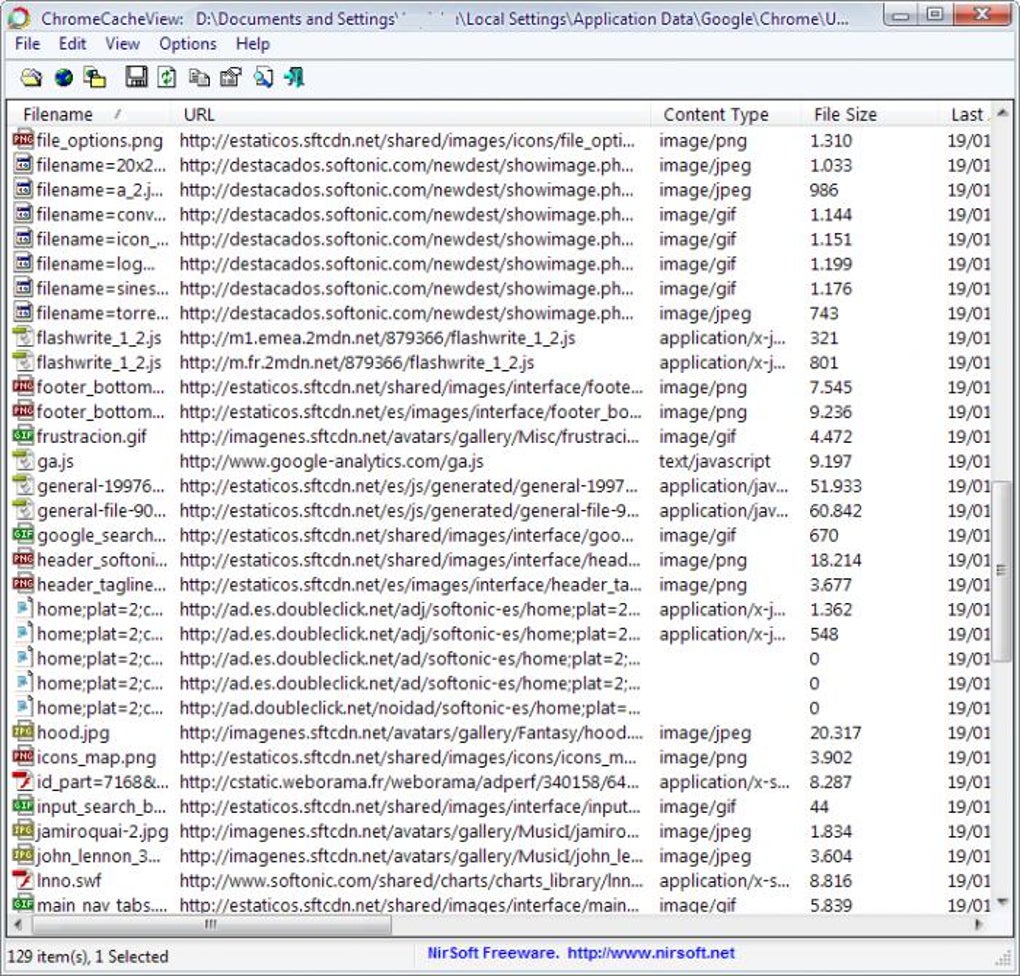
ChromeCacheView operates by directly accessing and interpreting the data stored within Google Chrome’s cache files. It presents this data in a clear, user-friendly format, listing each cached item with relevant details such as the URL, file size, last access time, and the data itself, whenever possible. The interface is straightforward, avoiding unnecessary complexities that might intimidate less tech-savvy users. This simplicity is a key strength, allowing even novice users to quickly understand and utilize its capabilities.
The program’s core function lies in its ability to display the contents of the Chrome cache in a tabular format. This allows for easy searching and filtering based on different criteria, such as file size, URL, or date. This feature is especially useful for identifying specific files cached by the browser, whether for troubleshooting purposes or simply to understand browsing habits. However, it’s crucial to understand that while ChromeCacheView can display the raw cache data, it does not directly interpret or display images, videos, or other complex file types within the cache. These would require separate software or manual file opening depending on the file type.
One of the significant benefits of ChromeCacheView is its portability. It’s a standalone executable file, meaning it doesn’t require installation. Users simply download the file and run it, making it exceptionally convenient for use on various systems without leaving any traces on the computer’s registry or requiring administrator privileges. This feature makes it ideal for quick checks or use on systems where installing software is restricted.
However, the lack of updates since 2012 means that its compatibility with the latest versions of Google Chrome is not guaranteed. While it might still function with older versions, newer Chrome releases may have implemented changes that render ChromeCacheView incompatible or unreliable. This is a key limitation of the software, highlighting the importance of exploring more modern alternatives for current Chrome versions.
ChromeCacheView: A Comparison with Modern Alternatives
While ChromeCacheView offers a simple and straightforward approach to viewing Chrome cache data, it pales in comparison to more modern alternatives available today. Many newer tools offer enhanced features, better compatibility with current Chrome versions, and more sophisticated analytical capabilities. These newer tools often include features like:
- More detailed analysis: Modern tools frequently provide more in-depth analysis of cached data, identifying not just the files but also the types of data, sizes, and relationships between cached items. This can help users gain a deeper understanding of their browsing habits and potential security vulnerabilities.
- Integration with other tools: Some advanced browser cache viewers integrate seamlessly with other system utilities and security software, providing a comprehensive overview of browser activity and system health.
- Regular updates: Unlike ChromeCacheView, modern tools receive regular updates to ensure compatibility with the latest versions of Chrome and to incorporate new features and security improvements.
- Graphical User Interfaces (GUI): While ChromeCacheView’s interface is simple, modern tools often include visually richer and more intuitive GUIs to enhance the user experience. Interactive charts and graphs can visually represent cache data, aiding in comprehension.
- Advanced Filtering and Search: Modern tools may offer far more sophisticated search and filtering capabilities, allowing users to refine their search criteria based on a wide variety of parameters, improving data identification efficiency.
The lack of continuous development and updates is a major drawback for ChromeCacheView. Google frequently updates its Chrome browser, introducing changes to the cache structure and data formats. Consequently, an outdated tool like ChromeCacheView might encounter compatibility issues, leading to incomplete or inaccurate results. This underscores the need to consider modern alternatives that are actively maintained and updated to ensure accuracy and reliability.
Security and Privacy Considerations
While ChromeCacheView itself is not a malicious program, accessing and analyzing cache data raises certain security and privacy concerns. Cache files often contain sensitive information, such as website login credentials, personal data, or browsing history. Care should be exercised when using any tool that accesses this type of information. It is crucial to ensure that the software you use is from a trusted and reputable source to minimize the risk of malware or data breaches.
It’s also important to remember that even seemingly innocuous actions, like viewing cached data, can potentially compromise privacy if not handled responsibly. It’s advisable to use ChromeCacheView (or any similar tool) only on systems that you fully trust and control, and to avoid analyzing cache data from shared or public computers.
Understanding the limitations and potential risks associated with accessing cache data is paramount before using ChromeCacheView or any comparable software. Always practice caution and prioritize security best practices when dealing with potentially sensitive information.
ChromeCacheView: Target Audience and Use Cases
Despite its limitations, ChromeCacheView can still be useful for specific users and scenarios. Its primary advantage remains its simplicity and ease of use. This makes it a suitable choice for:
- Beginner users: Individuals with limited technical expertise might find ChromeCacheView’s straightforward interface beneficial for a basic understanding of their Chrome cache contents.
- Troubleshooting: In specific scenarios, viewing the cache might help troubleshoot minor browsing issues or identify problematic cached files.
- Educational purposes: ChromeCacheView can serve as a simple educational tool to demonstrate how browser caching works and the type of data stored within it.
However, for most users, especially those concerned with compatibility with the latest Chrome versions or requiring advanced analytical features, more modern alternatives would be a more suitable and reliable option. The simplicity that was once an asset is now a limitation in today’s environment of ever-evolving browsers and data management tools.
Conclusion
ChromeCacheView offers a basic, straightforward method for viewing Google Chrome cache data. Its simplicity and ease of use are its strengths. However, the lack of updates and potential incompatibility with modern Chrome versions limit its applicability. Users seeking comprehensive cache analysis, compatibility with the latest browsers, and enhanced features should explore the numerous modern alternatives available. Always prioritize software security and privacy best practices when working with tools that access potentially sensitive browsing data. While ChromeCacheView might hold some historical value, its current limitations make it less attractive compared to newer and more actively maintained options.
File Information
- License: “Free”
- Version: “1.21”
- Latest update: “June 19, 2012”
- Platform: “Windows”
- OS: “Windows 2000”
- Language: “English”
- Downloads: “6.1K”
- Size: “54.52 KB”


