
In an era defined by distributed teams, remote work, and the imperative for secure, flexible access to corporate resources, Citrix Workspace stands out as a pivotal digital workspace solution. It’s more than just an application; it’s a comprehensive platform designed to unify and simplify the user experience, allowing individuals and teams to securely access all the applications, services, and data they need from virtually any device, anywhere. At its core, Citrix Workspace addresses the complex challenges of modern IT environments by providing a single, intelligent, and secure portal that consolidates disparate tools, enhances decision-making capabilities, and fosters seamless collaboration.
This productivity powerhouse eliminates the friction often associated with remote work by creating a cohesive environment where Software-as-a-Service (SaaS) applications, web applications, critical files, and even mobile apps are instantly accessible. It acts as a central nervous system for your digital work life, ensuring that whether you’re working from a home office, a co-working space, or on the go, your essential tools are always within reach and consistently updated. The promise of Citrix Workspace is a more flexible, efficient, and secure way to work, empowering employees to focus on their tasks without the distractions of fragmented systems or security concerns.
Citrix Workspace for Mac: A Tailored Experience for Apple Users
For the growing community of professionals who rely on Apple’s macOS ecosystem, Citrix Workspace for Mac delivers a particularly refined and robust experience. Recognizing the unique demands and user interface expectations of Mac users, Citrix has engineered a client application that integrates seamlessly into the macOS environment while providing all the core functionalities of the digital workspace. This dedicated version ensures that Mac users can enjoy the same high levels of convenience, intelligence, and security as their counterparts on other platforms.
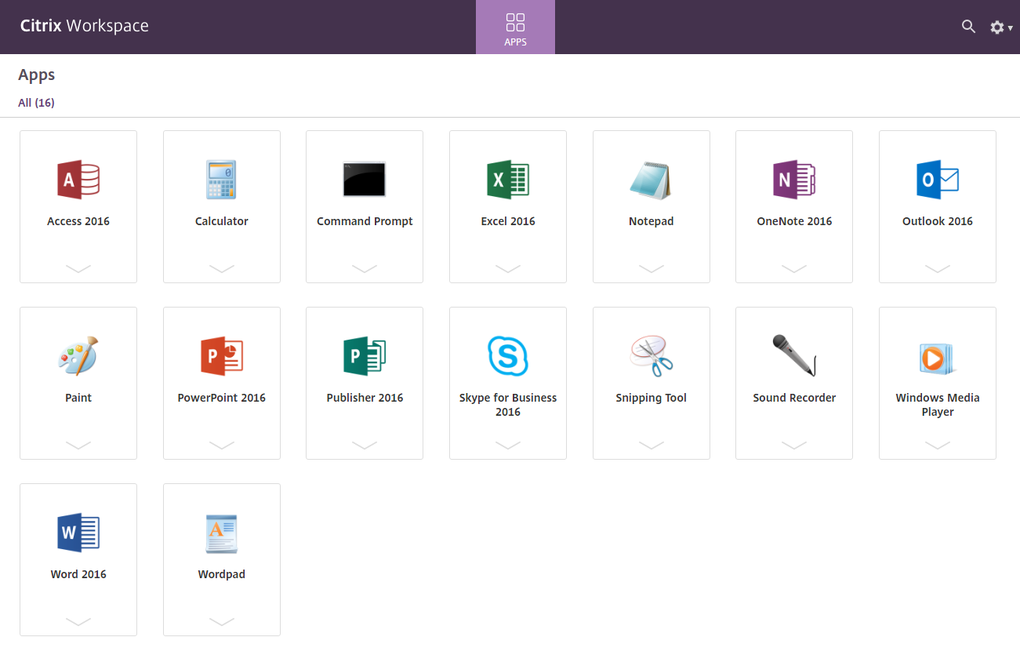
The essence of Citrix Workspace on Mac is its ability to transform how users interact with their professional tools. It’s a digital nerve center that redefines what it means to work remotely, offering secure access to a multitude of applications, services, and data. Whether these resources reside on premise, in the cloud, or as a hybrid deployment, the Mac client acts as a gateway, presenting them within a unified and intuitive interface. This means instant access to an organization’s full suite of SaaS applications like Salesforce or Microsoft 365, internal web applications, critical business files stored on network drives or cloud storage, and even specialized mobile applications that are part of the corporate ecosystem.
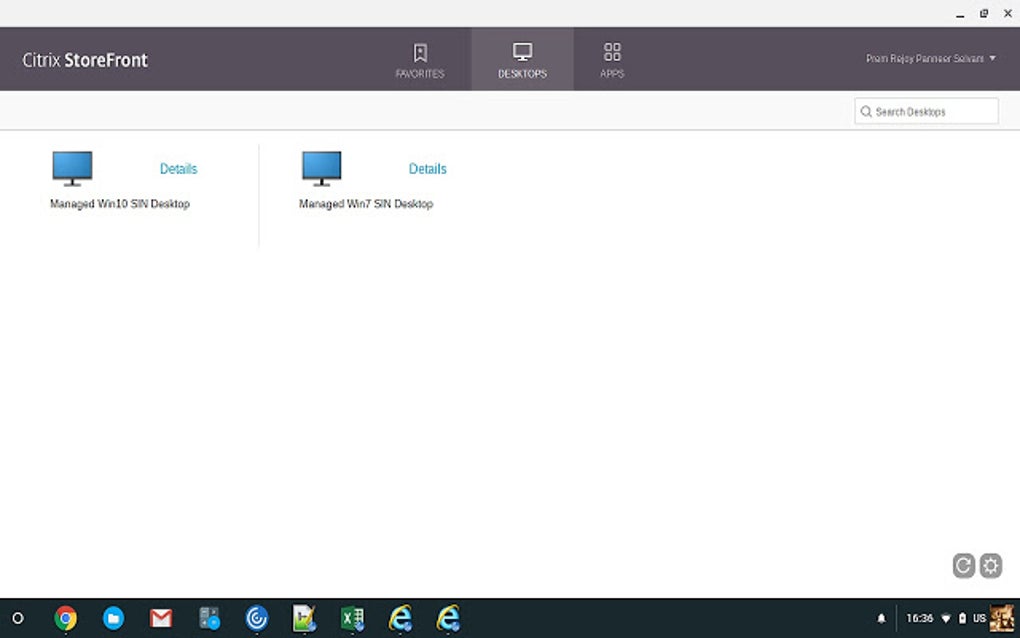
One of the most compelling features for Mac users is the customized interface. Citrix Workspace allows individuals to organize their essential data, tasks, and tools into personalized flows. This level of customization is crucial for enhancing focus, as it reduces the need to navigate through irrelevant information or switch between countless applications. Imagine having your daily dashboard presenting only the most pertinent information and shortcuts to the tools you use most frequently – that’s the tailored experience Citrix aims to deliver. This personalized environment directly contributes to increasing employee productivity and engagement by streamlining workflows and minimizing cognitive load.
The convenience extends to authentication as well. Citrix Workspace requires only a single sign-on (SSO) for universal access to all integrated applications and data. This eliminates the tedious process of entering credentials for each separate application, saving valuable time and reducing password fatigue, which can often lead to insecure password practices. With SSO, a Mac user logs in once to their Workspace, and all their authorized resources become available, maintaining a high level of security without sacrificing ease of use.
Furthermore, the application ensures that data integrity and currency are maintained, irrespective of where you choose to work. Files stored centrally are dynamically updated. This critical feature means that whenever a colleague makes an update to a shared document or project file, you are guaranteed to be working with the latest version. This eliminates version control issues, reduces miscommunication, and ensures that collaborative efforts are always synchronized. For Mac users on the move or those who switch between devices, this dynamic updating capability is invaluable.
Security, a paramount concern for any business, is deeply embedded in the Citrix Workspace for Mac. The platform allows for the coexistence of both personal and work-related applications on a single device without any risk of a data breach for the company. This is achieved through intelligent isolation mechanisms. For instance, any browsing-related activities initiated within the workspace are redirected to a cloud-based web browser. This browser is completely isolated from the corporate network, acting as a sandbox. This means that users can safely browse the internet without exposing the corporate network to potential cybersecurity threats, malware, or phishing attempts. It’s a robust defense mechanism that ensures secure access to web resources while safeguarding sensitive corporate data, offering Mac users peace of mind in their digital environment.
In essence, Citrix Workspace for Mac is engineered to provide a powerful, smart, and highly flexible way of working. It leverages the strengths of the macOS platform to deliver an optimized experience, allowing professionals to access their digital office with confidence, efficiency, and advanced security.
Boosting Productivity and Collaboration
The core mission of Citrix Workspace is to significantly enhance productivity and streamline collaboration within any organization, regardless of its size or operational model. In today’s fast-paced business world, where delays and inefficiencies can translate directly into lost opportunities, a platform that empowers focused work and seamless interaction is indispensable. Citrix Workspace is meticulously designed as a secure digital workspace, engineered from the ground up to empower people to work without the constant distractions and logistical hurdles that often plague traditional IT setups.
One of the most significant ways it achieves this is by providing a unified access point to all necessary tools. Think about the typical workday: switching between a dozen different applications, logging into separate systems for email, project management, CRM, file storage, and more. This constant context-switching is a well-documented drain on productivity. Citrix Workspace eradicates this by allowing users to open all their essential apps and files from a single, intuitive interface. This means there’s no longer a need to endlessly switch from app to app or sift through irrelevant information and activities. The platform presents a curated view of what’s important, enabling employees to dive directly into their work.
The integration capabilities of Citrix Workspace are also a key differentiator. It seamlessly integrates with existing systems, meaning organizations don’t have to overhaul their entire IT infrastructure to adopt it. This flexibility ensures a smooth transition and allows businesses to leverage their previous investments while upgrading their remote access and security postures. Once integrated, it lets users remotely access their entire workspace without experiencing the frustrating slowdowns or delays often associated with virtual private networks (VPNs) or other remote access solutions. This “always-on,” high-performance access is critical for maintaining momentum and ensuring that remote work feels just as responsive as working directly in the office.
The platform’s intelligent design also facilitates better decision-making and collaboration. By consolidating all tools and data into one accessible location, users have a holistic view of their projects and tasks. This fosters an environment where information is readily available, enabling timely decisions and more effective collaboration with colleagues, partners, and clients. Whether it’s real-time document editing, instant messaging within the workspace context, or accessing shared project dashboards, Citrix Workspace creates a cohesive environment for team interaction.
Let’s delve deeper into the specific advantages, or “pros,” that directly contribute to increased productivity and collaboration:
- Secure Digital Workspace: This is perhaps the most fundamental benefit. By providing a highly secure environment for accessing sensitive corporate data and applications, Citrix Workspace eliminates many security-related anxieties. This security posture not only protects the company from breaches but also instills confidence in employees, allowing them to focus on their work without worrying about data vulnerability.
- Requires a Single Sign-On (SSO): As mentioned previously, SSO is a massive time-saver. By simplifying the authentication process, employees spend less time logging in and more time on productive tasks. It also improves security by centralizing access control and reducing the number of passwords users need to manage.
- Dynamically Update Files Stored Centrally: For collaborative teams, this feature is invaluable. Ensuring everyone is always working on the most current version of a document or project plan prevents errors, avoids redundant work, and keeps projects on track. This real-time synchronization is essential for efficient team-based workflows.
- Allows Personal and Work-Related Apps to Exist in One Device: In an age of personal device usage for work (BYOD), this is a critical security and productivity feature. It allows employees the flexibility to use their preferred devices while maintaining a strict separation between personal data and corporate assets. The isolation technology ensures that personal activities don’t compromise corporate security, making BYOD programs safer and more practical, thus boosting employee satisfaction and flexibility without sacrificing security.
While these advantages significantly contribute to a more productive and collaborative work environment, it’s also important to acknowledge that the path to optimal productivity can sometimes encounter bumps, such as potential performance issues or occasional lags, which the platform aims to minimize continually. Overall, however, Citrix Workspace remains a potent tool for enhancing team performance and fostering a more integrated, efficient, and secure way of working.
Considerations for Business Adoption
While Citrix Workspace presents a compelling vision for modern work, any business considering its adoption must weigh its extensive benefits against certain practical considerations. Understanding these nuances is crucial for making an informed decision that aligns with an organization’s specific needs, budget, and scale.
One of the primary points to consider, as highlighted in user feedback and product specifications, is its dependency on Citrix Virtual Apps. For smaller or medium-sized organizations that might not already be invested in the broader Citrix ecosystem, this can represent a significant hurdle due to the associated costs. Citrix Virtual Apps (formerly XenApp) provides the core application and desktop virtualization components that Citrix Workspace then delivers. While the Workspace client itself is often described as “Free Version” (referring to the client software), the underlying infrastructure it requires—the Virtual Apps backend—is a robust, enterprise-grade solution that comes with a considerable price tag. This dependency means that the “cost of entry” can be quite high, potentially making the full solution less feasible for businesses operating on tighter budgets or those that don’t require the full breadth of virtualization capabilities offered by Virtual Apps. For a medium-scale organization, this additional expense might not make economic sense if their primary goal is simply unified access rather than extensive application virtualization.
Another limitation frequently cited is the limit of up to 25 users. While this might be a specific tier or licensing model that Citrix offers, if applicable to the standard offering, it poses a severe restriction for even moderately sized teams, let alone larger enterprises. A business with 50, 100, or even thousands of employees would quickly outgrow such a limit, necessitating an upgrade to higher-tier licenses that invariably come with increased costs. This limitation suggests that the entry-level offering might be geared more towards very small businesses or specific departmental deployments rather than broad organizational adoption. Companies must thoroughly evaluate their current and projected user base when assessing Citrix Workspace.
Beyond financial and scaling considerations, some users have reported practical issues that can impact the day-to-day experience. The login process, for instance, has sometimes been described as not very intuitive. While single sign-on (SSO) is a major benefit once established, the initial setup or occasional authentication challenges might require a learning curve or more robust IT support. An intuitive user experience, especially during critical access points like login, is vital for minimizing user frustration and maximizing adoption rates across an organization.
Finally, the mention of frequent lags is a performance concern that cannot be overlooked. While the promise is seamless and delay-free remote access, real-world conditions can introduce variables such as network latency, server load, or client-side resource limitations that lead to performance degradation. Lags can severely impede productivity, disrupt workflows, and undermine the user experience, especially in applications that demand high responsiveness (e.g., design software, video editing, or even fast-paced data entry). While these issues might be intermittent or dependent on specific configurations and network environments, they are critical points for prospective adopters to investigate during pilot testing or through direct inquiries with Citrix support or existing customers.
Despite these “cons,” it’s important to frame them within the context of Citrix Workspace’s overall value proposition. For organizations that prioritize robust security, comprehensive application delivery, and a truly unified digital workspace, and are prepared for the investment in the broader Citrix ecosystem, these drawbacks might be manageable or specific to certain deployment scenarios. The “Trusted Program” status and the developer’s (Citrix) long-standing reputation in the enterprise virtualization space lend credibility and expertise to the platform. For businesses, the decision hinges on whether the unparalleled security, flexibility, and productivity gains outweigh the initial investment and potential operational adjustments required. Understanding these considerations allows businesses to accurately assess if Citrix Workspace is the right fit for their specific operational scale, budget, and long-term strategic goals.
Beyond the Basics: Features and Technical Specifications
Delving deeper into Citrix Workspace reveals a sophisticated piece of software with specifications that underscore its robust design and broad applicability. Understanding these details helps users and IT professionals alike appreciate the engineering behind this digital workspace solution.
The client application itself is often referred to as a Free Version in terms of its license, meaning that individuals can download and install the client software without direct cost. However, as previously discussed, this client acts as a gateway to a broader, paid Citrix infrastructure (like Citrix Virtual Apps or Virtual Desktops), so the “free” aspect pertains to the endpoint software rather than the entire solution. This model allows for widespread adoption of the client across various user devices, facilitating easy access once an organization has implemented the necessary backend.
The Version 24.11.0.55 indicates a commitment to continuous development and improvement. Software updates are critical in today’s dynamic digital landscape, especially for a security-centric platform. Regular updates address security vulnerabilities, introduce new features, enhance performance, and ensure compatibility with evolving operating systems and applications. The Latest update date of January 31, 2025 (as per the provided reference) signifies that Citrix actively maintains and refines the Workspace client, ensuring it remains cutting-edge and responsive to user needs and technological advancements. This forward-looking maintenance schedule is crucial for enterprise software.
Citrix Workspace is available across multiple platforms, with the primary focus of this discussion being its Mac OS X compatibility. This ensures that users on Apple’s desktop and laptop ecosystem can leverage the full power of the digital workspace. However, the mention of “Other platforms (1)” and specific examples like “Citrix Workspace for iPhone” highlights Citrix’s broader strategy to provide ubiquitous access. This multi-platform availability ensures a consistent user experience whether an employee is on a Mac desktop, an iPhone, or other supported devices, reinforcing the “work from anywhere” ethos. The availability in various languages, such as “Ladda ner Citrix Workspace” (Swedish), “Скачать Citrix Workspace” (Russian), and “ダウンロードする” (Japanese), further demonstrates its global reach and commitment to serving a diverse international user base.
The client’s footprint is relatively significant, with a size of 557.82 MB. This size is indicative of a feature-rich application that incorporates various components necessary for secure connectivity, display protocols, and integration functionalities. While half a gigabyte might seem substantial for a client, it is commensurate with the complexity and capabilities it delivers, including advanced graphics handling for virtualized desktops and applications, strong encryption, and comprehensive device redirection.
With Downloads totaling 5.6K (as referenced), it shows a solid user base who have chosen to download and use this specific version of the client. This download count, while potentially specific to a single distribution channel or period, reflects the ongoing demand for secure remote access solutions that Citrix Workspace provides.
The developer, Citrix, is a well-established and respected name in the virtualization and remote access industry. With decades of experience, Citrix has built a reputation for delivering robust, enterprise-grade solutions that address the complex needs of large organizations. Their expertise is evident in the stability, security features, and comprehensive management capabilities that underpin Citrix Workspace. The existence of “More programs (10)” from the same developer also points to a rich ecosystem of related products and a deep understanding of enterprise IT challenges. This long-standing industry presence and reputation contribute significantly to the “Trusted Program” status of Citrix Workspace. The combination of these technical specifications and the backing of a reputable developer provides a strong foundation for businesses looking to adopt a reliable digital workspace solution.
Exploring Alternatives and the Broader Ecosystem
While Citrix Workspace stands as a powerful contender in the realm of digital workspace solutions, the dynamic nature of enterprise software means that businesses often explore a landscape rich with alternatives and complementary tools. Understanding this broader ecosystem is crucial for organizations to make the most informed decision, tailoring their technology stack to their unique requirements.
The concept of “Alternative apps” is particularly relevant for those who might find Citrix Workspace’s dependency on Citrix Virtual Apps or its user limits restrictive for their specific context. These alternatives typically fall into several categories:
- Other Virtual Desktop Infrastructure (VDI) and Desktop-as-a-Service (DaaS) Solutions: Competitors like VMware Horizon, Microsoft Azure Virtual Desktop, Amazon WorkSpaces, and Google Chrome Enterprise offer similar capabilities for delivering virtual desktops and applications securely to end-users. These platforms provide secure remote access, centralized management, and flexibility, but they differ in their underlying technology, cloud integration, licensing models, and specific feature sets. Organizations often compare these based on their existing cloud infrastructure, budget, and specific needs for application delivery.
- Remote Desktop Solutions: Simpler tools like TeamViewer, AnyDesk, or Microsoft Remote Desktop allow users to access a specific computer remotely. While effective for one-to-one access, they typically lack the unified workspace, application publishing, and advanced security features of a full VDI/DaaS solution like Citrix Workspace.
- Comprehensive Productivity Suites with Integrated Access: Platforms like Microsoft 365 or Google Workspace (formerly G Suite) offer a suite of productivity applications alongside cloud storage and communication tools. While they provide access to their own applications, they don’t generally offer the same level of secure, universal access to any corporate application (legacy, SaaS, web) in a virtualized or isolated environment that Citrix Workspace does. However, they are essential parts of many businesses’ digital ecosystems.
- Endpoint Management and Security Solutions: Tools focusing specifically on managing devices and securing endpoints might not offer a full digital workspace but are critical components that can integrate with or complement solutions like Citrix Workspace.
Beyond direct alternatives, Citrix Workspace exists within a broader ecosystem of “Productivity” and “Project Management” tools that users might leverage in conjunction with or as part of their digital workspace. The “Top downloads” section often highlights popular applications that users of productivity platforms are interested in, providing insight into related needs. For example:
- Trello: A highly visual project management tool that helps teams organize tasks and workflows.
- Freemind: A free and open-source mind-mapping tool for brainstorming and organizing ideas.
- TopTracker: A time-tracking and invoicing tool, crucial for freelancers and teams needing to monitor billable hours.
- GanttProject: A comprehensive project management and scheduling tool, popular for its Gantt chart capabilities.
These tools illustrate that while Citrix Workspace provides the platform for accessing applications, the applications themselves cover a wide range of functions, including robust project management capabilities. An effective digital workspace doesn’t just deliver access; it facilitates the use of these specialized tools, allowing teams to manage complex projects, track progress, and collaborate effectively within a secure, unified environment. Users of Citrix Workspace might be running any of these project management tools virtually, emphasizing the platform’s role in delivering a complete software environment.
The market for “Apps,” especially those relevant “For Business” and specifically “for Mac,” is constantly evolving. Citrix Workspace’s value proposition is its ability to centralize and secure access to this vast array of software, irrespective of its origin or hosting location. By understanding the alternatives and the broader landscape of productivity and project management tools, organizations can better position Citrix Workspace within their IT strategy, either as a primary digital workspace solution or as a critical component complementing other specialized applications and services. The goal is always to create an efficient, secure, and flexible work environment that empowers employees to achieve their best.
In conclusion, Citrix Workspace represents a significant advancement in how businesses approach remote work and digital transformation. It offers a powerful, unified, and secure platform that consolidates access to a diverse array of applications and data, simplifying the user experience and boosting productivity. For Mac users, the tailored client ensures seamless integration into their preferred operating environment, delivering on the promise of flexibility and robust security. While considerations such as its dependency on other Citrix components, potential user limits, and occasional performance issues warrant careful evaluation, its core strengths—secure access, single sign-on, dynamic updates, and robust data protection—make it an invaluable tool for organizations committed to empowering their distributed workforce. By enabling employees to work without distraction and collaborate effectively, Citrix Workspace stands as a cornerstone for the modern, agile enterprise navigating the complexities of the digital age.
File Information
- License: “Free”
- Latest update: “January 31, 2025”
- Platform: “Mac”
- OS: “Mac OS X”
- Language: “English”
- Downloads: “5.4K”
- Size: “557.82 MB”


