
The internet, a powerful tool for individuals and businesses alike, has unfortunately introduced a new set of security risks. Web browsers meticulously track online activities, while websites and apps collect cookies and even personal information. To combat these threats, a range of security programs have emerged. Click&Clean is a browser add-on designed to enhance your online safety by acting as a robust cleaning application. It efficiently removes browsing traces, protects your privacy, and contributes to a more secure computing experience.
Streamlined Cleaning for Enhanced Privacy
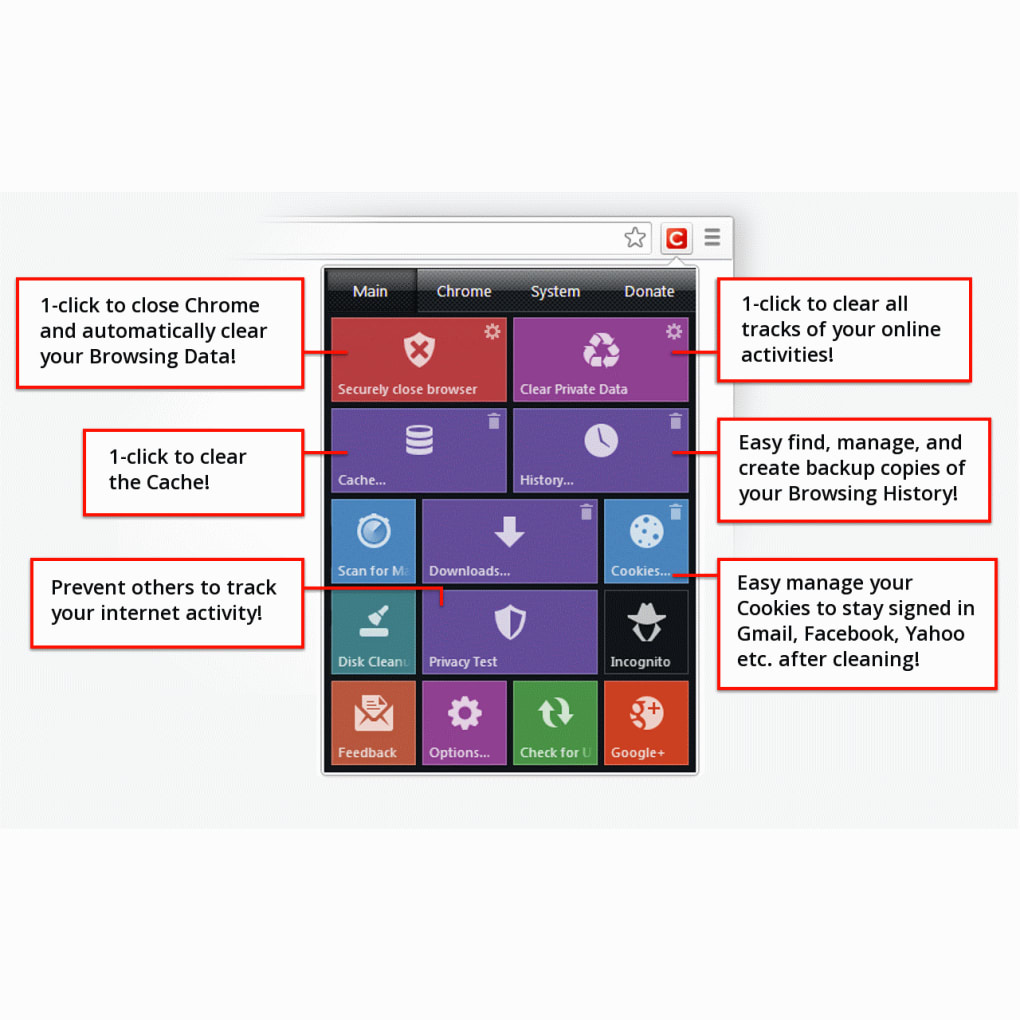
Click&Clean tackles the issue of digital footprints left behind during online browsing. It excels at removing various forms of digital residue, including typed URLs, cached data, cookies, and browsing history. The process is remarkably straightforward; a single click initiates the cleaning process, offering a swift and effective solution for privacy concerns. This instant cleaning capability sets it apart from other methods that often require browser closure to complete the cleaning process. This automated process not only saves time but also enhances efficiency.
Manually cleaning browser data can be tedious and time-consuming. Click&Clean simplifies this task considerably. Its integration with built-in browser functions and advanced cleaning techniques ensure a thorough and secure cleanup without disrupting ongoing workflows. Users can opt for manual cleaning, initiated by clicking the app icon and selecting “Clear Private Data,” or set up automatic cleanup upon browser closure. This level of customization allows for flexible use based on individual preferences and security needs. The granular control allows users to completely erase their activity history or selectively delete specific types of data.
Beyond Browsing History: Comprehensive PC Cleaning
Click&Clean goes beyond simple browsing history removal, offering a broader suite of cleaning functionalities to maintain a healthy and secure computing environment. Its capabilities extend to:
-
Malware Scanning: Integrated with BitDefender technology, Click&Clean performs quick scans to detect and remove malware, bolstering the overall security of your system. This feature provides an extra layer of protection against malicious software that could compromise your privacy or damage your computer.
-
Temporary File Removal: The application efficiently eliminates temporary files that accumulate over time, contributing to hard drive clutter and potentially slowing down system performance. By removing these unnecessary files, Click&Clean helps optimize your computer’s performance and reclaims valuable disk space.
-
Database Cleaning: Click&Clean cleans client-side web SQL databases, ensuring that sensitive data stored locally by websites is removed, contributing to greater privacy.
-
Flash Cookie Removal: It removes Flash cookies, a type of persistent cookie that can track your online activity even when standard cookies are cleared. This comprehensive approach to cookie management helps ensure a more private browsing experience.
-
Hard Drive Cleaning: Click&Clean also offers hard drive cleaning functionality, removing unnecessary files and freeing up disk space for optimal system performance. This contributes to a more responsive and efficient computing experience.
User-Friendly Interface and Ease of Use
Click&Clean’s design prioritizes user-friendliness. Its intuitive interface and straightforward functionality make it accessible to both novice and advanced users. The included Quick Start Guide ensures a rapid onboarding experience, minimizing the learning curve and allowing users to quickly begin utilizing the application’s features. The simplicity of its design contrasts with the comprehensive nature of its cleaning capabilities. The single-click cleaning function is a testament to its commitment to user experience, making essential privacy-enhancing measures readily available.
Performance Considerations and Limitations
While Click&Clean offers considerable benefits, it is crucial to acknowledge certain limitations. Some users have reported a slight decrease in browsing speed during or immediately after using the application. This performance impact is likely due to the intensive nature of the cleaning process, which involves scanning and deleting numerous files and data points. Furthermore, the application currently has limited browser support and requires a 64-bit architecture. These limitations could affect its usability for users with older systems or who prefer browsers not yet supported. While generally safe, some users have reported instances where the malware scanner mistakenly identified safe downloads as threats. Such false positives, while infrequent, underscore the importance of exercising caution and reviewing any flagged files before taking action.
Click&Clean: A Comparative Analysis
Click&Clean stands out among similar cleaning utilities due to its seamless integration with the browser and its automated cleaning features. Many competing applications require manual initiation and often necessitate browser closure for a complete cleanup. Click&Clean’s automated functionality sets it apart, offering a more efficient and user-friendly solution for maintaining online privacy and system health. While some competing tools may offer more advanced features or broader compatibility, Click&Clean successfully balances comprehensive cleaning capabilities with ease of use and speed.
Features Overview
The application offers a comprehensive array of features designed to enhance both privacy and system performance:
-
Automatic History Deletion: This core feature automatically deletes browsing history upon Chrome closure, preventing unwanted tracking of online activities.
-
Tracking Prevention: Click&Clean actively works to prevent tracking of online activity, reducing the exposure of personal data to third parties.
-
Disk Space Optimization: By removing temporary files, cached data, and other unnecessary files, Click&Clean frees up hard drive space and improves system speed.
-
Malware Quick Scan: Powered by BitDefender, the malware scanner helps to detect and remove malicious software, improving overall system security.
-
Additional Tools: Click&Clean also includes supplementary tools like the History Explorer, Cache Viewer, and Cookie Wiper, providing detailed insights into your online activity and granular control over data removal.
These features combine to create a powerful and versatile tool for maintaining online privacy and system health.
Conclusion: A Valuable Tool for Online Security and Privacy
Click&Clean presents a compelling solution for users concerned about online privacy and system performance. Its automated cleaning, coupled with malware scanning and comprehensive data removal capabilities, effectively addresses many of the challenges associated with online browsing and computer maintenance. While some limitations exist regarding browser support, system requirements, and potential for false positives, the application’s overall performance and ease of use make it a valuable asset for those seeking a streamlined and effective approach to digital cleaning and security. The combination of its ease of use, comprehensive feature set, and focus on automation positions Click&Clean as a strong contender in the browser and PC cleaner market.
File Information
- License: “Free”
- Latest update: “July 11, 2023”
- Platform: “Windows”
- OS: “Windows 8”
- Language: “English”
- Downloads: “18.3K”
- Size: “232.45 KB”


