
ClickCharts, developed by NCH Software, is a free flowchart and diagram creation tool designed for both personal and professional use. This software provides a user-friendly interface for creating visually appealing flowcharts, diagrams, and organizational charts, simplifying complex processes and facilitating better communication of ideas and workflows. While offering a free version suitable for personal projects, ClickCharts also provides paid plans for more extensive usage, making it a versatile option for various needs. This review delves into the software’s features, usability, pros, cons, and overall effectiveness as a tool for visualizing data and processes.
User Interface and Functionality
ClickCharts boasts a clean and intuitive interface that is easy to navigate, even for users with limited experience in flowcharting software. The main window presents a clear layout, comprising a standard file menu, a ribbon-style toolbar offering quick access to frequently used tools, and a left-hand panel containing a comprehensive library of shapes, icons, and other visual elements. This panel is intelligently organized by chart type, allowing for efficient selection of relevant objects based on the intended use.
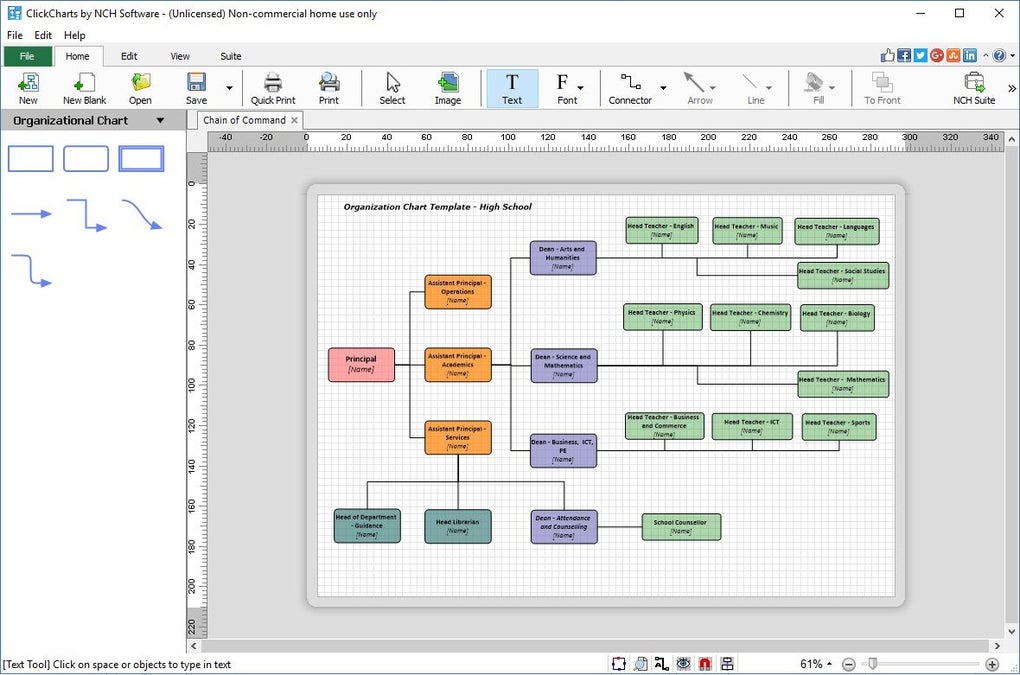
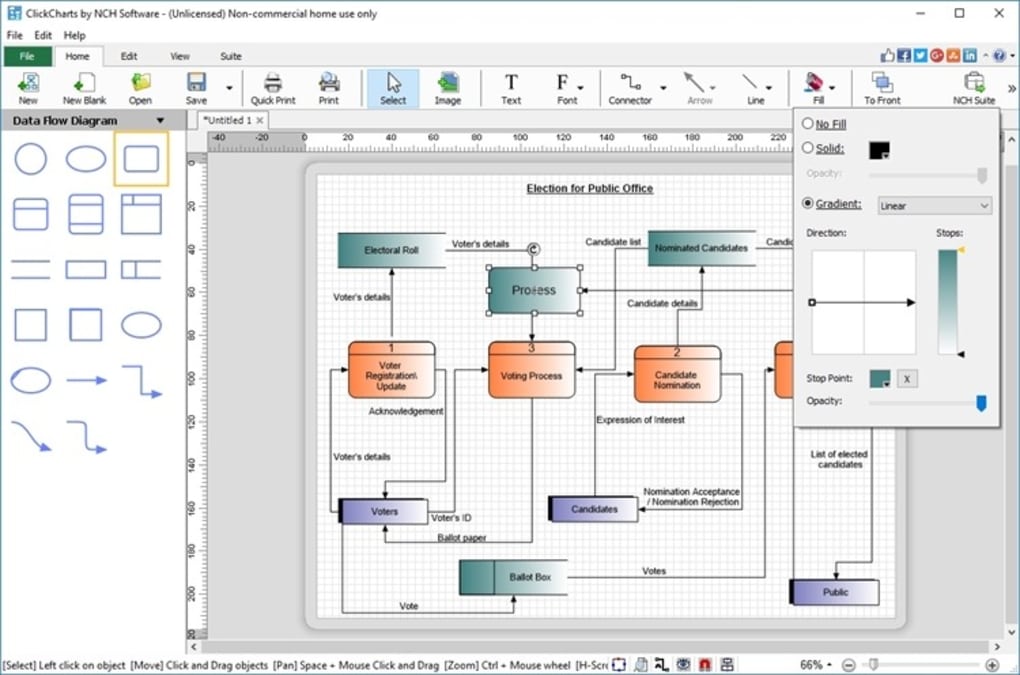
The selection and placement of elements are straightforward. Users can simply drag and drop chosen shapes and objects directly onto the canvas. The software provides a wealth of customization options to ensure visual appeal and accurate representation of data. Users can modify the fill color, line color, and arrow styles of connectors, providing flexibility in creating visually distinctive charts. Text within shapes can be easily edited, with full control over font, size, color, and alignment.
Furthermore, ClickCharts allows for the creation of complex diagrams through seamless layering and editing capabilities. Users can open and simultaneously edit multiple diagrams, enhancing productivity for projects involving multiple flowcharts or interconnected diagrams. For large diagrams spanning multiple pages, the software offers seamless sheet overlapping during printing, eliminating the disruption of fragmented visualizations.
The export options offer versatility in sharing and integrating the created flowcharts into other applications. Users can save their work in ClickCharts’ proprietary CCD format for later editing or export to widely used formats such as PDF, JPEG, and GIF, ensuring compatibility with various platforms and applications. This allows for seamless integration into reports, presentations, and collaborative documents.
Template and Shape Libraries
ClickCharts’ comprehensive library of templates and shapes significantly enhances the user experience. Users can choose from a range of pre-designed templates tailored to various purposes, streamlining the creation process. These templates provide a head start, particularly for users unfamiliar with flowcharting conventions. This feature is especially beneficial for users needing quick solutions or those with limited design expertise.
Beyond the templates, the software’s extensive shape library provides a diverse selection of symbols and icons catering to different diagram types and needs. These shapes are categorized intuitively, allowing for easy browsing and selection, and the software’s drag-and-drop interface simplifies the process of incorporating these elements into a user’s design.
This rich library of pre-designed elements ensures that the process of creating visually appealing and informative flowcharts remains accessible to users of all skill levels, reducing the time and effort needed for designing from scratch.
Strengths and Weaknesses of ClickCharts
ClickCharts offers several advantages that make it a strong contender in the flowchart software market. Its intuitive interface and user-friendly design are major strengths, making the software accessible to both beginners and experienced users. The extensive customization options provide ample flexibility for users to tailor their charts to specific requirements, and the ability to export to common formats like PDF, JPEG, and GIF ensures broad compatibility.
However, ClickCharts also has some drawbacks. One notable limitation is the relative lack of advanced features compared to more sophisticated professional-grade flowcharting applications. While sufficient for many users, those requiring specialized functionalities or advanced diagramming tools might find ClickCharts’ feature set somewhat restrictive.
Another point of consideration is the software’s reliance on proprietary CCD format. While the option to export to common formats exists, the inability to directly import files in these formats may pose a minor inconvenience for users working with diagrams created in other applications. This limitation might necessitate manual recreation of diagrams when migrating from other software.
Finally, the lack of extensive community support or readily available online tutorials might present a challenge for certain users. While the software’s intuitive design generally mitigates this, some users might benefit from more comprehensive online resources or active community forums for troubleshooting or learning advanced techniques.
ClickCharts Compared to Alternatives
ClickCharts stands as a valuable option among the wide array of flowcharting software available. Compared to more comprehensive and often more expensive alternatives like Microsoft Visio or ConceptDraw PRO, ClickCharts presents a compelling proposition with its free version. While lacking the advanced features and extensive functionalities of these professional-grade applications, ClickCharts offers a pragmatic solution for users with less demanding needs.
For simpler projects or personal use, ClickCharts’ free version provides a robust and user-friendly solution without the financial commitment associated with professional software. The intuitive interface and extensive shape library are significant advantages for users prioritizing ease of use and quick creation of visually clear flowcharts.
For users with advanced requirements, however, the paid versions of other alternatives might better meet their needs. These options often offer more extensive libraries of templates and shapes, advanced collaboration features, and functionalities like data linking and integration with other business applications. The choice of software, therefore, depends greatly on the individual user’s specific requirements, budget, and level of technical expertise.
Conclusion: Is ClickCharts Right for You?
ClickCharts emerges as a user-friendly and effective flowcharting software, particularly suited for individuals and teams with moderate flowcharting needs. Its intuitive interface, extensive shape libraries, and ease of customization contribute to a positive user experience. The availability of a free version significantly lowers the barrier to entry, making it an ideal choice for personal projects or simple professional tasks.
However, users requiring advanced features, extensive collaboration tools, or integration with other business systems might find more specialized professional-grade software better suited to their requirements. The decision to use ClickCharts hinges on a careful assessment of the user’s specific needs and priorities. For users prioritizing ease of use and visual clarity in flowchart creation without significant financial investment, ClickCharts is a strong and recommended choice. Users seeking a comprehensive suite of advanced features might need to consider other alternatives in the market.

File Information
- License: “Free”
- Latest update: “January 31, 2025”
- Platform: “Windows”
- OS: “Windows 10”
- Language: “English”
- Downloads: “27K”
- Size: “1.77 MB”


