
CLion, pronounced “sea lion,” is a powerful Integrated Development Environment (IDE) meticulously crafted by JetBrains for C and C++ programming. This comprehensive tool provides a robust suite of features designed to streamline the development process, from code completion and debugging to advanced refactoring and code analysis. Unlike simpler text editors or basic IDEs, CLion offers a sophisticated environment tailored to the complexities of modern C++ development, making it a popular choice among professional and aspiring C++ programmers alike. This in-depth exploration will delve into CLion’s capabilities, examining its key features, advantages, and potential limitations.
Understanding CLion’s Core Functionality
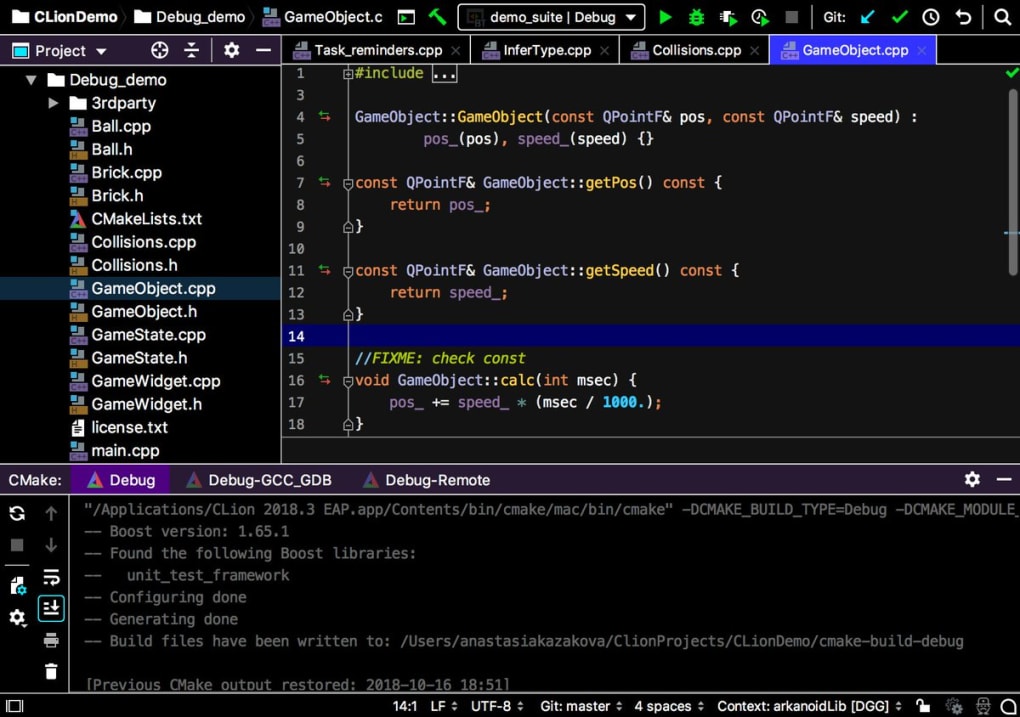
At its heart, CLion functions as a sophisticated code editor with a vast array of features built to enhance developer productivity and code quality. Its core strength lies in its deep understanding of C and C++ languages, including modern C++ standards and preprocessor directives. This understanding enables CLion to provide intelligent code completion, going beyond simple keyword suggestions to offer context-aware completions based on the current code context, project structure, and included libraries. This “Smart Completion” feature significantly reduces typing time and minimizes the risk of errors.
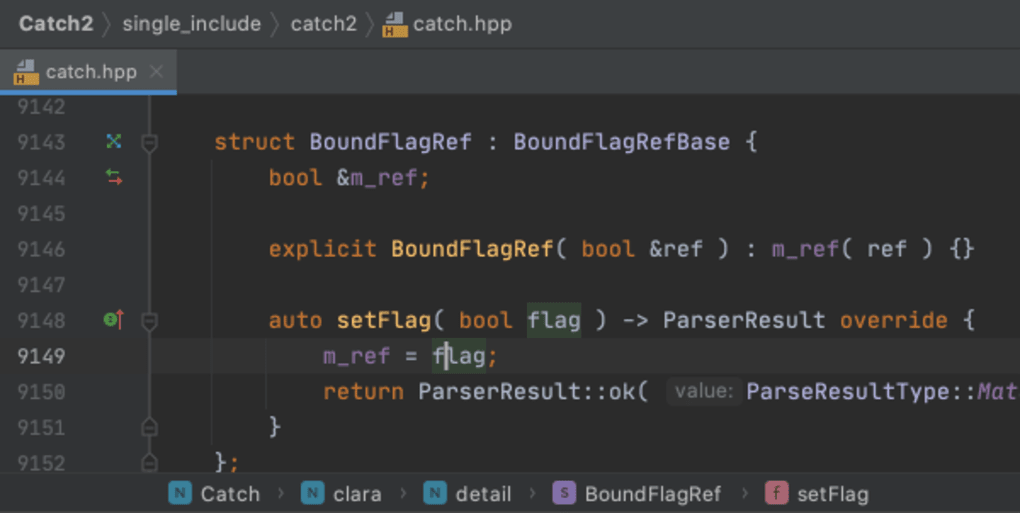
Furthermore, CLion’s integrated navigation tools, such as “Breadcrumbs,” provide a clear visual representation of the code’s hierarchical structure, allowing developers to quickly jump between different parts of their codebase. This intuitive navigation significantly improves code understanding and reduces the time spent searching for specific functions or variables.
CLion goes beyond simple editing. It empowers developers with powerful code generation capabilities. Through simple keyboard shortcuts, developers can readily generate common code structures like overriding or implementing functions. This automation streamlines the development process, especially when dealing with large or complex projects.
Advanced Features for Enhanced Productivity and Code Quality
CLion’s capabilities extend far beyond basic code editing and generation. The IDE incorporates robust automated refactoring tools. These tools automatically propagate changes made to symbols, functions, or parameters throughout the entire codebase, ensuring consistency and minimizing the risk of introducing errors during refactoring. This feature is especially valuable in large-scale projects where manual updates would be tedious and error-prone.
CLion’s built-in code analysis functionality continuously monitors the code for potential issues as the developer types. It proactively identifies potential errors, style violations, and other problems, providing immediate feedback and suggesting solutions. This real-time feedback helps developers catch and address issues early, preventing them from escalating into more significant problems later in the development cycle. This proactive approach to error detection significantly improves code quality and reduces debugging time.
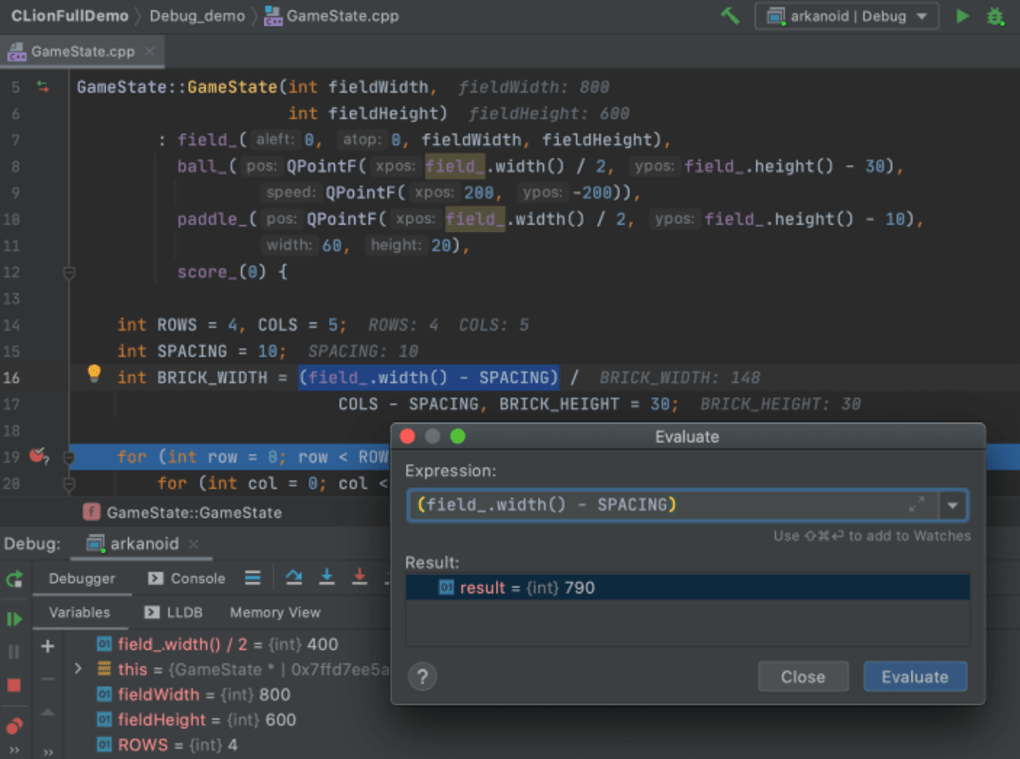
The IDE also includes a powerful built-in debugger, allowing developers to step through their code, inspect variables, and identify the root cause of errors. This debugger seamlessly integrates with the development environment, making the debugging process more efficient and less disruptive. With the ability to set breakpoints, step through code line by line, and inspect variables in real-time, developers can efficiently pinpoint and resolve bugs.
CLion’s Cross-Platform Compatibility and Integration
CLion distinguishes itself through its cross-platform compatibility, supporting Windows, macOS, and Linux operating systems. This feature allows developers to work seamlessly across different platforms without having to adapt their development environment. This consistent experience ensures a smooth workflow regardless of the developer’s preferred operating system.
While CLion excels as a standalone IDE, it also benefits from seamless integration with other tools and services commonly used in software development. Its support for Git and other version control systems simplifies collaboration and code management. Furthermore, its extensibility allows developers to tailor their environment to their specific needs and preferences by installing plugins and extensions.
Comparing CLion to Alternative IDEs and Code Editors
While CLion is a highly capable IDE, it’s essential to consider its position within the broader landscape of C++ development tools. Compared to simpler text editors like Notepad++ or Sublime Text, CLion offers a significantly richer set of features, including advanced code completion, integrated debugging, and refactoring capabilities. However, this enhanced functionality comes at the cost of increased system resource consumption and a steeper learning curve. Simpler editors are often preferred for quick edits or when system resources are limited.
When compared to other IDEs specifically designed for C++ development, such as Visual Studio or Code::Blocks, CLion holds its own. Visual Studio, particularly in its professional editions, offers a vast array of features, including advanced debugging, profiling, and integration with Microsoft technologies. However, Visual Studio’s complexity and resource requirements can be a barrier for some users. Code::Blocks, on the other hand, provides a lightweight alternative, but it lacks some of the sophisticated features found in CLion, like the comprehensive code analysis and refactoring tools.
CLion’s strength lies in its balance between a comprehensive feature set and a relatively streamlined user interface. It provides advanced features without being overwhelmingly complex, making it a suitable choice for both experienced developers and those new to C++ programming.
The Practical Use Cases and Limitations of CLion
CLion’s primary use case is undeniably the development of C and C++ applications. Its core strengths – intelligent code completion, advanced refactoring, powerful debugging, and integrated code analysis – are specifically tailored to address the challenges and complexities of these languages. It is an excellent choice for projects ranging from small utilities to large-scale software applications. Its cross-platform compatibility also makes it ideal for projects requiring development across multiple operating systems.
However, CLion is not without limitations. Its primary drawback is its licensing model. CLion is a commercial product, requiring a paid subscription for continued use. While a free trial is available, this might not be suitable for individuals or organizations with budget constraints. Another potential limitation is its resource consumption, as a full-featured IDE with comprehensive code analysis features requires a reasonably powerful system to operate efficiently. Users with less powerful machines may experience performance issues.
Conclusion: Is CLion the Right IDE for You?
CLion is a potent and versatile IDE specifically designed for C and C++ development. Its intelligent code completion, powerful refactoring tools, integrated debugger, and advanced code analysis features significantly enhance developer productivity and code quality. Its cross-platform compatibility ensures a consistent development experience across various operating systems.
However, the decision of whether or not CLion is the right IDE for you depends on your individual needs and circumstances. If you’re a serious C or C++ developer working on significant projects and appreciate a powerful, feature-rich environment, CLion is an excellent investment. However, if you’re working on smaller projects, have budget constraints, or have limited system resources, a lighter-weight alternative might be a more suitable option. The free trial version allows for hands-on evaluation to determine whether CLion meets your specific requirements and workflow.
File Information
- License: “Trial version”
- Version: “2020.3.2”
- Latest update: “July 15, 2022”
- Platform: “Windows”
- OS: “Windows 10”
- Language: “English”
- Downloads: “13K”
- Size: “514.52 MB”


