In today’s visually-driven world, video content reigns supreme. From captivating social media stories to informative business presentations and cherished family memories, the demand for accessible and powerful video editing tools has never been higher. Enter Clipchamp, a name that has steadily risen in prominence as a user-friendly, feature-rich video editor designed to empower creators of all skill levels. Originally a web-based platform, Clipchamp has cemented its position in the Windows ecosystem, especially after its acquisition by Microsoft, making it an integral part of the Windows 11 experience. This comprehensive guide delves deep into what makes Clipchamp a compelling choice, exploring its features, benefits, limitations, and how it stands in the crowded landscape of video editing software.
At its core, Clipchamp is built on the philosophy of simplifying video production without sacrificing quality or creative potential. It aims to bridge the gap between overly complex professional-grade software and basic, often restrictive, mobile editing apps. Whether you’re a budding influencer, a small business owner looking to create engaging marketing material, an educator crafting compelling lessons, or simply someone who wants to compile holiday footage into a memorable highlight reel, Clipchamp offers a streamlined pathway to achieving your vision. Its cloud-based architecture further enhances its accessibility, allowing users to work on projects from virtually any device with an internet connection, ensuring flexibility and collaboration are at the forefront of the editing experience.
Unlocking Creativity: Core Features and User Experience
Clipchamp’s appeal lies in its intuitive design and robust set of features that cater to both novices and those with some editing experience. It prioritizes a drag-and-drop interface, making the learning curve remarkably gentle. This section explores the fundamental elements that contribute to Clipchamp’s acclaimed user experience and creative toolkit.

A Rich Library of Templates for Every Project
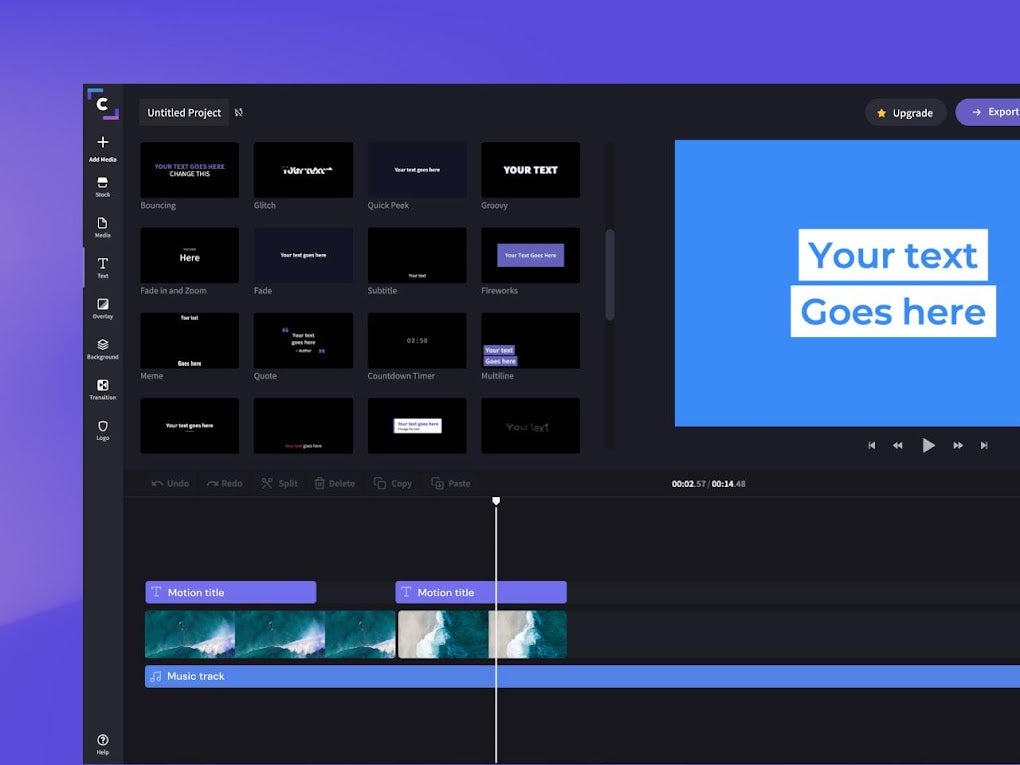
One of Clipchamp’s most celebrated features is its extensive library of templates. This treasure trove of pre-designed video structures is a game-changer, especially for users who might feel overwhelmed by starting a project from scratch. These templates are meticulously crafted to suit a vast array of purposes:
- Social Media: Templates optimized for Instagram Reels, YouTube Shorts, TikTok videos, Facebook ads, and more, ensuring your content looks professional and is perfectly formatted for each platform.
- Business & Marketing: From product promotions and explainer videos to corporate presentations and event highlights, businesses of all sizes can find suitable starting points to convey their message effectively.
- Personal & Lifestyle: Celebrate milestones with birthday videos, create travel vlogs, compile family montages, or craft engaging educational content.
- Gaming: Specific templates tailored for gaming highlights, intros, and outros, appealing to the vibrant online gaming community.
Each template comes with pre-set aspect ratios, engaging transitions, royalty-free stock footage, music, and text animations, which users can easily customize. This not only saves a tremendous amount of time but also provides inspiration and a professional foundation upon which to build unique video content. The ability to quickly swap out stock media with personal clips, adjust text, and change color schemes transforms these templates into personalized masterpieces with minimal effort.
Seamless Importing and Flexible Editing Tools

Clipchamp understands that content comes from various sources. To facilitate an uninterrupted workflow, the platform offers flexible options for importing media:
- Local Storage: Directly upload video files, images, and audio from your computer or mobile device. This is the most common method and is straightforward.
- Cloud Services: Connect and import media directly from popular cloud storage platforms such as Google Drive, OneDrive, Dropbox, and Box. This is incredibly convenient for users who store their media in the cloud, allowing them to access files without prior downloads.
- Webcam and Screen Recording: For creators who need to record new content, Clipchamp integrates both webcam and screen recording functionalities. This is perfect for tutorials, reaction videos, or quickly capturing on-screen demonstrations.
Once your media is imported, Clipchamp’s editing timeline becomes your creative canvas. The interface is clean and intuitive, featuring a standard multi-track timeline where you can arrange, trim, cut, and split your clips with precision. Key editing functionalities include:
- Trimming and Cutting: Easily shorten clips, remove unwanted segments, and arrange them in the desired sequence.
- Splitting: Divide long videos into shorter, manageable segments.
- Transitions: Add professional-looking transitions between clips to ensure a smooth flow, choosing from a variety of styles like fades, wipes, and dissolves.
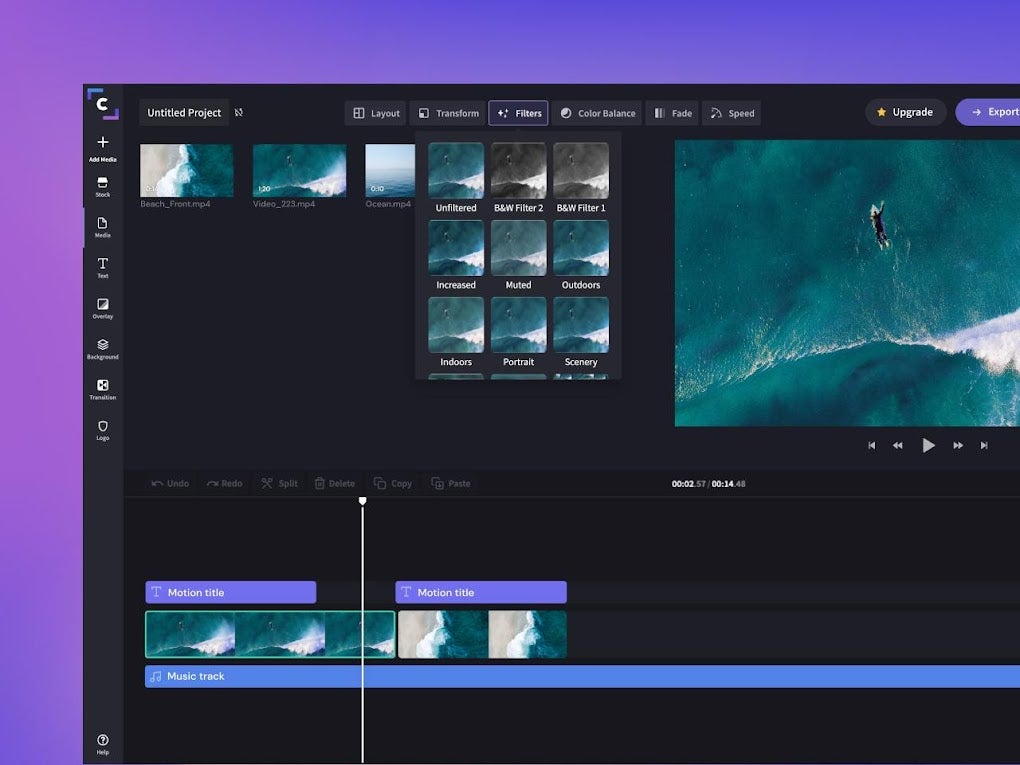
- Filters and Effects: Apply a wide range of visual filters to enhance the mood or aesthetic of your video, from vintage looks to vibrant modern tones. Effects like slow-motion, fast-motion, and picture-in-picture are also readily available.
- Text and Titles: Overlay text with customizable fonts, colors, sizes, and animations. This is crucial for adding context, titles, captions, or calls to action.
- Audio Editing: Adjust volume levels, add background music from Clipchamp’s stock library (or upload your own), and apply fade-in/fade-out effects to ensure smooth audio transitions.

Empowering Narration with Text-to-Speech
A standout feature within Clipchamp’s accessibility toolkit is its integrated Text-to-Speech (TTS) facility. This technology allows users to convert written text into natural-sounding voiceovers, opening up a world of possibilities for content creators:
- Voiceovers without Recording: For those who are uncomfortable recording their own voice, or simply want a consistent, professional narration, TTS provides a convenient alternative.
- Multilingual Content: Clipchamp’s TTS supports a multitude of languages and accents, enabling creators to produce content for a global audience without needing multiple voice actors.
- Accessibility: It makes video content more accessible to visually impaired viewers or those who prefer consuming information through audio.
- Efficiency: Quickly generate narration for tutorials, explainer videos, or documentaries, saving time on recording and post-production voice editing.
The TTS feature offers various voice options, allowing users to choose the gender, age, and accent that best fits their video’s tone. This integration highlights Clipchamp’s commitment to making sophisticated tools available to every user, ensuring professional results are within reach.
Clipchamp for Every Creator: From Personal Projects to Professional Use
Clipchamp’s versatility extends beyond its core editing functions, positioning it as a valuable asset for a diverse range of users. Its ability to simplify complex tasks and integrate with popular platforms makes it a go-to solution for both casual users and businesses.
Ideal for Businesses and Content Creators of All Sizes
The modern digital landscape demands constant creation of engaging video content for brands and individuals alike. Clipchamp rises to this challenge by providing tools specifically tailored for various commercial and creative endeavors:
- Small Businesses: For entrepreneurs and small teams, Clipchamp offers an affordable and efficient way to produce high-quality marketing videos. Create compelling product demonstrations, promotional advertisements for social media, company overview videos, or customer testimonials without investing in expensive software or professional editors. The template library is particularly useful here, providing quick starting points for various campaigns.
- Large Corporations: Even larger organizations can leverage Clipchamp for internal communications, training videos, or quick marketing initiatives where a rapid turnaround is necessary. Its brand kit feature (available in premium versions) allows companies to upload their logos, custom fonts, and brand colors, ensuring all video content remains consistent with their corporate identity.
- Social Media Influencers and YouTubers: Aspiring and established content creators benefit from Clipchamp’s optimization for various platforms. Easily create intros, outros, lower-thirds, and full-length videos for YouTube, Instagram, TikTok, and other platforms. The direct sharing options significantly streamline the publishing process.
- Educators and Students: Teachers can create engaging lesson materials, explainer videos, or presentation aids. Students can use it for school projects, video essays, or creative presentations, enhancing their digital literacy skills.
- Personal Use: Beyond professional applications, Clipchamp is excellent for personal projects. Whether it’s compiling family vacation videos, creating photo montages for special occasions, or simply experimenting with video editing as a hobby, its user-friendly interface makes it accessible to everyone.
The program’s ability to facilitate quick and polished video creation makes it an indispensable tool for anyone looking to make an impact in the digital space.
Seamless Sharing and Saving Capabilities
Once a video is meticulously crafted, the next crucial step is sharing it with the world or preserving it for future reference. Clipchamp excels in providing diverse and convenient options for both:
- Direct Sharing to Social Media: Integrated sharing options allow users to directly upload their finished videos to popular platforms like YouTube, Instagram, TikTok, Pinterest, and LinkedIn. This eliminates the need to download the video and then re-upload it manually, saving time and ensuring optimal settings for each platform.
- Cloud Storage Integration: Users can save their completed projects or exported videos directly to cloud services such as OneDrive, Google Drive, or Dropbox. This is particularly useful for backup, collaborative workflows, or accessing projects across different devices.
- Local Download: For those who prefer to keep a copy on their device or need to use the video in offline contexts, Clipchamp allows users to download the final video file directly to their PC or mobile phone. This gives creators full control over their content and its distribution.
- Customizable Export Settings: Before exporting, users can often choose their desired resolution (e.g., 480p, 720p, 1080p, 4K in premium versions), quality settings, and file format, ensuring the video meets specific requirements for playback or platform uploads.
This comprehensive suite of sharing and saving options ensures that Clipchamp users can easily distribute their creations, collaborate efficiently, and maintain archival copies of their work.
Browser Compatibility and Cross-Platform Access
Clipchamp’s foundation as a web application ensures its accessibility across a wide range of devices and operating systems, promoting flexibility in the creative process. Its compatibility with various browsers makes it a truly cross-platform solution.
- Broad Browser Support: The app is compatible with most modern web browsers, including leading options like Microsoft Edge, Google Chrome, Mozilla Firefox, and Safari. This means users aren’t tied to a specific browser and can work from their preferred environment.
- Windows Integration: As a Microsoft product, Clipchamp is deeply integrated into the Windows ecosystem, particularly Windows 11, where it comes pre-installed as the default video editor. This offers optimized performance and a seamless experience for Windows users.
- Mobile Accessibility: While the primary editing experience is typically on a desktop or laptop, Clipchamp also offers mobile applications (e.g., for Android) that allow for on-the-go editing and quick adjustments. This extends its utility to smartphone users who need to create or tweak content from their handheld devices.
- Cloud-Based Workflow: Because it’s cloud-based, projects are saved online, allowing users to start editing on one device (e.g., a desktop) and continue on another (e.g., a laptop or tablet) without losing progress or needing to transfer files manually. This flexibility is invaluable for modern workflows.
This robust compatibility ensures that Clipchamp remains accessible and functional, whether you’re working from your powerful desktop PC, a portable laptop, or even making quick edits on your smartphone.
Technical Deep Dive: Formats, Performance, and Platform Availability
Understanding the technical underpinnings of any software is crucial for maximizing its potential. Clipchamp, while user-friendly, also offers solid technical specifications that support its creative functionalities. However, like any tool, it comes with certain considerations, especially regarding its free tier.
Supported File Formats and Codecs
Clipchamp boasts broad support for a variety of popular video file types and codecs, aiming to accommodate most common media formats encountered by users. This includes, but is not limited to:
- Video Formats: MP4, MOV, AVI, WMV, FLV, DIVX, MPEG, M4V, MKV, WebM, and more. While it generally supports these, some less common codecs within these formats might require initial conversion. The platform strives to automatically handle most popular encodings to ensure a smooth import experience.
- Image Formats: JPG, PNG, GIF, BMP, TIFF, WebP, etc.
- Audio Formats: MP3, WAV, OGG, FLAC, AAC, WMA, etc.
It’s important to note, as the original content mentions, that “some video file types, such as MP4 or MOV, need to be converted before they can be edited in Clipchamp.” While MP4 and MOV are broadly supported, specific codecs or advanced features within those containers might sometimes necessitate an internal conversion process by Clipchamp to ensure full compatibility with its editing engine. This conversion usually happens in the background upon import, ensuring the user can still proceed with their editing. This process is generally seamless but might take a moment depending on the file size and complexity. The vast majority of user-generated content and standard media files will import and edit without such a prerequisite, reflecting Clipchamp’s commitment to broad compatibility.
Understanding Clipchamp’s Free vs. Paid Tiers
A significant aspect of Clipchamp’s offering is its freemium model. While the platform is celebrated for its accessibility, it’s crucial for users to understand the distinctions between the free version and its premium counterparts.
- Free Version: The free version of Clipchamp provides a robust set of basic video editing tools, including trimming, cutting, splitting, adding text, filters, transitions, and access to a selection of free stock media and audio. It allows users to export videos in standard definition (typically 720p or 1080p, though 1080p export often requires a premium subscription on some instances or specific features). The key limitation, as highlighted in the reference, is that “the free version of Clipchamp does not include standard video editing tools” – this phrasing is a bit misleading. It does include standard tools, but it restricts access to advanced features and high-resolution exports. Historically, 4K export, certain premium stock assets, brand kit features, and specific advanced effects are locked behind a paywall. Watermarks were also a feature of the free tier in the past, though Microsoft has since made 1080p export watermark-free for all users, significantly boosting the value of the free offering.
- Premium Versions: Subscribing to a Clipchamp premium plan (often included with Microsoft 365 subscriptions) unlocks the full potential of the editor. This typically includes:
- 4K Export: The ability to export videos in stunning ultra-high definition.
- Premium Stock Content: Full access to an extensive library of royalty-free stock videos, images, and music.
- Brand Kit: Customize and save brand logos, fonts, and colors for consistent branding across all videos.
- Advanced Features: Access to more sophisticated effects, filters, and potentially faster processing times due to prioritized cloud resources.
- Cloud Storage: Enhanced cloud storage for projects and media.
Users should be prepared to make some compromises if relying solely on the free version, particularly regarding professional-grade resolution and access to the full creative asset library. However, for most casual users and many small businesses, the free tier, especially with its 1080p watermark-free export, provides exceptional value.
Performance and Platform-Specific Considerations
Given Clipchamp’s cloud-based nature, its performance is influenced by both your internet connection and the power of your device.
- Cloud Processing: Many of Clipchamp’s heavier tasks, like rendering and applying complex effects, leverage cloud computing. This means that a fast and stable internet connection is beneficial for a smooth editing experience and quicker export times.
- System Requirements: While it runs in a browser, a reasonably modern computer with a decent amount of RAM (8GB or more recommended) and a capable processor will provide the best experience, especially when dealing with multiple video tracks or high-resolution footage.
- Dedicated App vs. Browser: For Windows users, the dedicated Clipchamp app, integrated into Windows 11, often offers a more optimized experience compared to running it solely in a browser tab. It can sometimes leverage system resources more efficiently, leading to smoother playback and editing.
Clipchamp is truly cross-platform, available for Windows as a native application and through web browsers. There are also mobile versions, like “Clipchamp - Video Editor for Android,” extending its reach to smartphone users who need to edit on the go. This broad availability underscores its mission to be an accessible video editor for everyone, everywhere.
Navigating the Ecosystem: Clipchamp’s Place in Video Editing
The video editing landscape is diverse, offering a spectrum of tools from basic to professional-grade. Clipchamp carves its niche by balancing power with simplicity, making it a strong contender for a specific audience while also acknowledging the need for more specialized tools in certain scenarios.
Clipchamp in a Competitive Landscape
When evaluating Clipchamp, it’s helpful to consider its position relative to other popular video editors. The market includes a wide array of options, each with its own strengths and target audience.
- CapCut: Often cited as a direct competitor, CapCut is a “free all-in-one video editor for everyone” (as per the reference content) known for its strong mobile presence and TikTok integration. It offers a similar ease of use and a rich set of effects, often surpassing Clipchamp in some trendy features for short-form content. CapCut’s user base is immense, particularly among younger content creators.
- DaVinci Resolve: While also free, DaVinci Resolve represents the other end of the spectrum. It’s a “free powerful video and audio editing software” (from the reference) that is professional-grade, offering Hollywood-level color grading, visual effects, and audio post-production. It has a steep learning curve and demands powerful hardware, making it unsuitable for beginners or those seeking quick edits.
- Adobe Premiere Pro/Rush: Adobe offers industry-standard professional tools like Premiere Pro, which is highly complex and subscription-based, alongside Premiere Rush, a more simplified, mobile-first option. Rush is closer to Clipchamp in terms of accessibility but often requires an Adobe Creative Cloud subscription.
- FilmForth, VSDC Free Video Editor, Lightworks: These are other free video editors that cater to different needs. FilmForth is a “Forth-based multimedia video editor” (from the reference), typically simpler. VSDC is known for its non-linear editing capabilities and a wide range of features in its free version. Lightworks offers professional-grade editing at your fingertips, with a free version that has some limitations but is still powerful.
Clipchamp differentiates itself by its deep integration with the Microsoft ecosystem, its strong template library, and its focus on being an all-in-one, browser-friendly solution for everyday video creation. It aims to be the accessible middle ground, offering more features than basic mobile apps but less complexity than professional suites, making it an excellent choice for a broad user base.
User Experience and Community Feedback
User reviews and community feedback are invaluable indicators of a software’s real-world performance and utility. Clipchamp generally garners positive remarks for its ease of use and accessibility.
- Positive Feedback: Users frequently praise Clipchamp for its intuitive interface, making it easy for beginners to jump in and start creating. The template library and stock media options are often highlighted as significant advantages. The Text-to-Speech feature and direct sharing capabilities also receive positive mentions for streamlining workflows. The fact that it’s a Microsoft product, especially its integration with Windows 11, provides a sense of reliability and trust for many users.
- Areas for Improvement: Some users occasionally point out limitations of the free version, such as resolution restrictions or the unavailability of certain premium assets. Advanced editors might find it lacks the granular control and highly specialized features of professional software. Performance, particularly with very large files or complex projects on less powerful machines or slower internet connections, can sometimes be a concern, although Clipchamp continuously optimizes its cloud infrastructure.
PhanMemFree (formerly Softonic) user reviews, for instance, show a rating of 3.6 out of 5 for Clipchamp - Video Editor, reflecting a generally positive reception with room for ongoing enhancements. The “Top downloads Video for Windows” section on PhanMemFree.org often lists Clipchamp alongside VLC media player, CapCut, and DaVinci Resolve, indicating its popularity and competitive standing.
The Future of Video Editing with Clipchamp
As video content continues to evolve, so too will Clipchamp. Microsoft’s backing suggests a continued investment in its development, ensuring it stays relevant with new features, improved performance, and deeper integrations across their ecosystem. We can anticipate further enhancements in AI-powered editing features, more sophisticated templates, expanded stock libraries, and even greater cross-device synchronization.
The emphasis on ease of use, combined with an ever-growing set of capabilities, positions Clipchamp as a forward-thinking tool that will adapt to the dynamic needs of modern content creators. It’s more than just an editor; it’s a gateway for millions to express themselves visually, share their stories, and connect with their audiences in powerful new ways.
Conclusion
Clipchamp Video Editor stands as a testament to the idea that powerful video creation doesn’t have to be complicated. With its user-friendly interface, extensive template library, flexible import/export options, and innovative features like Text-to-Speech, it democratizes video editing for a vast audience. Whether you’re a small business striving for brand presence, a social media enthusiast looking to captivate followers, or an individual wanting to immortalize precious moments, Clipchamp offers a compelling, accessible, and often free pathway to achieving your creative aspirations.
While the free version comes with certain limitations, its core functionalities, especially the 1080p watermark-free export, provide immense value. For those requiring advanced features, the premium tiers offer a comprehensive toolkit that rivals more specialized software. Integrated seamlessly into the Windows environment and accessible across various browsers and mobile devices, Clipchamp is more than just an editor; it’s an ecosystem designed to simplify and elevate the art of visual storytelling for everyone. Its position in the market as a robust yet intuitive solution makes it a standout choice for anyone looking to step into the world of video creation with confidence.
File Information
- License: “Free”
- Version: “4.2.10230.0”
- Latest update: “June 12, 2025”
- Platform: “Windows”
- OS: “Windows 11”
- Downloads: “46.1K”