
CloneDVD is a software application designed for copying and burning DVD movies. While offering a straightforward approach to DVD duplication, its functionality and ease of use are subject to varying opinions. This review delves into its features, performance, and overall user experience, comparing it to similar software options available in the market.
Core Functionality: Copying and Burning DVDs
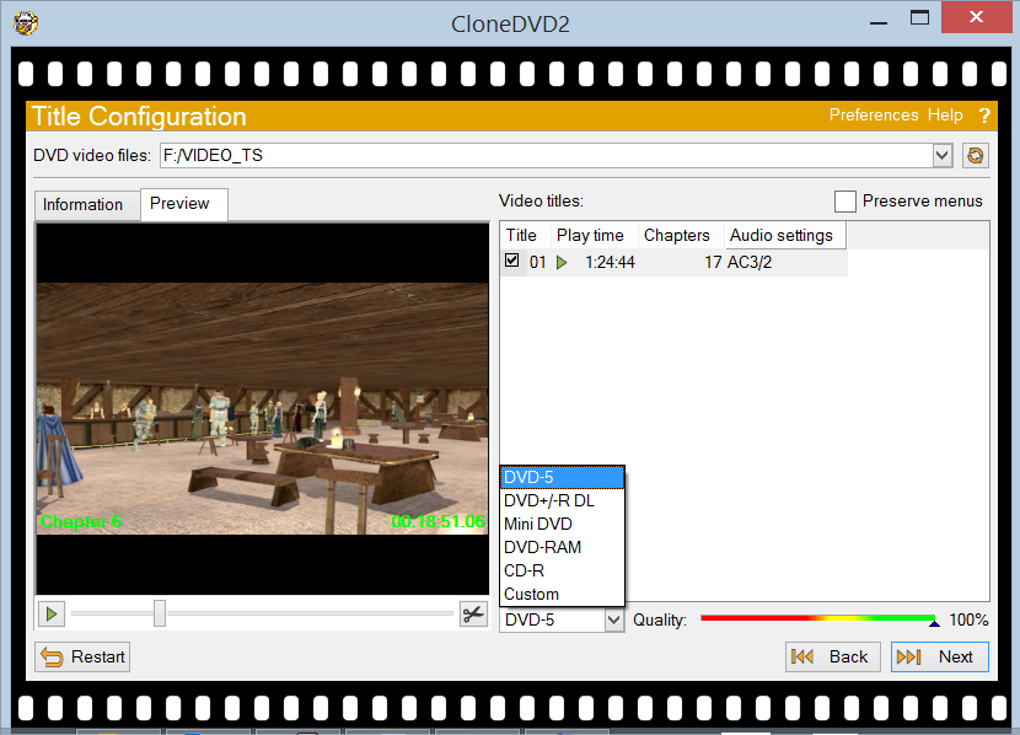
CloneDVD’s primary function is the creation of DVD copies. It provides users with three primary options: copying a DVD, cloning a DVD, and writing data to a disc. The process is relatively user-friendly. Users select the source DVD, adjust preferences such as compression ratio, subtitle selection, and audio tracks, and then specify their desired output format. This output can be a DVD file, an ISO image, or a directly burned disc. A simple “Go!” button initiates the copying process.
The speed and efficiency of CloneDVD are frequently cited as positive attributes. Many users report a fast and reliable cloning performance. This speed, however, doesn’t come at the cost of picture quality in most cases; the software aims to maintain the highest possible visual fidelity during the copying process. The post-processing auto-shutdown feature is another convenience praised by users, enhancing the overall user experience.
However, the software’s configuration options are considered rather basic by some reviewers. While sufficient for users primarily focused on creating backups of their DVD movies, those seeking finer control over the copying process might find CloneDVD lacking in advanced features. The limited customization may disappoint users familiar with more advanced DVD ripping and burning applications. More granular control over compression settings, video encoding, and other parameters is noticeably absent.
Strengths and Weaknesses of CloneDVD
Strengths:
- Ease of Use: The intuitive interface makes CloneDVD accessible even to users with minimal technical experience. The streamlined process requires minimal input, allowing for quick and easy DVD backups.
- Speed and Efficiency: CloneDVD is generally praised for its speed and efficiency in copying DVDs. The process is noticeably quicker than some competing software.
- High-Quality Copies: In many instances, the software produces DVD copies with minimal loss of picture quality, ensuring the integrity of the original content is preserved during the transfer process.
- Multiple Output Options: The flexibility of outputting to a DVD file, an ISO image, or directly to a disc caters to different user preferences and needs, enabling users to choose the method most suitable for their workflows.
- Auto-Shutdown Feature: This convenience eliminates the need for user intervention after the copying process is complete, improving workflow efficiency.
Weaknesses:
- Limited Configuration Options: The lack of advanced settings restricts customization compared to more feature-rich competitors. This simplicity may be advantageous for casual users, but it limits the control experienced users may desire.
- Potential for Copy Protection Issues: While the software is designed for backup purposes, some users have reported issues with correctly identifying copy-protected DVDs. This may limit its effectiveness for certain discs.
- Bundled Software: The installation process has been criticized for potentially installing unwanted toolbars or other software. Users must be vigilant during installation to avoid these potentially intrusive additions.
- Limited Online Help: The online support resources may not be as extensive or readily accessible as some users would prefer, potentially leading to difficulties resolving certain issues.
Comparison with Alternative Software
Several alternative applications provide similar DVD copying functionality. Some notable competitors include:
- CloneCD: Focuses on CD cloning but shares similarities in terms of ease of use and efficiency. However, it doesn’t offer DVD support.
- DVD Shrink: A free and popular option known for its ability to reduce the size of DVD images before burning, helpful for fitting larger movies onto single-layer DVDs. However, it lacks some of the polished features of CloneDVD and may be more complex to use.
- ImgBurn: A free and open-source program with a wider range of features for burning various types of discs, including DVDs. Its complexity may be a drawback for less technically inclined users.
- DVD Decrypter: A free program specifically designed for circumventing copy protection on DVDs. However, its legality may be questionable in certain jurisdictions.
The choice between CloneDVD and its alternatives depends on individual needs and priorities. While CloneDVD excels in its speed, ease of use, and generally high-quality outputs, its limited configurability and potential for bundled software installation may steer experienced users towards more advanced options. Conversely, less technically proficient users might find CloneDVD’s simplicity a welcome advantage.
Recent Updates and Improvements
Recent updates to CloneDVD have focused on enhancing performance and addressing specific technical issues. The software’s changelog highlights several notable changes:
- Improved Transcoder Performance: Significantly increased the speed of the transcoding process, leading to faster overall copying times.
- Enhanced Layer Break Handling: Improved management of layer breaks on dual-layer DVDs, reducing the likelihood of errors and ensuring seamless playback.
- .dvd File Support: Added support for .dvd files, enhancing compatibility with Virtual CloneDrive and CloneCD. This improvement facilitates a smoother workflow for users utilizing these tools.
- Warnings for Single-Layer to Dual-Layer Writes: Implemented warning messages to prevent accidental overwriting of single-layer image files onto dual-layer media, mitigating potential data loss or errors.
- Support for “A” and “B” Drive Letters: Increased compatibility with a wider range of optical drives.
- “Loop Titles” Option: This new feature addresses playback issues on certain DVD players. Enabling this option ensures continuous playback of titles copied without menus.
- Episodic DVD Support: Added support for DVDs with episodic content organized as chapters. This improved compatibility enhances usability for a broader range of DVD types.
- Bug Fixes: Numerous bug fixes addressed issues encountered with compressing certain discs and made other minor improvements to overall stability and functionality.
These improvements demonstrate the ongoing development and refinement of CloneDVD, addressing user feedback and improving overall performance and compatibility. These updates highlight the commitment to enhancing the user experience and addressing technical limitations.
Conclusion
CloneDVD provides a straightforward and generally efficient solution for copying and burning DVD movies. While its ease of use is a major strength, the limited configuration options might be a significant limitation for some users. Before choosing CloneDVD, carefully consider its strengths and weaknesses in relation to your specific needs and compare it to available alternatives. The recent updates demonstrate ongoing efforts to enhance the software, but potential users should still weigh the pros and cons based on their technical expertise and requirements.
File Information
- License: “Trial version”
- Latest update: “November 26, 2024”
- Platform: “Windows”
- OS: “Windows Vista”
- Language: “English”
- Downloads: “252K”


