
Code Writer is a robust text and code editor developed by Actipro Software LLC, designed for Windows 10 users. This powerful tool seamlessly blends intuitive design with advanced features, catering to both novice and experienced programmers. It provides a streamlined environment for writing, editing, and managing various code types, making it a versatile asset for diverse programming tasks. This in-depth review will explore its functionality, features, strengths, and limitations.
User Interface and Functionality
Code Writer boasts a clean and intuitive user interface that prioritizes ease of use. The application opens in a near full-screen mode, maximizing the available screen real estate for code viewing and editing. A notable feature is the ability to fade the application’s chrome to blend seamlessly with the desktop background, minimizing distractions and promoting a focused coding experience. This customizable aesthetic allows users to tailor their workspace to their preferences.
Central to the application’s functionality is its Explorer Sidebar. This sidebar houses essential productivity features, readily accessible without interrupting the coding process. Users can find advanced editing commands, a document explorer for easy navigation between open files, comprehensive help documentation, print and share options, a powerful search function, and application settings all conveniently located within this panel. The sidebar is collapsible, allowing users to maximize code viewing space when needed.
The search functionality within Code Writer is particularly noteworthy. It allows users to quickly locate specific functions or code segments within their projects. This is crucial for efficient code navigation and modification, enabling seamless updates and error corrections. The search function also facilitates the easy replacement of functionalities, a common requirement during software development.
Beyond the mouse, Code Writer supports touch-based selection, providing flexibility for users who prefer a touch-based interaction. Furthermore, a wide array of keyboard shortcuts are available, speeding up workflows for experienced users. An easily accessible editing popup provides quick access to common editing commands, minimizing the need to navigate menus. For advanced users, the popup command palette offers a comprehensive list of shortcuts, including access to commands, recent documents, and a convenient “Go To Line” function for precise code navigation.
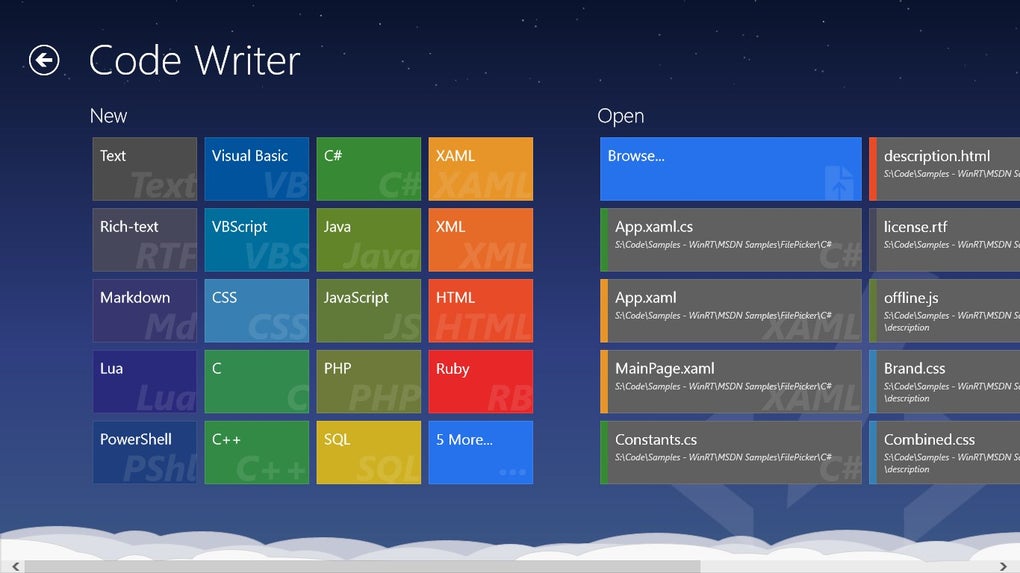
The application also excels in document management. Users can effortlessly create new documents, open existing ones, and easily resume their work from previous sessions. This seamless transition between sessions ensures that progress is preserved, enhancing overall productivity. Furthermore, any open documents persist between editing sessions, eliminating the need to reopen files each time the application is launched.
Supported Languages and File Types
Code Writer demonstrates its versatility through its extensive support for various programming languages and file types. This broad compatibility makes it a valuable tool for a wide range of developers and coders. The supported formats include, but are not limited to:
- Text-based: TXT, Rich Text, INI, Markdown
- Scripting Languages: Lua, Perl, PowerShell, Visual Basic, VBScript
- Styling: CSS
- General Purpose: Python, C, C++, C#, Java, JavaScript, JSON, PHP, Ruby
- Database: SQL
- Markup: XAML, XML, HTML, ASP, ASP.NET
This comprehensive list caters to a wide range of programming needs, from simple text editing to complex software development projects. The built-in syntax highlighting feature intelligently recognizes different file types, automatically coloring code elements to improve readability and aid in code comprehension. This greatly enhances the coding experience, allowing for easier identification of variables, functions, and other crucial code components.
Customization and Configuration
Code Writer offers an extensive degree of customization, allowing users to tailor the application to their preferences and coding style. Users can modify a range of attributes, including:
- Font: Family and size
- Indentation: Guides for enhanced code readability
- Line endings: Configuration for different operating systems
- Line highlighting: To highlight the current line for improved focus
- Line numbers: For easy code referencing
- Themes: Customizable themes for a personalized visual experience
- Web color previews: Visual representation of web colors
- Whitespace: Display or hide whitespace characters
- Word wrap: Automatic line wrapping for better readability
These extensive customization options ensure that users can create a coding environment perfectly suited to their individual needs and preferences. Detailed documentation is readily available within the application, guiding users through the available configuration settings and functionalities. This documentation is printable, offering a convenient offline reference for users who prefer a printed copy. Furthermore, the application offers several printing options, allowing for flexible output customization.
Strengths and Weaknesses
Code Writer presents several notable strengths, making it a compelling option for many users:
Pros:
- Intuitive interface: The user-friendly interface ensures a smooth learning curve for new users.
- Syntax highlighting: Improves code readability and understanding.
- Extensive language support: Covers a wide range of programming languages and file types.
- Advanced editing features: Includes powerful search and replace functionality, keyboard shortcuts, and touch-based selection.
- Customization options: Offers extensive customization options to tailor the environment to individual preferences.
- Document persistence: Preserves open documents between sessions.
- Integrated help documentation: Provides comprehensive assistance for navigating the software’s features.
Cons:
- Windows 10 dependency: Requires the Windows 10 Fall Creators Update (version 1709) or later, limiting compatibility with older systems.
- Large file handling: May experience performance issues when handling very large files.
- Limited multi-file management: Does not offer advanced features for managing multiple files as a single unit, such as simultaneous editing or easy switching between multiple related documents.
- Advanced editing limitations: Some file types might not fully support advanced editing features.
Conclusion
Code Writer provides a robust and versatile coding environment for Windows 10 users. Its intuitive interface, comprehensive language support, and extensive customization options make it a valuable tool for both beginners and experienced programmers. While some limitations exist regarding large file handling and advanced multi-file management, its strengths significantly outweigh its weaknesses for a wide range of users. The application’s focus on ease of use, combined with its powerful features, makes it a solid choice for anyone seeking a streamlined yet capable code editor. The inclusion of detailed documentation and a wide range of configuration settings ensures that users can fully tailor the application to their specific needs and preferences, creating a truly personalized coding experience.
File Information
- License: “Free”
- Version: “4.2.42.0”
- Latest update: “July 11, 2023”
- Platform: “Windows”
- OS: “Windows 10”
- Language: “English”
- Downloads: “24.1K”


