
Cok Free Auto Typer is a free Windows utility designed to significantly increase efficiency by automating repetitive typing tasks. It achieves this by allowing users to assign custom hotkeys to frequently used phrases or words, eliminating the need for manual typing and pasting. This review will delve into its features, usability, advantages, disadvantages, and compare it to similar applications.
Ease of Use and Installation
One of Cok Free Auto Typer’s primary strengths lies in its simplicity. The installation process is remarkably straightforward, requiring no registration or subscription. Users can download and launch the application within seconds, a significant advantage over more complex automation tools. The program boasts a minimalist interface, making it intuitive and accessible even for individuals with limited technical expertise. The main window presents a clear display of assigned hotkeys and text entries, while a dedicated “Help” section provides additional assistance and troubleshooting resources.
The application’s user-friendliness extends beyond installation. Adding new hotkeys is achieved with minimal clicks, and there’s no limit to the number of entries. Editing or deleting existing hotkeys is equally simple, offering users significant customization flexibility. The program seamlessly integrates into the Windows environment, running quietly in the background without causing noticeable performance lag or system crashes. This allows users to maintain productivity across multiple applications without interruption.
Customizable Features and Functionality
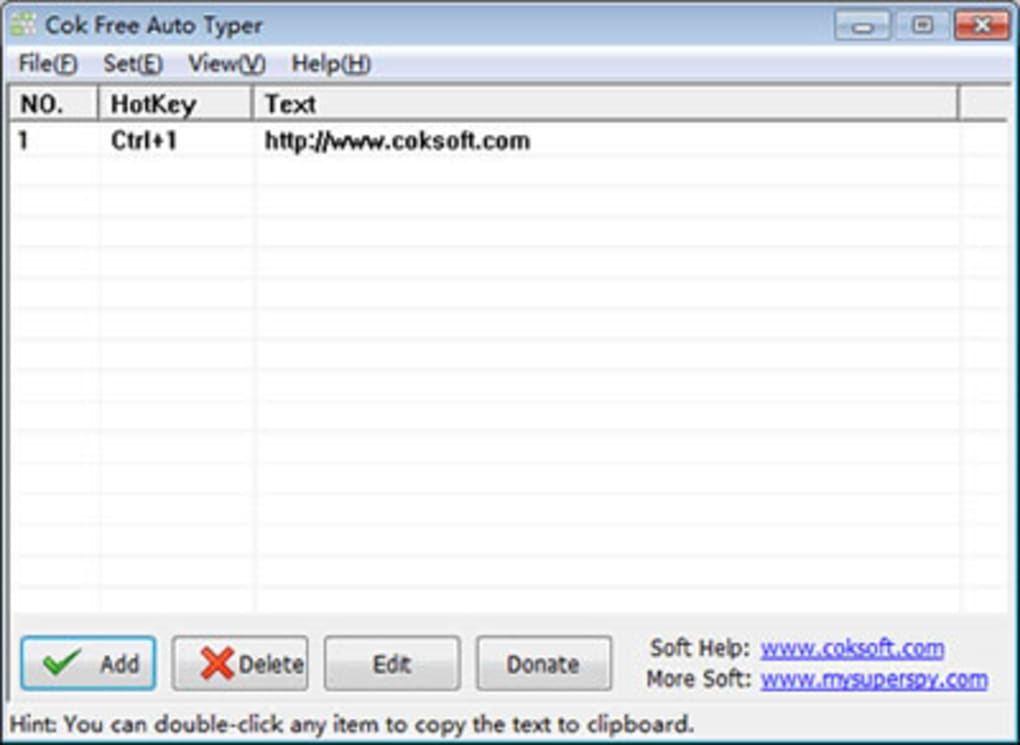
Cok Free Auto Typer offers a considerable level of customization, going beyond simple hotkey assignments. Users can configure the program to launch automatically at system startup, minimizing the need for manual activation. The ability to force the application window to appear above other applications ensures easy access to assigned hotkeys even during multitasking. Additionally, users can alter the hotkey responsible for showing or hiding the minimized application window, tailoring it to their preferred workflow.
The program handles text entry efficiently. Double-clicking a phrase automatically copies it to the system clipboard, ready for immediate pasting into any active document or application. This streamlined process further enhances efficiency, particularly for tasks involving frequent text duplication. The settings menu allows fine-tuning of various preferences, empowering users to personalize the program to perfectly match their unique needs and work style. This degree of customization distinguishes Cok Free Auto Typer from many of its competitors, offering a highly tailored user experience.
Advantages and Disadvantages
Cok Free Auto Typer provides several key advantages over manual typing for repetitive tasks. It significantly reduces the time spent on routine typing, freeing up valuable time for other, more complex tasks. This time savings translates to increased productivity and efficiency, a significant benefit for individuals in roles requiring frequent text entry. Furthermore, by eliminating the repetitive strain of constant typing, it can contribute to improved ergonomics and help reduce the risk of repetitive strain injuries like carpal tunnel syndrome. This makes it a worthwhile investment in both productivity and physical well-being.
The program’s lightweight nature is another significant advantage. Its minimal system resource consumption allows it to run smoothly in the background without impacting the overall system performance. This is particularly beneficial for users working with resource-intensive applications or older machines. The free-of-charge accessibility of the software further adds to its appeal, making it an attractive option for users on a budget or those wanting to try the software before committing to a paid alternative.
However, the software isn’t without its drawbacks. One potential issue is the possibility of conflicting hotkeys. If a user chooses a hotkey already assigned to another application or system function, this could lead to unexpected behavior. The program’s flexibility in hotkey assignment mitigates this somewhat, but users need to be mindful of potential conflicts. Additionally, longer or more complex hotkey sequences might require memorization, which could present a learning curve for some users. Although simple to use, it does demand some initial learning and familiarization to harness the full potential of its features.
Comparison with Alternative Applications
Several other applications offer similar functionalities, but Cok Free Auto Typer stands out due to its combination of ease of use, extensive customization options, and its free availability. While alternatives like Auto Typer and Auto Clicker Typer provide text automation, they often lack the user-friendly interface and extensive customization features found in Cok Free Auto Typer. Typing tutors like TypingClub, on the other hand, focus on improving typing speed rather than automating repetitive tasks, offering a different solution to the problem of text entry efficiency.
Other tools might offer more advanced features, such as voice-to-text capabilities or macro recording. However, these often come at the cost of increased complexity and potentially higher pricing. Cok Free Auto Typer strikes a balance, delivering powerful automation functionality without sacrificing usability or affordability. Its focus remains firmly on the efficient automation of text entry, rather than offering a broader suite of functionalities that might be less relevant to its core purpose.
Ideal User Profiles
Cok Free Auto Typer proves especially valuable for professionals and individuals who engage in repetitive typing tasks as part of their daily workflow. Customer service representatives handling numerous similar inquiries throughout the day can significantly increase their efficiency and handle a larger volume of requests. Teachers creating and grading assignments, programmers writing code containing repetitive sequences, or article writers frequently using the same phrases or boilerplate text can greatly benefit from the time-saving capabilities of this software. Students also find it beneficial for repetitive tasks such as completing online forms or quizzes.
The software’s applicability extends beyond professional settings. Anyone who frequently engages in repetitive typing tasks, regardless of their profession, can leverage this tool to streamline their work and improve productivity. Whether it’s completing online forms, responding to emails with standardized greetings and closings, or composing documents with recurring phrases, Cok Free Auto Typer offers a simple yet powerful solution to automate these routine tasks.
Conclusion
Cok Free Auto Typer is a powerful and user-friendly tool for automating repetitive typing tasks. Its simple interface, extensive customization options, and lightweight design make it an excellent choice for a broad range of users. While potential conflicts with existing hotkeys might require some attention, the overall benefits in terms of increased productivity, time savings, and ergonomic advantages far outweigh the minor drawbacks. Its free availability further solidifies its position as a valuable asset for anyone seeking to improve their efficiency in tasks involving repetitive typing. The program provides a compelling solution for boosting productivity without requiring complex setup or extensive technical knowledge, making it an excellent choice for both novice and experienced computer users.
File Information
- License: “Free”
- Latest update: “May 26, 2020”
- Platform: “Windows”
- OS: “Windows 2000”
- Language: “English”
- Downloads: “222.9K”
- Size: “341.01 KB”


