
In the vast and ever-evolving landscape of digital tools, some applications stand the test of time, proving their enduring utility through sheer simplicity and effectiveness. Color Cop is one such stalwart in the realm of graphic design and web development. This compact, free utility for Windows has carved out a niche as an indispensable color picker, empowering users to precisely identify, convert, and manage colors from any point on their screen. Whether you’re a seasoned web developer meticulously matching hexadecimal codes, a graphic designer ensuring brand consistency, or a hobbyist dabbling in digital art, Color Cop offers a straightforward yet powerful solution to a common challenge: accurately capturing and utilizing digital colors.
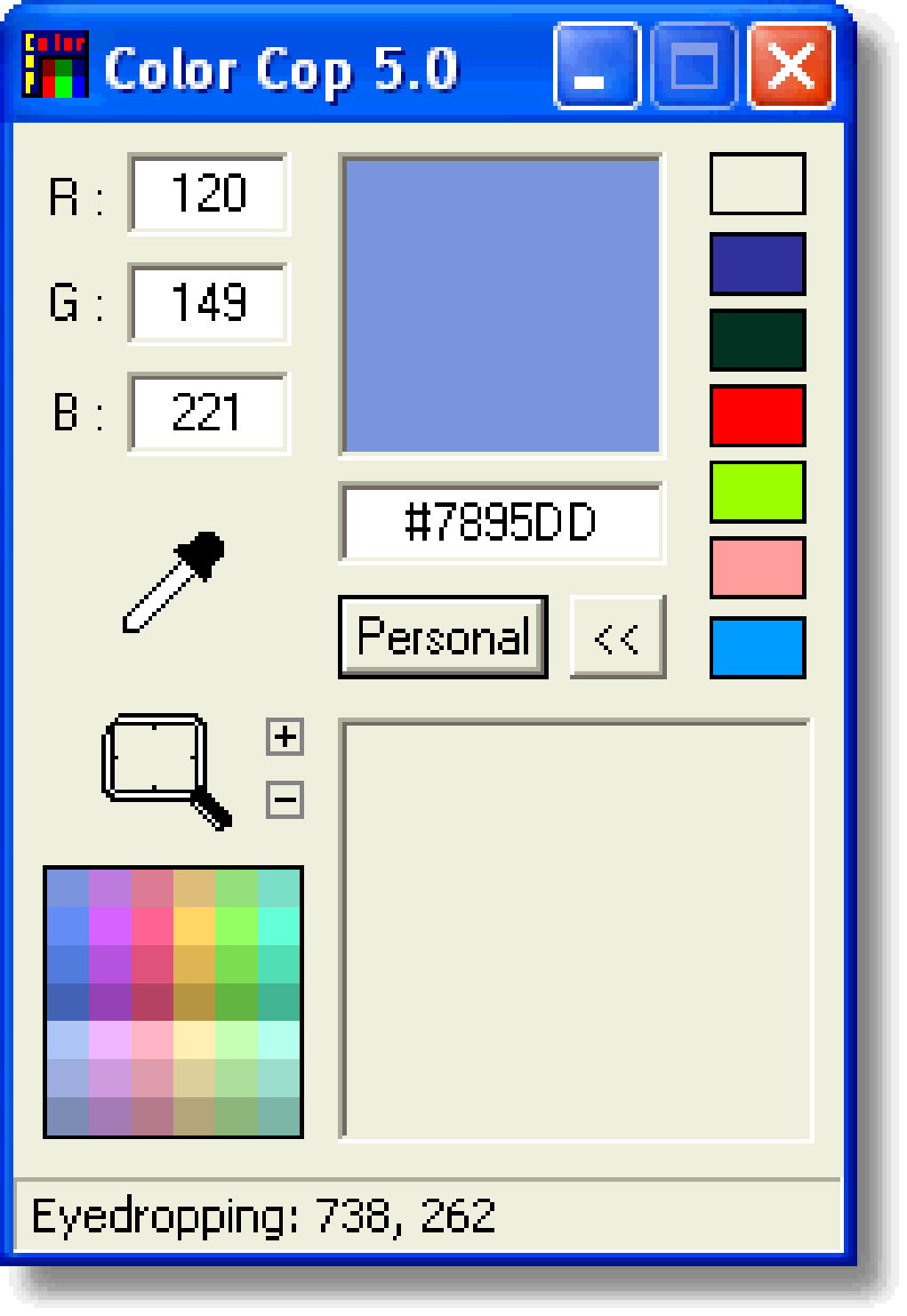
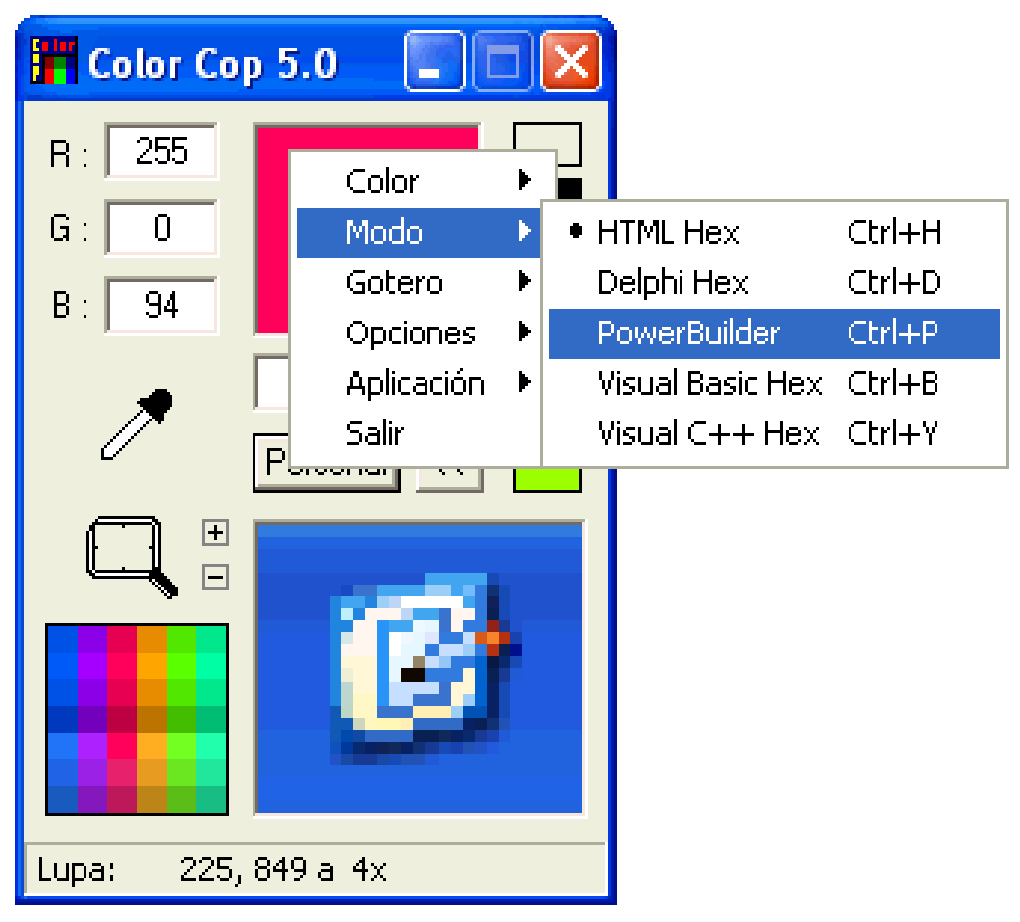
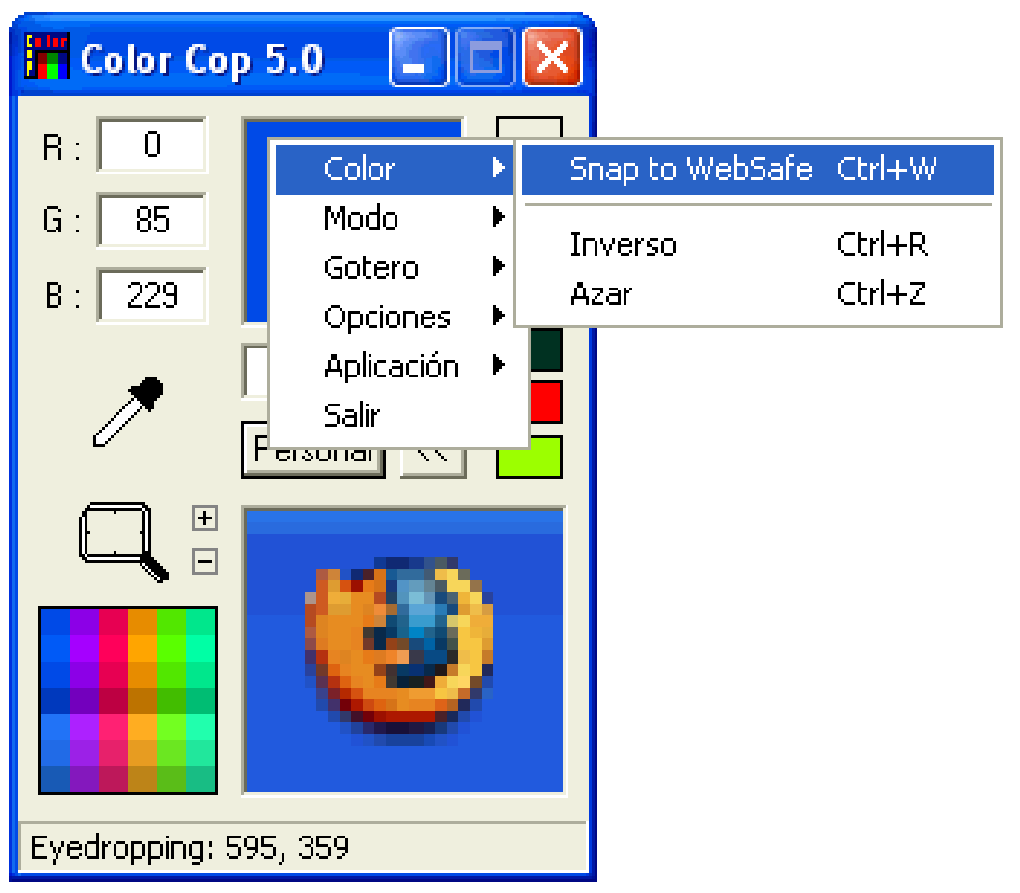
At its core, Color Cop is a sophisticated color selector that allows users to pick any color visible on their computer screen. Its primary function goes beyond mere identification, as it instantly translates the selected color into various widely used code formats, including HTML, RGB, C++, and BASIC. This multi-format conversion capability makes it an invaluable asset for professionals working across different programming languages and design platforms. But Color Cop’s utility doesn’t stop there. It enhances precision with an integrated magnifying glass, allowing users to zoom in up to 16 times on any screen area to ensure the exact pixel color is captured. Furthermore, the program features a convenient storage mechanism for frequently used colors, streamlining workflows and fostering efficiency for recurring design or development tasks. Despite its last update dating back to August 2011, which some might consider making it “old and deprecated” in a rapidly changing tech world, Color Cop continues to be a reliable and highly functional tool for its specific purpose, demonstrating that foundational utilities often transcend the need for frequent overhauls.
Multimedia: A Hub for Creative Tools
The digital world thrives on visual content, making multimedia applications cornerstones of both personal expression and professional endeavor. Platforms like PhanMemFree.org serve as comprehensive repositories for a vast array of software designed to cater to every facet of multimedia creation and consumption. From sophisticated video editing suites to intricate audio workstations, and from powerful image manipulation programs to simple yet effective graphic design utilities, the Multimedia category is a vibrant ecosystem. Within this broad spectrum, tools like Color Cop demonstrate how even specialized, lightweight applications contribute significantly to the overall creative workflow. They might not be the central pillar of a massive design project, but they are the crucial accessories that ensure precision, consistency, and efficiency in the finer details.
The diversity of multimedia tools available on PhanMemFree.org reflects the varied needs of its user base. For instance, aspiring photographers can find powerful image editors, while budding filmmakers can explore video editing software. Graphic designers, a key demographic for Color Cop, rely on a combination of robust design suites and nimble utilities to bring their visions to life. Color Cop, specifically, resides within the Graphic & Design subcategory, aligning it with applications that focus on visual creation and manipulation. Its presence highlights the importance of granular control over elements like color, which is fundamental to any visual medium. The seamless integration of such a tool into a broader multimedia toolkit empowers creators to achieve high-quality results, whether they are crafting digital illustrations, designing user interfaces, or developing visually rich web pages. The ability to quickly and accurately manage color properties is not just a convenience; it is a necessity for maintaining aesthetic integrity and professional standards across all forms of digital multimedia.
Graphic & Design: Precision for Visuals
Within the expansive “Multimedia” category, the “Graphic & Design” section on PhanMemFree.org is a treasure trove for anyone involved in visual creation. This is where users discover everything from industry-standard software like AutoCAD and Adobe Illustrator CC – tools synonymous with professional drafting and vector art – to more accessible options like Inkscape, a popular open-source vector graphics editor, and even the nostalgic charm of MS Paint for basic image manipulation. Color Cop finds its home among these diverse offerings, not as a comprehensive design suite, but as a crucial companion that enhances the precision and efficiency of the design process.
The essence of good graphic design often lies in meticulous attention to detail, and color is arguably one of the most impactful elements. It dictates mood, establishes brand identity, and guides user perception. Therefore, having an accurate and versatile color picker like Color Cop is paramount. It allows designers to pull colors directly from existing images, websites, or even application interfaces, ensuring perfect matches or inspiring new palettes. Imagine a scenario where a designer needs to match a specific shade from a client’s logo for a new website banner. Without Color Cop, this could involve guesswork, multiple attempts, or the laborious process of manually sampling and adjusting colors within a larger design program. With Color Cop, it’s a matter of seconds: point the magnified cursor, copy the code, and apply.
Moreover, the utility of Color Cop extends to ensuring color consistency across different design elements and platforms. In web design, for instance, a slight variation in a brand’s primary color can lead to a disjointed user experience. By providing exact HTML or RGB values, Color Cop ensures that the chosen color renders identically wherever it’s applied, from CSS stylesheets to image assets. For developers working on desktop applications, the C++ or BASIC color codes are equally vital for maintaining a cohesive visual theme. This simple yet powerful functionality positions Color Cop as a fundamental tool for achieving pixel-perfect designs and maintaining high standards of visual quality, making it an indispensable part of any graphic designer’s digital arsenal found within the Graphic & Design category on PhanMemFree.org.
Enhancing Productivity in Development and Design
In the fast-paced worlds of software development and digital design, productivity is not merely about working faster; it’s about working smarter, minimizing repetitive tasks, and ensuring accuracy with minimal effort. Tools that streamline specific, frequent operations contribute significantly to overall project efficiency. Color Cop, though seemingly a minor utility, plays a substantial role in this productivity enhancement, particularly when it comes to managing color properties across various digital assets and coding environments. By automating the process of color identification and conversion, it frees up valuable time and reduces the potential for human error, allowing developers and designers to focus on more complex, creative, and problem-solving aspects of their work.
Consider the iterative nature of design and development. A designer might create a mockup with specific color schemes, and then a developer needs to translate these visual cues into functional code. Manually identifying RGB values from an image, then converting them to hex codes for HTML, or to integer values for C++ or BASIC, can be a tedious and error-prone process. Color Cop consolidates these steps into a single, intuitive action. The ability to store frequently used colors further amplifies productivity. For projects with strict brand guidelines or recurring color palettes, designers and developers can quickly access and reapply these colors without the need to re-sample or re-convert them each time. This not only saves minutes on individual tasks but cumulatively shaves off hours from larger projects, demonstrating how a specialized utility can have a profound impact on an individual’s or team’s output.
Streamlining Web Development and Coding Workflows
Color Cop’s multi-format conversion capability is particularly invaluable for streamlining web development and various coding workflows. Web developers constantly work with HTML and CSS, where hexadecimal color codes are standard. Manually picking a color from a design, then converting it to its hex equivalent, and finally entering it into a stylesheet can be a fragmented process. With Color Cop, a developer can instantly grab any color from a visual element on their screen—be it a client’s website, a design brief, or an inspirational image—and obtain its precise HTML hex code. This direct conversion capability eliminates guesswork and ensures that the colors in the developed website perfectly match the intended design, reducing revisions and accelerating deployment.
Beyond web development, Color Cop also caters to programmers working in other environments. Its support for RGB, C++, and BASIC color formats makes it relevant for desktop application development or even game design where specific color values might need to be hardcoded. For instance, a developer building a Windows application using C++ might need to define custom button colors or background shades. Color Cop provides the exact numerical values needed for these programming languages, ensuring that the application’s user interface adheres strictly to design specifications. This level of precision and ease of access to various color codes makes Color Cop a versatile assistant, seamlessly integrating into different coding paradigms. By simplifying one of the most basic yet critical aspects of visual programming—color specification—it empowers developers to maintain design integrity while focusing on the logic and functionality of their applications, significantly contributing to a more efficient and error-free development cycle.
The Role of Specialized Utilities in the Digital Toolkit
In the vast ecosystem of software, while large suites and comprehensive applications often capture the most attention, the true backbone of efficient digital work often lies in the specialized utilities and tools. These are the small, purpose-built applications that excel at a single, critical task, complementing larger programs and filling gaps that might otherwise require cumbersome workarounds. Color Cop perfectly embodies this concept. It is not an image editor, a design suite, or a development environment; rather, it’s a finely tuned instrument for color selection, converting what could be a laborious manual process into a swift, accurate action. Its presence within categories like “Utilities & Tools” on platforms like PhanMemFree.org underscores the recognition of such niche solutions as essential components of a well-rounded digital toolkit.
Utilities like Color Cop prove that not every problem requires a complex, feature-rich solution. Sometimes, the most effective tool is the one that does one thing exceptionally well. For graphic designers, web developers, and even casual users who frequently need to identify or match colors, Color Cop provides an unparalleled level of convenience. Imagine trying to replicate a specific shade from a banner ad for a social media post, or extracting a color code from a screenshot to use in a presentation. Without a dedicated tool, this often involves importing the image into a heavier application, using its built-in color picker, and then manually noting down the values. Color Cop bypasses all these steps, offering an immediate, system-wide solution that floats above other applications.
Other examples of utilities that fall into this vital category include file managers for organizing digital assets, screen capture tools for documenting visual information, and various converters for data formats. While these utilities may not have the glamour of a full-fledged creative suite, their cumulative impact on productivity and user experience is immense. They simplify routine tasks, enhance precision, and ultimately empower users to work more efficiently within their respective domains. Color Cop, with its lightweight footprint, ease of use, and focused functionality, stands as a prime example of how a specialized utility can become an indispensable part of a digital professional’s everyday workflow, proving that sometimes, less is indeed more when it comes to solving specific problems effectively.
Navigating the PhanMemFree.org Ecosystem
PhanMemFree.org serves as a comprehensive portal, offering a meticulously organized catalog of software across various categories, catering to a diverse range of user needs. From “Games” that span every genre imaginable—Action, Adventure, Puzzle, Strategy—to essential “AI” tools covering Audio, Chat, Image Generation, and Writing, the site acts as a central hub for digital applications. Navigating this extensive ecosystem is made intuitive through a clear “Main Menu” structure that guides users from “Home” to specific software classifications, ensuring that whether you’re looking for an “Antivirus” under “Security & Privacy” or an “Office Suite” under “Productivity,” the desired application is easily discoverable.
Color Cop’s placement within this structure—specifically under “Windows > Multimedia > Graphic & Design”—is logical and reflective of its core function. However, the site’s broader classification system allows users to explore related tools or discover applications they might not have initially considered. For example, a web developer using Color Cop might also explore “Development & IT” for “IDEs/Source Editors” or “Web Development” tools, recognizing the interconnectedness of their digital toolkit. Similarly, a graphic designer might delve into “Best Products” to find “Best Image Editors” or enhance their system aesthetics through “Personalization” options like “Wallpaper” and “Themes.”
The “Change OS” and “Change language” menus further highlight PhanMemFree.org’s commitment to accessibility and a global user base. Whether a user operates on “Windows,” “Android,” “Mac,” or “iPhone,” they can find relevant software, and the availability of the site in numerous languages—from “English” and “Español” to “日本語” and “中文”—ensures that users worldwide can comfortably browse and download applications. This comprehensive approach ensures that tools like Color Cop, despite being a Windows-specific application, are presented within a larger context of operating system support and language options, enhancing the overall user experience on PhanMemFree.org. The platform’s dedication to providing a well-structured and user-friendly interface allows users to efficiently locate not just essential utilities like Color Cop, but also to explore a vast world of digital possibilities, making it a go-to resource for software discovery and download.
Color Cop: An Enduring Legacy
Despite the user review from 2013 labeling it “old and deprecated,” Color Cop’s continued presence and downloads (39.2K total downloads, 34 last month on PhanMemFree.org) attest to its enduring relevance. Its lightweight nature (only 62.24 KB) and zero cost make it an attractive option for users seeking a no-fuss solution. While modern operating systems often include basic color pickers, Color Cop’s distinct features—especially the magnified view, multi-format code conversion, and color storage—continue to set it apart. It’s a testament to the idea that a tool doesn’t always need constant updates to remain valuable; sometimes, a perfectly executed core functionality is all that’s required.
Color Cop might have been last updated in 2011, making it a vintage piece in the fast-paced software world, but its core function remains utterly indispensable. For professionals and enthusiasts alike who demand precision and efficiency in their digital color management, Color Cop remains a reliable, free, and straightforward choice. It perfectly encapsulates the spirit of simple, effective utilities that seamlessly integrate into complex workflows, proving that some tools are simply timeless in their utility. Its continued availability and popularity on platforms like PhanMemFree.org solidify its position as a classic, no-frills tool that just works, day in and day out, for countless users worldwide.
File Information
- License: “Free”
- Version: “5.4.5”
- Latest update: “August 11, 2011”
- Platform: “Windows”
- OS: “Windows XP”
- Language: “English”
- Downloads: “39.2K”
- Size: “62.24 KB”


