
ColorMania is a free, advanced color-choosing utility designed for graphic artists, web designers, and anyone needing precise color control. Its intuitive interface and extensive features make it a powerful addition to any designer’s toolkit, seamlessly integrating with popular third-party applications like Adobe Photoshop and GIMP. This in-depth review explores ColorMania’s functionality, benefits, limitations, and its place within the broader landscape of color selection tools.
Core Functionality and Usability
ColorMania presents a familiar workflow for users accustomed to graphic design software. However, its strength lies in its superior support for a wider range of color formats compared to many alternative color pickers. This enhanced capability stems from its advanced coding architecture and remarkable flexibility, enabling seamless integration with a variety of graphic design applications. Unlike some simpler color pickers, ColorMania doesn’t limit itself to a basic selection; it provides a comprehensive suite of tools that go beyond simply choosing a color.
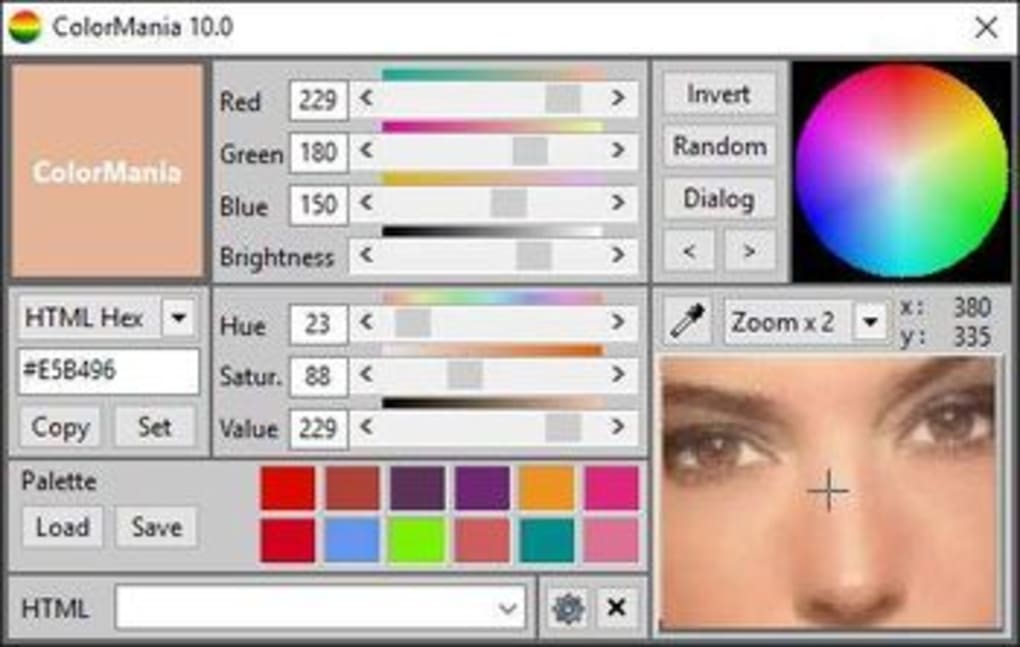
The application’s interface is clean and uncluttered, prioritizing ease of use. Users can easily select colors using a traditional color wheel or by inputting specific color codes. The eyedropper tool allows for sampling colors directly from the screen, making it invaluable for matching existing colors or extracting colors from images. A built-in screen magnifier further enhances precision by allowing users to zoom in on a specific pixel to identify its exact hue with pinpoint accuracy. This level of detail is crucial for tasks demanding precise color matching, particularly in areas of fine detail.
Extensive Color Format Support and Beyond
ColorMania’s versatility shines through its extensive support for various color coding formats, catering to diverse needs and workflows. It natively supports formats such as HTML, hexadecimal, CSS, CMY (Cyan, Magenta, Yellow), CMYK (Cyan, Magenta, Yellow, Key/Black), and VB Hex (Microsoft Visual Basic). This broad compatibility eliminates the need for manual conversions, streamlining the workflow for users working across different platforms and applications.
Beyond the standard color formats, ColorMania also allows manipulation of key color variables such as hue, saturation, and brightness. These adjustable parameters offer unparalleled control, enabling users to fine-tune colors to achieve the exact shade they envision. The ability to view all color codes in their alphanumeric format proves particularly helpful for developers needing to embed these codes directly into HTML pages or CSS stylesheets, eliminating the need for external conversion utilities or tedious manual input. This integrated approach significantly accelerates the design process.
Advantages and Disadvantages of ColorMania
ColorMania presents a compelling suite of features, but like any software, it has its strengths and weaknesses.
Pros:
- Free and Open Source: The most significant advantage is its availability as freeware. This removes any financial barrier to entry, making it accessible to a wide audience, including students, hobbyists, and professionals alike. The open-source nature (while not explicitly stated in the source material, it’s implied by the mention of potential bugs) potentially fosters community development and contribution, leading to further improvements and updates.
- Wide Compatibility: ColorMania’s compatibility with various third-party design programs significantly enhances its utility. It seamlessly integrates into existing workflows, eliminating the need to switch between different applications for color selection.
- Comprehensive Color Management: The extensive color format support and ability to manipulate hue, saturation, and brightness offer a level of control seldom found in simpler color pickers. This detailed control allows for precise color matching and refinement, critical for achieving professional-level results.
- Intuitive Interface: The user-friendly interface minimizes the learning curve, making it easy for users of all skill levels to grasp and utilize its functionality. Even users unfamiliar with complex graphic design software will find ColorMania easy to navigate and use effectively.
- Built-in Tools: The inclusion of an eyedropper and screen magnifier adds significant value, improving precision and efficiency in color selection. These integrated tools streamline workflows and minimize the need for additional applications.
Cons:
- Limited Advanced Features: While ColorMania excels in color selection and management, it lacks advanced features found in professional-grade graphic design software. For example, it lacks the layering options and other standard actions found in applications like Photoshop or GIMP. This is expected given its free and focused nature, but it’s a key distinction.
- Potential for Bugs: As with many open-source applications, the potential for bugs exists. While the developers strive for stability, users might occasionally encounter unexpected issues, although the frequency is not detailed in the provided information.
- Limited User Interface Customization: While the interface is clean and user-friendly, there might be a lack of customization options to cater to individual preferences. This may be a minor drawback for some users.
ColorMania: A Niche Tool with Broad Appeal
ColorMania occupies a unique niche within the color selection tool landscape. It doesn’t aim to replace full-fledged graphic design suites; instead, it excels as a dedicated color picker offering superior functionality in its area of expertise. Its free availability and extensive color format support make it particularly appealing to web developers, graphic designers, and anyone working with digital color extensively. The incorporation of tools such as the eyedropper and screen magnifier further enhances its practicality, making it a valuable addition to any design workflow. While limitations exist regarding advanced features, its core functionality and ease of use are undeniably compelling for a wide range of users. The lack of detailed user reviews prevents a more definitive assessment of its long-term usability and stability, but based on the information provided, ColorMania presents a strong case as a free and effective tool for precise color selection. Its strength is its focused functionality, providing an efficient and versatile color picker without the complexity of a comprehensive design suite.
File Information
- License: “Free”
- Latest update: “June 19, 2025”
- Platform: “Windows”
- OS: “Windows 10”
- Language: “English”
- Downloads: “60.5K”
- Size: “3.10 MB”


