
ColorPic is a free, lightweight Windows program categorized as design and photography software, specifically under the Web Design (Color Coding) subcategory. Developed by Iconico, it’s compatible with Windows 2000 and earlier versions, offering a user-friendly interface in English. While initially released in 2006, it continues to receive updates, with the latest version released in July 2023 boasting a significant number of downloads, highlighting its enduring popularity and utility among users worldwide. This review will delve into the features, functionality, and overall user experience of ColorPic, comparing it to similar applications and addressing its strengths and weaknesses.
Feature-Rich and User-Friendly Design
ColorPic distinguishes itself through its streamlined design and surprisingly comprehensive feature set, especially considering its compact size and free availability. Unlike some bulky professional-grade color pickers, ColorPic manages to offer a potent combination of functionality without sacrificing ease of use. At its core, ColorPic functions as a precise color picker, allowing users to select colors directly from their screen with pinpoint accuracy. The inclusion of a magnifier significantly enhances this functionality, particularly beneficial for high-resolution monitors where selecting precise pixels can be challenging with less sophisticated tools. This magnification is adjustable, enabling users to fine-tune the level of zoom based on their needs and monitor resolution.
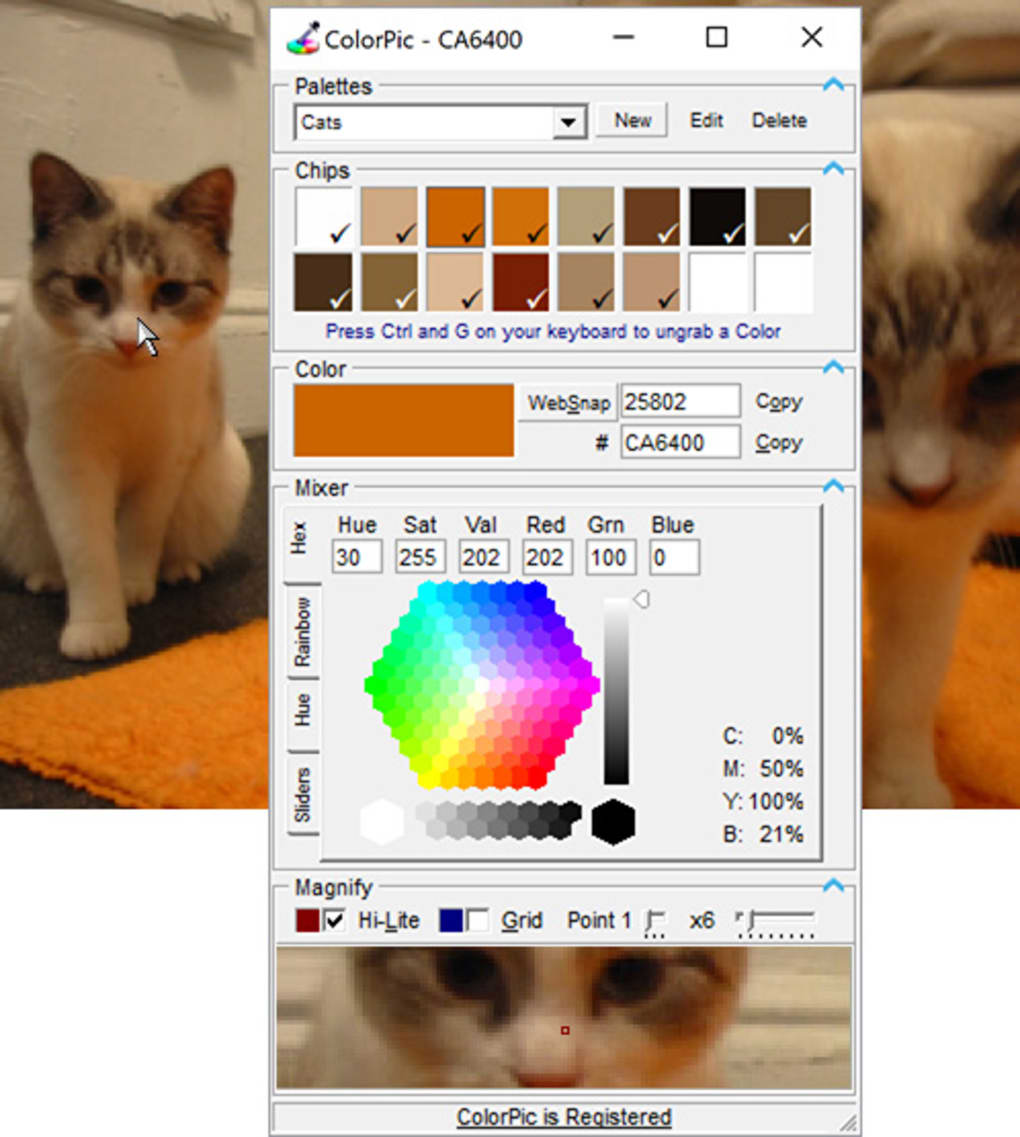
Beyond basic color selection, ColorPic provides tools for color palette management. Users can save multiple palettes containing up to 16 colors at once, providing a convenient way to organize and reuse color schemes for various projects. This feature significantly streamlines the workflow for graphic designers, web developers, and other users frequently working with color palettes. The program supports different color formats, including hex and decimal representations, catering to various applications and software preferences.
Furthermore, ColorPic allows for color adjustment using multiple advanced color mixers, enabling users to fine-tune and experiment with shades and hues. The inclusion of Hue, Saturation, Value (HSV) and Red, Green, Blue (RGB) values, as well as Cyan, Magenta, Yellow, and Black (CMYK) percentages offers extensive control and flexibility. These advanced features cater to users who need more than just basic color selection and allow for sophisticated color manipulation.
The addition of a grid overlay option is a thoughtful touch, enhancing the precision of color picking by providing a visual guide for accurate alignment. The ability to nudge the mouse pointer using arrow keys provides even finer control, particularly useful for selecting colors within intricate designs or images. The integration of “Snap to nearest WebSafe color” is a particularly useful feature for web designers, ensuring color consistency across different browsers and devices. The option to perform point sampling, as well as 3x3 and 5x5 pixel averaging, provides versatility for different selection needs and image resolutions.
Comparison with Alternative Color Picker Applications
While ColorPic stands out for its combination of power and simplicity, several alternative color picker applications exist, each with its own strengths and weaknesses. Some alternatives provide more advanced features, such as support for additional color models or integration with specific design software. Others prioritize a more minimalist interface, sacrificing some features for enhanced ease of use.
Some notable competitors include:
-
Just Color Picker: This advanced color picker offers similar functionality to ColorPic, including a screen magnifier and palette management. It also excels in providing detailed color information and calculation tools, making it suitable for tasks requiring precise color analysis. However, it might be considered more complex to learn than ColorPic.
-
ColorPix: This streamlined color picker emphasizes simplicity and ease of use. While it lacks some of the advanced features found in ColorPic, it provides a quick and efficient solution for basic color selection.
-
Free Color Picker: Offering similar basic functions to ColorPic, this application might present a simpler interface, suitable for users prioritizing ease of use over extensive functionality.
ColorPic differentiates itself by striking a balance between these extremes. It provides advanced features like color mixing and palette management while maintaining a user-friendly interface that’s relatively easy to learn and use, even for novice users. The inclusion of a magnifier, especially valuable on high-resolution displays, serves as a significant advantage over some alternatives that lack this crucial feature.
Strengths and Weaknesses of ColorPic
ColorPic exhibits a number of strengths, making it a strong contender in the free color picker market:
-
Comprehensive Feature Set: Offers a surprisingly rich array of features for a free program, including a magnifier, palette management, multiple color mixers, and WebSafe color support.
-
Ease of Use: The interface is intuitive and user-friendly, even for users with limited experience in color selection tools.
-
Lightweight and Efficient: The program is small in size and consumes minimal system resources, making it suitable for older systems or those with limited processing power.
-
Free and Open Source (implied): The lack of intrusive advertisements and the open availability of the software are commendable.
However, ColorPic is not without limitations:
- Limited Platform Support: Currently only supports Windows, leaving out users of macOS, Linux, or other operating systems.
-
No Advanced Features (relative): While offering many features, some professional-grade alternatives offer more advanced capabilities, such as color profile management or specialized colorimetry tools.
-
Outdated Interface (potentially): The visual design might appear dated compared to some more modern applications. This is however subjective and some may prefer a simpler design.
User Reviews and Overall Assessment
User reviews consistently praise ColorPic’s ease of use and its surprisingly robust feature set, often highlighting the usefulness of the magnifier for precise color selection. Many users emphasize the value of its free availability, contrasting it favorably with comparable commercial alternatives. The absence of intrusive ads or spyware is frequently cited as a significant positive.
Overall, ColorPic presents a compelling option for users seeking a free, efficient, and feature-rich color picker. Its combination of a user-friendly interface, advanced features, and compact size makes it a valuable tool for both casual users and professionals alike. While it may not surpass some premium, professional alternatives in terms of specific advanced features, its accessibility and overall effectiveness make it a solid choice for a wide range of users. For those requiring more specialized features or cross-platform compatibility, exploring alternative solutions might be necessary. However, for a free and effective color picker for Windows, ColorPic is a very strong contender. The consistent updates and ongoing maintenance demonstrate the developer’s continued commitment to improving and maintaining this valuable tool.
File Information
- License: “Free”
- Latest update: “July 12, 2023”
- Platform: “Windows”
- OS: “Windows 2000”
- Language: “English”
- Downloads: “55.5K”
- Size: “1.42 MB”


