
In the vast and intricate world of software development and system administration, efficiency and precision are paramount. Managing the myriad components that constitute a modern computing environment can be a daunting task, especially when dealing with legacy but still relevant technologies like the Component Object Model (COM) and ActiveX. This is where a specialized tool like COM Explorer steps in, offering a crucial lifeline to developers and IT professionals striving for system stability, performance, and maintainability.
COM Explorer, a trial version software available for Windows, carves out a niche in the “Development software” category, specifically targeting “ActiveX Tools & Utilities.” Since its introduction to the PhanMemFree catalog in 2005, it has consistently served as an indispensable utility for anyone grappling with the complexities of ActiveX controls, EXE Servers (Out-Proc), and DLL Servers (In-Proc). Designed to explore, manage, and rectify issues related to these components, COM Explorer transforms what could be a tedious, error-prone manual process into an intuitive and streamlined operation.
Unveiling the Power of COM Explorer: An Essential Tool for ActiveX Management
At its heart, COM Explorer is more than just a utility; it’s a diagnostic and management powerhouse. Its existence is rooted in the fundamental challenges posed by the COM and ActiveX frameworks, which, while powerful, often leave a trail of digital clutter and potential instability if not properly handled. For anyone whose daily routine involves system maintenance, software deployment, or application debugging on Windows platforms, understanding and leveraging a tool like COM Explorer is not just an advantage—it’s a necessity.
A Legacy of Efficient Administration
First cataloged on PhanMemFree.org in 2005, COM Explorer quickly established its relevance in an era where ActiveX controls were a foundational element of many Windows applications and web experiences. Although its initial versions catered to operating systems as far back as Windows 95, the tool has seen continuous updates and remains pertinent, with its latest listing indicating an update in March 2017. This longevity speaks volumes about its enduring utility and the persistent need for robust COM management solutions. With a modest footprint of just 417.91 KB, it’s a lightweight yet incredibly powerful application, embodying the principle that effective tools don’t need to be resource hogs.
The primary objective of COM Explorer is to demystify the often-opaque world of COM objects. These objects, whether ActiveX controls, EXE servers, or DLL servers, are critical building blocks for inter-process communication and component reuse within Windows. However, their lifecycle management—from registration to eventual deprecation—is notoriously complex. Improperly registered components, missing dependencies, or orphaned registry entries can lead to application crashes, system slowdowns, and security vulnerabilities. COM Explorer was engineered to address these very pain points, providing a singular, comprehensive interface for oversight and control.
The Landscape of Component Object Model (COM) and ActiveX
To fully appreciate the significance of COM Explorer, it’s essential to briefly revisit the Component Object Model (COM) and ActiveX. COM is a platform-independent, distributed, object-oriented system for creating binary software components that can interact. It’s the underlying architecture for technologies like OLE (Object Linking and Embedding), DirectX, and, most famously, ActiveX.
ActiveX, in turn, is a set of Microsoft technologies derived from COM, designed for embedding components into applications or web pages. While hugely popular in its prime for dynamic web content and desktop application extensibility, ActiveX controls posed unique challenges. They could introduce security risks if not carefully vetted, and their intricate registration process frequently led to “DLL Hell” – a phenomenon where multiple versions of the same DLL (Dynamic Link Library) or COM component conflicted with each other, leading to application failures.
In this context, managing ActiveX controls and other COM objects wasn’t just about tweaking settings; it was about maintaining the very integrity and functionality of the Windows operating system and its applications. Developers needed to ensure their components registered correctly and didn’t interfere with others, while system administrators had to troubleshoot elusive application errors often traced back to COM registration issues. COM Explorer emerged as a tailored solution to navigate this complex ecosystem, providing clarity and control where often there was only confusion.
Core Functionalities: Diving Deep into COM Explorer’s Capabilities
COM Explorer’s suite of features is meticulously crafted to address the full spectrum of COM and ActiveX management needs. From detailed object introspection to powerful reporting, each functionality is designed to save time, reduce frustration, and enhance system reliability.
Intuitive Object Exploration and Detailed Insights
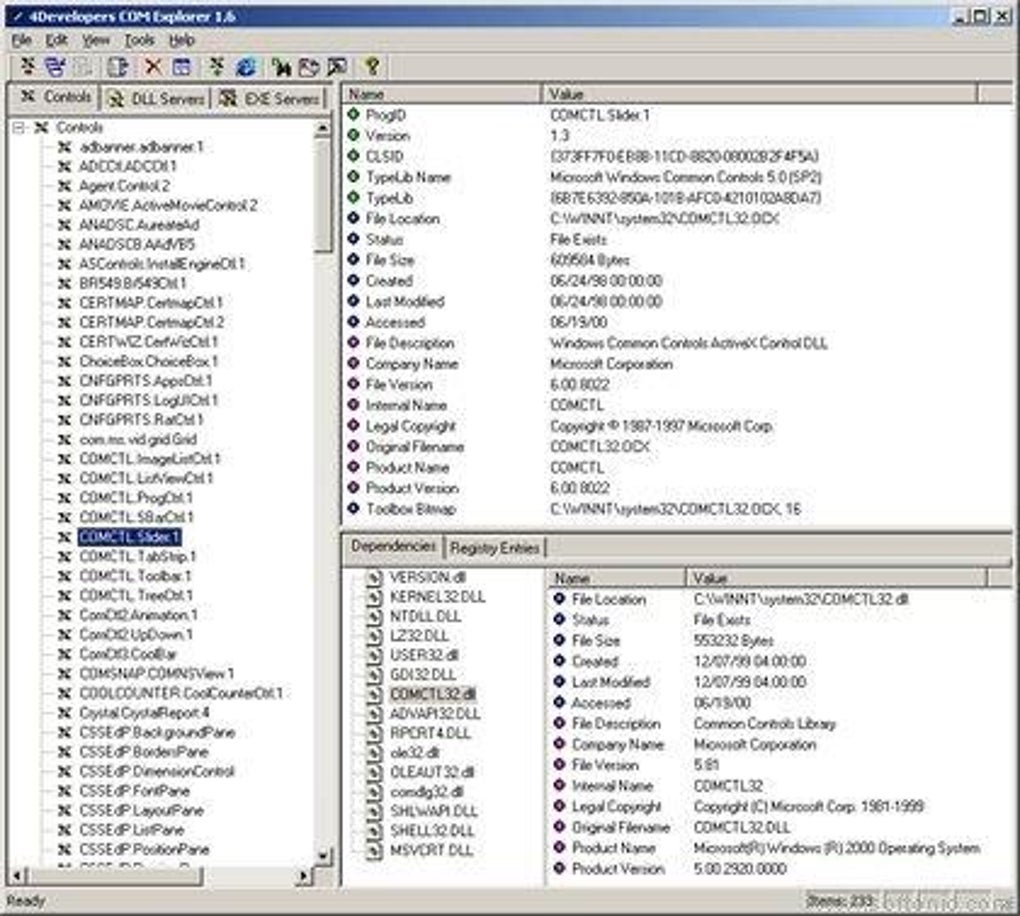
One of the standout features of COM Explorer is its “Explorer-like GUI.” This familiar interface paradigm allows users, particularly developers and system administrators, to effortlessly browse registered COM objects. Upon selection, the tool provides a wealth of critical information, essential for understanding the component’s identity and behavior:
- GUID (Globally Unique Identifier): The unique hexadecimal string that identifies the COM class.
- TypeLib Information: Details about the component’s type library, which describes its interfaces, methods, and properties.
- Version Information: Critical for managing dependencies and resolving conflicts between different versions of a component.
- Dependency Information: Understanding which other components or files a particular COM object relies upon, crucial for troubleshooting.
- File Information: The location and attributes of the physical file (DLL or EXE) associated with the COM object.
Crucially, COM Explorer doesn’t just display information; it actively flags problems. “Misbehaved objects,” such as those with missing files or orphaned registry entries—often referred to as “junk” left behind from incomplete uninstalls—are clearly marked. This visual cue immediately draws attention to potential issues, allowing for proactive maintenance before they escalate into significant system problems.
Streamlined Registration and Deregistration
The manual process of registering and unregistering COM controls via command-line utilities like regsvr32.exe can be cumbersome, especially when dealing with multiple components. COM Explorer dramatically simplifies this:
- Batch Operations: Users can register or unregister multiple COM controls with a single mouse click, saving considerable time and reducing the margin for error. This is invaluable during software deployments or system cleanups.
- Windows Explorer Integration: The tool seamlessly integrates into the Windows Explorer shell. This means that by simply right-clicking a DLL or EXE file, users can access a pop-up menu to quickly register, unregister, or view information about the associated COM control directly from their file manager. This contextual access enhances workflow efficiency, making COM management an organic part of file system interaction.
- Configurable Behavior: COM Explorer allows users to specify how it behaves after a control is registered. This level of customization ensures that the tool fits into existing workflows, whether it’s confirming success, logging the action, or performing subsequent checks.
Advanced Registry Management and Troubleshooting
The Windows Registry is the central hierarchical database for the operating system, and it’s where COM object settings are stored. Errors or corruption in COM-related registry entries can render applications unusable. COM Explorer’s integrated Registry editor provides:
- Direct Access: Users can view and edit COM settings directly within the tool, eliminating the need to open a separate
regedit.exeinstance and manually navigate complex registry paths. - Problem Resolution: The ability to quickly identify and remove “misbehaved” COM controls from the System Registry is a significant advantage. This includes orphaned entries that point to non-existent files, which can bloat the registry and contribute to system instability. Rapid removal of these entries helps maintain a clean and efficient system.
Cross-System Compatibility Checks and Reporting
For organizations with multiple systems or developers working in collaborative environments, ensuring consistent COM component versions across different machines is vital. COM Explorer addresses this with powerful comparison and reporting features:
- Remote Comparison: One of its most powerful features is the ability to compare COM control versions across different remote computers. This helps identify discrepancies that could lead to “it works on my machine” syndrome in development or deployment issues in enterprise environments. By pinpointing version mismatches, administrators can ensure uniformity and compatibility.
- Inventory Report Generator: COM Explorer excels at documenting the COM landscape of a system. It can generate comprehensive inventory reports in either HTML or comma-delimited text formats. These reports detail all installed COM objects, including their attributes.
- Strong Filtering and Customization: The reporting engine isn’t just a dump of data; it includes robust filtering and customization capabilities. Users can tailor reports to focus on specific types of components, versions, or installation dates, making it easier to analyze data, track changes, or audit system configurations. This is invaluable for compliance, security assessments, and general system documentation.
Beyond Basic Management: The Strategic Advantages for IT Professionals
The comprehensive feature set of COM Explorer translates into significant strategic advantages for both developers and system administrators. It transforms a reactive, troubleshooting-heavy approach to COM issues into a proactive, preventative strategy.
Enhancing System Stability and Performance
Unmanaged or “misbehaved” COM objects are a common source of system instability. Orphaned registry entries can lead to registry bloat, slowing down system boot times and overall performance. Conflicting COM versions can cause applications to crash unpredictably. By providing tools to identify, clean, and manage these components, COM Explorer helps:
- Reduce Registry Bloat: Proactively removing junk entries ensures a leaner, faster registry.
- Resolve Conflicts: Identifying version mismatches or conflicting components allows administrators to address them before they cause widespread issues.
- Improve Application Reliability: Ensuring that all necessary COM components are correctly registered and in their expected versions enhances the stability of applications relying on them.
Aiding Development Cycles and Debugging
For developers, COM Explorer is an invaluable debugging and development aid. When an application fails due to a COM error, pinpointing the exact cause can be a nightmare. COM Explorer provides the necessary visibility:
- Faster Problem Identification: Developers can quickly inspect COM objects, their dependencies, and registry settings, drastically cutting down on debugging time.
- Understanding Dependencies: Visualizing component dependencies helps developers understand the ecosystem their application operates within, preventing unforeseen conflicts when deploying or updating.
- Ensuring Clean Installations: By using the tool to check for leftover components after uninstalling test versions, developers can ensure their development environment remains clean and free from interference.
Ensuring System Hygiene and Security
While ActiveX controls, particularly in web browsers, have largely been phased out due to security concerns, COM components still form a fundamental part of the Windows operating system. Orphaned or maliciously altered COM entries can pose security risks. COM Explorer helps maintain system hygiene by:
- Identifying Suspicious Entries: Clearly marking “misbehaved” objects helps in identifying components that might be remnants of malware or poorly written software.
- Auditing System State: The reporting feature allows for regular audits of installed COM components, ensuring that only approved and expected components are present on critical systems.
- Facilitating Cleanups: Quick removal of unwanted or problematic components enhances the overall security posture of a system.
Technical Specifications, Availability, and the PhanMemFree Perspective
COM Explorer’s design philosophy prioritizes efficiency and accessibility. As a trial version software, it allows users to experience its full capabilities before committing, which is a testament to the developer’s confidence in its utility.
Compatibility and System Requirements
- Platform: Windows
- Operating Systems: Compatible with Windows 95, Windows 98, and previous versions. While this indicates its roots in earlier Windows eras, many of its core functionalities remain relevant for newer Windows versions where COM components are still used.
- Language: Exclusively in English, simplifying its interface for a global audience familiar with technical English.
- Version: 2.1
- Latest Update: March 9, 2017 (as per PhanMemFree’s latest specifications, providing a more recent timestamp for its availability and listing maintenance).
- Size: A remarkably light 417.91 KB, ensuring quick downloads and minimal impact on system resources.
- Developer: 4developers, a team focused on providing essential tools for the developer community.
- Downloads: With 9.5K total downloads and 7 downloads in the last month on PhanMemFree.org, it continues to see steady interest, underscoring its niche but enduring relevance.
The lightweight nature of COM Explorer is a significant advantage. It doesn’t burden the system and can be deployed quickly, even on older machines or in environments with limited resources. This makes it an ideal tool for rapid diagnostics and cleanup operations.
The PhanMemFree Commitment to Quality Software
PhanMemFree.org, as a platform dedicated to providing a curated selection of useful software, hosts COM Explorer under the “Development & IT” category. The presence of COM Explorer on PhanMemFree.org is a testament to its value within the community. PhanMemFree’s editorial guidelines emphasize providing software that is clean, functional, and genuinely helpful. The detailed listing, including security status and user reviews, reflects PhanMemFree’s commitment to transparency and user-centric information.
The trial version model allows users to thoroughly test COM Explorer’s capabilities against their specific needs without any initial financial commitment. This “try before you buy” approach is particularly valuable for specialized tools where the exact fit for a user’s unique environment needs to be validated. PhanMemFree ensures that the download experience is secure, scanning all files for potential threats, thereby maintaining a trustworthy catalog of applications.
Conclusion: Empowering Users with Comprehensive COM Control
COM Explorer stands out as an indispensable tool for anyone navigating the intricate world of COM and ActiveX components on Windows platforms. Its intuitive interface, coupled with powerful features for exploration, management, troubleshooting, and reporting, significantly simplifies what would otherwise be a complex and time-consuming task. From registering multiple controls with a single click to generating detailed inventory reports and comparing versions across remote machines, COM Explorer provides a level of control and insight that is crucial for maintaining stable, performant, and secure Windows environments.
Whether you are a developer debugging a new application, a system administrator cleaning up orphaned registry entries, or an IT professional auditing system configurations, COM Explorer offers the precision and efficiency required to tackle COM-related challenges head-on. Its enduring presence on platforms like PhanMemFree.org, its lightweight design, and its comprehensive feature set cement its status as a vital utility in the developer’s and administrator’s toolkit, empowering users with the clarity and control needed to master their Windows systems.
File Information
- License: “Trial version”
- Version: “2.1”
- Latest update: “March 9, 2017”
- Platform: “Windows”
- OS: “Windows 2000”
- Language: “English”
- Downloads: “9.5K”
- Size: “417.91 KB”


