Combo Cleaner is a versatile antivirus software designed to protect Windows PCs from various threats while simultaneously optimizing system performance. Developed by RCS LT, this security and privacy program boasts a range of features, including anti-malware capabilities, real-time web browsing protection, and efficient file cleanup tools. While a free version is available, its functionality is limited, with most features locked behind a premium subscription. This review will delve into Combo Cleaner’s features, usability, and overall effectiveness, helping you determine if it’s the right solution for your PC’s security needs.
Core Features and Functionality
Combo Cleaner presents a comprehensive suite of security tools designed to combat online threats and enhance PC performance. At its core, the application offers robust anti-malware protection through both on-demand and real-time scanning. The constantly updated malware database ensures detection of the latest threats, including potentially unwanted programs (PUPs), suspicious files, and even compromised or phishing websites. This proactive approach is further strengthened by its anti-ransomware module, which actively protects files from malicious encryption attempts.
Beyond its core antivirus functionality, Combo Cleaner provides valuable system optimization tools. These include:
-
Big Files Finder: This utility identifies and helps remove large files that may be consuming unnecessary hard drive space, contributing to sluggish performance.
-
Duplicates Files Finder: This feature pinpoints and allows you to delete duplicate files, freeing up space and improving efficiency.
These cleanup tools, coupled with the anti-malware scanner, contribute to a more optimized and secure computing environment. The program is also designed to address emerging threats quickly, with the developers regularly updating the software to counter newly discovered malicious techniques employed by cybercriminals, such as the removal of unwanted Chrome extensions or the disabling of intrusive browser notification settings. This responsiveness to evolving threats is a significant advantage over some larger, slower-moving security companies.
User Interface and Ease of Use
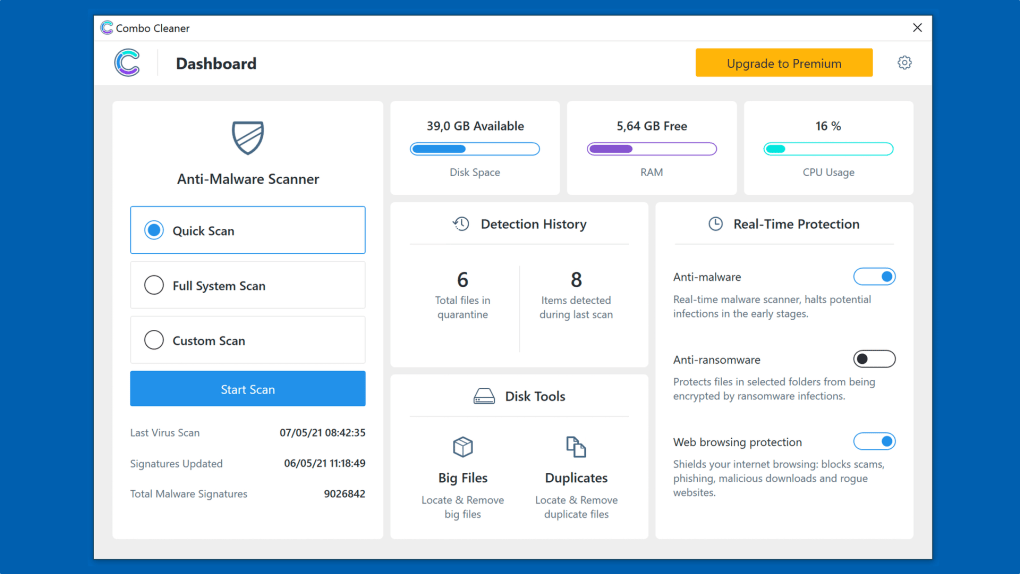
One of Combo Cleaner’s most appealing aspects is its user-friendly interface. The design is clean and intuitive, easily navigable by both novice and experienced users. Unlike many security applications that employ complex tabbed interfaces or nested menus, Combo Cleaner presents all essential features on a single, uncluttered main screen. This streamlined approach minimizes confusion and allows users to quickly access the tools they need.
The left-hand side of the main screen features the prominent Anti-Malware Scanner, offering three scan options: Quick Scan, Full System Scan, and Custom Scan. Users can initiate scans with ease, and the software allows you to minimize the scanner window and return to the main menu without interrupting the scan process. At the top of the screen, colored meters provide real-time feedback on disk space, RAM, and CPU usage, offering valuable system performance insights. Below this, users find a summary of their Detection History, access to Real-Time Protection Tools (anti-malware, anti-ransomware, and web protection), and the Disk Tools (Big Files Finder and Duplicates Files Finder). The on/off toggles for real-time protection features provide simple control over these functionalities.
Free vs. Premium Version: A Detailed Comparison
Combo Cleaner offers a free version, although its functionality is somewhat limited. The free version allows users to run manual scans, utilize the Big Files Finder and Duplicates Files Finder tools, and, crucially, identify potential threats. However, the removal of detected threats requires a premium subscription. This model allows users to test the scanner and cleanup tools without financial commitment, but essential protection features remain inaccessible without purchase.
The premium subscription offers two plans: a single-device license and a five-device license. Both plans include 24/7 technical support, providing assistance with any issues encountered during use. It’s important to note that the free trial of the premium version requires registration, a point of differentiation from some competitors that offer more readily accessible free trials.
Performance and Effectiveness
Combo Cleaner’s performance is generally praised. The malware scanner is considered powerful and effective, reliably detecting and, in the premium version, removing a wide range of threats. The real-time protection modules provide continuous safeguarding against online threats, contributing to a secure browsing experience. The PC cleanup tools are also effective at identifying and removing unwanted files, freeing up disk space and optimizing system performance. While the real-time protection is a valuable feature, it is worth remembering that no antivirus program is perfectly foolproof and user caution and common sense are still paramount in online security. Combo Cleaner acts as an important layer of protection, not an absolute guarantee of safety.
Strengths and Weaknesses
Strengths:
- Powerful malware scanner: Effectively detects and removes a wide array of malware, including PUPs.
- Real-time web browsing protection: Provides continuous protection against online threats.
- Flexible PC cleaner tools: Big Files Finder and Duplicates Files Finder are efficient in optimizing disk space.
- User-friendly interface: Clean and intuitive design, easy for all users to navigate.
- Responsive to emerging threats: Developers actively adapt the software to counter new malicious techniques.
- Comprehensive free tools: Allows users to evaluate the scan and cleanup features without committing to a purchase.
Weaknesses:
- Limited free version: Threat removal requires a premium subscription.
- Free trial requires registration: A less accessible trial compared to some competitors.
- No detailed reporting: While the detection history provides a summary, a more comprehensive report on detected threats may be beneficial for advanced users.
Conclusion
Combo Cleaner provides a compelling solution for users seeking a blend of robust antivirus protection and convenient PC cleanup tools. Its user-friendly interface and effective malware scanner make it an attractive option for both beginners and experienced users. While the free version’s limitations might push some users towards paid alternatives, the core functionality offered, particularly the scanning capabilities and cleanup utilities, justify a trial. The availability of a premium version ensures comprehensive protection and allows for the removal of detected threats. The developer’s responsiveness to emerging threats is a significant positive, highlighting a commitment to keeping the application effective against the constantly evolving landscape of online dangers. While not without minor drawbacks, Combo Cleaner delivers a satisfying security experience, and its streamlined interface and powerful scanning engine make it a noteworthy contender in the crowded antivirus market.
File Information
- License: “Trial version”
- Version: “1.0.42”
- Latest update: “July 20, 2021”
- Platform: “Windows”
- OS: “Windows 7”
- Language: “English”
- Downloads: “13.2K”
- Size: “3.59 MB”