
Comical is a free, lightweight comic book reader designed for Windows users who appreciate a clean and efficient interface. Its primary strength lies in its simplicity and speed, making it an ideal choice for those seeking a straightforward way to enjoy their digital comic collections without the bloat of more feature-rich applications. This review will explore Comical’s functionality, strengths, weaknesses, and its place within the broader landscape of comic book reading software.
Core Functionality and Supported Formats
Comical’s core function is the display and navigation of digital comic books. It boasts support for the most popular comic book formats, namely CBR and CBZ. This ensures compatibility with a vast majority of digitally available comics. Beyond these dedicated comic formats, Comical also extends its support to common image formats like JPG, PNG, GIF, and TIFF. This added versatility allows users to read comics even if they aren’t packaged in the standard CBR or CBZ containers. Further enhancing its convenience, Comical can directly open comic books compressed within ZIP or RAR archives, eliminating the need for manual extraction before reading.
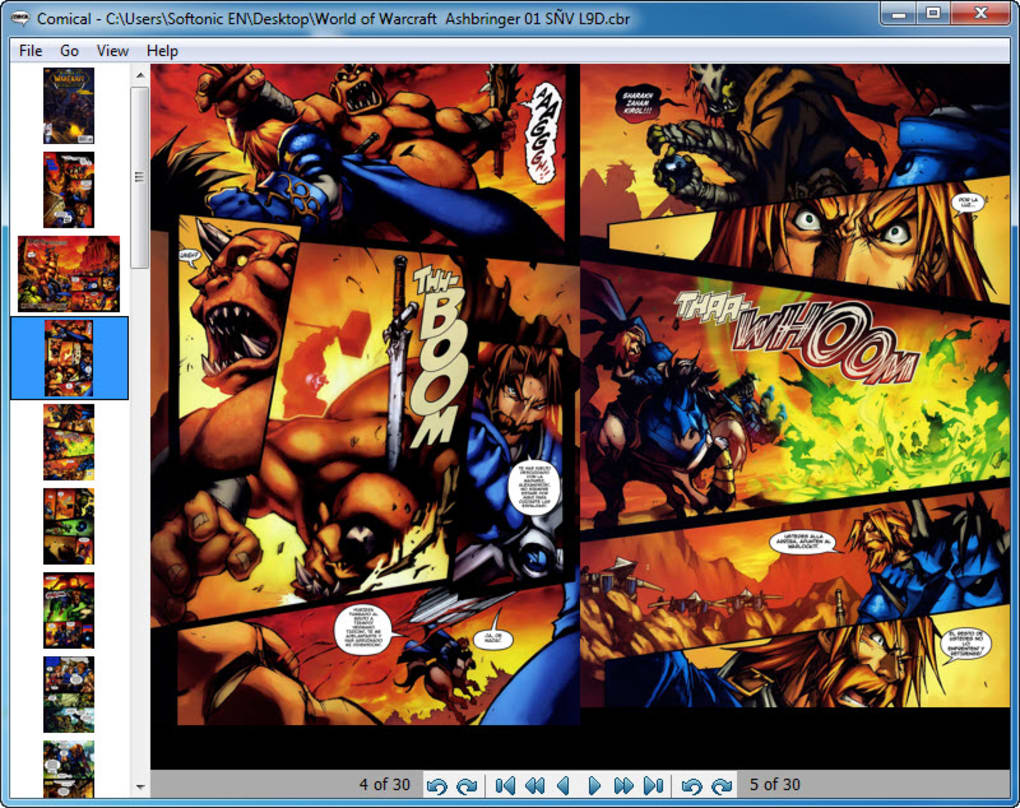
The application’s interface is purposefully minimalist. The majority of the screen is dedicated to the comic itself, with only a small toolbar at the bottom and a concise menu bar at the top. This design prioritizes the reading experience, minimizing distractions and maximizing the viewing area for the comic panels. This straightforward approach contributes to Comical’s overall lightweight nature, ensuring that it runs smoothly even on older or less powerful computers.
Navigation within Comical is straightforward. Users can choose between different viewing modes, opting to display one or two pages simultaneously, depending on their preference. A zoom tool is integrated, allowing for adjustments to the displayed panel size for optimal readability.
Strengths of Comical: Simplicity and Efficiency

Comical’s primary advantage is its lightweight nature. It consumes minimal system resources, making it a viable option for users with older hardware or those who prefer a fast-loading and responsive reading experience. This is a crucial factor for many users, especially when dealing with large comic book files that can strain less powerful systems. The speed at which Comical loads and renders pages contributes significantly to a pleasant and interruption-free reading experience.
The clean and intuitive interface is another significant strength. The minimalist design, devoid of unnecessary features and clutter, directly translates to ease of use. Even novice users will find Comical immediately accessible and easy to navigate. The focus on the core functionality—displaying and navigating comic books—leaves little room for confusion. The simple yet effective toolbar and menu bar provide easy access to essential functions, without overwhelming the user with options.
The broad format support, including CBR, CBZ, and various image formats alongside support for compressed archives, is another key advantage. This ensures compatibility with the majority of digital comic collections, eliminating the need for multiple readers or file conversions. This wide compatibility is a critical factor for users who accumulate comics from different sources and in various formats.
Weaknesses of Comical: Limited Features
Despite its strengths, Comical does possess notable limitations. The most significant drawback is the lack of annotation and bookmarking tools. This absence severely restricts the ability of users to interact more deeply with their comics. For readers who appreciate annotating panels, adding notes, or saving specific pages for later reference, this omission is a major impediment. The lack of these features significantly reduces Comical’s functionality compared to more feature-rich competitors.

The absence of keyboard shortcuts further diminishes the reading experience for some users. The reliance on mouse navigation alone can become cumbersome, especially during extended reading sessions. The incorporation of keyboard shortcuts would improve efficiency and enhance the overall usability of the application.
Moreover, the user feedback indicates a lack of settings options. The absence of configurable preferences limits the user’s ability to customize the reading experience to their liking. This lack of personalization makes it less adaptable to individual needs and preferences.
Comparison with Other Comic Readers
Compared to other comic book readers available on the market, Comical positions itself as a lightweight and straightforward option. While it lacks the advanced features of more comprehensive readers, this simplicity is also its key strength. Applications such as CDisplayEx and MComix offer a wider array of features, including annotation tools, bookmarking capabilities, and advanced display options. However, these applications often come with a larger system footprint and a steeper learning curve.
Comical’s primary competition comes from other lightweight readers. The choice between Comical and these alternatives often comes down to a trade-off between features and system resource usage. Users prioritizing minimal system impact and a simple interface might find Comical to be the ideal choice. However, those requiring advanced features such as annotation or extensive customization options will likely find more comprehensive applications more suitable.
User Reviews and Feedback
User reviews on Comical highlight its speed and simplicity. Many users praise its lightweight nature and fast loading times. However, the recurring criticism centers on the lack of features. The absence of bookmarking, annotation tools, and keyboard shortcuts are frequently mentioned as significant drawbacks. Several users describe the application as an “unfinished product” due to these omissions.
The mixed feedback underscores Comical’s position as a niche application. It excels in its simplicity and efficiency but falls short in providing the robust feature set found in many competitors. Its suitability depends largely on individual user priorities. Users who prioritize speed and minimal resource consumption may overlook the lack of advanced features. However, users who require annotation, bookmarking, or extensive customization options would likely find other applications more fitting for their needs.
Conclusion: A Niche Application with Specific Strengths
Comical occupies a specific niche within the comic book reader market. It serves as a lightweight and efficient solution for users who value speed and simplicity above all else. Its straightforward interface and minimal resource consumption are significant advantages. However, the lack of crucial features such as annotation and bookmarking tools significantly limits its appeal to a broader audience. For users prioritizing a fast and uncomplicated reading experience with minimal system impact, Comical provides a viable option. However, those who value a richer feature set will need to look towards more comprehensive comic readers. The future of Comical likely hinges on addressing the reported limitations through future updates. The inclusion of annotation, bookmarking capabilities, and keyboard shortcuts would significantly broaden its appeal and make it a stronger contender in the competitive market of comic book readers.
File Information
- License: “Free”
- Version: “0.8”
- Latest update: “May 6, 2011”
- Platform: “Windows”
- OS: “Windows 2000”
- Language: “English”
- Downloads: “52K”
- Size: “1.36 MB”


