
In today’s interconnected world, the stability, security, and efficiency of local area networks (LANs) and internet connections are paramount for businesses and individuals alike. IT professionals constantly grapple with challenges ranging from ensuring optimal network performance to thwarting sophisticated cyber threats. To navigate this complex landscape, robust network analysis tools are indispensable. Among the prominent solutions available, CommView stands out as a powerful and intuitive network analyser, designed to provide deep insights into network activity, capture and analyse data packets, and assist administrators in maintaining a healthy and secure network environment.
CommView is not just a simple packet sniffer; it’s a comprehensive platform that offers a panoramic view of all data flowing through a network adapter. Whether the goal is to pinpoint the source of a network slowdown, validate firewall configurations, or monitor for suspicious activities in real-time, CommView equips users with the necessary tools to achieve these objectives. Its hands-on functionality, coupled with an easy-to-understand interface, makes it a valuable asset for both seasoned network administrators and those new to advanced network diagnostics.
Understanding CommView’s Core Capabilities
At its heart, CommView acts as a vigilant sentinel, observing every byte of data that traverses the network interface. It transforms raw network traffic into intelligible information, allowing users to understand the intricate dance of packets and protocols that underpin all digital communication. This fundamental capability is crucial for identifying problems, verifying configurations, and ensuring compliance with security policies.
Packet Capture and Protocol Decoding
One of CommView’s primary functions is its ability to capture data packets passing through various network interfaces, including Ethernet, Token Ring, Wi-Fi (with CommView for WiFi), and even dial-up connections. This capture mechanism operates at a low level, ensuring that virtually all traffic is intercepted for analysis. Once captured, these packets are not merely stored; they are decoded and presented in a human-readable format.
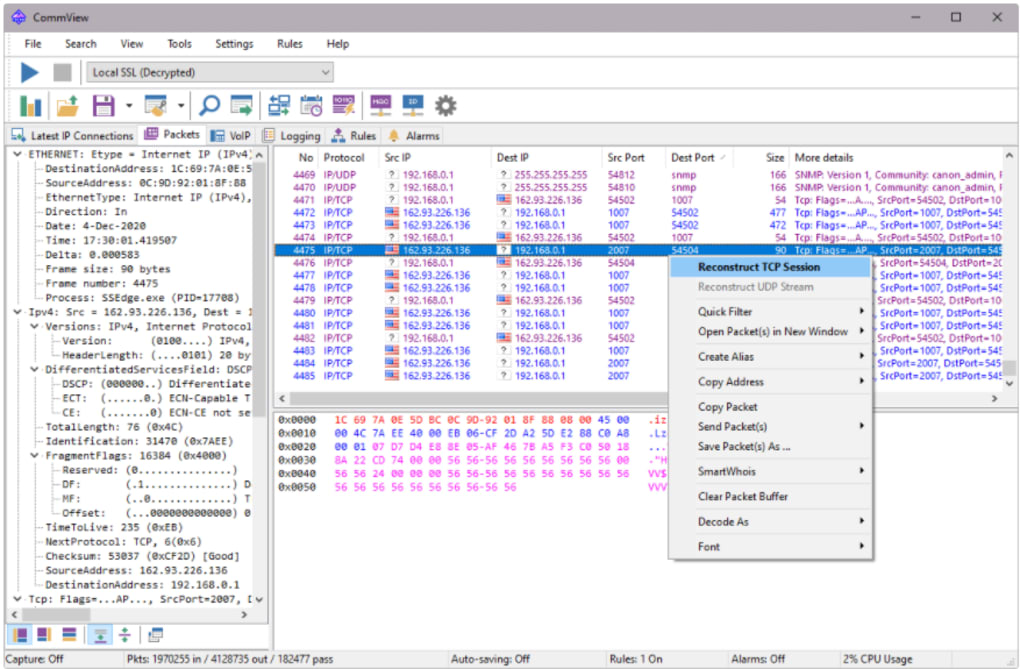
CommView excels in its deep protocol analysis. It can decode packets down to the lowest layers of the OSI model, providing detailed information about various network protocols. This includes, but is not limited to, common protocols like TCP/IP, UDP, ICMP, HTTP, FTP, SMTP, DNS, and many others. For each decoded packet, users can inspect header information, payload data, and flags, offering a granular view of communication flows. For instance, an administrator can see the source and destination IP addresses, port numbers, sequence numbers, and acknowledgements of TCP packets, or the specifics of an HTTP request or response. This detailed decoding is vital for understanding exactly what kind of data is being transmitted, by whom, and for what purpose. It allows for the identification of malformed packets, unusual protocol usage, or unauthorized communication attempts that might indicate a security breach or a misconfigured application.
Real-time Monitoring and Session Reconstruction
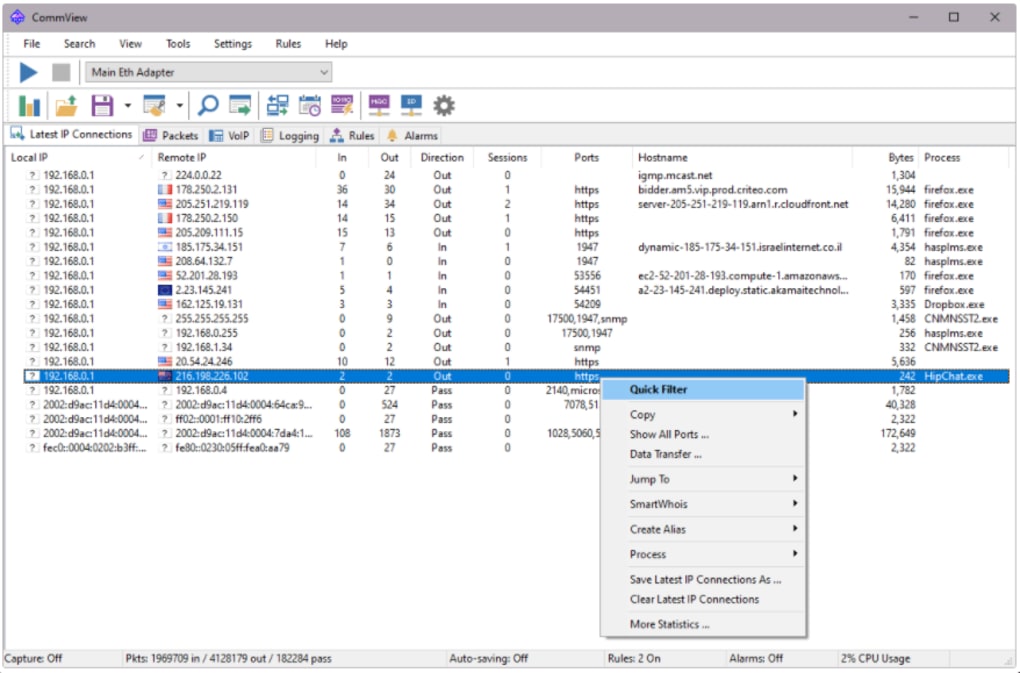
Beyond individual packet inspection, CommView provides a centralized platform for viewing all network activity in real-time. This real-time monitoring dashboard is a dynamic window into the network’s pulse, constantly updating with critical metrics. Users can observe:
- Connections between local and remote IP addresses: This helps in understanding which internal machines are communicating with external services or other internal hosts. It’s crucial for identifying unexpected connections or data exfiltration attempts.
- Data sent and received: Tracking the volume of data can help identify bandwidth hogs or unusual data transfers.
- Ports in use: Monitoring port activity can reveal applications running on non-standard ports, which might be legitimate but also could signal malicious activity.
- Host names: Resolving IP addresses to host names makes it easier to identify the specific machines or services involved in network communication.
- Running processes: CommView is capable of mapping captured packets to the specific applications that sent or received them. This is an incredibly powerful feature for troubleshooting application-level network issues. If an application is behaving erratically or consuming excessive bandwidth, pinpointing its network activity provides immediate diagnostic clues.
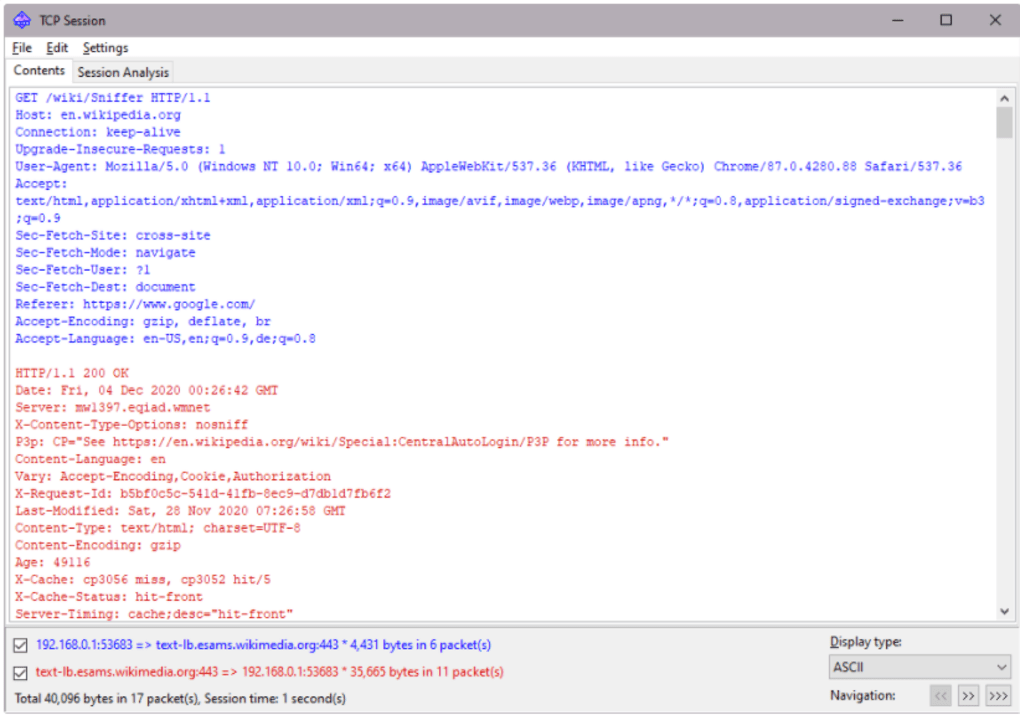
Furthermore, CommView has the unique ability to reconstruct TCP sessions. A TCP session represents a complete conversation between two endpoints, from the initial connection handshake to the termination of the communication. By stitching together all related packets, CommView allows users to view the entire data stream of a session, effectively reconstructing the content exchanged. For instance, an administrator could reconstruct an FTP session to see the files transferred, or an HTTP session to view the web pages accessed. This functionality is invaluable for deep-dive investigations, allowing for post-incident analysis, content verification, and understanding application behavior in detail. It moves beyond just seeing that communication happened to understanding what was communicated.
Advanced Features for Enhanced Network Management
While core packet capture and real-time monitoring form the backbone of CommView, the software is replete with advanced features designed to streamline network management, enhance security, and facilitate in-depth analysis. These utilities transform raw data into actionable intelligence, empowering IT professionals to manage their networks with greater precision and effectiveness.
Flexible Filtering and Data Export
The sheer volume of network traffic, especially in busy environments, can be overwhelming. CommView addresses this challenge with a powerful and flexible system of filters. Users can define specific criteria to include or exclude packets based on various parameters, such as:
- IP addresses: Monitor traffic only to or from specific hosts.
- MAC addresses: Track devices based on their hardware identifiers.
- Port numbers: Focus on traffic generated by particular applications or services (e.g., HTTP on port 80, DNS on port 53).
- Protocols: Isolate traffic of a certain type, like all TCP or UDP packets.
- Packet content: Search for specific strings of hexadecimal data within the packet payload, which is invaluable for identifying particular data patterns or signatures of malware.
This granular filtering ensures that users only see the data relevant to their investigation, significantly reducing noise and accelerating analysis. For instance, to test a new firewall rule, an administrator could set a filter to only show packets that should be blocked, quickly verifying the rule’s effectiveness.
Captured packets and analysis results can be saved to log files. This feature is critical for historical analysis, auditing, and sharing data with other team members or security analysts. These log files can be reopened and re-analysed at a later date, providing a persistent record of network activity. Additionally, CommView can generate HTML reports, offering a user-friendly and shareable summary of network statistics and findings. These reports can include traffic statistics, connection lists, and protocol distributions, making it easier to present network insights to non-technical stakeholders or for compliance documentation.
Remote Monitoring and Custom Integrations
CommView extends its capabilities beyond the local machine, offering robust remote network monitoring. This means administrators can monitor network activity on remote computers without needing direct physical access to those machines. This is particularly useful for managing distributed networks, branch offices, or specific servers from a central location. Remote monitoring enhances efficiency and responsiveness, allowing for quicker detection and resolution of issues across the entire network infrastructure.
For users with specific or unique requirements, CommView supports the design of bespoke plug-ins. This extensibility allows developers and power users to create custom modules that integrate with CommView’s data stream, enabling specialized analysis, custom alerts, or unique data processing workflows. This open architecture ensures that CommView can adapt to evolving network monitoring needs and integrate seamlessly into existing IT ecosystems.
Furthermore, CommView data can be shared with other applications using a TCP/IP interface. This allows for integration with other network management systems, custom scripts, or third-party analysis tools, enhancing its utility within a broader IT toolkit. The program also features an advanced Packet Generator, which allows users to construct and inject custom packets into the network. This is an invaluable tool for testing network devices, simulating various network conditions, verifying firewall rules, or even conducting basic penetration testing to check network resilience. Other useful utilities include an invisible mode for discrete monitoring, assigning aliases to IP or MAC addresses for easier identification, and a flexible alarm system that can trigger notifications based on predefined network events or thresholds. There is also a dedicated version for use within VoIP systems, acknowledging the unique challenges and requirements of monitoring voice-over-IP traffic.
Practical Applications and Benefits for IT Professionals
The comprehensive suite of features offered by CommView translates into a multitude of practical applications and significant benefits for IT professionals across various domains. Its effectiveness stems from its ability to provide clear, actionable insights into complex network behaviors.
Bolstering Network Security
For any business, preventing potential security breaches is a top priority. CommView serves as a critical tool in a layered security strategy. By continuously monitoring all important metrics in a real-time scenario from a centralized and secure platform, it helps administrators:
- Identify suspicious activity: Unusual connections, unauthorized port scans, or unexpected data flows can be flagged immediately. For instance, if a workstation starts communicating with an unknown external IP address on an unusual port, CommView can highlight this anomaly, prompting an investigation.
- Test security configurations: Before deploying a new firewall or updating existing rules, CommView can be used to test their effectiveness. Administrators can send specific test packets or monitor traffic to confirm that desired packets are being blocked or allowed correctly.
- Detect malware and intrusions: By searching for specific hexadecimal strings or patterns, CommView can help identify the signatures of known malware or communication associated with command-and-control servers. Its ability to map packets to applications can also pinpoint malicious processes.
- Audit network access: CommView provides a forensic record of who is communicating with whom, when, and what data is being exchanged. This is vital for post-incident analysis, compliance audits, and understanding the scope of a breach.
Troubleshooting and Performance Optimization
Network problems can significantly disrupt business operations, leading to downtime and productivity loss. CommView is an invaluable diagnostic tool for rapidly identifying and rectifying these issues:
- Pinpointing bottlenecks: By monitoring data rates and connection statistics, administrators can identify segments of the network or specific applications that are consuming excessive bandwidth, leading to performance bottlenecks.
- Diagnosing connectivity issues: If a client cannot connect to a server, CommView can show if the connection attempts are even reaching the server, if the server is responding, or if a firewall is silently dropping packets.
- Resolving application problems: When an application is not performing as expected, CommView can show the exact network interactions, revealing if the application is experiencing delays in data transfer, malformed requests, or other communication failures. Its ability to map packets to applications is especially powerful here.
- Validating QoS settings: For critical applications like VoIP or video conferencing, Quality of Service (QoS) settings are crucial. CommView can monitor traffic to ensure that these high-priority packets are being treated appropriately by network devices.
- Proactive problem identification: Real-time traffic reports and alarms allow administrators to detect nascent problems before they escalate into major outages. Trends in error rates, unusual traffic spikes, or connection failures can be caught early.
Licensing, Technical Aspects, and User Experience
CommView, like many professional-grade tools, is offered as a trial version, with different license types available based on individual needs. This allows organizations to choose a licensing model that best fits their operational scale and budget. While the provided information mentions “no free trial version available,” referring to the user needing to purchase a subscription, it’s worth noting that typically “trial version” implies a limited-time or feature-restricted usage before purchase. This apparent contradiction in the source content suggests a need for clarification from the vendor regarding their current trial policy. However, the availability of different license types indicates flexibility for various deployment scenarios, from single-user to enterprise-wide installations.
CommView is primarily designed for Windows operating systems, supporting various versions including Windows 8.1 and likely newer iterations. The software is available in English, making it accessible to a wide global audience of IT professionals. Regular updates are a standard expectation for network analysis tools, ensuring compatibility with new protocols, operating systems, and addressing security vulnerabilities. The provided content mentions that “the newer version (7.1) may include updates and fixes that are not specified to the user.” While this highlights continuous development, it also points to a desire for greater transparency from users regarding specific bug fixes, performance enhancements, and new features in release notes, which is crucial for IT professionals planning deployments and upgrades. The reported size of the application (e.g., 45.69 MB for version 7.0.794) indicates a relatively lightweight footprint, which is beneficial for quick deployment and minimal system impact.
The user experience of CommView is described as highly intuitive and effective. This ease of use is critical for a tool that often needs to be deployed rapidly in troubleshooting scenarios. A well-designed interface, coupled with logical workflows, enables users to quickly grasp its functionalities and derive meaningful insights without a steep learning curve. The robust security status, as indicated by PhanMemFree’s checks, suggests that the software itself is clean and safe to use, which is a paramount concern for any tool handling sensitive network data.
Exploring the Landscape: CommView and Its Alternatives
While CommView offers a powerful suite of features, the network analysis landscape is diverse, with several other tools offering complementary or alternative approaches. Understanding these alternatives helps in appreciating CommView’s specific strengths and choosing the right tool for a particular task. PhanMemFree.org, for instance, lists several related and alternative applications:
- IP Sniffer: Described as a free tool to “Monitor your WiFi,” IP Sniffer focuses on specific aspects of network monitoring, potentially offering a simpler, more targeted approach for basic Wi-Fi analysis compared to CommView’s broader capabilities.
- SwitchSniffer: Also free, this tool is designed to “Monitor and control your local networks.” Its emphasis on “control” might suggest features for active network management beyond passive monitoring, a potential differentiator from CommView’s primary analysis focus.
- SmartSniff: This is a “Free TCP/IP packet capture program” that directly competes with CommView’s core packet capture functionality, likely offering a more lightweight and basic alternative for simply capturing and viewing TCP/IP packets.
- NetworkView: A trial version tool to “Get a full graphical map of your network.” While CommView provides detailed packet analysis, NetworkView seems to focus on network topology and visual representation, which can complement packet analysis by offering a holistic view of the network structure.
- SoftPerfect Network Scanner: A free tool to “Analyze your LAN network fully.” This often includes features like IP, MAC, and NetBIOS scanning, port scanning, and shared folder detection, providing a discovery and inventory perspective that CommView might not prioritize as its primary function.
- OmniPeek Network Analyzer: Described as simplifying “the troubleshooting and debugging of multiprotocol networks,” OmniPeek is a commercial-grade, often more enterprise-focused tool that offers deep analysis capabilities comparable to, and sometimes exceeding, CommView, particularly for complex multiprotocol environments. It’s often used in larger organizations for sophisticated network diagnostics.
- InSSIDer: A “Diagnostic Tool For Your Wi-Fi Network,” InSSIDer specifically focuses on Wi-Fi channel analysis, signal strength, and interference, providing insights into wireless network health that are specialized beyond CommView’s general network monitoring, though CommView does have a dedicated Wi-Fi version.
- Nmap: A powerful “Free network mapping software,” Nmap is renowned for its network discovery and security auditing capabilities, including port scanning and operating system detection. While not a real-time packet analyzer like CommView, it serves a critical role in proactive network security assessments.
CommView distinguishes itself by offering a balanced blend of real-time monitoring, deep packet analysis, session reconstruction, and advanced utilities like the packet generator and remote monitoring, all within a relatively intuitive interface. While some alternatives might excel in specific niches (e.g., Wi-Fi diagnostics, network mapping), CommView aims to be a comprehensive, general-purpose network analysis tool for a broad range of diagnostic and security tasks. The choice between CommView and its alternatives often depends on the specific requirements, budget, and the existing toolset of the IT professional or organization.
Conclusion
CommView stands as a formidable solution for network administrators and IT professionals seeking comprehensive visibility into their network traffic. Its robust feature set, encompassing real-time monitoring, deep packet capture and decoding, TCP session reconstruction, and advanced filtering, provides an unparalleled level of insight into network operations. From bolstering security by detecting anomalies and testing firewalls to rapidly troubleshooting performance bottlenecks and resolving application-level issues, CommView equips users with the intelligence needed to maintain a healthy, secure, and efficient network.
Despite the noted points regarding its licensing model and update transparency, its overall effectiveness, intuitive design, and powerful analytical capabilities solidify its position as an essential tool in the modern IT arsenal. For anyone responsible for the performance, security, and integrity of a network, CommView offers a clear window into the intricate world of data communication, transforming complex packet flows into actionable insights. In a world increasingly reliant on seamless digital connectivity, tools like CommView are not merely optional; they are fundamental to ensuring operational excellence and robust security.
File Information
- License: “Trial version”
- Latest update: “July 11, 2023”
- Platform: “Windows”
- OS: “Windows 8.1”
- Language: “English”
- Downloads: “37.1K”
- Size: “45.69 MB”


