
Compact RAM Cleaner is a free, open-source utility designed to enhance the performance of your Windows computer by optimizing RAM usage. This comprehensive guide delves into its functionality, features, benefits, drawbacks, and alternatives, providing a complete overview of this handy tool. Whether you’re a seasoned tech user or a casual computer owner, understanding how Compact RAM Cleaner works can significantly improve your PC’s responsiveness and overall performance.
Understanding the Need for RAM Optimization
Before exploring Compact RAM Cleaner specifically, it’s crucial to understand the role of RAM (Random Access Memory) in your computer’s operation and why optimization is often necessary. RAM acts as your computer’s short-term memory. It stores data the computer is actively using, allowing for quick access. The more RAM you have, the more programs and data your computer can handle simultaneously without slowing down. However, even with ample RAM, inefficient usage can lead to performance bottlenecks.
Over time, numerous processes – running applications, background tasks, and cached data – can consume significant amounts of RAM. This can manifest as sluggish performance, application freezes, and overall system instability. Manually identifying and closing unnecessary processes can be tedious and time-consuming. This is where a RAM cleaner like Compact RAM Cleaner comes into play. It automates the process of identifying and clearing unused RAM, thereby freeing up resources and improving your PC’s responsiveness.
Compact RAM Cleaner: Features and Functionality
Compact RAM Cleaner lives up to its name; it boasts a compact and user-friendly interface, prioritizing ease of use and efficient RAM management. The interface displays key real-time memory details, including RAM usage, total memory, and available free memory. This allows users to monitor their system’s RAM status at a glance.
The core functionality revolves around a single, prominent “Clear” button. A simple click initiates the RAM cleaning process, immediately freeing up unused memory. The speed and efficiency of this operation are remarkable, typically taking only a few seconds to complete. Upon completion, a notification pops up, informing the user of the amount of RAM freed.
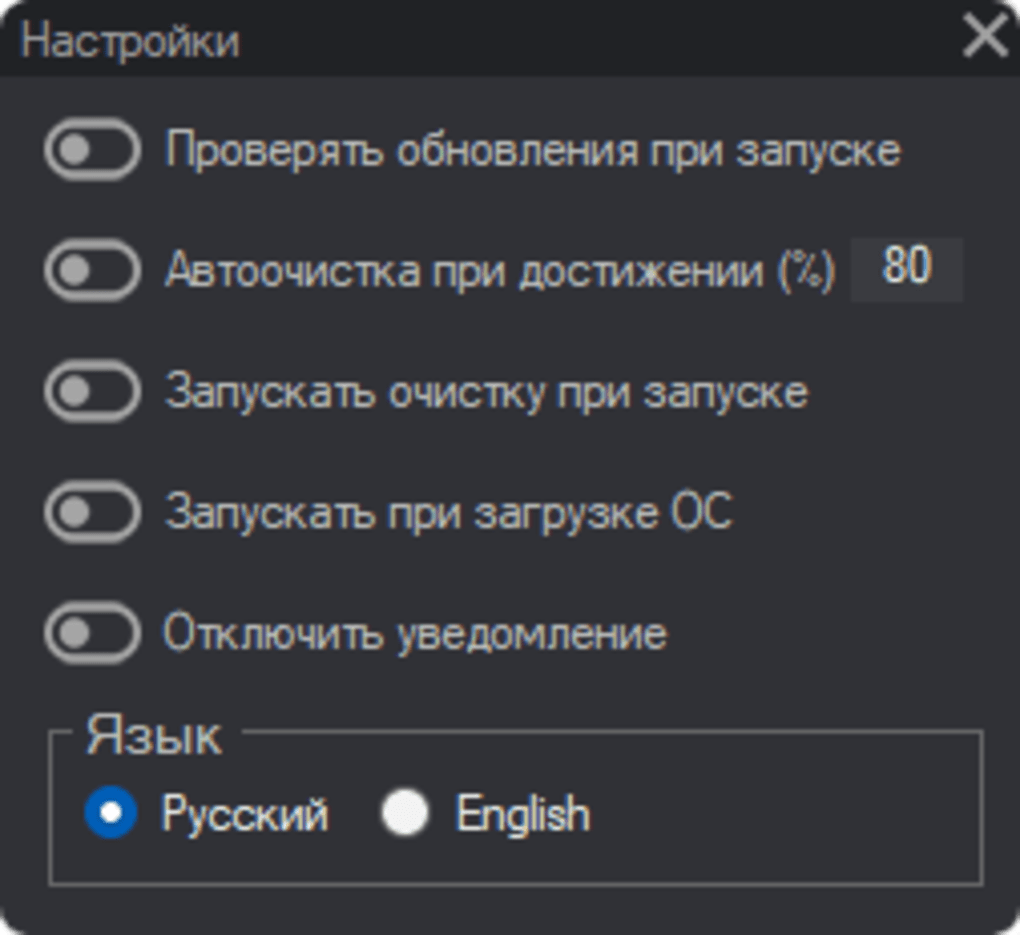
Beyond the immediate manual cleaning, Compact RAM Cleaner offers several automated options for more proactive RAM management:
- Auto Purge: This feature allows users to set a custom threshold (percentage of RAM usage). Once this threshold is reached, Compact RAM Cleaner automatically initiates a cleaning cycle without requiring manual intervention. This is particularly beneficial for users who frequently run multiple applications or experience periods of high RAM utilization.
-
Startup and Boot Options: Users can configure Compact RAM Cleaner to either run a cleanup operation on startup or initiate the cleaning process immediately upon operating system boot. This proactive approach ensures that your system starts with a clean slate, maximizing available RAM from the outset.
-
Notification Management: While notifications provide valuable feedback on the cleaning process, they might be distracting for some users. Compact RAM Cleaner allows users to disable these notifications, tailoring the software’s behavior to individual preferences.
A noteworthy yet somewhat ambiguous feature is the “Cached” checkbox. While the developers haven’t explicitly detailed its function, it’s crucial to exercise caution when enabling this option. Improperly managing cached data could potentially lead to unexpected consequences or negatively impact the performance of certain applications. Further investigation or clarification from the developers regarding this feature is recommended.
Benefits of Using Compact RAM Cleaner
The advantages of employing Compact RAM Cleaner are readily apparent:
-
Improved System Performance: By efficiently managing RAM usage, Compact RAM Cleaner directly addresses performance bottlenecks, resulting in a more responsive and stable system. This translates to faster application loading times, smoother multitasking, and reduced instances of freezing or lagging.
-
Automated RAM Optimization: The automated features of Compact RAM Cleaner eliminate the need for manual monitoring and cleaning. This convenience is invaluable for users who may not possess the technical expertise or time to manage RAM manually.
-
User-Friendly Interface: The intuitive interface makes Compact RAM Cleaner accessible to users of all technical skill levels. The simple design ensures a hassle-free experience, focusing solely on providing efficient RAM management.
-
Free and Open-Source: The software is freely available, eliminating the cost barrier often associated with commercial RAM optimization tools. The open-source nature ensures transparency and community involvement in its development and improvement.
Potential Drawbacks and Limitations
While Compact RAM Cleaner offers significant benefits, some potential drawbacks warrant consideration:
-
Unclear Cached Feature: The lack of clarity surrounding the “Cached” checkbox represents a significant limitation. Users should avoid activating this feature until its function is fully understood.
-
Limited Functionality: Compared to more comprehensive system optimization tools, Compact RAM Cleaner’s focus is solely on RAM management. It doesn’t address other potential performance bottlenecks, such as disk cleanup or registry optimization.
-
Potential for Over-Aggressiveness: While the auto-purge feature is beneficial, improperly setting the threshold could lead to unnecessary cleaning cycles or potentially disrupt applications relying on cached data.
-
Relatively Small User Base: Due to its open-source nature and smaller community, resources and support may be comparatively limited compared to larger, commercially developed software.
Alternatives to Compact RAM Cleaner
Several alternative RAM optimization tools are available, each with its own set of features and functionalities. Some popular options include:
-
Windows Memory Cleaner: A built-in Windows feature that provides basic RAM management. However, it lacks the automated features and user-friendly interface offered by Compact RAM Cleaner.
-
Ainvo Memory Cleaner: A commercially available RAM cleaner with a wider range of features and options. However, it requires a purchase and may include additional bundled software.
-
Casper RAM Cleaner: Another commercial option offering enhanced RAM management functionality. Similar to Ainvo Memory Cleaner, it also comes with a price tag and potential bundled software.
-
MemoryCleaner 4Free: A free, simpler alternative, but it may lack the advanced features and automation capabilities found in Compact RAM Cleaner.
The choice of the best RAM cleaner depends on individual needs and preferences. While Compact RAM Cleaner offers a streamlined and user-friendly approach, other options might provide more advanced features or additional system optimization capabilities.
Conclusion
Compact RAM Cleaner provides a simple yet effective solution for optimizing RAM usage on Windows systems. Its intuitive interface, automated features, and free, open-source nature make it an appealing choice for users seeking to enhance their PC’s performance. However, the lack of clarity surrounding the “Cached” feature and the limited overall functionality compared to more comprehensive tools should be carefully considered. Ultimately, users should evaluate their individual needs and preferences when choosing a RAM optimization tool. If a simple, free, and efficient solution is desired, Compact RAM Cleaner is a worthy contender. However, for more advanced features and system-wide optimization, exploring alternative options might be necessary.
File Information
- License: “Free”
- Version: “1.2.1”
- Latest update: “February 9, 2022”
- Platform: “Windows”
- OS: “Windows 8”
- Language: “English”
- Downloads: “6.8K”
- Size: “75.78 KB”


