Compare It! is a discontinued Windows-based file comparison and merging utility developed by Grigsoft. While no longer actively updated, it remains relevant as a historical example of early file comparison software and offers insights into the evolution of such tools. This review will delve into its features, performance, and place within the broader context of file comparison utilities.
A Look Back at Compare It!’s Functionality
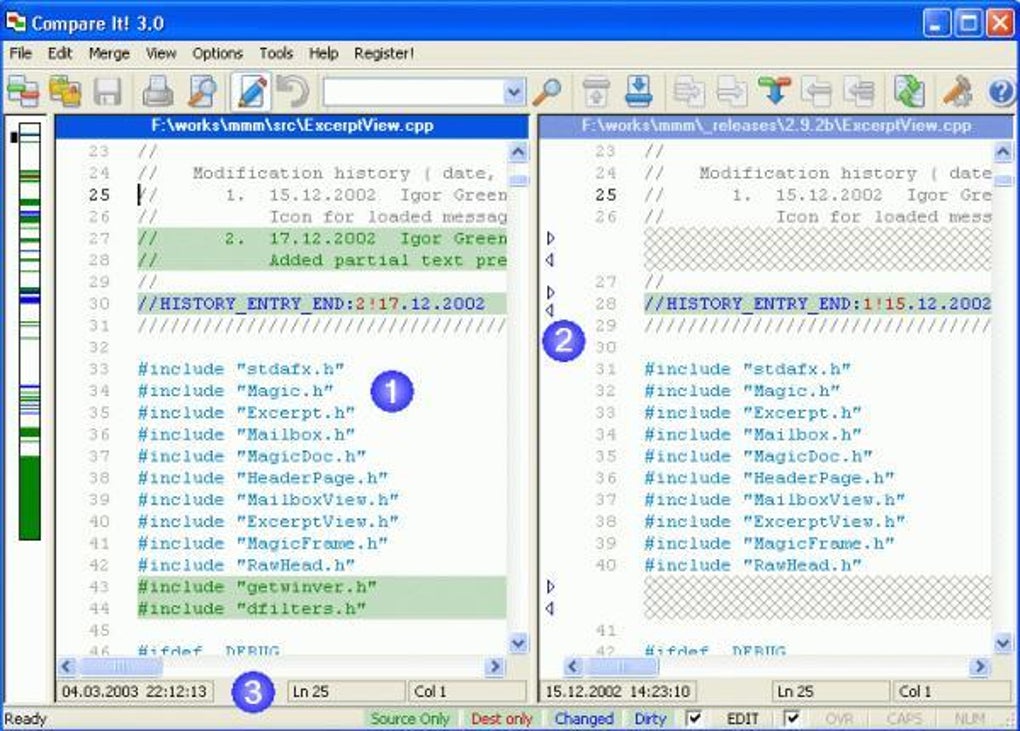
Compare It! presented a straightforward approach to comparing and merging files. Its core strength lay in its ability to display two files side-by-side, highlighting differences with color-coding. This visual representation made identifying discrepancies significantly easier, particularly for text-based files. The software included an overview bar providing a summary of the overall changes, allowing users to quickly grasp the extent of the differences. Beyond simple visual comparison, Compare It! allowed users to merge files with a single click, streamlining the process of integrating changes from one version to another. The capability to print or publish the comparison results further enhanced its practicality for documentation and collaborative work. While lacking the advanced features of modern comparison tools, Compare It! fulfilled its primary function effectively for its time.
Its simplicity, however, also defined its limitations. Unlike contemporary tools offering sophisticated algorithms for comparing diverse file types, including binary files and images, Compare It! likely focused primarily on text files. The absence of features such as three-way merging (comparing and merging three versions of a file simultaneously), recursive folder comparison (comparing the contents of entire directory structures), and support for various character encodings would have constrained its usability in complex projects or when dealing with diverse file types. This limitation, though apparent from a modern perspective, was common among file comparison utilities of its era.
System Requirements and Availability
Compare It! was designed for Windows 95 and earlier versions of the Windows operating system. This significantly limits its compatibility with modern systems. Its reliance on older Windows versions reflects its age and highlights the rapid advancement in operating systems and software compatibility. The software was solely available in English, restricting its accessibility to a specific linguistic group. While it saw substantial popularity in countries such as India, the United States, and the United Kingdom, this geographical reach was likely constrained by the limitations of its time, which predate the widespread global adoption of software seen today. The relatively small installation size was a notable advantage in an era with more limited storage capabilities, making it a viable option for users with less available hard drive space.
Performance and User Experience
While comprehensive performance benchmarks are unavailable due to the software’s age and lack of active development, user feedback from its time suggests that Compare It! functioned adequately for basic file comparison tasks. The side-by-side view and color-coded highlighting would have likely resulted in an intuitive and efficient user experience for its target tasks. The simplicity of the interface likely minimized the learning curve, making it accessible to users with varying levels of technical expertise. However, the absence of sophisticated features and limited file type support would have likely created challenges when dealing with more complex scenarios, and slowdowns or crashes may have been an issue considering the capabilities of hardware at the time.
Comparison with Contemporary Alternatives
Compared to contemporary file comparison utilities, Compare It! appears considerably less sophisticated. Modern tools like Beyond Compare, WinMerge, and FreeFileSync provide a range of advanced features that were absent in Compare It!. These features include:
- Support for a wider range of file types: Modern tools seamlessly handle various file formats, including binary files, images, and compressed archives.
- Advanced comparison algorithms: These tools utilize more sophisticated algorithms to identify differences effectively, even in large or complex files.
- Three-way merging: Allowing users to reconcile changes across multiple versions of a file.
- Recursive folder comparison: Facilitating the comparison and synchronization of entire directory structures.
- File synchronization: Many modern tools integrate file synchronization capabilities, automating the process of updating files across different locations.
- Version control integration: Some tools directly integrate with version control systems like Git, streamlining collaborative workflows.
- Customizable features and settings: Offering users greater control over the comparison process.
The contrast between Compare It! and modern alternatives underscores the significant advancements in file comparison technology. While Compare It! served its purpose adequately in its time, modern tools are far more powerful, versatile, and user-friendly.
Legacy and Significance
Despite its obsolescence, Compare It! holds a historical significance. It represents a stage in the development of file comparison software, highlighting the progression from simple side-by-side comparisons to the sophisticated, feature-rich tools available today. Studying its features and limitations provides valuable context for understanding the evolution of software development, the increasing demand for sophisticated functionalities, and the impact of technological advancements on user experience. Its existence serves as a reminder of how quickly software evolves and the constant drive for improvement in efficiency, functionality, and user experience. While users should not expect to utilize it in a modern context due to compatibility issues and functional limitations, its role in the history of software development should not be underestimated. Analyzing such software provides valuable historical data into the evolution of software functionalities and the overall advancement of technology.
Conclusion
Compare It! was a functional file comparison utility for its time, providing a basic but effective solution for comparing and merging files. However, its limitations in features, file type support, and operating system compatibility render it unsuitable for use in modern contexts. Its legacy lies primarily in its historical significance, representing a stepping stone in the evolution of file comparison software. The advancements in modern file comparison utilities highlight the considerable progress made in this area of software development, emphasizing the constant pursuit of improved user experience and enhanced functionalities. While Compare It! is no longer a viable option, its analysis provides a valuable perspective on the evolution of software and the continual refinement of its capabilities.
File Information
- License: “Trial version”
- Latest update: “May 23, 2023”
- Platform: “Windows”
- OS: “Windows 2000”
- Language: “English”
- Downloads: “52K”
- Size: “2.58 MB”